Showing posts with label consumer electronics. Show all posts

Tuesday, August 11, 2026

Belkin Unveils Qi2 Foldable Charger for Pixel 10 Series

Featured Image

Introducing Belkin’s 25W Qi2 Foldable Charger for the Google Pixel 10 Series

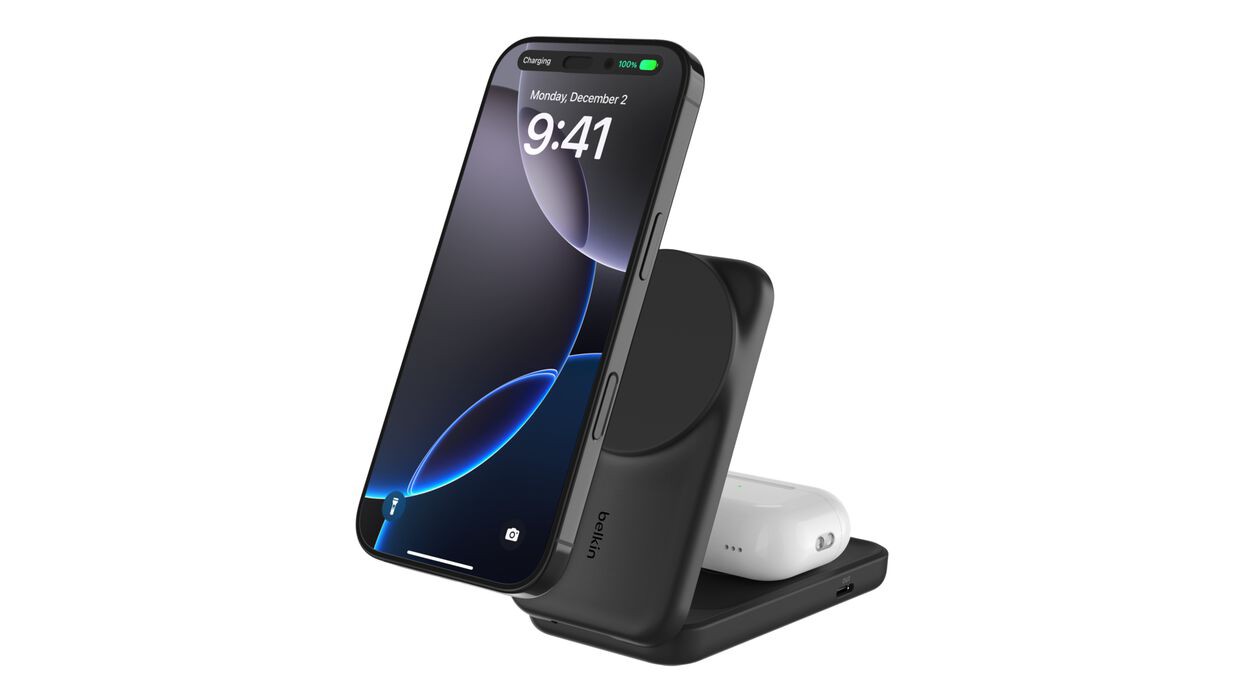
Belkin has introduced a new charging solution that is specifically designed to complement the latest Google Pixel 10 smartphone series. This charger is not just another wireless charging pad—it’s a versatile, foldable 2-in-1 device that offers enhanced convenience and performance.

The charger, named the “UltraCharge” by Belkin, supports 25W Qi2 charging speeds. This means it can deliver full-speed wireless charging to the Pixel 10 Pro XL, making it an ideal choice for users who want to keep their devices powered up efficiently. While the other models in the Pixel 10 series are limited to a maximum of 15W wireless charging, they can still benefit from the charger’s capabilities, albeit at a slightly lower speed.

A Versatile Design with Multiple Uses

One of the standout features of this charger is its foldable design. When unfolded, it reveals a standard Qi charging pad that can be used to charge a variety of devices. The second charging surface is particularly useful for charging Pixel Buds or other earbuds that support Qi wireless charging technology. This makes the charger a practical addition for users who own multiple wireless accessories.

For those who also own a Pixel Watch 4, the charger includes an additional feature. On the side of the charger, there is a USB-C port that allows users to connect their Pixel Watch 4 charging cable directly. This provides a convenient way to charge the watch alongside the smartphone, without the need for extra cables or adapters.

Advanced Cooling Technology for Safer Charging

Belkin has incorporated its proprietary ChillBoost technology into this charger to ensure that devices remain cool during the charging process. This is especially important for high-power wireless charging, as excessive heat can potentially damage devices or reduce battery life over time. By keeping temperatures under control, ChillBoost helps maintain the longevity and performance of connected devices.

In addition to the charger itself, Belkin includes a USB-C cable and a 45W power adapter in the box. These accessories ensure that users have everything they need to start using the charger right out of the box.

Availability and Pricing

The Belkin 25W Qi2 charger is already available for purchase in the United States through Belkin’s official website and Amazon. It is also accessible in parts of Europe via Amazon. The charger comes in three color options: Black, Blue, and White. Its compact, foldable design makes it easy to store and transport, adding to its appeal for on-the-go users.

Pricing for the charger is set at $59.99 in the US. For those interested in purchasing, links to the official retailers are provided below.

Where to Buy

Wednesday, August 5, 2026

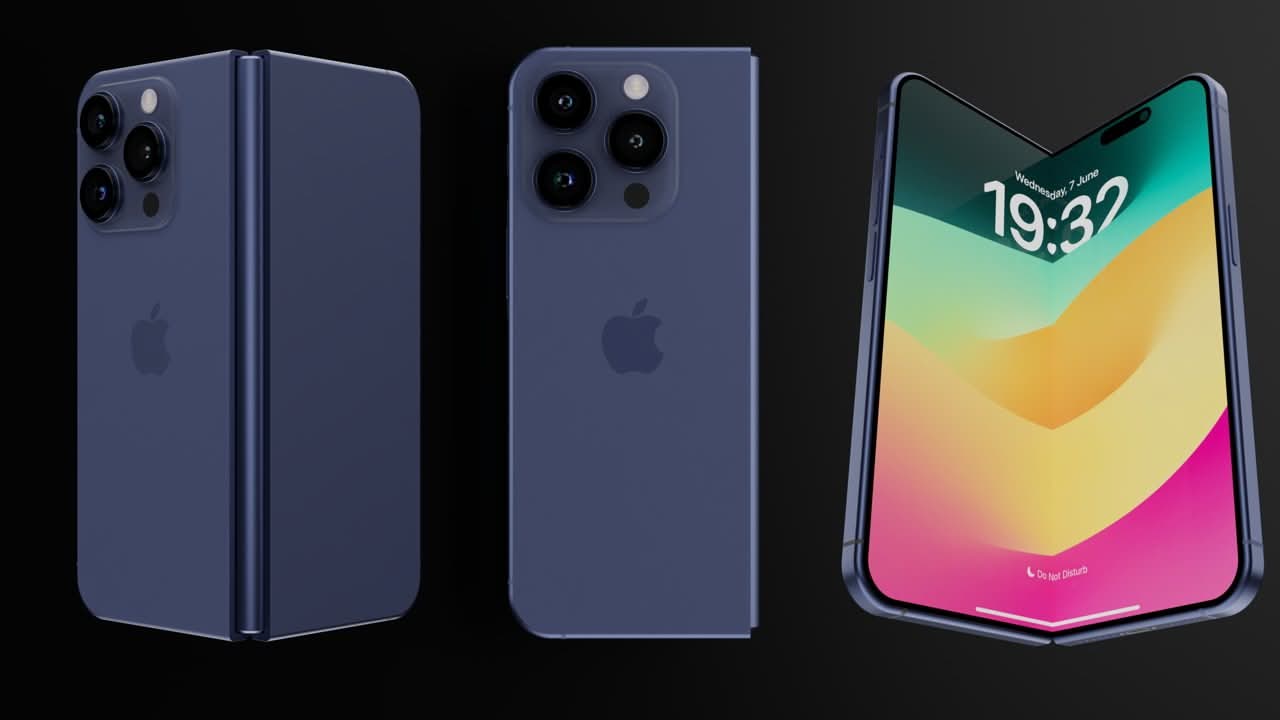
Apple Reimagines Foldable iPhone Display to Minimize Crease

Featured Image

Apple's Approach to Foldable Technology

Samsung introduced its first foldable phone in 2019, which marked the beginning of a new era in smartphone design. For years, the tech giant has been experimenting with flexible displays and innovative form factors. However, it wasn't until recently that Apple started showing serious interest in entering the foldable market. According to recent reports, Apple is preparing to launch its own foldable iPhone in 2026. This development comes after several years of research and development, as the company aims to avoid the pitfalls that have plagued other manufacturers.

Rethinking the Display Strategy

One of the key areas Apple is focusing on is the display technology for its upcoming foldable device. According to Mark Gurman’s Power On newsletter, Apple initially planned to use on-cell touch sensors for its foldable iPhone. This technology is similar to what Samsung uses in its foldable devices. However, there are some drawbacks to this approach. On-cell technology can lead to air gaps between the screen and its cover, making the crease more noticeable. This is something Apple wants to avoid, as it could negatively impact the user experience.

To address this issue, Apple has reportedly shifted its focus to in-cell display technology. This is the same technology used in current smartphones, including the iPhone. In-cell technology integrates the touch layer within the display’s TFT layer, resulting in a thinner display and faster response times. This could potentially create a less obvious crease while also improving touch accuracy.

Understanding the Difference

The difference between on-cell and in-cell technology lies in how the touch sensors are integrated into the display. On-cell technology places the touch electrodes on the top layer of the OLED panel under the cover film. In contrast, in-cell technology embeds the touch layer directly within the display’s TFT layer. This not only reduces the thickness of the display but also enhances the overall performance.

Despite these advantages, Apple initially avoided using in-cell technology for its foldable device. The reason behind this decision is related to the engineering challenges associated with in-cell sensors. These sensors can be more susceptible to damage when used in flexible displays compared to rigid ones. Given Apple’s commitment to quality and durability, this posed a significant challenge. However, there are indications that Apple may have found a solution to this problem.

Launch Timeline and Specifications

If the rumors are accurate, Apple's foldable iPhone is expected to launch in 2026. Reports suggest that the production of the display has already begun. In terms of specifications, the device could be smaller than the Samsung Galaxy Z Fold 7. It is rumored to feature a 5.5-inch outer display and a 7.8-inch inner display. This is slightly smaller than the Fold 7, which has a larger 6.5-inch cover display and an 8-inch inner display.

While the exact price has not been confirmed, it is expected to be significantly higher than traditional iPhones. Given Apple’s pricing strategy, the foldable iPhone could range from $1,800 to $2,400. This price point reflects the advanced technology and premium design that Apple is aiming for with its foldable device.

Conclusion

Apple’s entry into the foldable market represents a major shift in the smartphone industry. By learning from the mistakes of its competitors and focusing on innovation, Apple aims to deliver a product that sets a new standard. With a focus on reducing creases and improving touch accuracy, the company is taking a thoughtful approach to its foldable iPhone. As the launch date approaches, consumers will be eagerly awaiting the release of this highly anticipated device.

Monday, July 13, 2026

Samsung brings One UI to home appliances with 7-year updates

Featured Image

Samsung Expands One UI to Home Appliances

In October 2024, Samsung made a significant move by extending its One UI platform beyond smartphones, tablets, and smartwatches. Now, the company is taking this innovation further by bringing One UI to its home appliance lineup, including refrigerators, washers, and air conditioners. This expansion marks a major step in Samsung’s strategy to unify its ecosystem and provide users with a consistent digital experience across all devices.

One of the most notable features of this expansion is the promise of up to seven years of software support for these appliances. This aligns with the same level of support that Samsung offers for its Galaxy phones and tablets. The extended support ensures that users will continue to receive updates, security patches, and new features for an extended period, making their home appliances more future-proof.

While One UI for Galaxy devices is based on Android, the version designed for home appliances will be tailored specifically for these devices. However, it will still bring some of the best features from Galaxy phones, such as Bixby, Gallery, and expanded availability of Samsung TV Plus. These features will enhance the user experience, allowing for greater integration between appliances and other Samsung devices.

Bixby, Samsung’s voice assistant, will see several improvements. It will gain Voice ID, which enables the system to recognize individual users' voices and switch to their respective profiles. This personalization will make interactions with appliances more intuitive and tailored to each household member. Additionally, users can trigger Bixby with a simple double-tap on the display, making it even more convenient to use.

Another key feature of One UI on home appliances is Knox Matrix support. This technology allows compatible devices, such as air conditioners, EHS (Electric Heating System), slide-in induction cooking ranges, and washers, to monitor each other's security status. This creates a more secure environment within the smart home ecosystem.

Home appliances equipped with screens will also benefit from Passkey support, which simplifies the login process. This feature allows users to access their accounts securely without the need for traditional passwords, enhancing both convenience and security.

All Wi-Fi-enabled Samsung home appliances will enjoy deeper integration with SmartThings, Samsung’s smart home platform. This integration will create a more connected and powerful smart home experience, enabling seamless communication between devices. Furthermore, the Now Brief feature, which provides relevant information at a glance, will expand to other Samsung devices. This includes weather updates, family schedules, and appliance insights, such as how much time remains on a washing machine cycle.

However, this feature will only be available on compatible home appliances starting in 2026. Despite this delay, the overall vision of integrating One UI into Samsung’s home appliances is clear: to create a more intelligent, personalized, and connected living environment.

Long-Term Software Support for Home Appliances

The biggest advantage of bringing One UI to Samsung’s smart home devices is the extended software support. Samsung guarantees up to seven years of updates for its home appliances from the date of launch—just like its phones and tablets. This means that users won’t have to replace their appliances to get the latest features and security updates.

Samsung has also outlined a timeline for the rollout of One UI to compatible models launched in 2024. Starting in September, these models will begin receiving the update. This ensures that customers who purchased appliances in 2024 can enjoy the benefits of One UI without needing to buy new devices.

With this software policy, Samsung’s 2024 appliances running One UI will be supported until 2031. This long-term commitment highlights the company’s dedication to providing value and innovation over the lifespan of its products.

Thursday, June 18, 2026

Why I Disabled My Smart TV's Microphone (And You Should Too)

Featured Image

Understanding the Functionality of Smart TV Microphones

Smart TVs today are equipped with microphones that are always listening for voice commands. This feature is designed to make the user experience more convenient, allowing users to interact with their devices without the need for a remote or on-screen keyboard. Whether it's launching an app, searching for content, or adjusting settings, built-in voice assistants enable hands-free control. Some models even integrate with smart home ecosystems like Amazon Alexa and Google Home, acting as a central hub for managing various connected devices.

This level of convenience comes at a cost, however. The microphone must remain active in the background to detect wake words such as "Hey Google" or "Alexa." While this setup allows for seamless interaction, it also means that the TV is constantly listening, even when not actively being used. For many, this trade-off between convenience and privacy is a significant concern.

Why I Disabled My Smart TV's Always-On Microphone

Initially, I didn't give much thought to the always-on microphone on my smart TV. It was just another feature designed for convenience. However, as I reflected on the implications, I became increasingly uncomfortable with the idea of being monitored, even if unintentionally. After careful consideration, I decided to disable the microphone, and my decision came down to three key reasons.

1. Privacy Concerns

One of the main reasons I turned off the microphone was due to privacy concerns. Although these microphones are supposed to activate only when a wake word is detected, they must remain active in the background to function properly. This means that conversations in the home are continuously picked up, even if they aren't acted upon unless the wake word is spoken.

Manufacturers claim that they only record snippets of interactions after hearing the wake word, but as a user, it's difficult to be certain about what is actually being captured. These audio recordings are typically sent back to the manufacturer or third parties for processing, which raises concerns about how the data is stored and used. The possibility of someone reviewing these recordings to improve speech recognition algorithms felt invasive, especially in a space where I should feel safe and relaxed.

2. Limited Use of Voice Commands

Another factor that influenced my decision was realizing how infrequently I used voice commands. While the concept of controlling devices through voice sounded appealing, in practice, it never really resonated with me. My Google TV-powered TCL smart TV offers multiple ways to activate the voice assistant, but I still found myself reaching for the remote instead.

The microphone often failed to understand my commands, leading to frustration and repeated attempts. Additionally, since the TV is located far from where I sit, I had to shout to be heard, which made the feature less practical than it seemed. Considering the minimal benefit I derived from the feature, turning it off felt like a logical choice.

3. Security Risks

The final reason for disabling the microphone was the potential security risks associated with always-on devices. Any device connected to the internet is vulnerable to hacking, and smart TVs are no exception. They run software that can have flaws, making them susceptible to exploitation by malicious actors.

There is also the risk of misuse by manufacturers themselves, including collecting more data than intended or using voice recordings for purposes beyond what users agree to. The idea of unauthorized access to my TV’s microphone was unsettling, and it reinforced the importance of protecting my personal information.

Steps to Disable Your Smart TV's Microphone

Disabling the microphone on your smart TV can vary depending on the manufacturer, but the process is generally straightforward. On my Google TV-powered TCL smart TV, I followed these steps:

  1. Open the Settings app.
  2. Navigate to Privacy.
  3. Select Google Assistant.
  4. Under the Google Assistant settings, turn off Hands-free mic and Voice control.

These steps are specific to Google TV, so if you have a different smart TV OS, it’s best to check online for instructions tailored to your model.

Benefits of Disabling the Microphone

After turning off the microphone, I felt a greater sense of peace and control over my privacy. My daily routine remained unchanged—streaming shows, adjusting volume, and browsing apps still happened through the remote. I didn’t miss the functionality because I wasn’t using it anyway. The absence of an always-on microphone removed the nagging worry about who might be listening or how my conversations could be used.

While this change may seem minor, it serves as a reminder that convenience isn’t always worth the trade-off. In a world filled with always-listening and always-tracking devices, taking steps to protect your privacy is a valuable move.

Should You Turn Off Your Smart TV's Microphone?

Whether or not you should disable your smart TV’s microphone depends on how frequently you use voice commands. If you rely on voice control for streaming or managing smart home devices, keeping the microphone on may be beneficial. However, if you rarely use these features, there’s no need to keep the microphone active.

For those who prioritize privacy, turning off the microphone can provide a sense of security and control. It’s a simple action that can make a big difference in how you feel about your digital footprint. Ultimately, the decision comes down to personal preference and comfort with the trade-offs involved.

Saturday, June 13, 2026

Why the $2,000 Google Pixel 10 Pro Fold is a pointless luxury item

Featured Image

The Pixel 10 Pro Fold: A Luxury Item with Little Practical Value

Google’s latest offering, the Pixel 10 Pro Fold, has finally arrived, and while it brings a few notable features, its high price point raises serious questions about its value. Starting at $1,800, this foldable smartphone is not for the average consumer. For those looking to upgrade to a model with 1TB of storage, the cost jumps to an eye-watering $2,149. Even with trade-in deals or carrier discounts, the final price remains steep. For instance, my current Pixel 8 would only fetch around $350 through Google’s trade-in program, making the investment even less appealing.

While it’s common for smartphones to become more expensive over time, the Pixel 10 Pro Fold stands out as an example of a product that doesn’t seem necessary. The rest of the Pixel 10 lineup offers more reasonable pricing, with the standard Pixel 10 coming in at $449 after trade-in. Unless you have significant disposable income, the Pro Fold feels like a luxury item rather than a practical choice.

What’s Inside? Not Much More Than a Regular Phone

Removing the hinge from the Pixel 10 Pro Fold reveals that it’s essentially a Pixel 10 with slightly more RAM. The main selling point of foldable phones—its dual-screen design and hinge mechanism—comes at a premium. However, once the novelty wears off, the folding feature becomes more of a gimmick than a useful tool.

The software support for foldables is still limited, which means users might only use the device for watching videos or multitasking between apps. This raises the question: Is it worth paying an extra $1,000 for a feature that doesn’t perform well?

The internal hardware of the Pixel 10 Pro Fold isn’t significantly different from the regular Pixel 10. It offers 4GB more RAM and the option for expanded storage, but these upgrades don’t justify the massive price increase. Instead, the device gives you a mini-tablet screen that you don’t really need to carry separately.

Samsung and Other Competitors Are No Better

It’s worth noting that Samsung isn’t far behind when it comes to pricing. The Galaxy Z Fold 7 ranges from $2,000 to $2,419.99, while the Galaxy Tab S10 Ultra, which provides a better tablet experience, costs up to $1,319.99. This comparison highlights how foldable phones are often just expensive tech demos, used by companies to show they can keep up with industry trends.

For those seeking a top-tier tablet and phone experience, buying a Pixel 10 and a Galaxy Tab S10+ could be a smarter move. This combo will cost roughly the same as the Pixel 10 Pro Fold (before discounts), but you’ll get a more stable phone and a more powerful tablet.

Innovation Isn’t Always Worth the Price

I’m a big believer in mobile devices that offer something beyond the standard experience. My phone usage hasn’t changed much since I got the Pixel 2 XL in 2017, and I’m always on the lookout for something fresh. The Nothing Phone 3, for example, may not offer flagship hardware, but its unique design and software make it an attractive alternative to the latest Google or Samsung models.

However, there’s a limit to how much value I’m willing to sacrifice for innovation. A phone shouldn’t cost $2,000 unless it truly offers something special. The Samsung Galaxy S25 Ultra with 1TB of storage costs $1,660, but even that doesn’t feel worth the price. My Pixel 8, which costs just $700, already delivers excellent performance and display quality. At this point, spending $2,000 feels like throwing money away.

Don’t Be Tempted by Flashy Features

Phone manufacturers often try to entice consumers with flashy features and impressive specs. But in reality, many of these features don’t add much value. The Pixel 10 Pro Fold is an impressive piece of hardware, but it’s also a luxury item that lacks real-world utility for most users.

Unless manufacturers introduce radical advancements in the next few years, I believe that mid-range phones will continue to offer the best value. The gap between mid-range and flagship devices is shrinking, and for many users, a $700 phone will perform just as well as a $2,000 one.

In the end, the Pixel 10 Pro Fold is a great example of how expensive technology can sometimes be more about marketing than necessity. For now, I’ll stick to my budget-friendly phone and wait for the next big innovation that actually makes sense.

Monday, June 8, 2026

Xreal's cutting-edge AR glasses now on Amazon and Best Buy

Featured Image

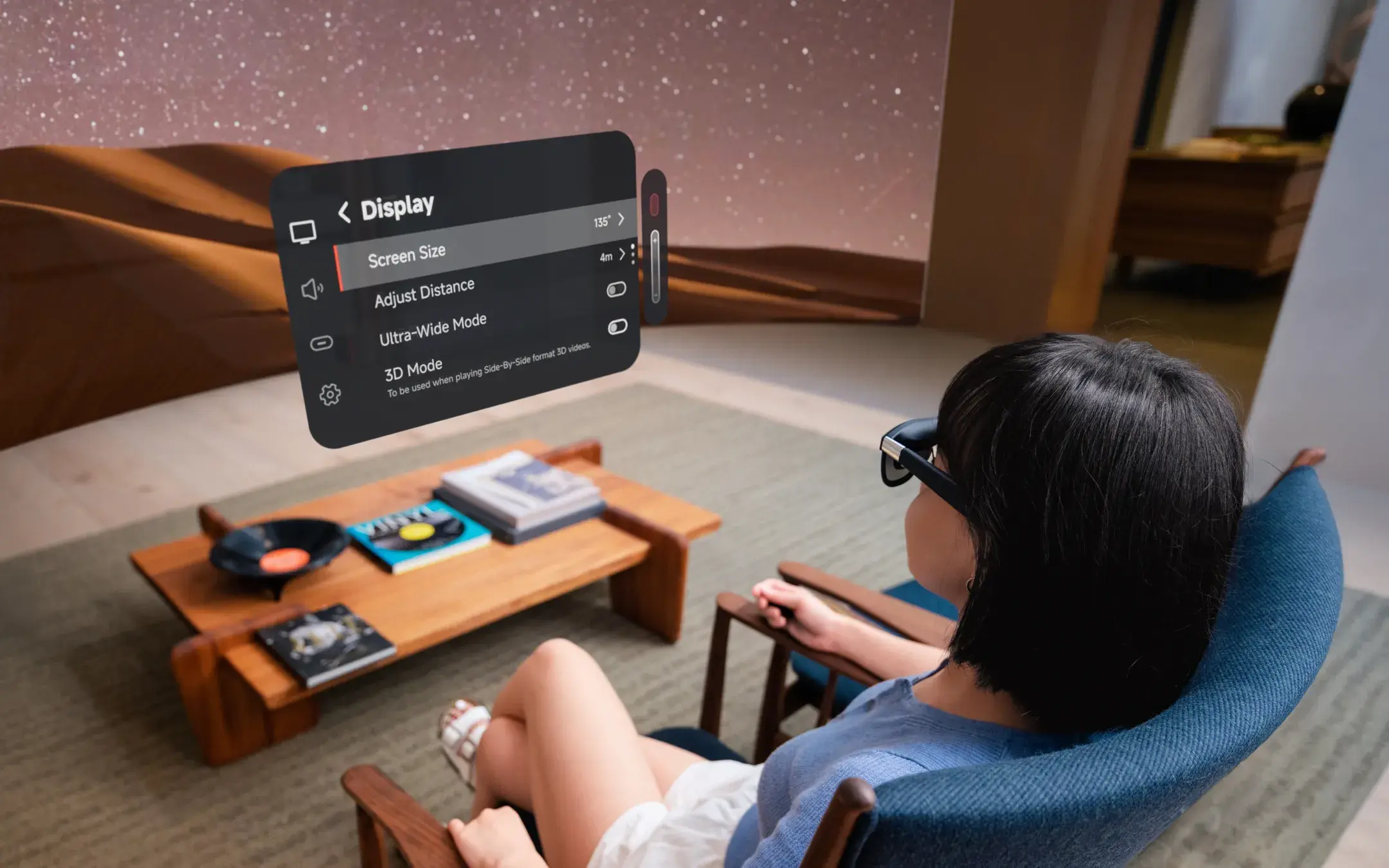
Introduction to Xreal One Pro AR Glasses

At CES 2025, one of the most anticipated products was the Xreal One Pro AR glasses. Now, these futuristic smart glasses are finally making their way to store shelves. Retailers like Amazon and Best Buy have started offering the Xreal One Pro, marking a significant milestone for augmented reality technology.

The Xreal One Pro combines advanced cameras, audio features, and a high-tech display to deliver an immersive augmented reality experience. This is something that has typically been reserved for bulky virtual reality headsets or expensive devices like Apple’s Vision Pro. Although the Xreal One Pro is still quite pricey, it brings a wealth of science fiction-like technology into a sleek pair of glasses.

Availability and Pre-Orders

Despite being highly anticipated, the Xreal One Pro glasses were difficult to obtain for a long time. However, this has changed. After fulfilling around 10,000 pre-orders in June, the glasses have since sold out multiple times. Now, consumers can easily purchase them by visiting Amazon and clicking "Add To Cart."

To make the purchase even more appealing, there's a limited-time bundle deal available. This offer allows customers to save $50 on the price of the Xreal One Pro AR glasses.

The Limited-Time Bundle Deal

For those who missed out on the initial launch of the XREAL One Pro AR glasses, there's now a chance to get a special bundle deal. This package includes the XREAL One Pro AR glasses and the XREAL Beam Pro. The bundle is available until September 1 and can be purchased at Amazon and Best Buy for $799, which is a $50 discount from the usual price of $849.

While the glasses are impressive on their own, the Beam Pro adds a unique value to the bundle. According to former East Coast Tech Editor Kimberly Gedeon, the Beam Pro received a 3.3 out of 5 rating. She noted that while the device still needs refinement, it offers some standout features. PCMag also gave the Beam Pro a "Good" but not perfect 3.5-star review.

Features of the XREAL Beam Pro

The main reason to consider the Beam Pro is its ability to enable a head-tracking AR interface called NebulaOS. PCMag's review highlighted that this interface feels much more natural than standard screen mirroring because it keeps apps fixed in place as you move your head. Additionally, the Beam Pro comes with dual cameras that can capture 3D "spatial" photos and videos.

Kimberly Gedeon pointed out several notable features, including the "fun 3D video capture," which she described as the device's "most badass feature." She also praised the "satisfying" haptic keyboard and the "shockingly long" battery life.

Although the Beam Pro has some limitations regarding multitasking, the Xreal One Pro glasses themselves are still impressive. For anyone looking to enter the AR market, this bundle offers a complete package, albeit a limited one. At just $799, it represents a reasonable entry point into the world of augmented reality.

If you found this information interesting, be sure to follow The Shiro Copr on MSN for more updates and insights.

Saturday, June 6, 2026

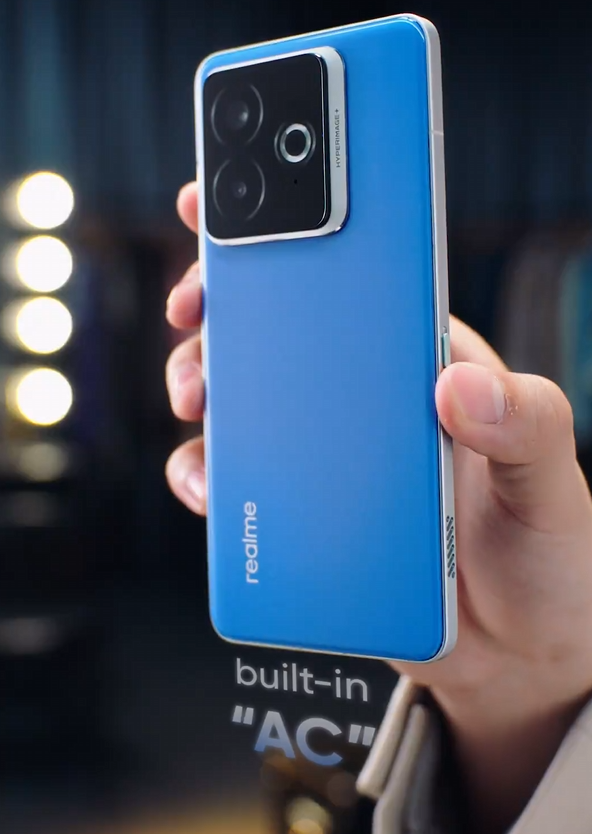
Realme Unveils "Chill Fan Phone" with Built-In AC Cooling

Featured Image

Realme Unveils Exciting New Smartphone Teasers Ahead of 828 Fan Festival

As the highly anticipated Realme 828 Fan Festival approaches, the brand has released a series of intriguing teasers for upcoming smartphones. These devices are expected to bring cutting-edge technology and unique features to the market. Among the most talked-about models is a smartphone equipped with an impressive 15,000mAh battery, promising up to 50 hours of video playback on a single charge. Alongside this model, Realme has also teased a new device called the Chill Fan Phone, which boasts an innovative cooling system.

A Revolutionary Cooling System

The Realme Chill Fan Phone introduces a built-in AC active cooling system, marking a significant advancement in smartphone cooling technology. While gaming smartphones have previously incorporated physical fans for cooling, the Chill Fan Phone stands out due to its "AC" cooling feature. This system is designed to reduce core temperatures by up to 6°C, offering a more efficient and effective way to manage heat during intense usage.

The official teaser video highlights the phone’s design, which remains familiar but includes a small vent on the side frame. The video showcases the vent's power, demonstrating its ability to blow out a candle and push a rubber ducky forward in a container of water. This visual demonstration emphasizes the effectiveness of the cooling system.

What Makes It Unique?

One of the standout features of the Chill Fan Phone is its ability to toggle the AC cooling system on and off. This flexibility allows users to customize their experience based on their needs, whether they are gaming, streaming, or simply browsing. The integration of such advanced cooling technology into a smartphone is a bold move by Realme, signaling their commitment to innovation and user comfort.

Upcoming Event Details

The Realme 828 Fan Festival is set to take place on August 27, 2025, at 11 AM China Standard Time. This event is expected to be a major highlight for tech enthusiasts and fans of the brand. While the details of the Chill Fan Phone are still emerging, it remains to be seen whether this device will offer genuine innovation or if it will be perceived as just another gimmick.

Staying Updated

For those eager to stay informed about the latest developments, there are several ways to keep up with the news. Regular updates can be found in the News Section, where new articles and insights are posted daily. Tech enthusiasts can also follow the brand’s Telegram channel and subscribe to their free newsletter for the latest updates and exclusive content.

Conclusion

Realme continues to push the boundaries of what is possible with smartphone technology. With the introduction of the Chill Fan Phone and the massive battery smartphone, the brand is setting the stage for an exciting lineup of devices. As the 828 Fan Festival approaches, all eyes will be on Realme to see how these innovations will shape the future of mobile technology. Whether it's through enhanced cooling systems or groundbreaking battery life, Realme is proving that they are at the forefront of the industry.

Thursday, June 4, 2026

Leica M11-V Rumors Spark Debate: Is It Really a Rangefinder?

Featured Image

The Evolution of the Leica M11: A New Era for Rangefinder Cameras

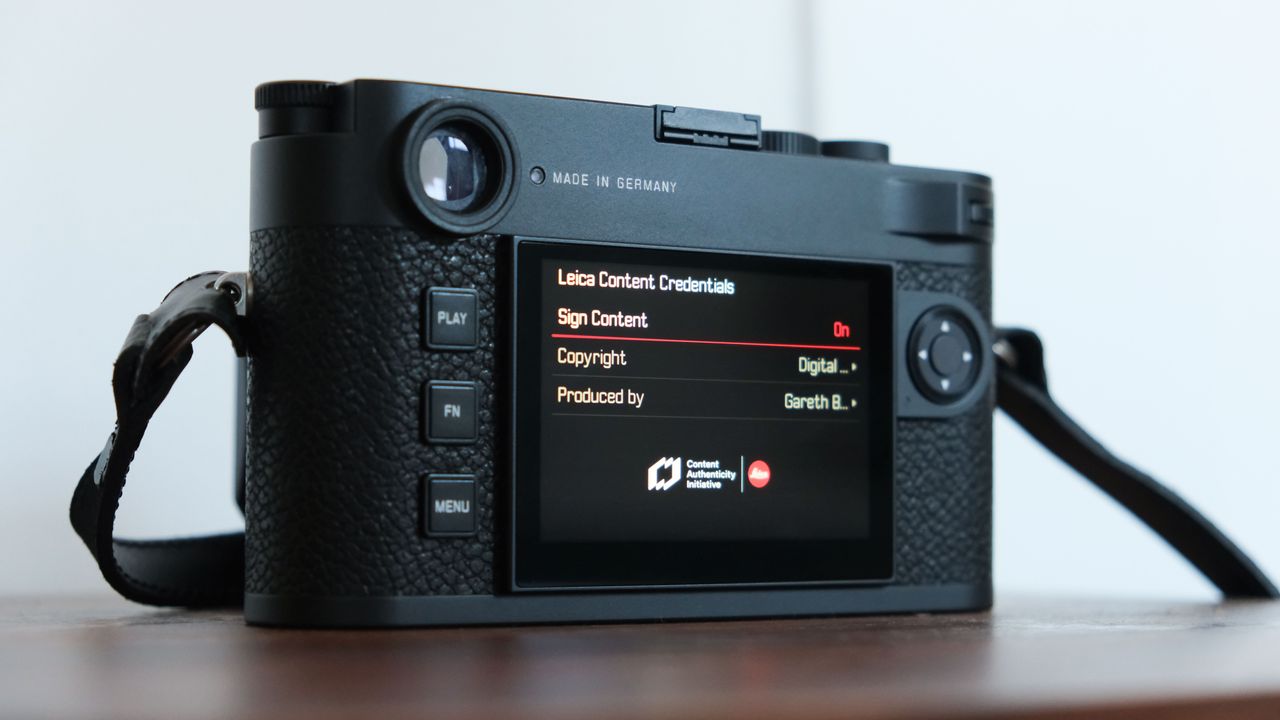
The Leica M11 has long been celebrated as one of the few digital cameras that truly embodies the traditional rangefinder design. Known for its classic viewfinder and split image manual focusing, the M11 stands out in a market dominated by mirrorless and DSLR systems. However, recent rumors suggest that Leica may be considering a significant change to the most iconic feature of the M11 series—the rangefinder itself. Instead of maintaining the optical viewfinder, there are whispers that the upcoming model, the M11-V, could feature an electronic viewfinder (EVF).

These rumors have been circulating for months, but a recent unverified leak has provided a glimpse into what the M11-V might offer. While Leica has not officially confirmed the existence of this camera or any of its specifications, the proposed features have sparked considerable debate among enthusiasts.

One of the most controversial aspects of the rumored M11-V is the switch from a traditional rangefinder to an electronic viewfinder. According to the leaked information, the EVF would be a half-inch screen equipped with focusing aids and a diopter adjustment. This shift could potentially alter the experience of using a Leica M camera, which many users consider essential to its charm and functionality.

Despite this change, the rest of the M11-V’s features are expected to align closely with those of other M-11 series models. These include a full-frame 60MP sensor, which has become a hallmark of the Leica M line. If the M11-V is indeed real, it is likely to serve as an alternative rather than a replacement for existing models. This new variant could appeal to photographers who prefer the convenience of an EVF while still enjoying the high-resolution capabilities of the M11 series.

The Leica M11 series remains one of the few modern rangefinder cameras that truly adhere to the historical definition of the category. A genuine rangefinder uses a viewfinder that lines up two images to achieve focus. When these images overlap correctly, the subject is in focus. This method has been a staple of film photography and continues to be a key feature of the M11.

Many digital cameras attempt to mimic the rangefinder look, but they often lack the functional elements that make a true rangefinder unique. For example, the Sony A7C II appears compact and resembles a rangefinder, but it does not use the same focusing mechanism. Similarly, the Fujifilm X100VI employs a hybrid viewfinder that combines traditional split image focusing with more modern modes.

The rangefinder design is what sets the Leica M11 apart from other full-frame digital cameras. As Leica explains, “The iconic Leica M-Camera uses state-of-the-art technology, focusing only on the features essential for photography.” The M11 is essentially a camera that blends advanced technology with a minimalist approach, aiming to return to the roots of photography while delivering high-resolution digital images.

The classic rangefinder system speeds up manual focusing by quickly indicating when an image is in focus using split images that overlap. However, the optical viewfinder uses hatch marks to show what the lens sees at different focal lengths, which can be challenging when working with longer lenses. Some photographers argue that electronic viewfinders, which often support a wider range of manual focus aids, can be easier to use, especially for those with visual impairments.

Currently, the M11 can gain some of these advantages by using the Visoflex 2, a viewfinder accessory that connects via the camera’s hot shoe slot. However, this accessory adds to the camera’s size and occupies the hot shoe, which may not be ideal for all users.

While the rangefinder design is a defining characteristic of the Leica M series, not all M cameras are true rangefinders. The film-era Leica MD series, introduced in 1963, did not even have viewfinders. Leica’s modern interpretation, the M11-D, lacks a playback screen but retains the viewfinder.

With the M11-V still in the realm of speculation, several questions remain unanswered. One of the most pressing is the price. Leica notes that “the mechanical rangefinder in every M-Camera is made by hand at the Leica factory in Germany using over 100 parts.” Installing an electronic viewfinder may seem simpler, but it raises questions about cost. Would an M11 with an EVF be less expensive? Or, given that it eliminates the need for the $955 / £650 / AU$1,370 Visoflex 2 accessory, could Leica justify a higher price point?

As the debate over the M11-V continues, one thing is clear: the Leica M series remains a symbol of craftsmanship and tradition in the world of photography. Whether the M11-V becomes a reality or remains a rumor, it highlights the ongoing evolution of camera design and the enduring appeal of the rangefinder.

Wednesday, June 3, 2026

A Microsoft Designer's Rogue Hololens Heir Compatible with Copilot

Featured Image

A New Vision for Copilot: The Audio-First Wearable Concept

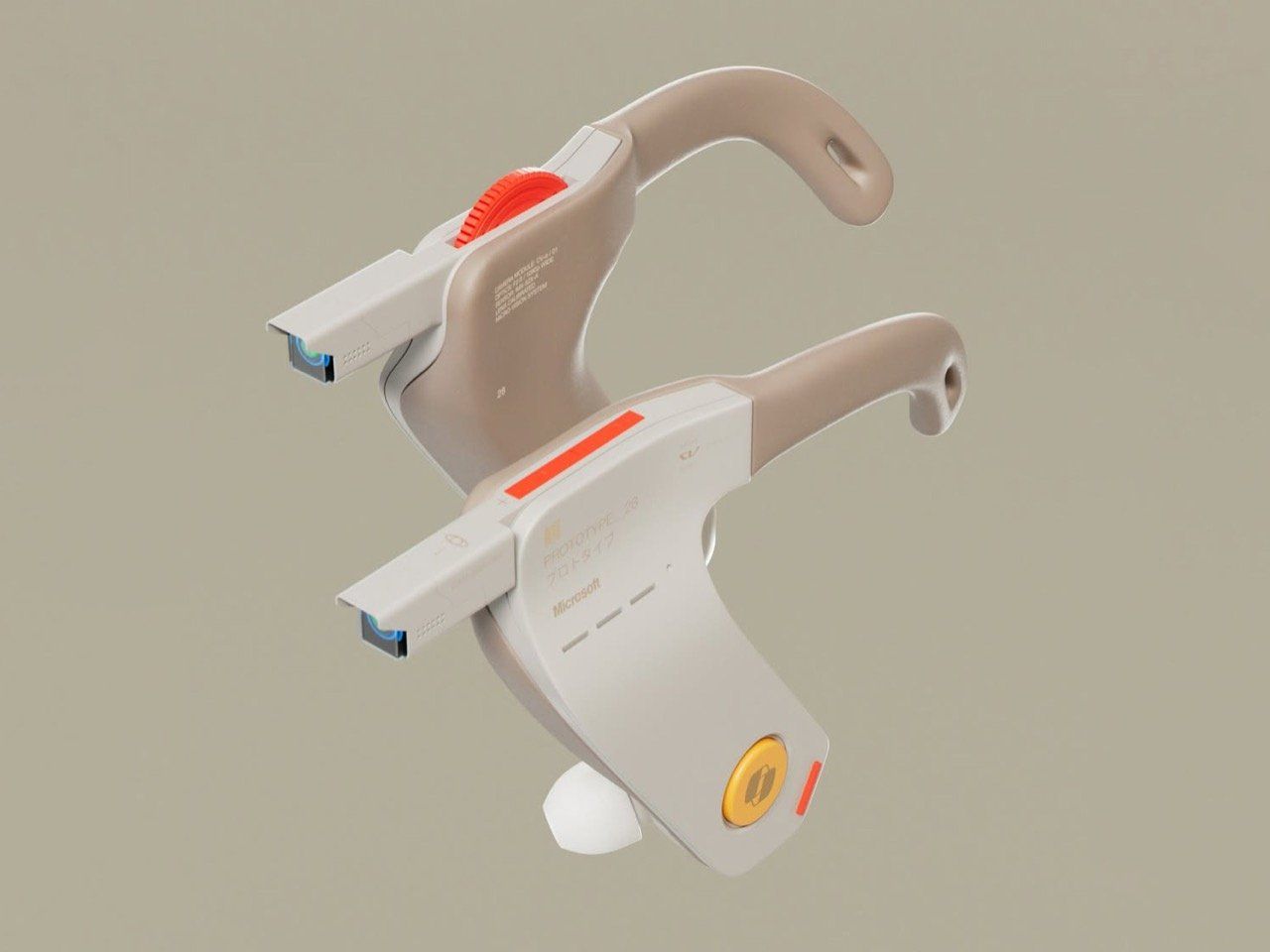
Microsoft designer Braz de Pina has introduced an innovative concept that reimagines the future of AI-powered wearable technology. Dubbed the Copilot Veja, this device takes a unique approach by eliminating the need for a traditional display or heads-up display (HUD). Instead, it relies on audio feedback to deliver information, offering a new way to interact with AI.

What is Copilot Veja?

The Copilot Veja is not a headset but rather an ear-worn wearable that features stems equipped with cameras, microphones, and physical controls. This design emphasizes portability and simplicity, making it ideal for everyday use. The name "Veja" comes from the Portuguese word for "see," which might seem ironic given the absence of eye cameras. However, this choice was intentional, as de Pina believes that visual displays are already abundant in modern life.

Audio-First Approach

De Pina describes the Copilot Veja as a "fan-made concept" designed around the idea of making Copilot more accessible and practical. By focusing on audio, the device aims to provide a seamless experience without the need for visual input. This approach raises an interesting question: with advanced AI capabilities, is it necessary to see what the AI is telling you? De Pina suggests that hearing the information could be just as effective, especially when combined with real-time context awareness.

This concept aligns with the growing trend of AI-driven interactions that prioritize voice and sound over visual interfaces. It also reflects a shift in how users might engage with technology in the future, where the emphasis is on natural communication rather than screen-based interaction.

Design and Features

The Copilot Veja is designed with comfort in mind. Each stem includes a set of controls such as a power button, volume knob, Copilot button, and a camera trigger. These physical elements allow users to interact with the device easily, even when their hands are occupied.

One of the most intriguing aspects of the design is the use of dual cameras. These cameras work together to replicate stereoscopic vision, enabling the AI to analyze the environment in three dimensions. This feature could enhance the user's ability to capture content and understand their surroundings through the device.

Why This Concept Matters

While the Copilot Veja is not something Microsoft would likely produce, it represents a compelling vision for the future of AI wearables. The concept challenges traditional assumptions about how users should interact with technology, suggesting that audio and context-aware AI could offer a more intuitive and less intrusive experience.

Moreover, the idea of an AI that can "see" what the user sees and provide instant feedback opens up new possibilities for applications in various fields, from personal assistance to professional settings. This kind of technology could revolutionize how people access and process information in real time.

Conclusion

The Copilot Veja concept highlights the potential for a new generation of wearable devices that focus on audio and context-aware AI. As technology continues to evolve, it’s exciting to imagine how these innovations could shape the way we interact with the world around us. Whether or not this specific design becomes a reality, it serves as a thought-provoking glimpse into the future of AI and wearable technology.

Monday, April 20, 2026

Acer Predator Helios Neo 16S AI Review: A Stunning OLED Deal

Featured Image

Overview

The Acer Predator Helios Neo 16S AI is a gaming laptop that offers a range of features and performance capabilities. It is designed to deliver a powerful experience for gamers and users who require high-performance hardware. However, it also comes with some limitations that are worth considering before making a purchase decision.

Pros

  • Beautiful high-refresh rate OLED display: The 16-inch OLED screen delivers vibrant colors and deep blacks, providing an immersive visual experience.
  • Good price for that OLED: The laptop offers an impressive OLED display at a reasonable price point.
  • Solid performance per dollar: The hardware configuration provides good value for the cost.
  • Lots of ports: The laptop includes a variety of ports, making it versatile for different connectivity needs.

Cons

  • Doesn’t pull far ahead of RTX 5070-powered laptops: Despite having a slightly more powerful GPU, the performance gains are minimal.
  • NPU is too slow for Copilot+ PC AI features: The neural processing unit does not meet the requirements for advanced AI features.
  • 12 GB VRAM is low for GPU-heavy AI models: This limits the laptop’s ability to handle more demanding AI tasks.
  • Bad speakers: The audio quality is not up to par, especially for gaming or multimedia use.

Verdict

The Acer Predator Helios Neo 16S AI feels like it was meant to be a gaming laptop, with marketing efforts trying to add “AI” features. While it is a solid midrange gaming laptop with a stunning OLED display, it may not meet the expectations of those looking for true AI laptop capabilities. If you’re in the market for a gaming laptop with a great display, this could be a strong contender. However, if AI features are your main concern, there are better options available.

Price

At the time of review, the laptop was priced at $1,899. This is a competitive price for the features offered, especially given the high-quality OLED display.

Specifications

  • Model number: PHN16S-71-98RF
  • CPU: Intel Core Ultra 9 275HX
  • Memory: 32 GB DDR5 6400 MHz RAM
  • Graphics/GPU: Nvidia GeForce RTX 5070 Ti 12GB
  • NPU: Intel AI Boost (up to 13 TOPS)
  • Display: 16-inch 2560×1600 OLED display with 240Hz refresh rate
  • Storage: 1 TB PCIe Gen4 SSD
  • Webcam: 1080p webcam
  • Connectivity: 2x USB Type-C (1x Thunderbolt 4, 1x USB 3.2 Gen 2 10Gbps), 3x USB Type-A (2x USB 3.2 Gen 2, 1x USB 3.2 Gen 1), 1x HDMI 2.1 out, 1x Ethernet, 1x microSD card reader, 1x combo audio jack, 1x DC power in
  • Networking: Wi-Fi 6E, Bluetooth 5.4
  • Biometrics: IR camera for facial recognition
  • Battery capacity: 76 Watt-hours
  • Dimensions: 14.06 x 10.9 x 1.01 inches
  • Weight: 4.8 pounds
  • MSRP: $1,899 as tested

If you want a 16-inch OLED with 240Hz refresh rate for under $2,000, you should seriously consider this machine.

Design and Build Quality

The Acer Predator Helios Neo 16S AI has a sleek design that balances aesthetics with functionality. It is made of a combination of aluminum and black plastic, giving it a sturdy feel. The keyboard lights up with multicolored LEDs, allowing for customizable backlighting. The trackpad is smooth and responsive, though it doesn't stand out compared to other models on the market.

Keyboard and Trackpad

The keyboard features a full-size layout with a number pad and four zones of RGB LED backlighting. The key travel is standard for a gaming laptop, offering a comfortable typing experience. The trackpad is adequate for general use but lacks the premium feel found in higher-end models.

Display and Speakers

The OLED display is one of the standout features of the laptop, offering excellent color accuracy and contrast. However, the speaker quality is lacking, with harsh upper midranges that can become fatiguing during extended use. For the best audio experience, it's recommended to use external headphones.

Webcam, Microphone, and Biometrics

The 1080p webcam is decent for a gaming laptop, though it doesn't match the quality of business-oriented models. The microphone setup is average, and while it includes AI features for noise reduction, an external microphone is recommended for optimal voice quality. The IR camera for facial recognition works well with Windows Hello.

Connectivity

The laptop offers a wide range of ports, including Ethernet, USB Type-A, and USB Type-C. However, the placement of some ports can be confusing, particularly with the Thunderbolt 4 and USB 3.2 ports on the back. The Wi-Fi 6E support is a positive feature, though the absence of Wi-Fi 7 support is a minor drawback.

Performance

The laptop performed well in various benchmarks, showcasing its capabilities as a gaming machine. However, the cooling system and TDP limitations affected the sustained performance of the CPU and GPU. While the RTX 5070 Ti GPU is a step up from the RTX 5070, the performance gains were marginal.

Battery Life

The 76 Watt-hour battery provides a moderate amount of runtime, though it is typical for a gaming laptop. The OLED display helps extend battery life, but real-world usage will likely result in shorter battery life than the benchmark results suggest.

Conclusion

The Acer Predator Helios Neo 16S AI is a solid choice for those looking for a gaming laptop with a high-quality OLED display. While it may not excel in AI features or offer the most powerful hardware, it provides a balanced mix of performance and value. If you're in the market for a 16-inch OLED with a 240Hz refresh rate at a reasonable price, this laptop is definitely worth considering.

Saturday, April 18, 2026

Ulanzi D200H Deck Dock: 7-in-1 Creator Hub with AI Workflow & Lighting Control

Featured Image

A New Era of Creative Control with Ulanzi D200H Deck Dock

Ulanzi has long been recognized as a leader in photography accessories, known for delivering high-quality, affordable tools that empower creators. The company has now taken its innovation to the next level with the release of the D200H Deck Dock, an all-in-one control and connectivity station designed to streamline workflows for videographers, live streamers, photographers, and video editors.

Priced at half the cost of similar products on the market, the D200H boasts an impressive 92% user satisfaction rate from beta testing. But what exactly makes this device stand out? Let’s explore the features that make it a must-have for modern creators.

Hardware-Software Synergy: A Creator's Dream Machine

The D200H combines tactile control with unified connectivity in a way that hasn’t been seen before. At its core are 14 customizable LCD keys, which offer sub-millisecond response times—critical for live production environments where every millisecond counts. These keys can be programmed to handle a wide range of tasks, from OBS scene transitions to Premiere Pro timeline edits and even Zoom meeting controls.

In addition to the LCD keys, the D200H includes a 7-in-1 docking station, making it a versatile tool that replaces multiple devices. This includes:

  • A USB-C dock
  • An SD card reader
  • A Stream Deck
  • A separate lighting remote

This consolidation not only saves desk space but also simplifies the setup for creators who juggle multiple tools.

AI-Powered Workflow Automation

One of the most groundbreaking features of the D200H is its built-in AI trigger system. A single key can be assigned to launch ChatGPT for live chat moderation, auto-generate meeting summaries, or apply batch presets in Adobe Lightroom. This intelligent automation allows creators to:

  • Trigger ChatGPT for live chat moderation during streams
  • Generate meeting summaries without leaving their workflow
  • Batch-apply Lightroom presets across hundreds of photos

This isn’t just about hardware—it’s about smart automation that adapts to your creative process.

Customization for Specific Creator Needs

Beyond its standout features, the D200H offers three unique innovations tailored to specific creator needs. These enhancements transform workflows across different scenarios.

For Gaming Live Streamers: No Lag

Game streamers will appreciate the low-latency scene switching that minimizes alt-tab delays—a common frustration during intense gameplay. The chat interaction suite allows for:

  • One-touch commands like “!clip” or “!drop”
  • Automated moderation triggers
  • Instant emote displays

These features ensure smooth and interactive streaming experiences.

For Photographers & Designers: Photoshop Efficiency

The D200H includes 39 instant-access Photoshop shortcuts, making it a game-changer for professionals. Functions like Free Transform, Redo, or New File creation are now literally at your fingertips. Beta testers reported completing color grading tasks 40% faster and layer management 35% more efficiently compared to traditional workflows.

Lighting Control: Ecosystem Integration Done Right

Ulanzi has created something truly unique with its lighting integration. The D200H serves as a central command hub for:

  • Ulanzi’s lighting products (VL series, AL series, etc.)
  • Major smart home systems (Mi Home, Haier, Midea)
  • Professional lighting setups via Home Assistant/HomeBridge

The intelligent lighting recommendations automatically adjust based on your content type—whether you’re streaming, shooting portraits, or photographing products.

Conclusion

The Ulanzi D200H Deck Dock is more than a control deck or a docking station—it’s a hybrid device that recognizes how messy, multi-platform, and multi-purpose modern creative work has become. By blending tactile control, AI automation, unified connectivity, and environmental integration, Ulanzi has built a product that can serve as the literal and figurative hub of a creator’s workspace.

Whether its primary role is to command a live broadcast, accelerate a Photoshop session, or keep a gaming stream smooth and interactive, the D200H appears ready to meet the challenge. Its combination of price, feature set, and compatibility gives it a competitive edge, while its integration with Ulanzi’s broader ecosystem hints at how the brand plans to connect its hardware line-up in the future.

For creators who have been piecing together a mix of docks, decks, and control panels, the D200H’s all-in-one approach could prove both a space saver and a workflow upgrade. And for Ulanzi, it’s a signal that the company is no longer just making accessories—it’s building creative command centers.

Monday, April 13, 2026

Upgraded Old Speakers to Bluetooth with Raspberry Pi Zero 2W

Featured Image

Exploring Wireless Connectivity for an Old Speaker System

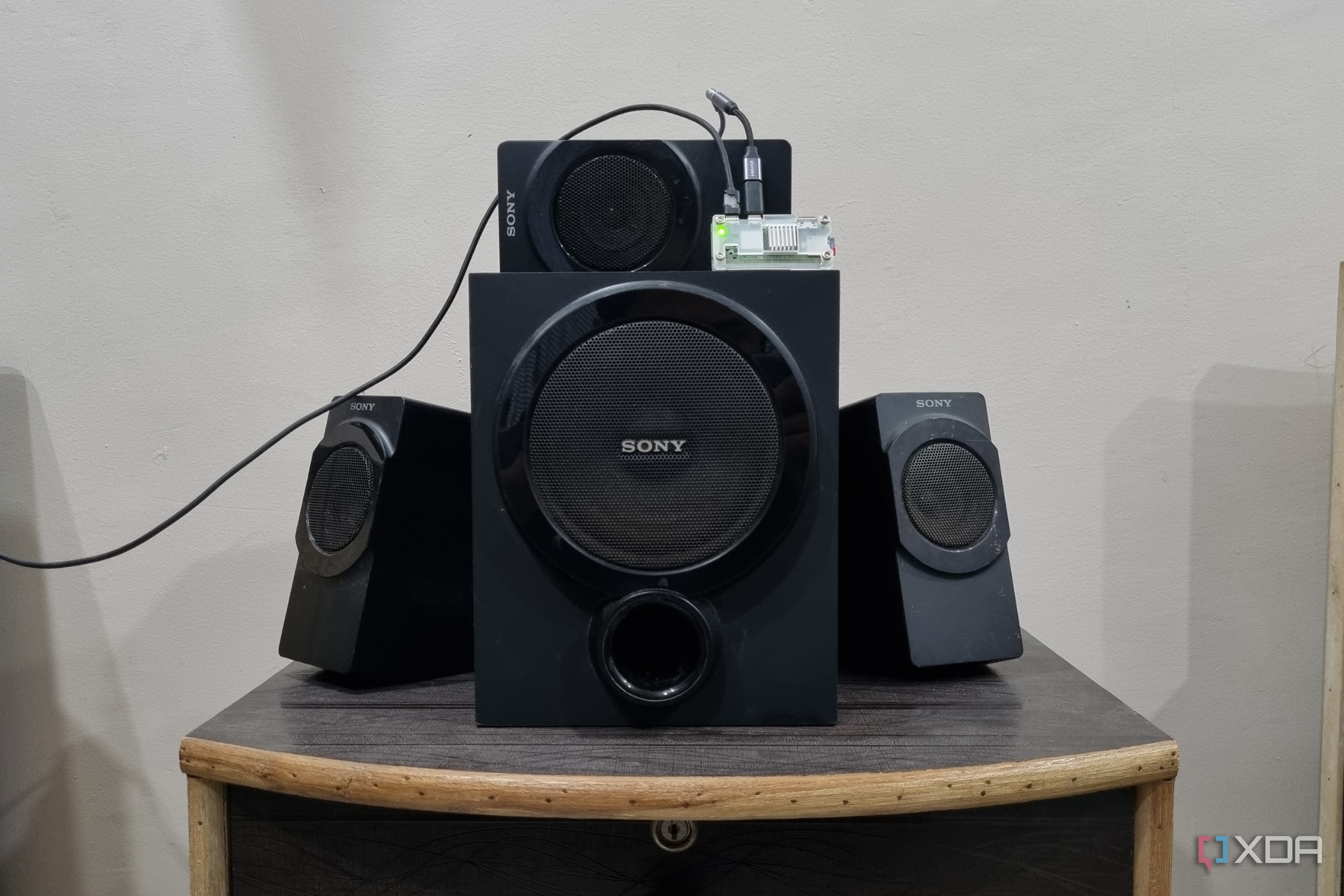
Repurposing old devices can be a rewarding and creative endeavor. I have an older Sony speaker system that, while still functional, only accepts audio through an AUX cable. This limitation made it inconvenient to use with my other Tribit speaker, which offers wireless playback. To address this, I started exploring self-hosted services and Raspberry Pi operating systems, eventually finding a solution that transformed my Hi-Fi speaker into a modern wireless device.

The Challenge of Adding Bluetooth

The main challenge was integrating Bluetooth connectivity into the speaker, which lacked this feature. Instead of soldering or modifying the speaker itself, I opted for a more straightforward approach by using a Raspberry Pi Zero 2W. This affordable single-board computer has built-in Bluetooth capabilities, making it an ideal choice for the project.

To connect the speaker to the Pi, I used an AUX adapter with a built-in DAC. Since the Pi doesn't have an AUX port, I used a micro USB to USB-C adapter and connected an audio DAC that I previously used with my Samsung Galaxy S21 FE. This setup allowed me to avoid any physical modifications to the speaker.

Choosing the Right Operating System

After setting up the hardware, I needed an appropriate operating system. I chose moOde Audio OS, a dedicated audio streaming OS for Raspberry Pi. It’s based on Raspberry Pi OS Lite and includes a music streaming server, making it perfect for this project.

I used the Pi Imager tool to flash moOde Audio OS onto an SD card. During the setup, I configured Wi-Fi and SSH settings to enable a headless setup. Once the Pi booted up, I accessed the web interface by entering its IP address in a browser. However, I encountered an issue: there was no audio output initially.

Adjusting Audio Output Settings

Upon investigation, I realized that the OS defaults to HDMI as the audio output. To fix this, I navigated to the "Configure" section, selected "Audio," and then "Output device." By clicking the "Scan" button, I found the USB DAC and selected it as the audio source. After adjusting the volume levels, the audio played correctly through the speaker.

Next, I formatted a USB drive with the FAT32 file system and copied several tracks to it. The software automatically recognized the USB drive, allowing me to play audio without manual configuration. Rebooting the Pi confirmed that the USB drive was detected, and I could access the tracks from the library interface.

Enabling Bluetooth Connectivity

While the web interface provided a convenient way to manage local playback, my primary goal was to enable Bluetooth connectivity. I manually installed Bluetooth packages using the following commands:

sudo apt install bluetooth bluez blueman
sudo systemctl enable bluetooth
sudo systemctl start bluetooth

Then, I went back to the "Configure" section and enabled Bluetooth connectivity under the "Renderer" option. After restarting the controller, I paired my phone with the Pi via Bluetooth. A quick test with a YouTube video confirmed that the audio connection worked smoothly.

Final Results and Benefits

This project turned out to be one of the easiest Raspberry Pi projects I've completed. My Hi-Fi speaker now supports wireless playback without the need for an AUX cable. The moOde Audio OS not only solved the connectivity issue but also offered a user-friendly web interface for local playback.

Both the web interface and Bluetooth functionality work exceptionally well, with no noticeable degradation in audio quality. If you have an old speaker with AUX connectivity that lacks Bluetooth or Wi-Fi support, consider using a Raspberry Pi Zero 2W and moOde Audio OS to give it a modern upgrade. It's a cost-effective and efficient way to breathe new life into your existing audio equipment.

Saturday, March 28, 2026

Sony INZONE Mouse Review: A Featherlight Pro Gaming Masterpiece

Featured Image

Price and Availability

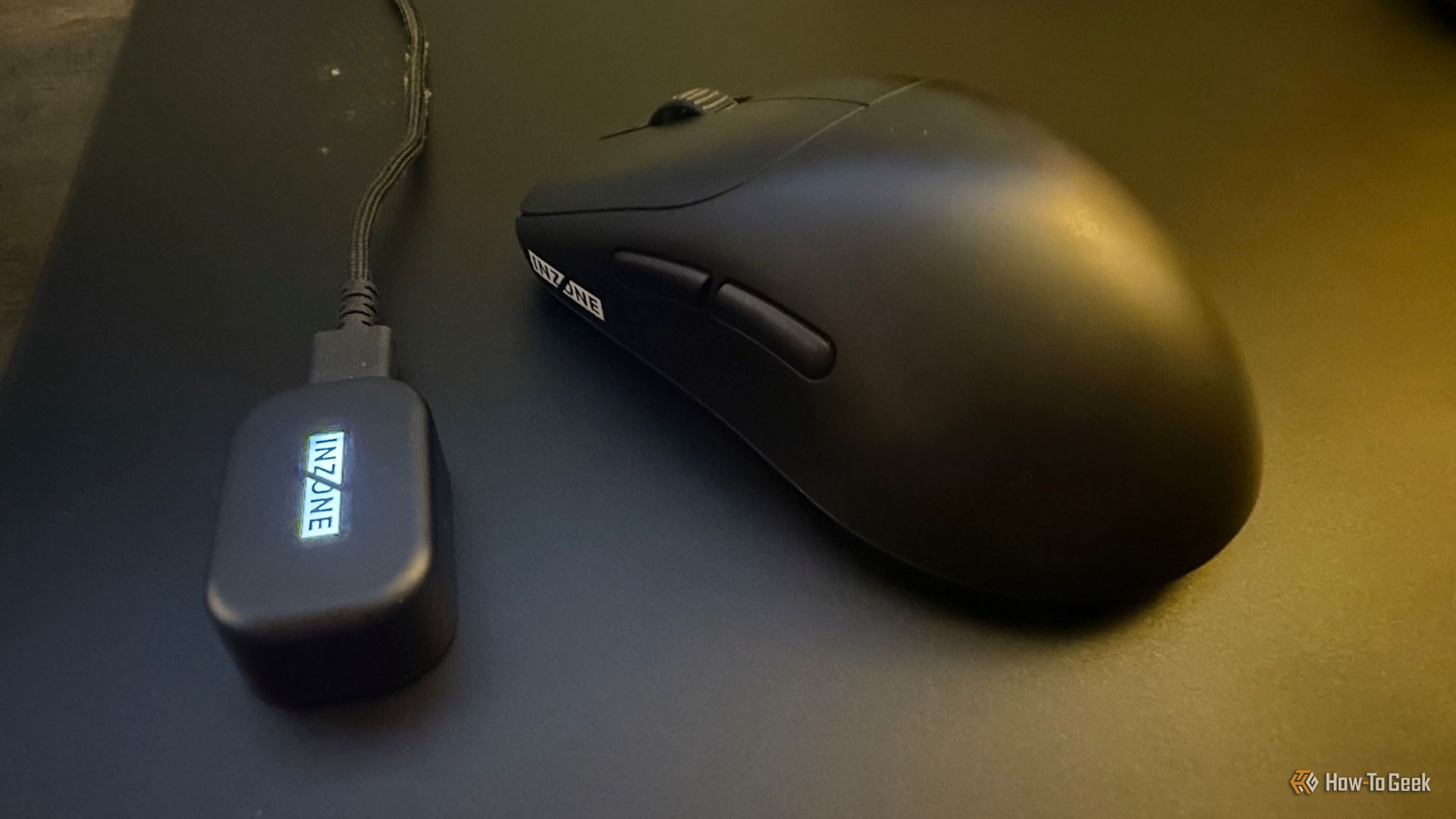
The Sony INZONE Mouse-A is priced at $150. When you purchase the mouse, it comes with a USB-A to USB-C cable, a 2.4 GHz receiver (dongle), and replacement skates. This setup ensures that users have everything they need right out of the box.

It’s All About Shape and Weight

From a technical standpoint, the Sony INZONE Mouse-A is on par with other high-end gaming mice. Specifications such as 750 IPS, 70 G acceleration, 30,000 DPI, and an 8000 Hz polling rate are common in this category. Sony brings these standard features to the table, resulting in a performant mouse that meets expectations.

Instead of focusing on specs, Sony aimed to differentiate the INZONE Mouse-A through its design. At just 48 grams, it's lighter than many of its competitors, making it ideal for fast-paced games like first-person shooters. The smooth skates contribute to its performance, though larger skates could further enhance its capabilities.

The shape of the mouse is also significant. While it may not provide a clear competitive edge, the aggressive hump encourages an active posture. It supports claw grips well, but the hump can be uncomfortable when using a palm grip. For those who prefer a flatter design, there are alternatives available. However, if you use a claw grip or something similar, the INZONE Mouse-A should be comfortable enough.

Everything You Need, Nothing You Don’t

As with most high-end gaming mice, the INZONE Mouse-A focuses on essential features rather than flashy extras. There’s no RGB lighting or gimmicks here—just a straightforward design that prioritizes function over form.

The mouse includes two primary buttons, two side buttons, and a scroll wheel. Optical switches ensure precise clicks, and the large side buttons are easy to access. The scroll wheel is notably big, which is a welcome feature since many modern mice have wheels that are too small for comfortable use.

Despite these positives, some aspects of the mouse feel underdeveloped. The short travel distance and lack of buoyancy in the buttons result in hard stops, which can be unpleasant. The side buttons feel hollow, and the wheel button is too firm. These issues may be attributed to Sony’s first attempt at a gaming mouse, but for the same price, there are other mice that have already refined these details.

Another notable omission is Bluetooth connectivity. While this trend is becoming more common in gaming mice, the 2.4 GHz connection offers better responsiveness, making it a logical choice for gaming. If Bluetooth is a must-have for you, the INZONE Mouse-A may not be the best option.

Wireless Performance and Battery Life

The wireless version of the INZONE Mouse-A delivers impressive battery life. Sony claims up to 90 hours of use, which aligns with real-world testing. The mouse efficiently manages power by turning off when idle and quickly resuming operation when needed. This feature is especially beneficial, as even a minor delay could hinder performance during intense gaming sessions.

Customization May Be Too Basic

High-end gaming mice typically offer extensive software customization. However, the INZONE Hub software falls short in this regard. Users can reassign buttons, adjust DPI, and modify lift-off distance, among other settings. While these options are sufficient for casual gamers, those willing to spend a premium on a mouse expect more advanced features, such as adjusting acceleration curves.

Additional quality-of-life improvements, like disabling the always-on light of the 2.4 GHz dongle, would have been appreciated. Although the software may improve over time, currently, it doesn’t fully justify the mouse’s price point.

Should You Buy the Sony INZONE Mouse-A?

The Sony INZONE Mouse-A is a reliable, no-frills gaming mouse that caters well to users who prefer a claw grip. It features quality components, but it could benefit from more robust customization and improved tactile feedback. While it may not be the top choice at full price, it could be worth considering if it becomes available at a discount.

Saturday, March 14, 2026

Retro Tech Revival: Why Junk is the New Punk

Featured Image

The Nostalgia of Retro Tech

In 2025, the world witnessed a surprising trend in the music industry. Taylor Swift released her latest mega-album, "Life of a Showgirl," not just on digital and vinyl but also on cassette tape. This choice might seem odd to many, given that cassettes are largely considered outdated. However, this move highlights a growing interest in retro technology. Despite the challenges of tape tangling and the need for endless rewinding, there is a strong appeal to these older formats.

This resurgence of interest in vintage tech is not limited to music. Many consumers are showing a renewed passion for old computers, consoles, cameras, and audio equipment. Companies have started rebooting classic devices like the Commodore 64 and ZX Spectrum, responding to a demand that has grown significantly over the years.

A recent survey by Smart Energy GB in the UK revealed that one in four people still keep cassette tapes and old MP3 players, while one in five still hold onto VHS tapes. TVs with Teletext also remain popular among some. A third of people even use these technologies occasionally, showing that nostalgia isn't just a passing trend.

Luke Malpass, owner of Retrosix, stumbled into the retro tech scene by accident. Starting as a software engineer, he began fixing old computers as a hobby. His journey led him to modify Game Boy shells, which eventually evolved into creating what he calls "prestige Game Boys." These modified devices retain the original CPU and motherboard but feature modern upgrades, making them more functional and appealing to today's users.

Malpass now builds and modifies old systems, offering custom designs and even constructing Amiga 1200s from scratch. He runs a forum to help others learn how to mod old systems, emphasizing the importance of community and accessibility.

Steve Vincent, who runs the VintNerd YouTube channel, notes that advancements in 3D printing, online forums, and affordable single-board computers have made it easier for enthusiasts to modify old tech. "If you're an enthusiast and you have an itch to make something happen, you can make it happen now," he says.

For many, the appeal of retro tech lies in its nostalgic value. Michele Diederich, a communications director and Vintage Computer Festival organizer, explains that it's about reconnecting with simpler times and core memories. However, it's not just older generations that are drawn to this trend. Younger individuals, aged 18 to 25, are also embracing retro tech, even if they didn't experience the original era.

Despite the positive aspects, there are concerns about the commercialization of retro trends. Grafton Tanner, a US-based author, warns that as retro tech becomes more popular, it risks becoming elitist. The vinyl record revival is a prime example, where prices have skyrocketed, making it less accessible to younger audiences.

Adam Fuerst, co-owner of Retrospekt, which refurbishes old instant film cameras, faces similar challenges. While the Y2K digital cameras are fun to use, their prices have become prohibitive. Fuerst strives to keep his business grounded by making retro gear affordable and functional. His team breaks down old equipment, reusing components to build new units.

Creating new cases for these refurbished devices is a challenge, as many original cases are beyond repair. Fuerst wants to maintain the original style, which requires precise manufacturing processes. Despite the difficulties, he remains committed to his passion.

The durability of older technology is another significant factor. Malpass points out that many consoles from the 70s and 80s are still functioning. Unlike modern devices, which often have short lifespans, older tech was built to last. This longevity, combined with the ease of repair, makes retro tech appealing.

Fuerst adds that modern PCBs are complex and difficult to repair, whereas older boards are simpler and more accessible. This simplicity allows for greater customization and adaptability.

As the past continues to influence the present, the future of retro tech looks promising. Modding ensures that these technologies remain relevant and adaptable. However, as modern technology becomes increasingly uniform and corporate, there is a question of whether it will hold the same nostalgic value in the future.

In the end, the appeal of retro tech lies in its ability to connect people with their past, offering a sense of history and character that modern devices often lack. Whether it's a cassette tape or a vintage console, these technologies continue to resonate with those who appreciate their unique qualities.

Saturday, February 28, 2026

Luxury Hi-Fi Brand Unveils Affordable Bluetooth Speakers for Modern Vinyl Enthusiasts

Featured Image

New Active Speakers from Elipson Elevate Audio Experience

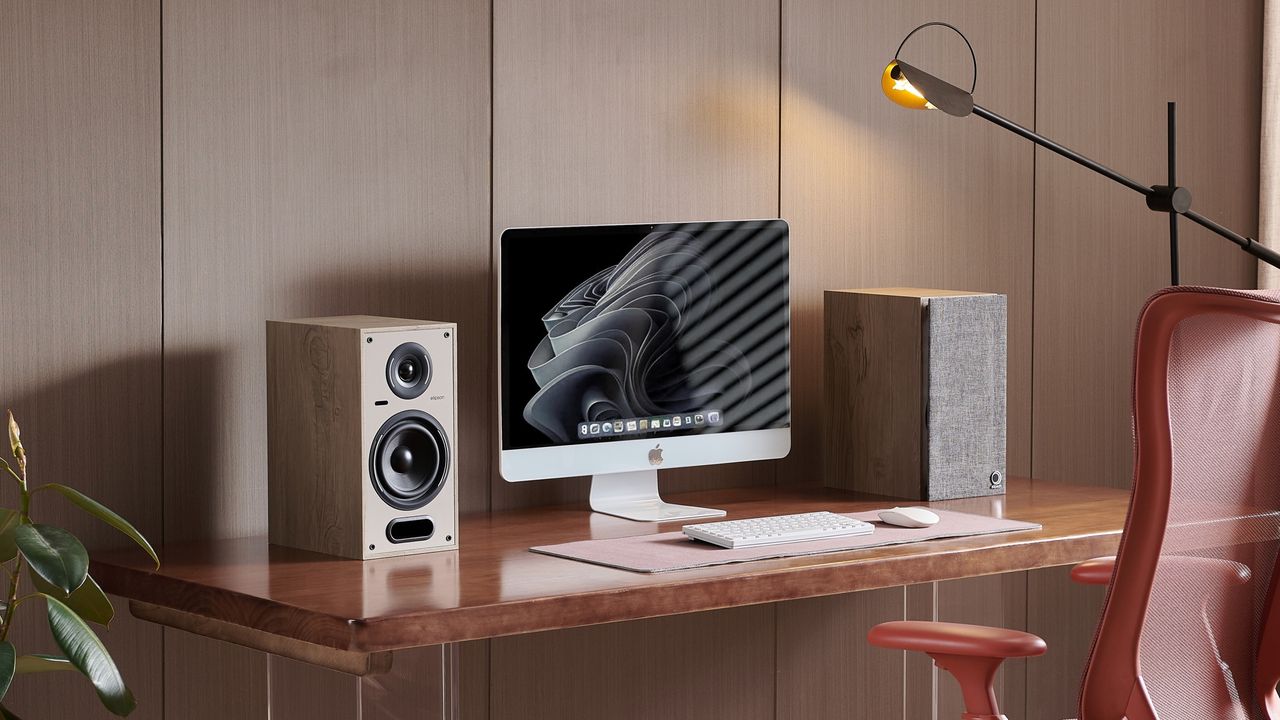
Elipson, a renowned French luxury audio brand, has recently introduced two new active speakers in its Horus series: the Horus 6B Active BT bookshelf speaker and the Horus 11F Active BT floorstander. These models are designed to deliver high-quality sound while offering versatile connectivity options for modern listening environments.

Both speakers come equipped with built-in 50W stereo amplification, ensuring powerful and clear audio output. They feature a sophisticated bass reflex system, which enhances low-frequency performance without compromising on clarity. The drivers used in these speakers include 130mm glass fiber-reinforced cellulose pulp bass/mid-range units and 25mm silk dome neodymium tweeters, providing a balanced and detailed soundstage.

The Horus 6B and Horus 11F are available in three elegant finishes: light wood / beige, walnut / dark gray, and black / carbon. This range of options allows users to choose a design that complements their home decor while maintaining a premium aesthetic.

Key Features and Connectivity Options

One of the standout features of the Horus 6B Active BT is its USB Audio connection, which supports plug-and-play functionality for PCs and Macs. This allows for high-resolution audio playback at up to 24-bit/96kHz, making it ideal for audiophiles who want to enjoy their digital music library in the best possible quality.

Additionally, the Horus 6B includes a moving magnet (MM) phono input, enabling direct connection to turntables without the need for an external pre-amp. This makes it a convenient choice for vinyl enthusiasts looking to integrate their analog collection into a modern audio setup.

Both speakers also offer multiple input options, including HDMI ARC for seamless integration with televisions, coaxial and optical inputs capable of handling 24-bit/192kHz audio, and Bluetooth 5.0 with aptX HD support. This ensures compatibility with a wide range of devices, from smartphones to streaming services.

Performance and Availability

In terms of frequency response, the Horus 11F Active BT delivers a broad range of 40Hz to 20,000Hz, making it suitable for a variety of music genres and listening scenarios. The Horus 6B Active BT has a slightly narrower range of 55Hz to 22,000Hz, but still provides excellent sound quality for most applications.

The Horus 6B Active BT is currently available for purchase, while the Horus 11F Active BT will be released in early October 2025. The recommended retail prices are £399 (approximately $530 or AU$840) for the Horus 6B and £899 (around $1,200 or AU$1,880) for the Horus 11F.

Conclusion

With their advanced features, stylish designs, and versatile connectivity, the Elipson Horus 6B and Horus 11F Active BT speakers are poised to become popular choices among both casual listeners and audiophiles. Whether you're looking to upgrade your home audio system or set up a dedicated listening space, these speakers offer a compelling combination of performance and style.

Sunday, February 15, 2026

Top Bone Conduction Headphones of 2025

Featured Image

Introduction to Bone Conduction Headphones

Bone conduction headphones, while often seen as futuristic and intimidating, are actually a realistic and comfortable alternative to traditional earbuds or over-ear headphones. These devices transmit sound through vibrations that travel through the bones of the skull, allowing users to hear both their music and ambient sounds. This makes them ideal for activities where situational awareness is crucial, such as running, cycling, or swimming. Since 2021, we have tested nearly two dozen of the best bone conduction headphones, carefully selecting the top models based on audio quality, connectivity, battery life, weight, and durability. Our experts have put these headsets through rigorous testing, including running, swimming, and lifting weights, to ensure they meet the demands of active lifestyles.

Best Overall Bone Conduction Headphones: Shokz OpenRun Pro

The Shokz OpenRun Pro stands out as the best overall bone conduction headphones. Priced at $125 at REI and $160 at Amazon, this model offers class-leading battery life, quick charging, and top-notch sound quality. With a battery life of 10 hours, it can easily handle long workouts or even a 50-mile run. The quick charge feature adds 1.5 hours of playtime in just 5 minutes, making it a reliable choice for those who need consistent power. The OpenRun Pro also features dual microphones with noise-canceling capabilities, ensuring clear communication during calls or when using voice commands. Its lightweight design, weighing only 29 grams, makes it comfortable for extended use. While it's not fully waterproof (IP55 rating), it's sweatproof and suitable for most outdoor activities. For those who require full waterproofing, the H2O Audio TRI Pro 2 Multi-Sport with PLAYLIST+ is an excellent alternative.

Best Budget Headphones: YouthWhisper Lite

For those looking for a more affordable option, the YouthWhisper Lite is a solid choice. Priced at $36 on Amazon, it offers outstanding value for its price. The headphones provide good audio quality, a lightweight design (25 grams), and multipoint Bluetooth pairing, which allows users to connect to multiple devices simultaneously. They also feature USB-C charging and a decent battery life of 6 hours. While the band may feel a bit stiff around the ears, the IP65 rating ensures they are sweatproof and suitable for most workouts. Although the audio quality isn't as refined as higher-end models, it's still sufficient for daily use. The YouthWhisper Lite is an excellent entry point for those new to bone conduction technology.

Best Running Headphones: Shokz OpenRun

When it comes to running, the Shokz OpenRun is a dependable choice. Priced at $130, it offers a lightweight design (26 grams) and an IP67 rating, making it fully waterproof and suitable for both running and swimming. The PremiumPitch 2.0+ technology delivers high-quality sound, and the dual noise-canceling microphones ensure clear communication. The OpenRun also features a user-friendly button setup, making it easy to navigate during workouts. While it's slightly more expensive than some alternatives, its combination of comfort, durability, and performance makes it a top recommendation for runners. If you're looking for a more budget-friendly option, the Mojawa Run Plus is another strong contender, offering similar features at a lower price.

Best Battery Life Headphones: Suunto Wing

For users who prioritize battery life, the Suunto Wing is an excellent choice. Priced at $169, it boasts an impressive 10-hour battery life, with the option to extend it to 30 hours using a portable charging dock. The headphones also feature a 10-minute quick charge that adds three hours of playback time. The Suunto Wing offers high-quality sound, with a strong bass response and clear audio. It also includes a built-in app for customizing sound modes and managing LED lights for visibility in low-light conditions. While the small buttons can be challenging to use, the overall performance and battery life make it a top pick for those who need long-lasting power.

Best Waterproof Headphones for Swimming: H2O Audio TRI Pro 2 Multi-Sport with PLAYLIST+

For swimmers, the H2O Audio TRI Pro 2 Multi-Sport with PLAYLIST+ is the best option. Rated IPX8, these headphones are fully waterproof and designed for use in pools, lakes, and oceans. They feature internal storage that allows users to load playlists from their favorite streaming services, eliminating the need for a phone while swimming. The headphones also include Bluetooth connectivity, though it only works within a few inches underwater. The Tri 2 model offers 9 hours of battery life, which is significantly longer than previous versions. With a comfortable behind-the-neck fit and clear audio quality, these headphones are perfect for triathletes and endurance athletes who need reliable performance in wet environments.

Best of the Rest

Other notable models include the Mojawa Run Plus, Kaibo Flex, Mojawa Run Air, Shokz OpenMove, and Tayogo Bone Conduction Headphones. Each of these options has its own strengths, whether it's the waterproof design of the Mojawa Run Plus, the wireless charging dock of the Kaibo Flex, or the affordability of the Tayogo headphones. While none of these models match the top-tier performance of the Shokz OpenRun Pro or the Suunto Wing, they still offer solid features and value for different budgets and needs.

How We Tested the Best Bone Conduction Headphones

Our testing process involved evaluating each model across several key categories, including audio quality, battery life, connectivity, comfort, and durability. We conducted field tests by using the headphones during various activities, such as gym workouts, runs, and cycle commuting. We also performed bench tests to assess technical specifications like battery capacity, charging speed, and sound clarity. Additionally, we evaluated the ease of use, microphone quality, and water resistance ratings. By combining real-world testing with controlled lab evaluations, we were able to determine which models truly stand out in terms of performance and reliability.

Why You Should Trust Us

Our guide is backed by the expertise of professional trainers, athletes, and journalists who have extensive experience in the fitness and technology industries. Cory Smith, a running coach with over 25 years of experience, and Tim Newcomb, a journalist with decades of coverage on sports gear, bring valuable insights to our testing process. Ian Atkinson, an ultramarathoner and wilderness guide, provides firsthand feedback on the performance of the headphones during long-distance events. Together, we ensure that our recommendations are based on thorough research and real-world use.

Buyer’s Guide: How to Choose Bone Conduction Headphones

When choosing bone conduction headphones, consider your specific needs and preferences. For runners, look for models with a lightweight design and long battery life. Swimmers should prioritize waterproof ratings and onboard storage for offline playback. Triathletes may benefit from multi-sport compatibility and durable construction. Commuters might appreciate features like noise-canceling microphones and a secure fit. Additionally, consider the price range and whether the headphones offer additional features like Bluetooth connectivity, touch controls, or app integration.

Bone Conduction Technology Explained

Bone conduction technology works by transmitting sound vibrations through the bones of the skull, bypassing the eardrum and allowing users to hear both music and ambient sounds. This makes it ideal for activities where situational awareness is important, such as running or cycling. Unlike traditional headphones, bone conduction devices do not block the ear canal, providing a more natural listening experience. While they may not deliver the same level of audio fidelity as in-ear headphones, they offer unique benefits for active users.

Sound Quality Considerations

While bone conduction headphones may not match the audio quality of traditional in-ear models, many high-end options offer impressive sound. The Shokz OpenRun Pro and Suunto Wing are among the best in terms of audio quality, with clear highs, balanced mids, and strong bass. However, it's important to note that bone conduction technology inherently has limitations, and some users may find the sound less immersive than traditional headphones. When purchasing, consider how important audio quality is for your specific use case.

Wireless, Bluetooth, and Charging

Most bone conduction headphones are wireless and use Bluetooth connectivity for seamless pairing with smartphones or other devices. The latest models feature Bluetooth 5.1 or 5.3, offering improved stability and faster connection speeds. Charging methods vary, with many models using USB-C cables or proprietary magnetic induction chargers. Battery life typically ranges from 4 to 10 hours, depending on the model and usage patterns. Some headphones, like the Suunto Wing, offer extended battery life with the help of a portable charging dock.

Waterproof & Dustproof Ratings

Waterproof and dustproof ratings are essential for users who plan to use their headphones in wet or dusty environments. The IP rating system, developed by the International Electronics Commission, measures a device's resistance to water and dust. An IPX8 rating means the headphones are fully waterproof and suitable for swimming, while an IPX5 rating indicates they are splash-resistant but not fully waterproof. When choosing a model, consider the environment in which you'll be using it and select a rating that matches your needs.

Design and Comfort

Bone conduction headphones typically feature a curved frame that fits comfortably around the back of the neck. Many models come in different sizes to accommodate various head shapes and sizes. The placement of buttons and controls varies, with some models using physical buttons and others incorporating touch-sensitive panels. Comfort is a key factor, especially for long-term use, and many users prefer models with a soft, flexible band that doesn't cause pressure points or discomfort.

Durability and Longevity

Durability is an important consideration for active users who subject their headphones to frequent use. Models like the Pyle Bone Conduction Headphones are known for their rugged build and ability to withstand drops and impacts. The IP rating also plays a role in determining a headphone's durability, with higher ratings indicating better protection against water and dust. When shopping for bone conduction headphones, look for models that are built to last and can handle the rigors of your lifestyle.

What About Open-Ear Headphones?

Open-ear headphones, such as the Sony LinkBuds, Bose Sport Open Buds, and Apple AirPods, offer a similar concept to bone conduction headphones by leaving the ear canal open. However, they rely on air conduction rather than bone conduction to transmit sound. While they provide a more natural listening experience, they may not offer the same level of situational awareness as bone conduction models. The choice between the two depends on personal preference and the specific use case.

Price & Value

Bone conduction headphones range in price from around $30 to $200, with higher-end models offering more advanced features and better performance. While cheaper options may lack some of the premium features found in top-tier models, they can still provide a satisfactory listening experience for casual users. When deciding on a purchase, consider your budget and what features are most important to you. Investing in a higher-quality pair may offer better long-term value, especially if you plan to use the headphones frequently.

Frequently Asked Questions

How do bone conduction headphones work?
Bone conduction headphones use vibrations to transmit sound through the bones of the skull, allowing users to hear both music and ambient sounds.

Can bone conduction headphones cause hearing loss?
Like any headphones, improper use at high volumes can lead to hearing damage. It's important to use them responsibly and avoid excessive volume levels.

Are bone conduction headphones any good?
While they may not match the audio quality of traditional in-ear headphones, they offer unique benefits for active users, such as situational awareness and comfort during long workouts.

Can I swim with bone conduction headphones?
Yes, some models are fully waterproof and designed for use in wet environments. Look for IPX8-rated models if you plan to swim regularly.
Top Bone Conduction Headphones of 2025

Featured Image

Introduction to Bone Conduction Headphones

Bone conduction headphones, while often seen as futuristic and intimidating, are actually a realistic and comfortable alternative to traditional earbuds or over-ear headphones. These devices transmit sound through vibrations that travel through the bones of the skull, allowing users to hear both their music and ambient sounds. This makes them ideal for activities where situational awareness is crucial, such as running, cycling, or swimming. Since 2021, we have tested nearly two dozen of the best bone conduction headphones, carefully selecting the top models based on audio quality, connectivity, battery life, weight, and durability. Our experts have put these headsets through rigorous testing, including running, swimming, and lifting weights, to ensure they meet the demands of active lifestyles.

Best Overall Bone Conduction Headphones: Shokz OpenRun Pro

The Shokz OpenRun Pro stands out as the best overall bone conduction headphones. Priced at $125 at REI and $160 at Amazon, this model offers class-leading battery life, quick charging, and top-notch sound quality. With a battery life of 10 hours, it can easily handle long workouts or even a 50-mile run. The quick charge feature adds 1.5 hours of playtime in just 5 minutes, making it a reliable choice for those who need consistent power. The OpenRun Pro also features dual microphones with noise-canceling capabilities, ensuring clear communication during calls or when using voice commands. Its lightweight design, weighing only 29 grams, makes it comfortable for extended use. While it's not fully waterproof (IP55 rating), it's sweatproof and suitable for most outdoor activities. For those who require full waterproofing, the H2O Audio TRI Pro 2 Multi-Sport with PLAYLIST+ is an excellent alternative.

Best Budget Headphones: YouthWhisper Lite

For those looking for a more affordable option, the YouthWhisper Lite is a solid choice. Priced at $36 on Amazon, it offers outstanding value for its price. The headphones provide good audio quality, a lightweight design (25 grams), and multipoint Bluetooth pairing, which allows users to connect to multiple devices simultaneously. They also feature USB-C charging and a decent battery life of 6 hours. While the band may feel a bit stiff around the ears, the IP65 rating ensures they are sweatproof and suitable for most workouts. Although the audio quality isn't as refined as higher-end models, it's still sufficient for daily use. The YouthWhisper Lite is an excellent entry point for those new to bone conduction technology.

Best Running Headphones: Shokz OpenRun

When it comes to running, the Shokz OpenRun is a dependable choice. Priced at $130, it offers a lightweight design (26 grams) and an IP67 rating, making it fully waterproof and suitable for both running and swimming. The PremiumPitch 2.0+ technology delivers high-quality sound, and the dual noise-canceling microphones ensure clear communication. The OpenRun also features a user-friendly button setup, making it easy to navigate during workouts. While it's slightly more expensive than some alternatives, its combination of comfort, durability, and performance makes it a top recommendation for runners. If you're looking for a more budget-friendly option, the Mojawa Run Plus is another strong contender, offering similar features at a lower price.

Best Battery Life Headphones: Suunto Wing

For users who prioritize battery life, the Suunto Wing is an excellent choice. Priced at $169, it boasts an impressive 10-hour battery life, with the option to extend it to 30 hours using a portable charging dock. The headphones also feature a 10-minute quick charge that adds three hours of playback time. The Suunto Wing offers high-quality sound, with a strong bass response and clear audio. It also includes a built-in app for customizing sound modes and managing LED lights for visibility in low-light conditions. While the small buttons can be challenging to use, the overall performance and battery life make it a top pick for those who need long-lasting power.

Best Waterproof Headphones for Swimming: H2O Audio TRI Pro 2 Multi-Sport with PLAYLIST+

For swimmers, the H2O Audio TRI Pro 2 Multi-Sport with PLAYLIST+ is the best option. Rated IPX8, these headphones are fully waterproof and designed for use in pools, lakes, and oceans. They feature internal storage that allows users to load playlists from their favorite streaming services, eliminating the need for a phone while swimming. The headphones also include Bluetooth connectivity, though it only works within a few inches underwater. The Tri 2 model offers 9 hours of battery life, which is significantly longer than previous versions. With a comfortable behind-the-neck fit and clear audio quality, these headphones are perfect for triathletes and endurance athletes who need reliable performance in wet environments.

Best of the Rest

Other notable models include the Mojawa Run Plus, Kaibo Flex, Mojawa Run Air, Shokz OpenMove, and Tayogo Bone Conduction Headphones. Each of these options has its own strengths, whether it's the waterproof design of the Mojawa Run Plus, the wireless charging dock of the Kaibo Flex, or the affordability of the Tayogo headphones. While none of these models match the top-tier performance of the Shokz OpenRun Pro or the Suunto Wing, they still offer solid features and value for different budgets and needs.

How We Tested the Best Bone Conduction Headphones

Our testing process involved evaluating each model across several key categories, including audio quality, battery life, connectivity, comfort, and durability. We conducted field tests by using the headphones during various activities, such as gym workouts, runs, and cycle commuting. We also performed bench tests to assess technical specifications like battery capacity, charging speed, and sound clarity. Additionally, we evaluated the ease of use, microphone quality, and water resistance ratings. By combining real-world testing with controlled lab evaluations, we were able to determine which models truly stand out in terms of performance and reliability.

Why You Should Trust Us

Our guide is backed by the expertise of professional trainers, athletes, and journalists who have extensive experience in the fitness and technology industries. Cory Smith, a running coach with over 25 years of experience, and Tim Newcomb, a journalist with decades of coverage on sports gear, bring valuable insights to our testing process. Ian Atkinson, an ultramarathoner and wilderness guide, provides firsthand feedback on the performance of the headphones during long-distance events. Together, we ensure that our recommendations are based on thorough research and real-world use.

Buyer’s Guide: How to Choose Bone Conduction Headphones

When choosing bone conduction headphones, consider your specific needs and preferences. For runners, look for models with a lightweight design and long battery life. Swimmers should prioritize waterproof ratings and onboard storage for offline playback. Triathletes may benefit from multi-sport compatibility and durable construction. Commuters might appreciate features like noise-canceling microphones and a secure fit. Additionally, consider the price range and whether the headphones offer additional features like Bluetooth connectivity, touch controls, or app integration.

Bone Conduction Technology Explained

Bone conduction technology works by transmitting sound vibrations through the bones of the skull, bypassing the eardrum and allowing users to hear both music and ambient sounds. This makes it ideal for activities where situational awareness is important, such as running or cycling. Unlike traditional headphones, bone conduction devices do not block the ear canal, providing a more natural listening experience. While they may not deliver the same level of audio fidelity as in-ear headphones, they offer unique benefits for active users.

Sound Quality Considerations

While bone conduction headphones may not match the audio quality of traditional in-ear models, many high-end options offer impressive sound. The Shokz OpenRun Pro and Suunto Wing are among the best in terms of audio quality, with clear highs, balanced mids, and strong bass. However, it's important to note that bone conduction technology inherently has limitations, and some users may find the sound less immersive than traditional headphones. When purchasing, consider how important audio quality is for your specific use case.

Wireless, Bluetooth, and Charging

Most bone conduction headphones are wireless and use Bluetooth connectivity for seamless pairing with smartphones or other devices. The latest models feature Bluetooth 5.1 or 5.3, offering improved stability and faster connection speeds. Charging methods vary, with many models using USB-C cables or proprietary magnetic induction chargers. Battery life typically ranges from 4 to 10 hours, depending on the model and usage patterns. Some headphones, like the Suunto Wing, offer extended battery life with the help of a portable charging dock.

Waterproof & Dustproof Ratings

Waterproof and dustproof ratings are essential for users who plan to use their headphones in wet or dusty environments. The IP rating system, developed by the International Electronics Commission, measures a device's resistance to water and dust. An IPX8 rating means the headphones are fully waterproof and suitable for swimming, while an IPX5 rating indicates they are splash-resistant but not fully waterproof. When choosing a model, consider the environment in which you'll be using it and select a rating that matches your needs.

Design and Comfort

Bone conduction headphones typically feature a curved frame that fits comfortably around the back of the neck. Many models come in different sizes to accommodate various head shapes and sizes. The placement of buttons and controls varies, with some models using physical buttons and others incorporating touch-sensitive panels. Comfort is a key factor, especially for long-term use, and many users prefer models with a soft, flexible band that doesn't cause pressure points or discomfort.

Durability and Longevity

Durability is an important consideration for active users who subject their headphones to frequent use. Models like the Pyle Bone Conduction Headphones are known for their rugged build and ability to withstand drops and impacts. The IP rating also plays a role in determining a headphone's durability, with higher ratings indicating better protection against water and dust. When shopping for bone conduction headphones, look for models that are built to last and can handle the rigors of your lifestyle.

What About Open-Ear Headphones?

Open-ear headphones, such as the Sony LinkBuds, Bose Sport Open Buds, and Apple AirPods, offer a similar concept to bone conduction headphones by leaving the ear canal open. However, they rely on air conduction rather than bone conduction to transmit sound. While they provide a more natural listening experience, they may not offer the same level of situational awareness as bone conduction models. The choice between the two depends on personal preference and the specific use case.

Price & Value

Bone conduction headphones range in price from around $30 to $200, with higher-end models offering more advanced features and better performance. While cheaper options may lack some of the premium features found in top-tier models, they can still provide a satisfactory listening experience for casual users. When deciding on a purchase, consider your budget and what features are most important to you. Investing in a higher-quality pair may offer better long-term value, especially if you plan to use the headphones frequently.

Frequently Asked Questions

How do bone conduction headphones work?
Bone conduction headphones use vibrations to transmit sound through the bones of the skull, allowing users to hear both music and ambient sounds.

Can bone conduction headphones cause hearing loss?
Like any headphones, improper use at high volumes can lead to hearing damage. It's important to use them responsibly and avoid excessive volume levels.

Are bone conduction headphones any good?
While they may not match the audio quality of traditional in-ear headphones, they offer unique benefits for active users, such as situational awareness and comfort during long workouts.

Can I swim with bone conduction headphones?
Yes, some models are fully waterproof and designed for use in wet environments. Look for IPX8-rated models if you plan to swim regularly.