Showing posts with label computer hardware. Show all posts

Monday, April 20, 2026

Acer Predator Helios Neo 16S AI Review: A Stunning OLED Deal

Featured Image

Overview

The Acer Predator Helios Neo 16S AI is a gaming laptop that offers a range of features and performance capabilities. It is designed to deliver a powerful experience for gamers and users who require high-performance hardware. However, it also comes with some limitations that are worth considering before making a purchase decision.

Pros

  • Beautiful high-refresh rate OLED display: The 16-inch OLED screen delivers vibrant colors and deep blacks, providing an immersive visual experience.
  • Good price for that OLED: The laptop offers an impressive OLED display at a reasonable price point.
  • Solid performance per dollar: The hardware configuration provides good value for the cost.
  • Lots of ports: The laptop includes a variety of ports, making it versatile for different connectivity needs.

Cons

  • Doesn’t pull far ahead of RTX 5070-powered laptops: Despite having a slightly more powerful GPU, the performance gains are minimal.
  • NPU is too slow for Copilot+ PC AI features: The neural processing unit does not meet the requirements for advanced AI features.
  • 12 GB VRAM is low for GPU-heavy AI models: This limits the laptop’s ability to handle more demanding AI tasks.
  • Bad speakers: The audio quality is not up to par, especially for gaming or multimedia use.

Verdict

The Acer Predator Helios Neo 16S AI feels like it was meant to be a gaming laptop, with marketing efforts trying to add “AI” features. While it is a solid midrange gaming laptop with a stunning OLED display, it may not meet the expectations of those looking for true AI laptop capabilities. If you’re in the market for a gaming laptop with a great display, this could be a strong contender. However, if AI features are your main concern, there are better options available.

Price

At the time of review, the laptop was priced at $1,899. This is a competitive price for the features offered, especially given the high-quality OLED display.

Specifications

  • Model number: PHN16S-71-98RF
  • CPU: Intel Core Ultra 9 275HX
  • Memory: 32 GB DDR5 6400 MHz RAM
  • Graphics/GPU: Nvidia GeForce RTX 5070 Ti 12GB
  • NPU: Intel AI Boost (up to 13 TOPS)
  • Display: 16-inch 2560×1600 OLED display with 240Hz refresh rate
  • Storage: 1 TB PCIe Gen4 SSD
  • Webcam: 1080p webcam
  • Connectivity: 2x USB Type-C (1x Thunderbolt 4, 1x USB 3.2 Gen 2 10Gbps), 3x USB Type-A (2x USB 3.2 Gen 2, 1x USB 3.2 Gen 1), 1x HDMI 2.1 out, 1x Ethernet, 1x microSD card reader, 1x combo audio jack, 1x DC power in
  • Networking: Wi-Fi 6E, Bluetooth 5.4
  • Biometrics: IR camera for facial recognition
  • Battery capacity: 76 Watt-hours
  • Dimensions: 14.06 x 10.9 x 1.01 inches
  • Weight: 4.8 pounds
  • MSRP: $1,899 as tested

If you want a 16-inch OLED with 240Hz refresh rate for under $2,000, you should seriously consider this machine.

Design and Build Quality

The Acer Predator Helios Neo 16S AI has a sleek design that balances aesthetics with functionality. It is made of a combination of aluminum and black plastic, giving it a sturdy feel. The keyboard lights up with multicolored LEDs, allowing for customizable backlighting. The trackpad is smooth and responsive, though it doesn't stand out compared to other models on the market.

Keyboard and Trackpad

The keyboard features a full-size layout with a number pad and four zones of RGB LED backlighting. The key travel is standard for a gaming laptop, offering a comfortable typing experience. The trackpad is adequate for general use but lacks the premium feel found in higher-end models.

Display and Speakers

The OLED display is one of the standout features of the laptop, offering excellent color accuracy and contrast. However, the speaker quality is lacking, with harsh upper midranges that can become fatiguing during extended use. For the best audio experience, it's recommended to use external headphones.

Webcam, Microphone, and Biometrics

The 1080p webcam is decent for a gaming laptop, though it doesn't match the quality of business-oriented models. The microphone setup is average, and while it includes AI features for noise reduction, an external microphone is recommended for optimal voice quality. The IR camera for facial recognition works well with Windows Hello.

Connectivity

The laptop offers a wide range of ports, including Ethernet, USB Type-A, and USB Type-C. However, the placement of some ports can be confusing, particularly with the Thunderbolt 4 and USB 3.2 ports on the back. The Wi-Fi 6E support is a positive feature, though the absence of Wi-Fi 7 support is a minor drawback.

Performance

The laptop performed well in various benchmarks, showcasing its capabilities as a gaming machine. However, the cooling system and TDP limitations affected the sustained performance of the CPU and GPU. While the RTX 5070 Ti GPU is a step up from the RTX 5070, the performance gains were marginal.

Battery Life

The 76 Watt-hour battery provides a moderate amount of runtime, though it is typical for a gaming laptop. The OLED display helps extend battery life, but real-world usage will likely result in shorter battery life than the benchmark results suggest.

Conclusion

The Acer Predator Helios Neo 16S AI is a solid choice for those looking for a gaming laptop with a high-quality OLED display. While it may not excel in AI features or offer the most powerful hardware, it provides a balanced mix of performance and value. If you're in the market for a 16-inch OLED with a 240Hz refresh rate at a reasonable price, this laptop is definitely worth considering.

Sunday, October 19, 2025

ADATA XPG Mars 980 Blade

Featured Image

Design: Heat Spreader Included

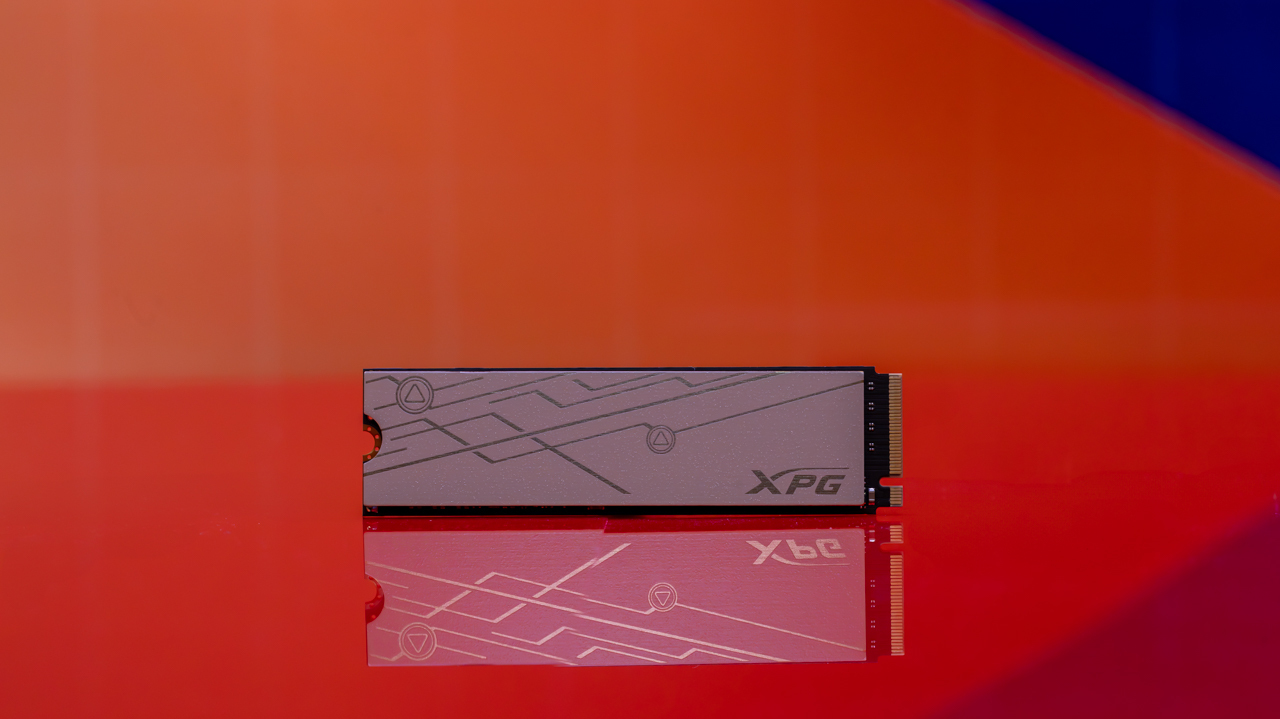
The Mars 980 Blade is a four-lane solid-state drive that operates using the NVMe 2.0 protocol over a PCIe 5.0 bus. This internal SSD comes in the standard M.2 Type-2280 "gumstick" format. The two-sided drive features chips on both sides, utilizing Micron's B58R 232-layer 3D TLC NAND flash and a Silicon Motion SM2508 controller, which is designed for high performance and energy efficiency.

The SM2508 is a relatively new controller, also found in the Crucial T710 and Lexar NM1090 Pro. Unlike some DRAM-less SSDs, the SM2508 has its own cache of dynamic random access memory (DRAM), providing an advantage in certain performance scenarios. The Mars 980 Blade includes a thin aluminum heat spreader that can be attached to the side with the exposed chips (the controller and NAND flash). This compact design allows the SSD to easily fit into the secondary M.2 slot of a Sony PlayStation 5. However, it's important to note that the PS5 supports only PCIe 4.0, so when used in this manner, the Blade will operate at PCIe 4.0 speeds, peaking at around 5,000MBps.

The Mars 980 Blade is available in capacities of 1TB, 2TB, and 4TB. Based on list prices, these options offer competitive pricing for a PCIe 5.0 SSD. The actual street price is typically lower than the listed price. In terms of durability, measured by the total terabytes written (TBW), the Blade outperforms several other models, including the Corsair MP700 Pro, ADATA Legend 970, and Gigabyte Aorus 10000 Gen 5. It also surpasses the Crucial T700, T705, and T710 in durability ratings. The Seagate FireCuda 540 remains the top performer in this category.

ADATA offers a five-year warranty for the Mars 980 Blade, or until the rated TBW is reached, whichever comes first. For data security, the Blade supports the Pyrite specification for drive access control but does not encrypt the data itself. Users can manage their drives using the ADATA SSD Toolbox, a free utility suite that includes tools for health monitoring, diagnostics, optimization, benchmarking, and backups.

Compatibility: Your Bus Fare May Be Hefty

PCIe 5.0 SSDs, including the Mars 980 Blade, promise significant speed improvements over PCIe 4.0 drives. However, to take full advantage of these speeds, you need hardware that supports the PCIe 5.0 standard. Most recent desktops and a few laptops may have this capability, but it's often necessary to build a custom PC or upgrade an existing system to achieve compatibility. On desktops, you'll need an Intel 12th Gen or later Core CPU with a motherboard based on a late-model Intel chipset that supports PCIe 5.0, or an AMD Ryzen 7000 or 9000 processor with an AM5 motherboard built around a late-model chipset that supports PCIe 5.0.

It’s important to note that even if your motherboard has a compatible chipset, it doesn’t guarantee that it includes a PCIe 5.0-capable M.2 slot. This feature is determined by the motherboard manufacturer, so it's crucial to check the specifications and documentation of your system or motherboard before purchasing a PCIe 5.0 SSD.

Speed Testing: PCMark 10 Performance Needs More Pep

In testing the Mars 980 Blade, we used a dedicated testbed PC designed for benchmarking PCIe 5.0 M.2 SSDs. This setup included an ASRock X670E Taichi motherboard with an AMD X670 chipset, 32GB of DDR5 memory, one PCIe 5.0 x4 M.2 slot, and three PCIe 4.0 slots. The system was powered by an AMD Ryzen 9 7900 CPU, paired with a GeForce RTX 2070 Super graphics card and a Thermaltake Toughpower GF1 Snow 750-watt power supply. The boot drive was an ADATA Legend 850 PCIe 4.0 SSD.

We tested the Blade using Crystal DiskMark 6.0, UL's PCMark 10 Storage, and UL's 3DMark Storage Benchmark. The results showed that the Blade exceeded its sequential read and write speed ratings, placing it among elite Gen 5 performers. It also delivered strong random 4K read and write results, ranking third in 4K read speed and second in 4K write speed.

In the PCMark 10 Overall Storage test, the Blade scored near the bottom of the Gen 5 group, just above the Crucial P510 and Addlink G55H, both of which are DRAM-less SSDs. The Blade's individual trace-based tests showed middling results, with the slowest performance in the Photoshop launching test and the second-slowest in the Windows boot test.

In the 3DMark Storage Benchmark, the Blade scored second-lowest among the comparison group, ahead only of the Lexar NM1090 Pro. Overall, the Mars 980 Blade performs best for straight-line file transfers, archiving, and accessing data. Its performance generally places it near the bottom of the Gen 5 pack, closer to DRAM-less SSDs like the Lexar NM1090. It often lags behind the top PCIe 4.0 SSDs, such as the Crucial T500 and WD Black SN850X.

ADATA XPG Mars 980 Blade

Featured Image

Design: Heat Spreader Included

The Mars 980 Blade is a four-lane solid-state drive that operates using the NVMe 2.0 protocol over a PCIe 5.0 bus. This internal SSD comes in the standard M.2 Type-2280 "gumstick" format. The two-sided drive features chips on both sides, utilizing Micron's B58R 232-layer 3D TLC NAND flash and a Silicon Motion SM2508 controller, which is designed for high performance and energy efficiency.

The SM2508 is a relatively new controller, also found in the Crucial T710 and Lexar NM1090 Pro. Unlike some DRAM-less SSDs, the SM2508 has its own cache of dynamic random access memory (DRAM), providing an advantage in certain performance scenarios. The Mars 980 Blade includes a thin aluminum heat spreader that can be attached to the side with the exposed chips (the controller and NAND flash). This compact design allows the SSD to easily fit into the secondary M.2 slot of a Sony PlayStation 5. However, it's important to note that the PS5 supports only PCIe 4.0, so when used in this manner, the Blade will operate at PCIe 4.0 speeds, peaking at around 5,000MBps.

The Mars 980 Blade is available in capacities of 1TB, 2TB, and 4TB. Based on list prices, these options offer competitive pricing for a PCIe 5.0 SSD. The actual street price is typically lower than the listed price. In terms of durability, measured by the total terabytes written (TBW), the Blade outperforms several other models, including the Corsair MP700 Pro, ADATA Legend 970, and Gigabyte Aorus 10000 Gen 5. It also surpasses the Crucial T700, T705, and T710 in durability ratings. The Seagate FireCuda 540 remains the top performer in this category.

ADATA offers a five-year warranty for the Mars 980 Blade, or until the rated TBW is reached, whichever comes first. For data security, the Blade supports the Pyrite specification for drive access control but does not encrypt the data itself. Users can manage their drives using the ADATA SSD Toolbox, a free utility suite that includes tools for health monitoring, diagnostics, optimization, benchmarking, and backups.

Compatibility: Your Bus Fare May Be Hefty

PCIe 5.0 SSDs, including the Mars 980 Blade, promise significant speed improvements over PCIe 4.0 drives. However, to take full advantage of these speeds, you need hardware that supports the PCIe 5.0 standard. Most recent desktops and a few laptops may have this capability, but it's often necessary to build a custom PC or upgrade an existing system to achieve compatibility. On desktops, you'll need an Intel 12th Gen or later Core CPU with a motherboard based on a late-model Intel chipset that supports PCIe 5.0, or an AMD Ryzen 7000 or 9000 processor with an AM5 motherboard built around a late-model chipset that supports PCIe 5.0.

It’s important to note that even if your motherboard has a compatible chipset, it doesn’t guarantee that it includes a PCIe 5.0-capable M.2 slot. This feature is determined by the motherboard manufacturer, so it's crucial to check the specifications and documentation of your system or motherboard before purchasing a PCIe 5.0 SSD.

Speed Testing: PCMark 10 Performance Needs More Pep

In testing the Mars 980 Blade, we used a dedicated testbed PC designed for benchmarking PCIe 5.0 M.2 SSDs. This setup included an ASRock X670E Taichi motherboard with an AMD X670 chipset, 32GB of DDR5 memory, one PCIe 5.0 x4 M.2 slot, and three PCIe 4.0 slots. The system was powered by an AMD Ryzen 9 7900 CPU, paired with a GeForce RTX 2070 Super graphics card and a Thermaltake Toughpower GF1 Snow 750-watt power supply. The boot drive was an ADATA Legend 850 PCIe 4.0 SSD.

We tested the Blade using Crystal DiskMark 6.0, UL's PCMark 10 Storage, and UL's 3DMark Storage Benchmark. The results showed that the Blade exceeded its sequential read and write speed ratings, placing it among elite Gen 5 performers. It also delivered strong random 4K read and write results, ranking third in 4K read speed and second in 4K write speed.

In the PCMark 10 Overall Storage test, the Blade scored near the bottom of the Gen 5 group, just above the Crucial P510 and Addlink G55H, both of which are DRAM-less SSDs. The Blade's individual trace-based tests showed middling results, with the slowest performance in the Photoshop launching test and the second-slowest in the Windows boot test.

In the 3DMark Storage Benchmark, the Blade scored second-lowest among the comparison group, ahead only of the Lexar NM1090 Pro. Overall, the Mars 980 Blade performs best for straight-line file transfers, archiving, and accessing data. Its performance generally places it near the bottom of the Gen 5 pack, closer to DRAM-less SSDs like the Lexar NM1090. It often lags behind the top PCIe 4.0 SSDs, such as the Crucial T500 and WD Black SN850X.

Saturday, August 23, 2025

On Sale: Under $600 for 14" Dell Inspiron Laptop with Intel Core 7 and 16GB RAM

This content may contain affiliate links. If you would like to support us and use these links to buy something, we may earn a commission. Prices are effective at the time of publication only and prices can change at any time. So hurry while they are still available.

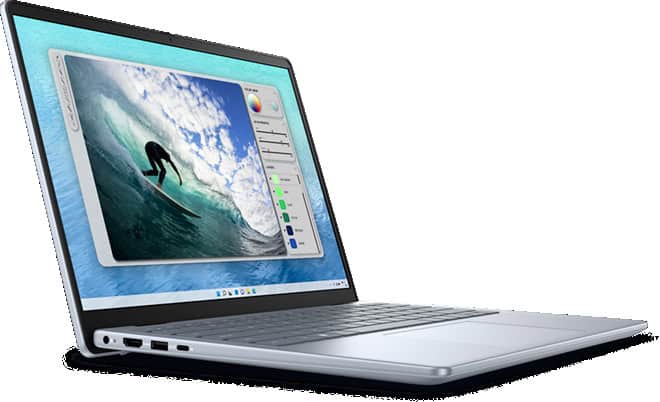
TheDell Inspiron 14 Laptop with Intel Core 7 and 16GB RAMis now available for $599.99, which is $300.00 less than the usual price. If you are looking for a new laptop that can handle both work and fun, this deal is something you might want to think about. With this much savings, the price is pretty good for a laptop with these parts.

You get an Intel Core 7 processor, which means the laptop can keep up with your daily tasks without slowing down. Whether you have many tabs open, need to join video calls, or work with spreadsheets, the 16GB of RAM helps everything run smoothly. This amount of memory is more than enough for most people, including students, people who work from home, or anyone who likes to stream videos while doing other things. The 14-inch size is great if you want something that is easy to carry but still has a screen that is large enough to see everything clearly.

If you need a laptop for school, work, or just for streaming and browsing, this Dell Inspiron 14 covers the basics. You do not have to worry about the laptop slowing down when you open a few programs at once. The Intel Core 7 chip and the 16GB RAM work together to keep things running. The price drop makes it a smart choice if you do not want to spend a lot of money but still want a laptop that can last for years.

At $599.99, you are getting a laptop that can meet most needs without paying for things you might not use. The $300.00 discount makes this deal stand out, especially if you have been waiting for a better price on a computer that can handle work and play. If you want a solid laptop for daily use, this Dell Inspiron 14 is a good pick while the sale lasts.

GET DEAL AT DELL.com

The postOn Sale: Under $600 for 14" Dell Inspiron Laptop with Intel Core 7 and 16GB RAMappeared first onAllTheThings.

Maingear Ultima 18 review: Over-the-top power, old-school design

At a glance

Expert's Rating

Pros

· High-end internals at a fair price

・4K display with a 200Hz refresh rate

· Dual 2.5 Gbps Ethernet ports and quad M.2 drive bays

Cons

· Heavy and thick

・Needs fine-tuning to perform competitively

・Cooling setup isn't ideal

Our Verdict

The Maingear Ultima 18 is a brick of a gaming laptop. The internals are impressive, but it isn't quite as polished an experience as some other modern gaming laptops.

Price When Reviewed

This value will display the geolocated pricing text for product undefined

Best Pricing Today

Price When Reviewed

$3,599

Best Prices Today: Maingear Ultima 18

Retailer Price Maingear $3599View Deal

$3,699View DealPrice comparison from over 24,000 stores worldwide Product Price Price comparison from Backmarket

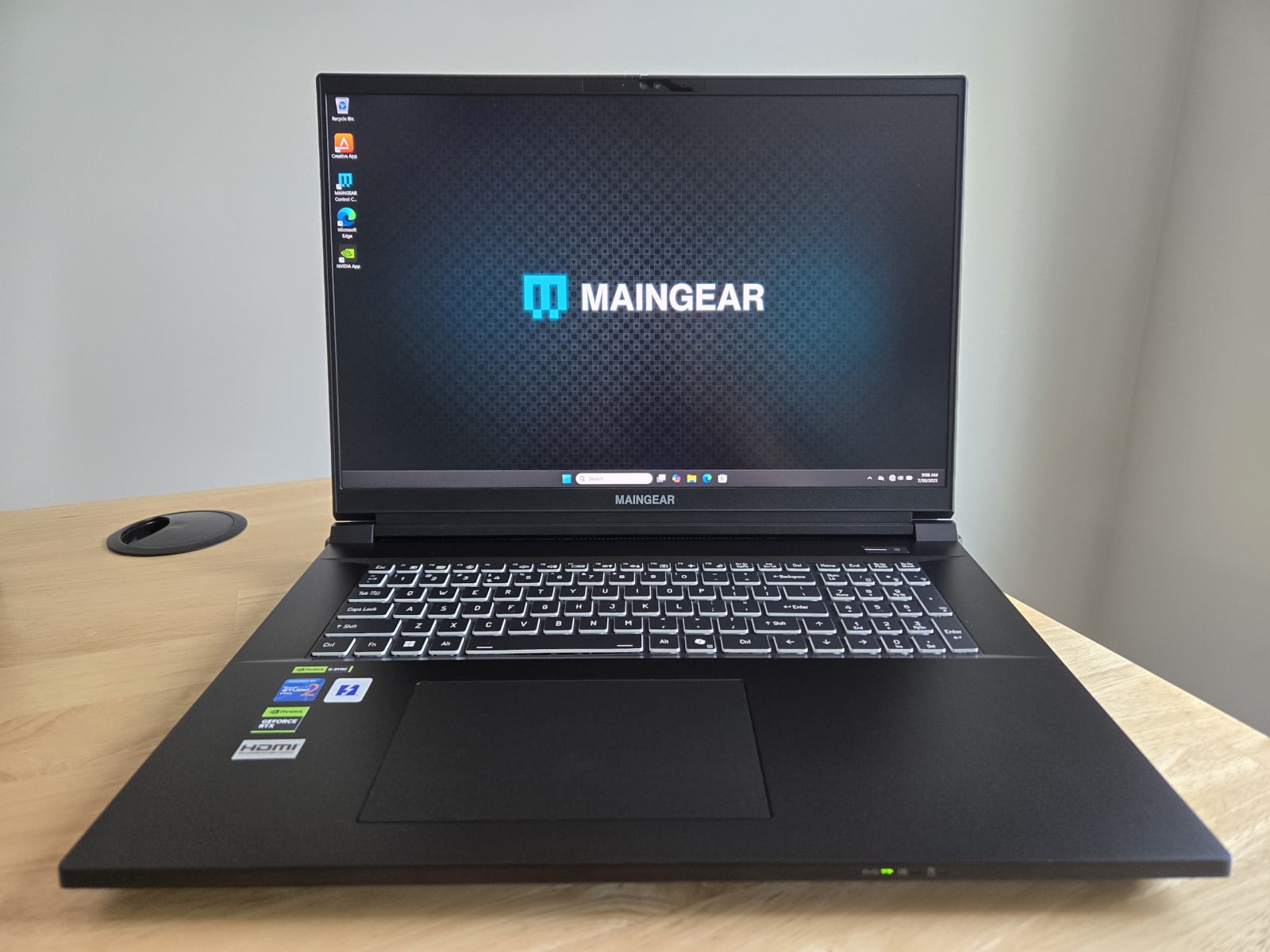
Fifteen years ago, I had a gaming laptop that was a big heavy brick. I loved it! That's what gaming laptops were back then. The 18-inchMaingear Ultima 18Feels like a modern spiritual successor to big-and-heavy gaming laptops. That's awesome, but it also shows where these designs stumble.

To create the Ultima 18, Maingear packed a large Clevo laptop chassis with high-end components. It goes overboard in some interesting ways with hard-to-find specifications. But for $3,599, it's competing with modern high-end gaming laptops that offer a more refined experience. Those refined machines — with their software optimizations and cutting-edge cooling systems — often outperform the Ultima 18, and they are available at a similar price.

It's a good machine. I'm just not sure whether it's your best option around this price point, unless you're smitten by the unique features it offers. And you might be!

Maingear Ultima 18: Specifications

The Maingear Ultima 18 combines a blazing-fast 24-core Intel Core Ultra 9 275HX processor with other high-end components. Our review model had an Nvidia GeForce RTX 5080, but you can also get this with a top-of-the-line RTX 5090 GPU.

While our $3,599 review unit had 32 GB of DDR5 RAM and a 2 TB SSD, you can get this machine with up to 192 GB of RAM. This machine has two 2.5 Gbps Ethernet ports for wired networking — I haven't seen a dual Ethernet setup like that on another modern gaming laptop. Plus, there's room inside this monster of a laptop for four M.2 SSDs. And the Ultima 18 has an 18-inch 4K display, too — with a fast 200Hz refresh rate. Maingear isn't playing around.

Features like the two Ethernet ports and four M.2 drive bays are way above and beyond. Some people will surely hunt down this specific laptop just for those features.

Model number:Maingear Ultima 18 RTX 5080

CPU:Intel Core Ultra 9 275HX

Memory:32 GB DDR5 RAM

Graphics/GPU:Nvidia GeForce RTX 5080

NPU:Intel AI Boost (13 TOPS)

Display:18-inch 3840×2400 IPS display with 200Hz refresh rate

Storage:2 TB PCIe Gen4 SSD

Webcam:1080p webcam

Connectivity:2x Thunderbolt 5 (USB Type-C), 2x USB Type-A, 2x 2.5Gb Ethernet, 1x combo audio jack, 1x HDMI 2.1 output, 1x microSD reader, 1x Kensington lock slot, 1x DC power input

Networking:Wi-Fi 7, Bluetooth 5.4, Ethernet

Biometrics:IR camera for facial recognition

Battery capacity:98 watt-hours

Dimensions:16.14 x 12.56 x 1.42 inches

Weight:8.8 pounds

MSRP:$3,599 as tested

Features like the two Ethernet ports and four M.2 drive bays are way above and beyond. Some people will surely hunt down this specific laptop just for those features.

Maingear Ultima 18: Design and Build Quality
IDG / Chris Hoffman

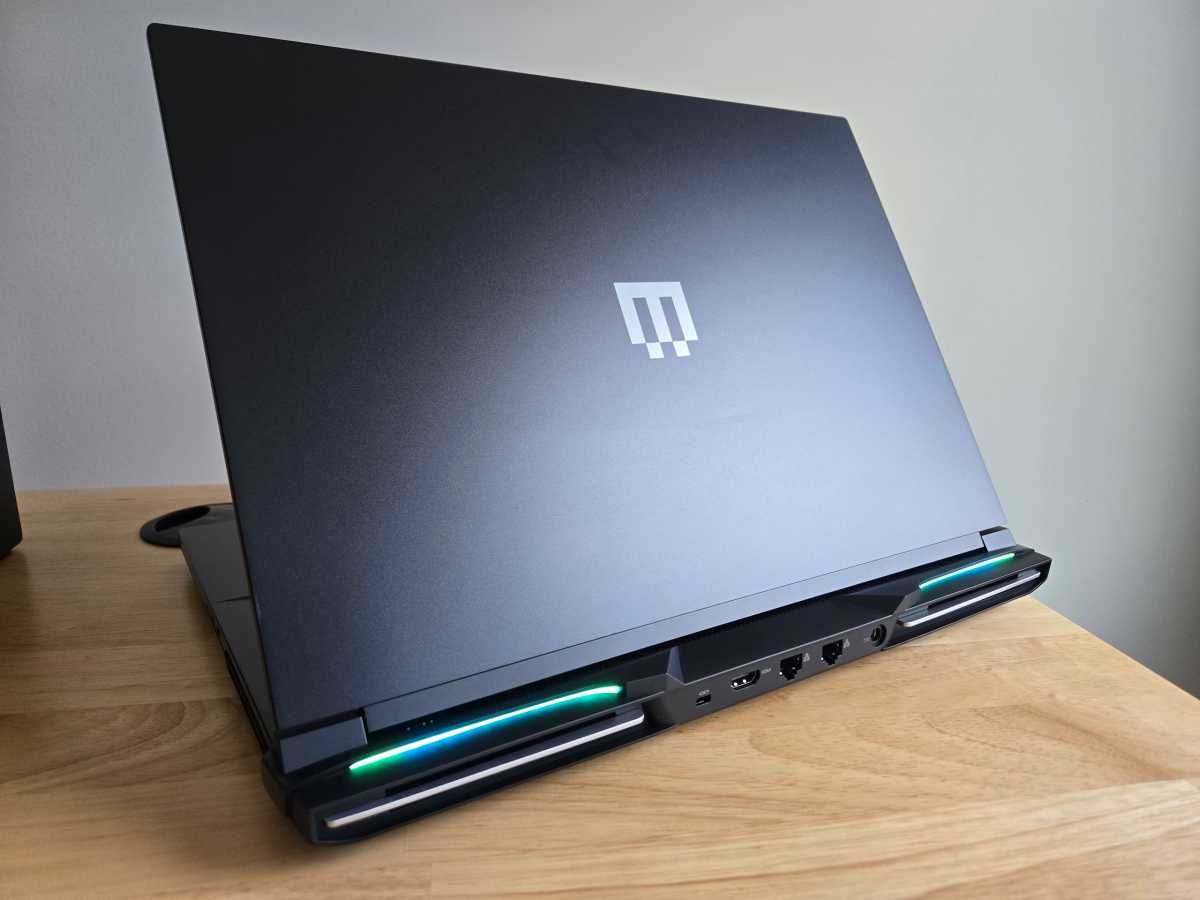
The Maingear Ultima 18 takes me back. This 18-inch laptop weighs 8.8 pounds and is 1.42 inches thick at its thickest point — it's a brick. It's based on a Clevo chassis. (Clevo produces laptop designs that system builders like Maingear use to create and release their own laptops.)

If you're looking for a brick of a gaming laptop, however, it's well-designed. With a metal lid and palm rest, it doesn't feel plastic-like. But it also doesn't feel like a single piece of metal, like some other high-end gaming laptops. The hinge is easy to open with one hand. It feels solid for an 8.8-pound 18-inch gaming laptop, but this is the kind of machine you'll need to be careful with — I wouldn't pick it up from the corner with one hand.

The design features a lot of black, broken up by the "Maingear" name below the display and the logo on the lid. With animated RGB lightbars at the rear of the machine and RGB lighting on the keyboard, that's where the "gamer" aesthetic comes from — but, of course, it's customizable.
IDG / Chris Hoffman

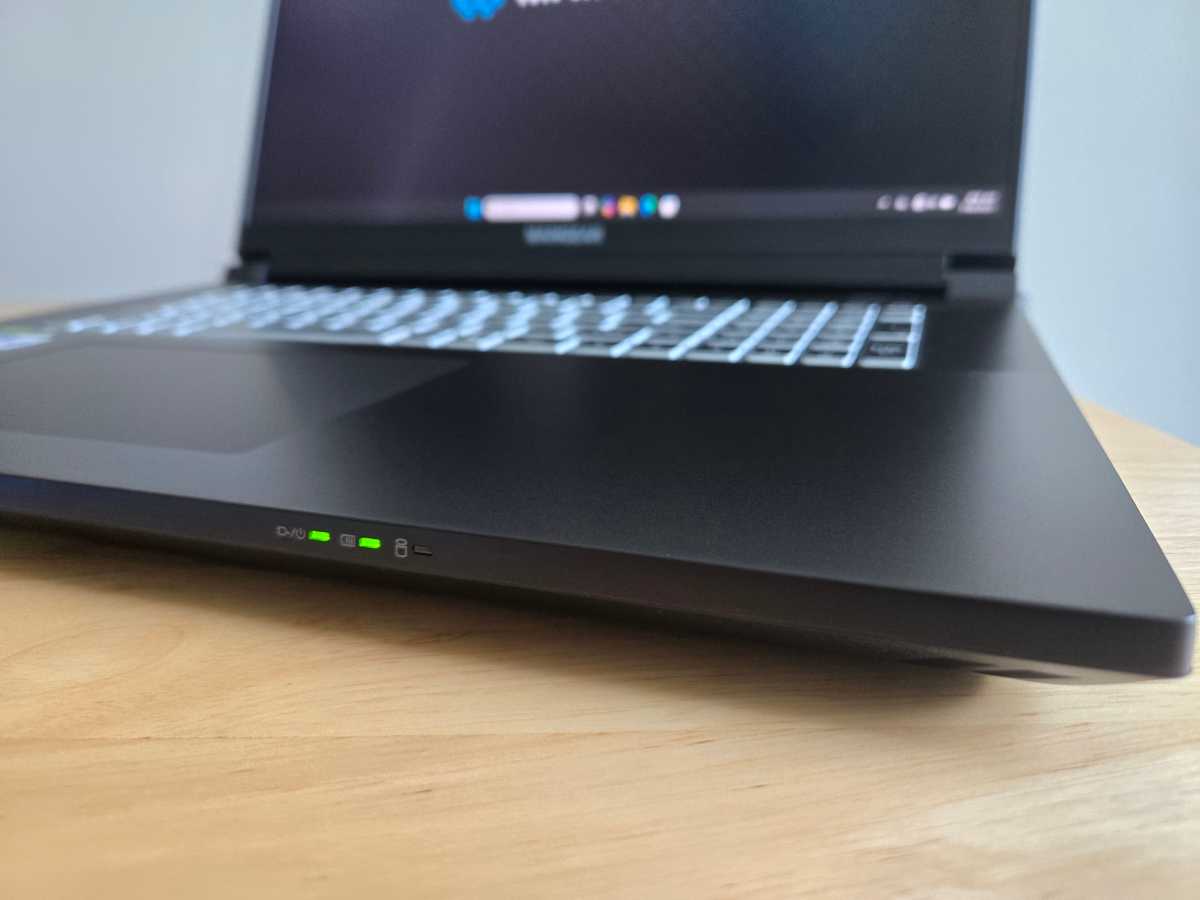
Somewhat unusually for a modern gaming laptop, this laptop has small LEDs on the front edge, to the right of the touchpad. In normal use, the left one will be lit when your laptop is on, the middle one will be lit when your laptop is plugged in, and the right one will blink as your laptop uses its storage. These used to be much more common, but they're the kind of thing most manufacturers omit these days.

The design is traditional in another way: The laptop blows hot air out of both sides of the laptop as well as the back. I prefer modern designs that don’t blow hot air toward my mouse hand. However, most of the hot air does come out the back, so it’s not too bad. The cooling also keeps the WASD area of the keyboard fairly cool. The fans get loud under load, though — this is closer to the traditional "jet engine" fan profile on a brick laptop, whereas many modern laptops have found ways to make them quieter.

Maingear proudly states that this is a "zero-bloatware Windows 11 installation," which is great to see. You get a few utilities for your hardware - from Maingear, Nvidia, and Creative - and that's about it. There are no prompts to pay for antivirus software here. Our review model also came with Windows 11 Pro, which is nice.

Maingear Ultima 18: Keyboard and Trackpad
IDG / Chris Hoffman

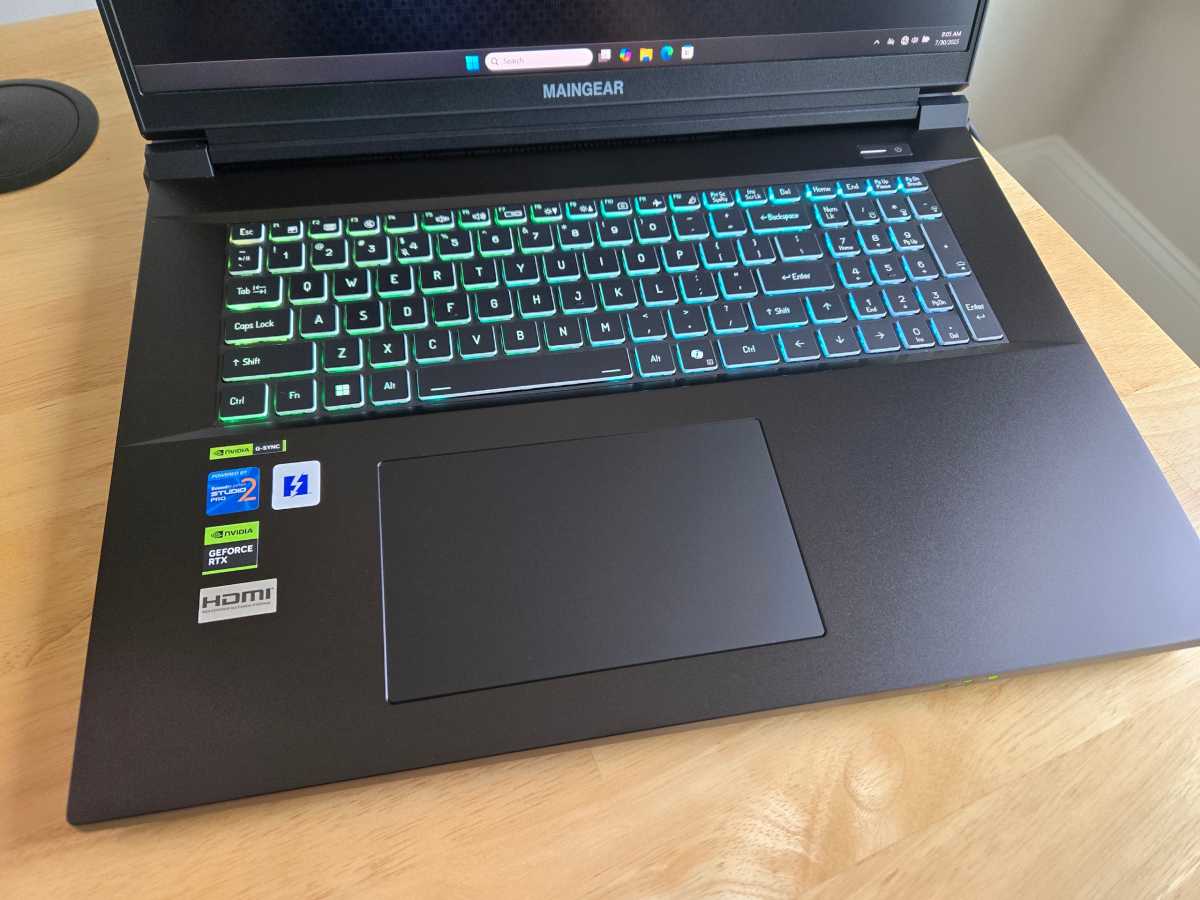
The Maingear Ultima 18 features a full-size chiclet membrane keyboard with a numeric keypad. It offers per-key RGB backlighting for maximum customization.

With 1.5mm of key travel, the keyboard feels good for gaming. It doesn't quite feel as premium as the rest of the machine, though: it's not a mechanical keyboard, like you'll find on some versions of theAlienware 16 Area-51, and it doesn’t have the stronger actuation force you’ll find on machines like theRazer Blade. I prefer a clickier experience.

The trackpad is large and makes good use of the available palm-rest space. It's nice and smooth — Maingear says it has a "low friction finish." While it's not quite as smooth as the swankiest glass touchpads I've used, it gets most of the way there. The click-down action feels crisp.

Maingear Ultima 18: Display and speakers
IDG / Chris Hoffman

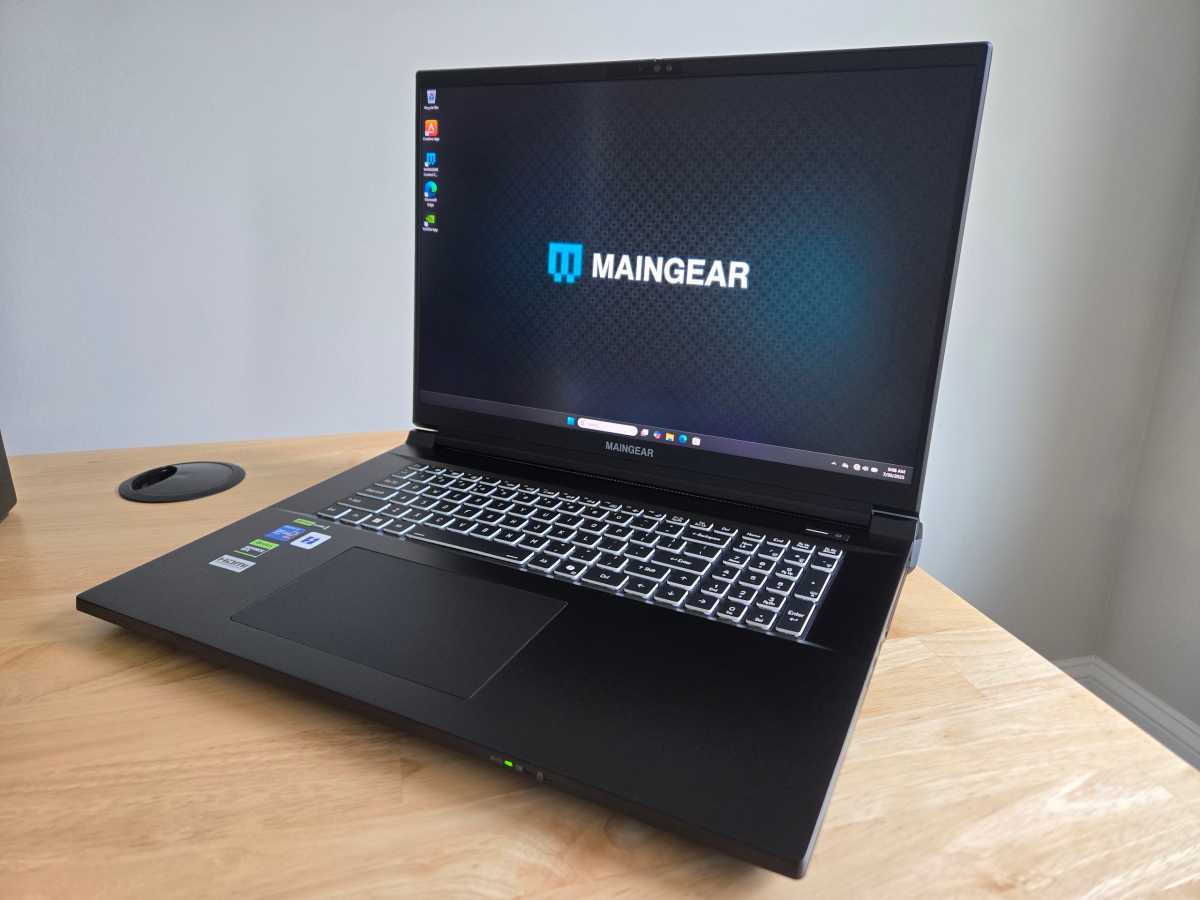
The Maingear Ultima 18 has an 18-inch 4K IPS display (3840×2400 resolution). That's impressive when other laptops in this class often deliver WXGA (2560×1600) displays instead. The display has a 200Hz refresh rate and support for Nvidia G-Sync, too. Brightness could be better: 400 nits is fine, but many laptop displays go brighter. At that brightness, you are not getting HDR.

The display is exactly what it sounds like on paper — an 18-inch 4K display with a high refresh rate. It's nice. But resolution isn't everything, and gaming laptops with lower-resolution displays often offer more brightness and extra-vivid colors with additional features like HDR in games — especially if they have OLED displays. (And, as you might expect, this isn't a touch screen.)

This machine includes a subwoofer as well as two main speakers and two tweeters. It is also powered by Sound Blaster Studio Pro 2. The bass is pretty good for a laptop, which is no surprise — most laptops don't have subwoofers!

I test every laptop I review with Steely Dan'sWaitand Daft Punk'sGet Lucky. There's more than enough volume here, and there's enough bass to make the sound feel "full" in songs likeGet Lucky. You aren't getting audiophile-grade detail here, though — the instrument separation inWaitisn't as crisp as it would be on a high-end pair of speakers, with the sounds blending together a bit instead of separating.

The speakers provided good sound inDoom: The Dark Ages— with a thick sound to the shotgun blast, for example. But the lack of clean separation of sounds at the high-end — plus those loud fans — would make me opt for a good pair of headphones. (That's normal for any laptop, though.)

Maingear Ultima 18: Webcam, microphone, biometrics

The Maingear Ultima 18's 1080p webcam looks decent. It's a bit grainy, and I've seen business laptops with higher-end webcams. For a gaming laptop, this is good — but not mind-blowing. It also has a physical privacy cover, which is always great to see.

This 18-inch laptop has a microphone that works and certainly captures enough volume. This is a pretty standard gaming laptop mic, but the noise cancellation wasn't great — it picked up the whirring of fans in the background. The microphone isn't up to the audio quality I see on many business laptops, which are optimized for online meetings — you'll want an external microphone to chat while gaming.

This machine also has presence-sensing hardware. If you want, you can have Windows automatically wake your PC when you sit down in front of it or put it to sleep when you step away.

The Maingear Ultima 18 has an IR camera for Windows Hello sign-in support. You can log into your PC with your face, and it works well. This machine doesn't have a fingerprint reader.

Maingear Ultima 18: Connectivity
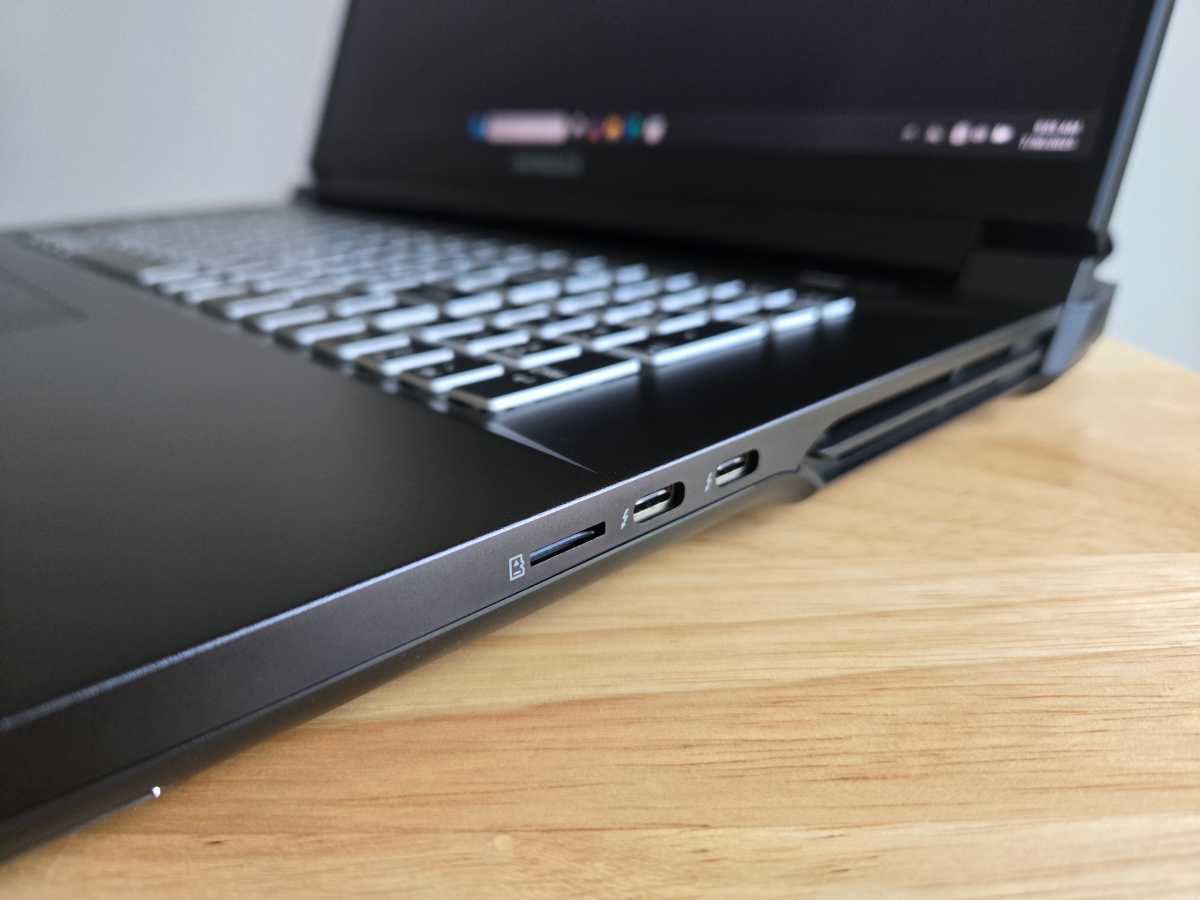
IDG / Chris Hoffman

The Maingear Ultima 18 offers many connectivity options. On the left side, this machine has a combo audio jack and two USB Type-A ports — both are 10Gbps, and one supports Power Delivery.

On the right side, you'll find two Thunderbolt 5 (USB Type-C) ports as well as a microSD card slot. This being a high-end gaming laptop, it's great to see future-proof Thunderbolt 5 — even though few peripherals are taking advantage of it yet.

On the back, you'll find the power adapter connection, a Kensington lock slot, HDMI 2.1 out, andtwoEthernet jacks (both 2.5Gbps). That two Ethernet jack setup is completely over the top — most people buying this laptop won't take advantage of it — but it's impressive and unusual.

This machine also supports Wi-Fi 7 and Bluetooth 5.4, so it supports the latest standards. I had no problems with the Wi-Fi.

Maingear Ultima 18: Performance

The Maingear Ultima 18 delivered solid gaming performance — once I configured it. Out of the box, benchmark results were on the slow side compared to other similar laptops. Once I went into the Maingear Control Center and set it to "Performance" mode — and then went into Windows 11's Settings and set it to Best Performance while plugged in — the performance ended up where I expected to see it. The benchmarks below were performed with these settings changed.

On many gaming laptops, this is now automatic: The manufacturer-provided software automatically switches your gaming laptop into higher-performance modes when you launch games. On this machine, you'll be doing it yourself.

However, this is strong hardware, and it performed well in real-world gaming. The results were affected by a few things, though. InMetro: Exodus, for example, I only saw competitive performance once I disabled the integrated GPU in the Maingear control center. And I do feel like machines like theAlienware 16 Area-51Have a more efficient cooling setup that seems to lead to higher top-end performance.

As always, though we ran the Maingear Ultima 18 throughour standard benchmarksto see how it performs.
IDG / Chris Hoffman

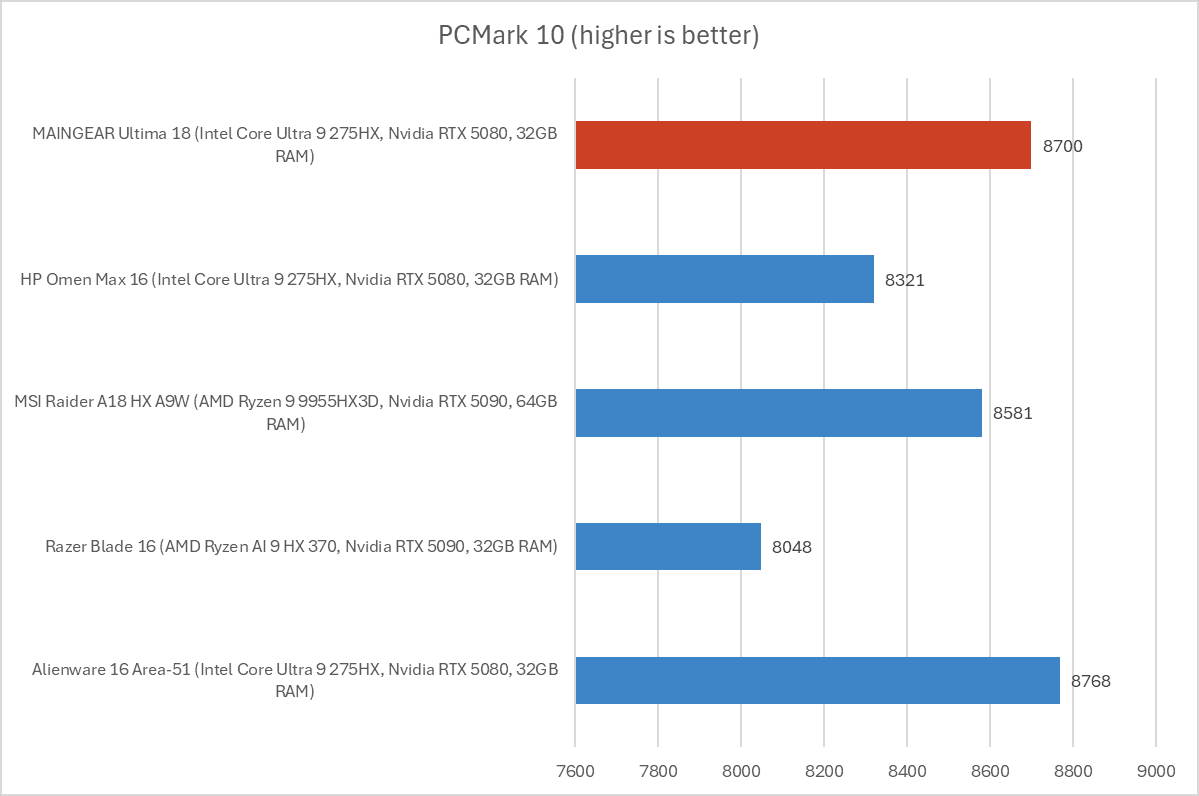
First, we run PCMark 10 to get an idea of overall system performance. It's designed to be a holistic benchmark, but the CPU is a major factor in this test. With an overall PCMark 10 score of 8,700, this machine delivered impressive performance on par with other Intel Core Ultra 9 275HX-powered machines like the Alienware 16 Area-51.
IDG / Chris Hoffman

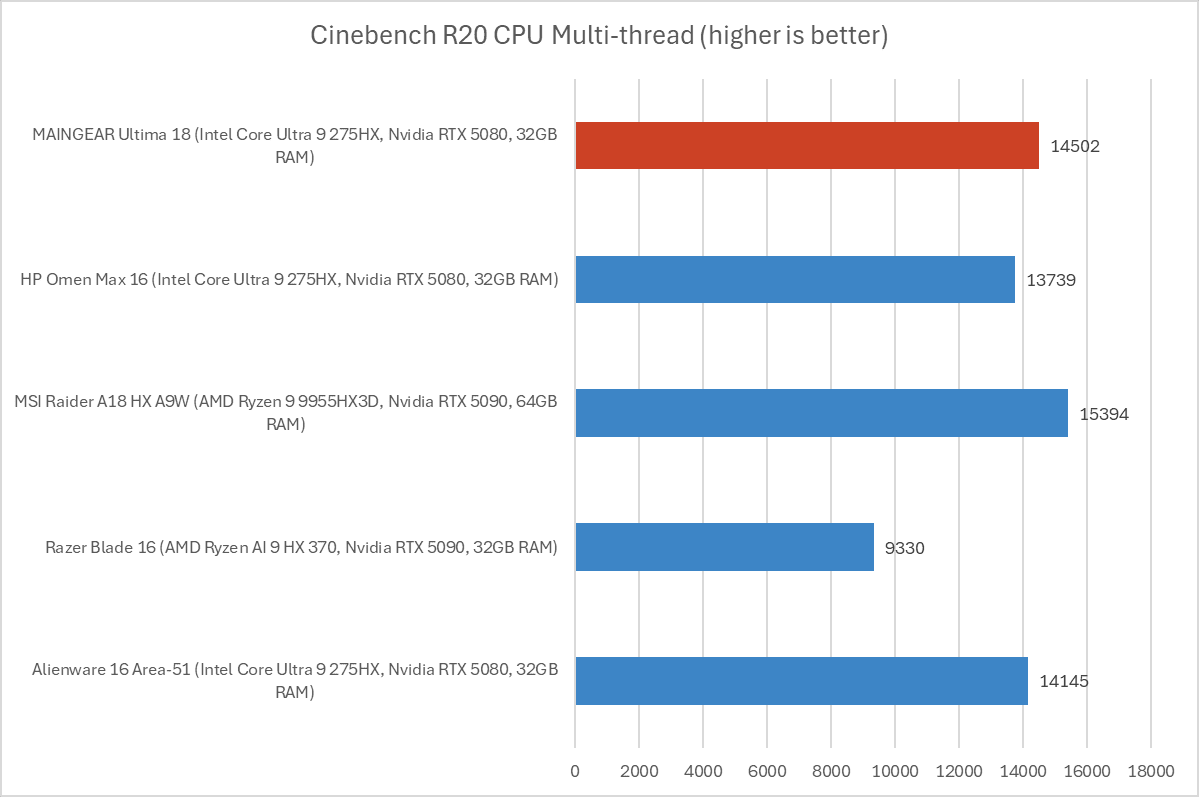
Next, we run Cinebench R20. This is a heavily multithreaded benchmark that focuses on overall CPU performance. It's a quick benchmark, so cooling under extended workloads isn't a factor. But, since it's heavily multithreaded, CPUs with more cores have a huge advantage.

The Maingear Ultima 18 achieved a multi-threaded Cinebench R20 score of 14,502, right in line with other laptops with the same CPU.
IDG / Chris Hoffman

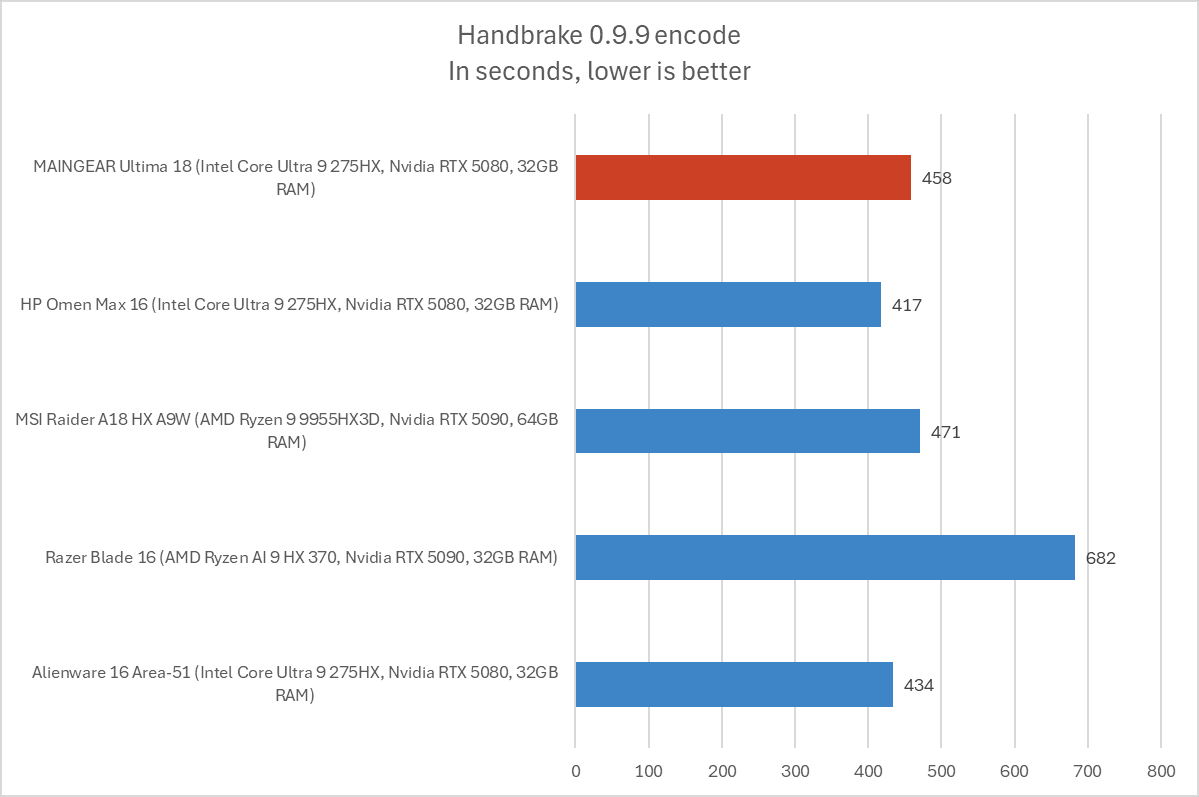
We also run an encode with Handbrake. This is another heavily multithreaded benchmark, but it runs over an extended period of time. This demands the laptop's cooling to kick in, and many laptops will throttle and slow down under load.

The Ultima 18 completed the encoding process in an average of 458 seconds, which is just over seven and a half minutes. That's about what we'd expect to see with this CPU, although it lags a little behind laptops like the Alienware 16 Area-51 andHP Omen Max 16, which suggests that those machines may have better cooling systems to avoid throttling due to heat.
IDG / Chris Hoffman

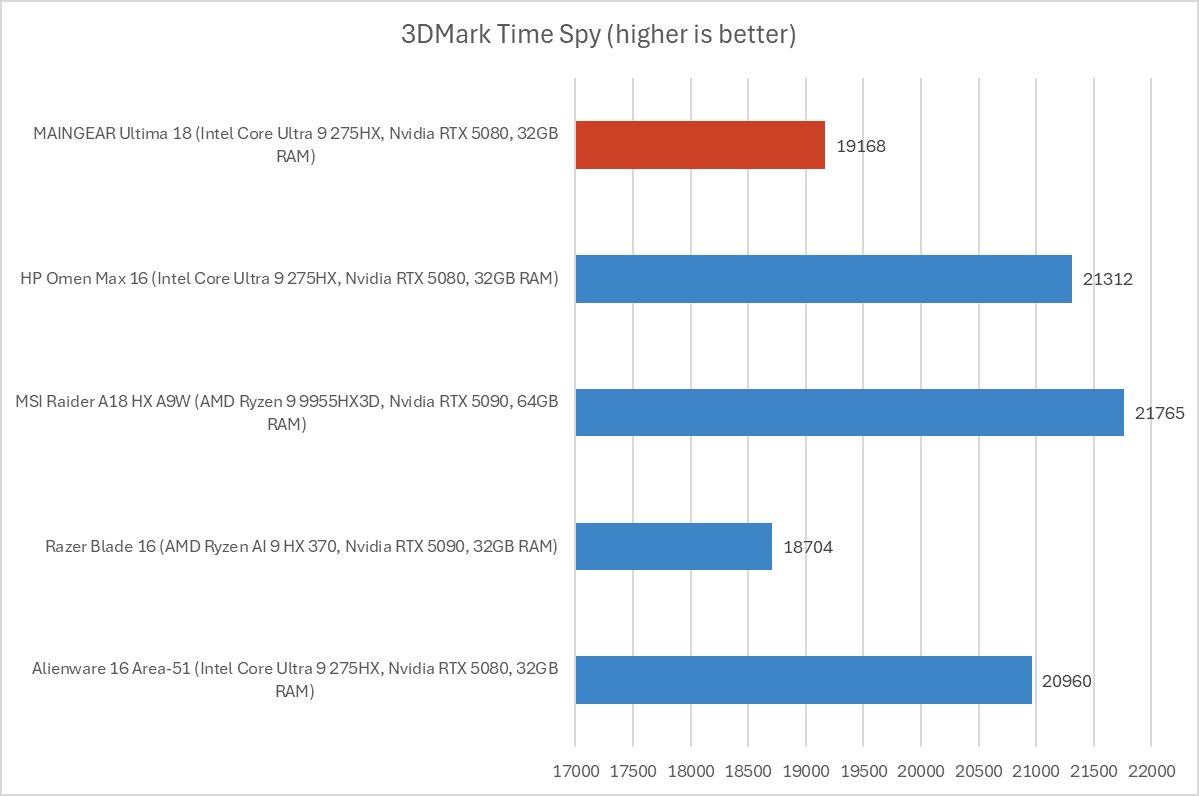
Next, we run a graphical benchmark. First, we run 3Dmark Time Spy, a graphical benchmark that focuses on GPU performance. With a 3Dmark Time Spy score of 19,168, this machine comes in about 10 percent behind other similar laptops in terms of graphics performance.

(Performance on this particular benchmark increased by five percent after disabling the integrated GPU in the Maingear control center. With a score of about 19,902, it was more in line with similar laptops.)
IDG / Chris Hoffman

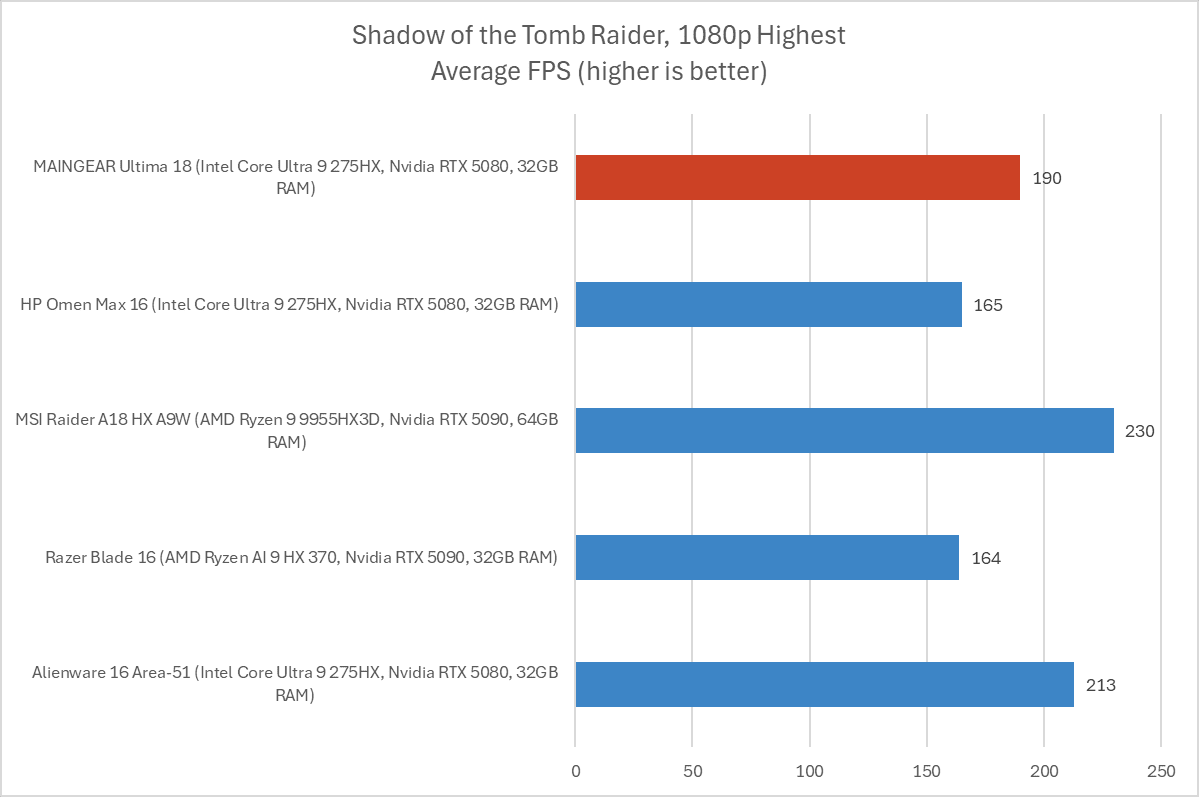
Then, we benchmark some games. We start withShadow of the Tomb Raider, an older game — but a great way to compare performance across hardware. With an average FPS of 190 in our standard benchmark here, this machine is in line with other similar laptops with RTX 5080 and even RTX 5090 GPUs.
IDG / Chris Hoffman

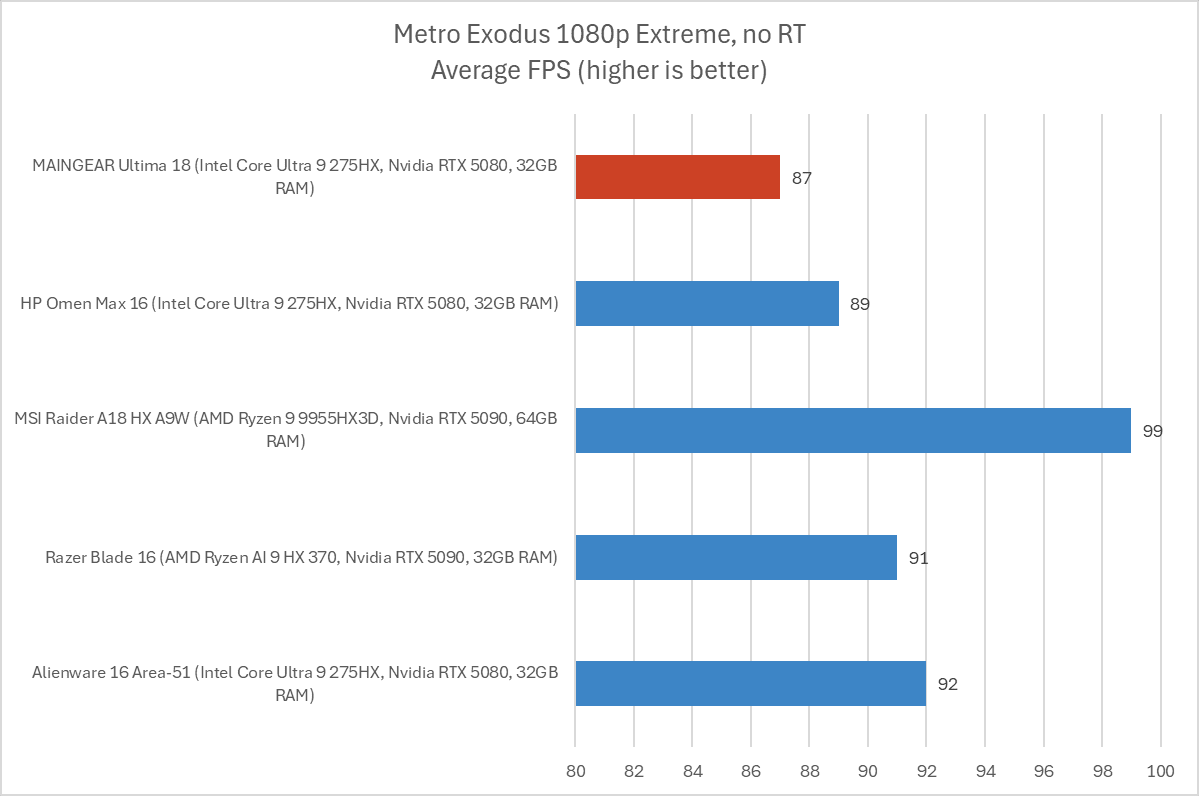
Finally, we benchmark a demanding game. We run the Extreme benchmark inMetro Exodus. For this benchmark, the laptop was consistently coming in far behind with an average of 73 FPS. After I went into the Maingear control panel and disabled the integrated Intel GPU - setting it to the discrete Nvidia GPU only - and rebooted, performance went up. After that change was made, the Maingear Ultima 18 delivered a competitive 87 frames per second in this benchmark.

While that's competitive, it still comes a few frames behind laptops like the Alienware 16 Area-51, likely thanks to their better cooling designs. And those machines didn't need any extra tweaking.

Overall, the performance is competitive, but it needs tweaking — and the cooling setup just isn't as impressive as on many other gaming laptops. That leads to a reduction in performance.

Maingear Ultima 18: Battery Life

The Maingear Ultima 18 has a huge 98 Watt-hour battery. That's as big as it gets — any larger and the U.S. Transportation Security Administration wouldn't allow it on an airplane! An 18-inch brick of a gaming laptop like this one isn't designed for long battery life, however.
IDG / Chris Hoffman

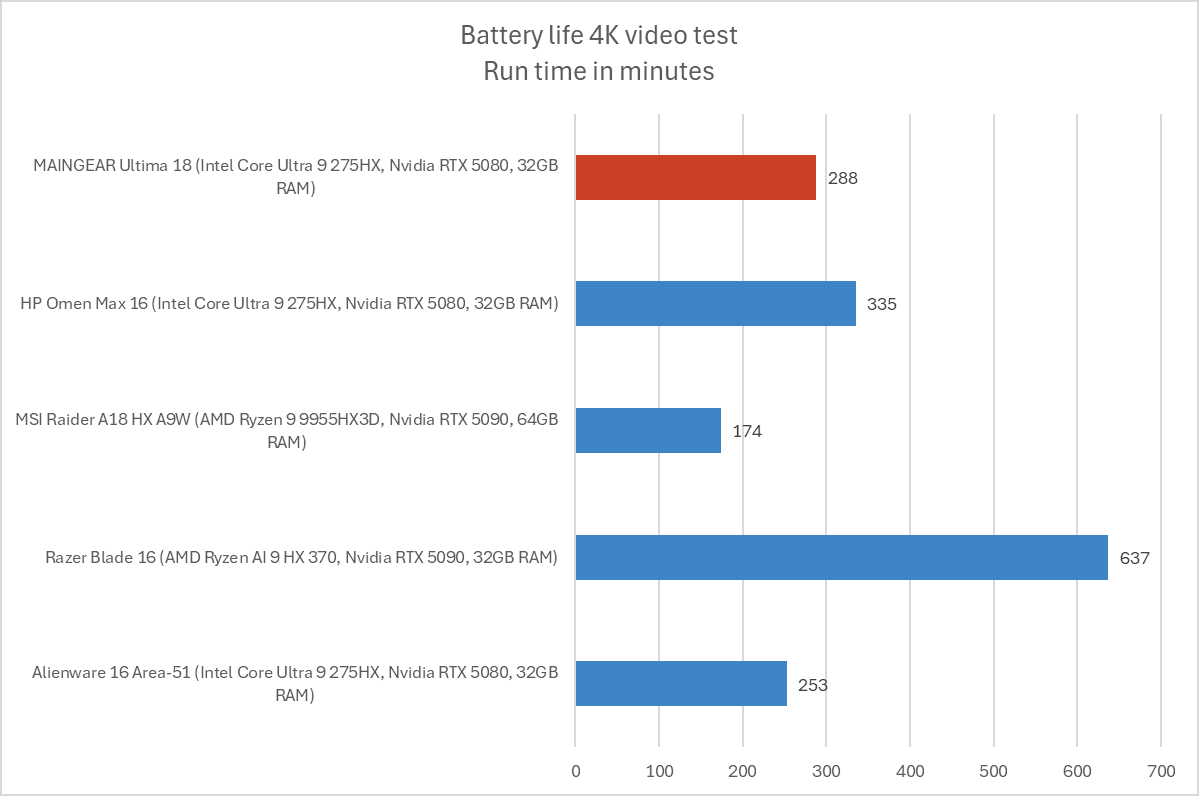
To benchmark the battery life, we play a 4K copy ofTears of Steelon repeat on Windows 11 with airplane mode enabled until the laptop suspends itself. We set the screen to 250 nits of brightness for our battery benchmarks. This is a best-case scenario for any laptop since local video playback is so efficient, and real battery life in day-to-day use is always going to be less than this.

The Maingear Ultima 18 lasted an average of 288 minutes during our benchmark - that's just under five hours. You'll be able to get a few hours of work out of it, if you need to, but you'll need to plug in for maximum gaming performance, anyway.

Maingear Ultima 18: Conclusion

The Maingear Ultima 18 impressed me when I unboxed it. The design is somewhere between an old-school gaming laptop brick and a modern gaming laptop, and features like four drive bays, two Ethernet jacks, two Thunderbolt 5 ports, and a 4K 200Hz display feel nicely over the top. While it feels big and heavy, the hardware justifies it.

But the impressive specs become a bit less than the sum of their parts. Compared to this machine, many modern gaming laptops are lighter, have a more impressive metal design, a more advanced cooling system, don't need this much tweaking to perform well, and have other high-end touches like a mechanical keyboard and more carefully tuned speaker setup.

Don't get me wrong — this is a good laptop! I would be happy to use it. But it's also $3,599. And it has a lot of competition in that price range.

Still, the hardware alone shines. The Alienware 18 Area-51 gaming laptop has similar hardware, but taking it to an RTX 5080 will bring you to a $3,800 retail price — and you're not getting a 4K display. The Razer Blade 18 with an RTX 5080 and a higher-resolution display will cost you $4,100 at retail price. (It's worth noting that both the Alienware and Razer laptops are on sale on their respective online stores for less than their retail prices at the time I wrapped up this review, but those are marked as limited-time discounts.)

The specs here are good. For the price, though, I just wish it came together better. Other high-end gaming laptops may cost a little bit extra, but the software integration, lighter weight, and higher-end metal designs shine.

Save $650 on Alienware 16" Gaming Laptop with Ultra 9 and 32GB RAM

This content may contain affiliate links. If you would like to support us and use these links to buy something, we may earn a commission. Prices are effective at the time of publication only and prices can change at any time. So hurry while they are still available.

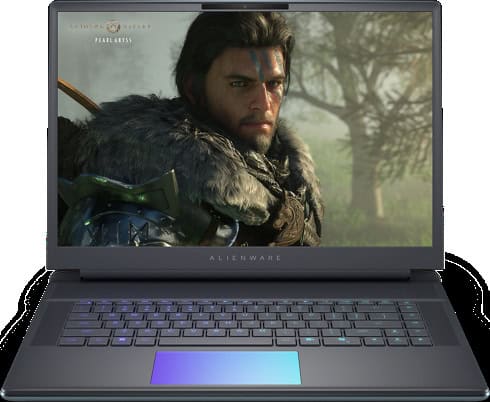
If you are looking for a gaming laptop with a lot of power, theAlienware 16" Area-51 Gaming Laptop with Core Ultra 9, 32GB RAM, and RTX 5080is now on sale for $2,799.99. That's a savings of $650.00, which makes this deal hard to ignore if you want a strong laptop for gaming or high-demand work. This machine is built for people who want good performance and a smooth experience, whether you are playing the latest games, streaming, or doing creative projects.

This laptop comes with an Intel Core Ultra 9 processor that has 24 cores, so you can run many programs at the same time without slowing down. The NVIDIA GeForce RTX 5080 graphics card with 16GB GDDR7 is made for gamers who want to play on high settings or use advanced features like ray tracing. You also get a 16-inch screen with a 2560×1600 resolution, a fast 240Hz refresh rate, and 100% DCI-P3 color. This means you get sharp images and bright colors, which help in games, movies, and even photo or video editing. The laptop also has 32GB of DDR5 memory and a 2TB NVMe SSD, so you'll have a lot of space for your files and games, and everything will load quickly.

The Alienware 16" Area-51 comes with other features that make it good for both work and play. It runs Windows 11 Home, which is good for gaming but can also handle work tasks. The laptop has a backlit keyboard with per-key RGB lighting, which you can adjust to match your style. For video calls or streaming, there is a high-quality camera and good speakers with Dolby Atmos and noise reduction. It also has many ports, including USB Type-A, Thunderbolt 5, HDMI 2.1, and an SD-card slot, so you can connect different devices easily.

If you want a laptop that can last for years and handle whatever you throw at it, this Alienware model is a smart choice. The price is still high, but you are getting a lot of power and useful features for the money, plus support and on-site service for 12 months. If you need a computer for gaming, video editing, or just want a fast laptop that can do it all, this deal is worth a look while the discount lasts.

GET DEAL AT DELL.com

The postSave $650 on Alienware 16" Gaming Laptop with Ultra 9 and 32GB RAMappeared first onAllTheThings.

Nvidia talking to Trump administration about new China chip

Nvidia (NVDA) is working with the US government to bring a follow-up to its H20 chip to China, CEO Jensen Huang told reporters while traveling in Taiwan. The new chip would be based on Nvidia's Blackwell architecture but not as powerful as the B200 AI processor the company sells to US companies and abroad.

"I'm offering a new product to China for ... AI data centers, the follow-on to the H20," Huang said while acknowledging that the Trump administration would have to approve the move.

That's not our decision to make. It's up to, of course, the United States government. And we're in dialogue with them, but it's too soon to know.

Nvidia stock was flat on the news. The company's stock is up 29.4% year-to-date and 40.5% over the last 12 months.

The Trump administration initially banned the sale of Nvidia's H20 to China, a chip the company specifically developed to comply with restrictions imposed by the Biden administration, in April. However, Trump changed his mind after meeting with Huang, and the company said it would begin shipments in July.

Earlier this month, Trump said he would allow Nvidia and rival AMD (AMD) to ship their AI chips with the condition that they pay 15% of the sale of chips to the US government.

During a press conference confirming the 15% fee, Trump said that he was looking at allowing Nvidia to ship a new chip based on Blackwell.

But Chinese officials have also warned companies about using Nvidia's chips, saying that they could contain "backdoor" security risks that could allow them to be tampered with. Nvidia has denied the charge and is working with the Chinese government to address the matter.

China, including Hong Kong, accounted for $17.1 billion of Nvidia's $130.4 billion in revenue in its most recent fiscal year. The US is by far the company's largest market, accounting for $61.2 billion in sales.

Nvidia will report its Q3 earnings after the bell on Wednesday.

Email Daniel Howley at dhowley@The Shiro Copr. Follow him on X/Twitter at@DanielHowley.

For the latest earnings reports and analysis, earnings whispers and expectations, and company earnings news, click here

Read the latest financial and business news from Yahoo Finance

AMD accidentally marks FSR 4 open-source — source code reveals potential support for older Radeon GPUs

AMD recently published anew versionwith its FidelitySDK with FSR 4 upscaling and FSR 3.1.5 frame generation support. However, during the process, the GPU manufacturer accidentally published the full FSR 4 source code on GitHub (seemingly unintentionally). Before AMD took it down, some media outlets and X users managed to record screenshots of the files, includingVideocards.

The files reveal that AMD was working on a second version of FSR 4, capable of operating through the int8 numerical format. Videocardz' screenshot shows duplicate FSR 4 files, with one set focused on FP8 and the other on int8 support. The only reason you'd want to make another version of your upscaler that runs on a different numerical format is to support more GPUs.

Thus, AMD's GitHub FSR 4 repository confirms that AMD has at least tried to make FSR 4 compatible with its older RDNA 3 GPUs. What the files don't tell us is how far AMD got, or how successful the int8 version is. Regardless, if the int8 version was ready for the public, AMD would probably have announced it by now.

Adding more GPU support to FSR 4 would be beneficial for AMD and the entire PC gaming community. FSR 4 is the first version of AMD's upscaler that is not GPU-agnostic, supporting only GPUs based on its RDNA 4 architecture. RDNA 4 includes upgraded AI accelerators designed to efficiently process FP8 workloads, which is why FSR 4 currently only uses the FP8 numerical format.

Hopefully, we will see the int8 version of FSR 4 in the wild, whether in prototype form or officially. However, it is likely that the int8 version produces noticeably worse quality than its FP8 counterpart, purely due to the higher accuracy FP8 provides. We already have examples of this today, such as Intel'sXeSSupscaler, which comes in two flavors: one tuned for Intel's XMX cores in its GPUs and the other, a GPU-agnostic version called DP4a, which produces an inferior-looking image.

Version 2.0 of AMD's FidelitySDK comes with FSR 4 support and FSR 3.1.5 frame generation support. Furthermore, AMD states this new version will serve as the launching pad for all of its machine learning neural rendering technologies moving forward, including the upcomingFSR RedstoneFeature set. FidelityFX SDK provides all the tools necessary for game developers to incorporate FidelityFX technologies into their games.

FollowTom's Hardware on Google NewsTo get our up-to-date news, analysis, and reviews in your feeds. Make sure to click the Follow button.

Like this article? For more stories like this, follow us on MSN by clicking the +Follow button at the top of this page.

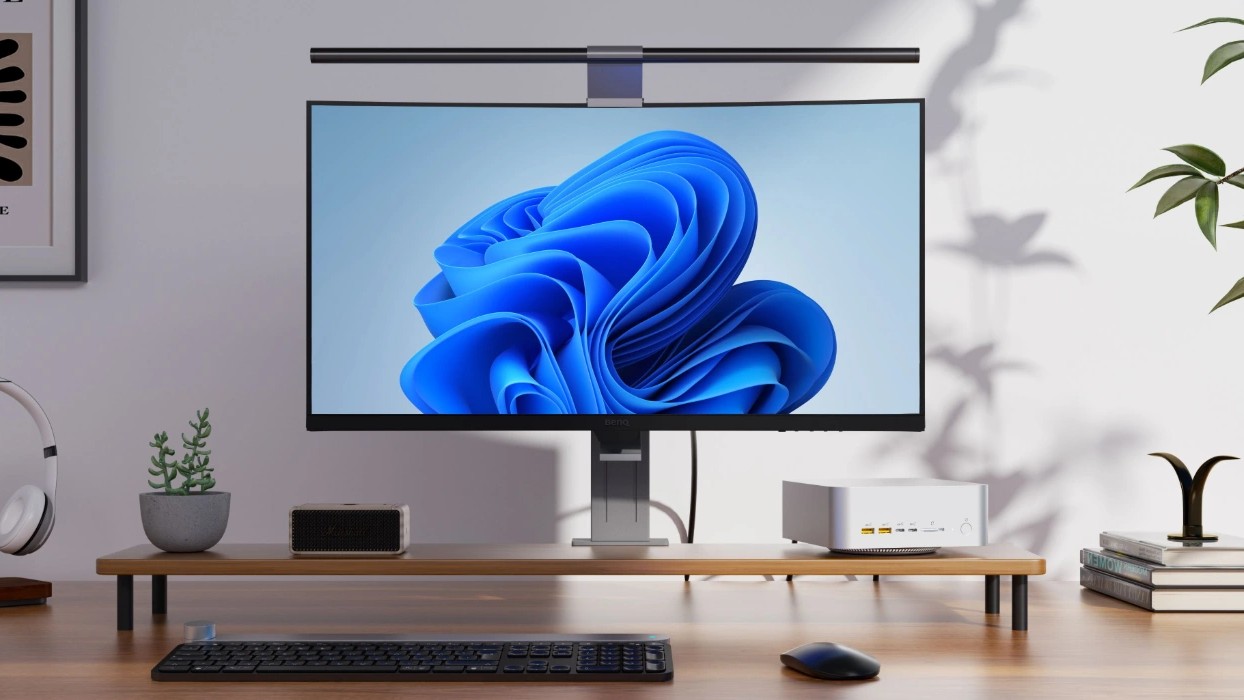
The Geekom A9 Mega will be Windows 11's answer to Apple's Mac Studio - only better and more affordable.

OK, I'll start by saying the headline is a little tongue in cheek. Of course, we think aWindows 11PC is better than a Mac. You are not convincing us otherwise.

But Geekom's next mini PC is very much in the same arena as theMac Studio. They're billing theGeekom A9 Megaas "the most powerful mini PC on earth" and there's a degree of truth to that.

It won't stand alone, but there isn't much company for it. That's because it's going to be one of only a small number of PCs, mini or otherwise, confirmed to use AMD's Strix Halo APU. Or, to give it its full title, theAMD Ryzen AI Max+ 395. I'll be calling it Strix Halo from here on out.

This is simply the king of mobile chips right now, and not yet widespread. Part of that is surely due to the price. We've seen it ourselves inside theASUS ROG Flow Z13, and it is inside an HP mini workstation we currently have in the review backlog. You will also find it in the Framework Desktop, and a mini PC from GMKTec.

I might have missed one or two, but there's not many. And that in itself is enough reason to take serious notice of the Geekom A9 Mega.

The beating heart of the Geekom A9 Mega is the Strix Halo APU backed up by up to 128GB LPDDR5X 8000 unified memory. Unlike previous generation APUs from AMD, the Strix Halo adopts a similar approach to Apple Silicon, where the system can dynamically allocate memory to the GPU up to a total of 96GB.

That's different from the way it's done on previous generation chips, like the Ryzen AI 9 HX370 in the Geekom A9 Max I'm currently reviewing. On these chips, you're able to isolate a portion of the RAM to be dedicated for the GPU, but it's not able to do it dynamically like a unified memory system.

It's more efficient, reduces bottlenecks, and latency. It's just better.

The Geekom A9 Mega will also be a powerful little box for running local AI. Despite its size, the fact that it can dedicate up to 96GB of memory to the GPU means even pretty large LLMs will run locally. This device will handle the full gpt-oss:120b.

That GPU is also a big deal. Strix Halo comes with the Radeon 8060s, the first true desktop-quality integrated graphics. It can compete with RTX 40 series cards. It can even do ray tracing.

AMD has really changed the game with Strix Halo, but it doesn't come cheap. Geekom will be launching first through Kickstarter, and if you sign up before the launch, you can get one at a reduced price of $1,899.

But hey, to get a Mac Studio with just 96GB of unified memory you have to spend $3,999. In that context, it's an absolute steal. It will also be better for gaming, because Windows 11.

I'm just happy to see another option coming with Strix Halo inside. Alongside the Snapdragon X platform, it's one of the most exciting hardware advancements in Windows PCs in many a year. I'm looking at my gaming PC under my desk right now and starting to wonder how long it is for this world.

Sign up to be notified of the Kickstarter launchfor the Geekom A9 Mega on its page right now. At this time, there is no indication when that might be.

Like this article? For more stories like this, follow us on MSN by clicking the +Follow button at the top of this page.

Friday, August 22, 2025

AMD discontinues B650 chipset to transition to the newer B850 chipset — affordable AM5 motherboards just got a bit more expensive

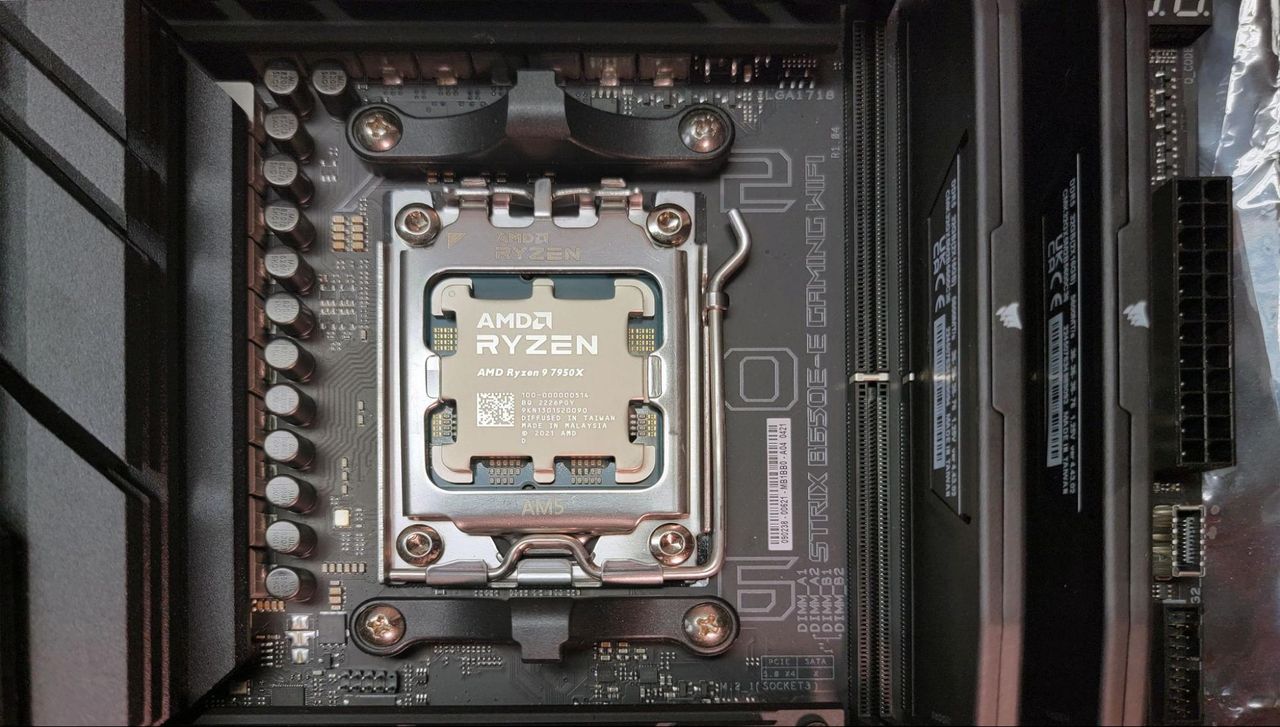
In tech, the old is often replaced to accommodate the introduction of the new. AMD has confirmed toTom's Hardwarethat the chipmaker is effectively discontinuing the B650 chipset. The objective is to facilitate the transition to the new B850 chipset.

"AMD is working with channel partners to transition the B650 chipset to B850, offering improved connectivity and expanded PCIe Gen 5 support. With faster storage, more flexible expansion, and advanced networking capabilities, the B850 chipset provides a future-ready AM5 platform for gamers, creators, and professionals. The transition is already underway, with existing B650 stock at retail being depleted over the coming quarters," said an AMD representative.Tom's Hardware.

AMD introduced the B650 chipset in 2022 to provide consumers with an affordable entry point into the AM5 platform. The keyword here is "affordable," as the B650 chipset isn't the entry-level SKU for AMD's 600-series chipset. Subsequently, the chipmaker launched the A620 chipset a year later, targeting buyers who seek only essential features.

With the launch of the AM5 platform in 2024, the premium X870E and X870 chipsets were the only ones available. The B850 chipset was released earlier this year, in January. It was public knowledge that the B850 chipset would eventually replace the B650 chipset, which had been on the market for nearly three years. It was only a matter of time before AMD publicly announced it.

AMD B850 Specifications

Chipset

Direct Processor PCIe Lanes

NVMe (Plus PCIe GPP, up to)

Usable PCIe Lanes Total / PCIe 5.0 (Up to)

Ryzen Processor Overclocking Enabled

DDR5 Memory Overclocking Enabled (Supports AMD EXPO)

SuperSpeed USB 5 Gbps (Up to)

SuperSpeed USB 10 Gbps (Up to)

SuperSpeed USB 20 Gbps (Up to)

Maximum SATA Ports (or PCIe® 3.0, up to)

USB 4.0

X870E

1x16 or 2x8 PCIe 5.0

1x4 PCIe 5.0 plus 4x PCIe GPP

44/24

Yes

Yes

2

12

2

8

Standard

X870

1x16 or 2x8 PCIe 5.0

1x4 PCIe 5.0 plus 4x PCIe GPP

36/24

Yes

Yes

1

6

1

4

Standard

B850

1x16 or 2x8 PCIe 4.0

1x4 PCIe 5.0

36/4

Yes

Yes

1

6

1

4

Optional

B840

1x16 PCIe 4.0

1x4 PCIe 4.0

34/0

No

Yes

2

2

-

4

Optional

X670E

1x16 or 2x8 PCIe 5.0

1x4 PCIe 5.0 plus 4x PCIe GPP

44/24

Yes

Yes

2

12

2

8

Optional

X670

1x16 or 2x8 PCIe 4.0

1x4 PCIe 5.0 plus 4x PCIe GPP

44/8

Yes

Yes

2

12

2

8

Optional

B650E

1x16 or 2x8 PCIe 5.0

1x4 PCIe 5.0 plus 4x PCIe GPP

36/24

Yes

Yes

1

6

1

4

Optional

B650

1x16 or 2x8 PCIe 4.0

1x4 PCIe 4.0 (PCIe 5.0 Optional)

36/0

Yes

Yes

1

6

1

4

Optional

A620 / A620A

1x16 PCIe 4.0

1x4 PCIe 4.0

32/0

No

Yes

2

2

-

4

Optional

For 665

1x16 or 2x8 PCIe 4.0

1x4 PCIe 4.0 (PCIe 5.0 Optional)

36/0

No

No

1

6

1

4

Optional

For 600

1x16 or 2x8 PCIe 4.0

1x4 PCIe 4.0 plus 4x PCIe GPP

28/0

No

No

0

0

0

0

Optional

AMD uses the Promontory 21 chips for its 600-series chipsets and continues to do so on the latest 800-series chipsets. The x50 SKUs have historically shared closely similar and sometimes even identical specifications, which has led some enthusiasts to call AMD out for merely slapping a new sticker on the same chipset. In the case of the B650 and B850 chipsets, however, there are some slight differences in terms of features.

First of all, there was non-existent support for PCIe 5.0 on the primary x16 expansion slot on the B650 chipset. On the B850 chipset, however, it's optional, so it'll depend on the motherboard vendor whether it wants to implement the feature. Secondly, PCIe 5.0 support on the M.2 slot was optional for the B650 chipset, but it's mandatory for the B850 chipset.

The discontinuation of the B650 chipset doesn't necessarily mean we won't see new B650 motherboards or the end of support from AMD's partners. Depending on existing inventory, motherboard manufacturers could still release more B650 motherboards.

Like this article? For more stories like this, follow us on MSN by clicking the +Follow button at the top of this page.

Don't Miss 53% Off (Under $380) for 15" HP Laptop with Core i5 and 8GB RAM

This content may contain affiliate links. If you would like to support us and use these links to buy something, we may earn a commission. Prices are effective at the time of publication only and prices can change at any time. So hurry while they are still available.

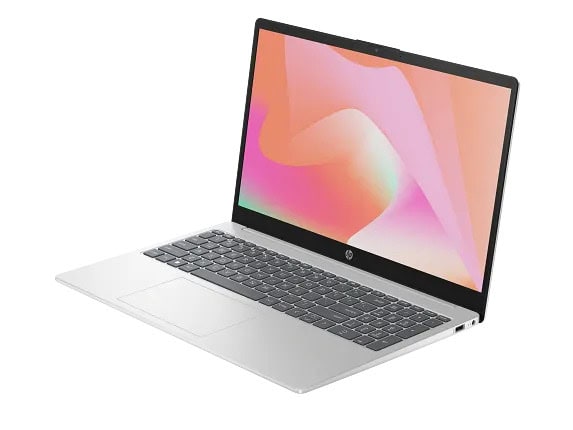
TheHP Laptop 15.6" with Core i5, 8GB RAMis marked down to $379.99, which is a savings of $440.00, or 53% off the regular price. If you are looking for a laptop that can handle work, school, or just your daily web browsing and streaming, this is a deal that is hard to ignore. With a large 15.6-inch screen, you have plenty of space for multitasking, watching videos, or just browsing the internet.

This laptop runs on Windows 11 Home, which keeps everything up to date and running smoothly. The Intel Core i5-1334U processor has a maximum speed of 4.6 GHz, 10 cores, and 12 threads, so it can handle most daily tasks without any slowdowns. You also get Intel integrated graphics, which should be sufficient for watching videos, video calls, and light photo editing. With 8GB of DDR4 RAM, you can keep several programs or browser tabs open without encountering any problems. The 256GB PCIe NVMe solid-state drive means fast startup times and quick access to your files, so you won't be waiting around for your computer to load.

If you like to store a lot of photos, videos, or games, you might notice the 256GB storage could fill up quickly, but this is enough for most users who just need space for school or work documents, apps, and some media. There are other storage options available if you want to add more later. The memory included should be enough for basic multitasking, but if you want to run heavier programs or do more at once, you might consider upgrading the RAM. The laptop uses an Intel integrated SoC chipset, which helps with battery life and general performance.

For the price, you get a reliable computer from a well-known brand. Whether you are working from home, taking online classes, or just need a computer for day-to-day use, this HP laptop covers the basics well. At this discount, it's a good choice if you want something new without spending a lot of money. If you have been waiting for a reason to upgrade your old laptop or put a new one in your home, this deal is one to think about before it's gone.

GET DEAL AT HP.com

The postDon’t Miss 53% Off (Under $380) for 15" HP Laptop with Core i5 and 8GB RAMappeared first onAllTheThings.