Showing posts with label smart devices. Show all posts

Thursday, August 27, 2026

I pitted two elite controllers against each other—only one had the edge

Featured Image

Design and Features

The Huben 2 made a great first impression before I’d even seen it: its hard-shell case was sturdier and more premium than I was expecting, with its insides perfectly modeled to the contours of the controller, spare D-pad hat, and USB dongle. It also has a netted area to store the USB cable, complete with an integrated hook-and-loop fastener to keep it coiled in place.

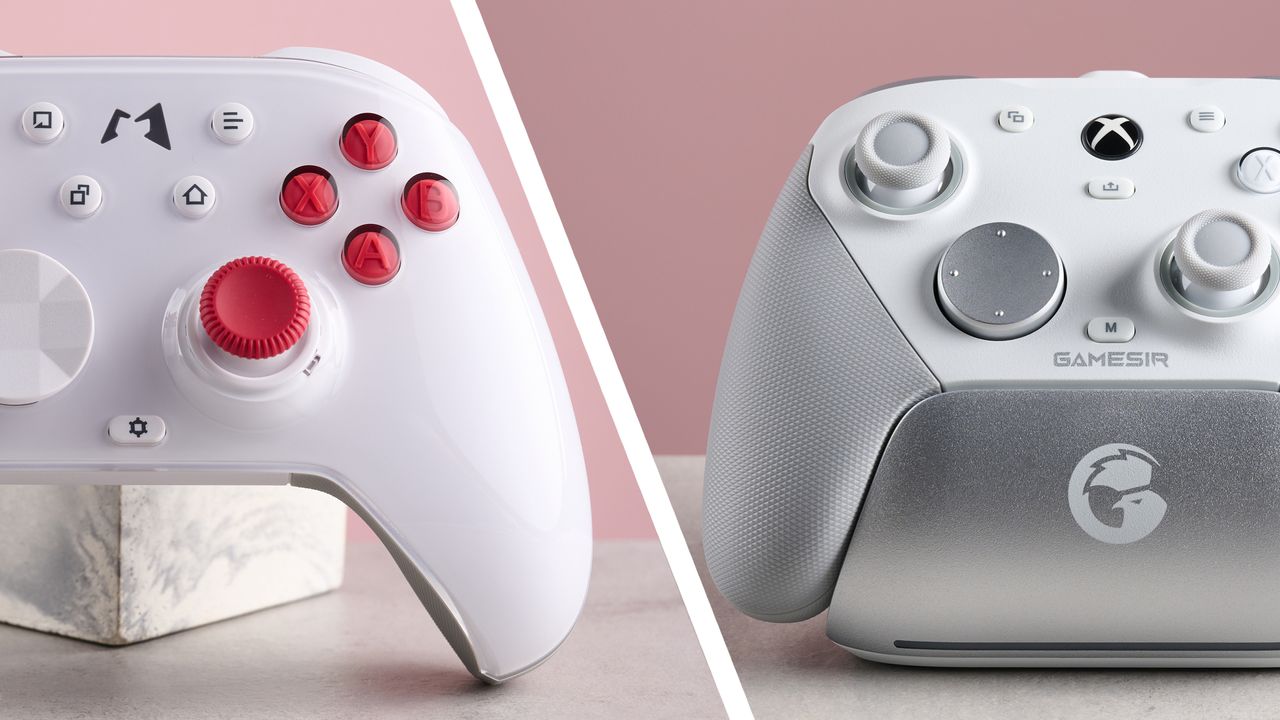
The controller itself lives up to its high quality packaging. It looks very sleek and smart with its transparent faceplate revealing the brilliant white colorway of my review unit, which is nicely accented by the red sticks and face buttons. All of its materials look and feel premium, and the overall build quality is excellent, with the moving parts being smooth to operate yet solidly fitted. The material behind the handles is textured to offer grip, although it’s a slight shame it’s still made from a hard plastic material.

The G7 Pro has a slightly smaller form than the Huben 2, so those with smaller hands might find it preferable to hold. Build quality is similar to that of Huben 2, although it’s perhaps not quite as sharp looking or as premium. Nevertheless, it still feels very nice in the hand, and it has better grips, thanks to the soft-touch material on their undersides that provide more grip than the Huben 2’s. The texture and even the color are very similar on both pads, though.

There’s no included case for the G7 Pro, but it does come with a charging dock, which is made to a similarly high standard and fits the pad seamlessly, offering plenty of security while being easy to set and release. It’s also pleasingly slight, so it takes up minimal space.

Both controllers adopt the familiar Xbox controller style, although there are some differences in their features. The G7 Pro has a headset jack, the Huben 2 doesn’t. But the Huben 2 has four back buttons, while the G7 Pro only has two. However, the G7 Pro has a further two extra buttons nestled between the triggers and bumpers. This is a choice location for them, as they’re very easy to use – easier than using back buttons. There’s also less chance of accidentally triggering them when gripping the pad, as I often did with the Huben 2’s back buttons.

What’s more, the two back buttons of the G7 Pro have an adjacent slider to disable them, which is far more convenient than having to use its accompanying software, as is the case with the Huben 2. Speaking of which, the software for both gamepads offers plenty of customization options, beyond those accessible on-board.

Performance

In action, the Huben 2 really shines. The face buttons are clicky, lacking the heavily damped feel of many other controllers, but still just as tactile; they’re more akin to the clicks of the best gaming mice. They’re also very snappy and responsive as a result. Even better is the D-pad: it feels very similar to the face buttons, and is just as quick and easy to use. Rapid, multiple inputs were a cinch in Tekken 8, while maintaining high levels of accuracy.

There’s a small amount of dampening in each direction, which helps to make presses more controlled. The default hat also helped in this regard. It adopts a very similar design to that of the latest Xbox controller, with its prominent middle dip and clearly squared-off segments, which provide plenty of feedback and stability.

The D-pad on the G7 Pro is, if anything, even easier and more clicky in its actuation than the Huben 2’s. However, it lacks any discernable dampening, which can result in less control over presses. I also found the hat too small and flat to provide sufficient grip, resulting in my thumb frequently falling off its left edge.

Both controllers have similar shoulder buttons, adopting the familiar shape and placement of those adorning the best Xbox controllers. I did find the bumpers of the Huben 2 a tad too high for my liking, but this is a minor gripe. Both sets of triggers offer sufficient travel and feel, although those on the G7 Pro offer more resistance and have greater dampening.

You might think this would make them easier to control than the Huben 2’s, but the latter’s more rounded shape compensates for their light actuation. This is because a larger portion of your fingers is in contact with the physical buttons, which in turn allows you to control their depression more easily, at least in my experience. They’re also more comfortable as a result of this shape, allowing me to play with the Huben 2 for longer periods without fatigue.

I certainly welcomed this aspect when playing games requiring constant use of the triggers, such Assetto Corsa and titles requiring vehicle control. However, all of this isn’t to say that the triggers of the G7 Pro are poor, as they’re still perfectly enjoyable to use.

Each trigger also has its own travel lock switch next to it, allowing you to switch it from analog to digital modes, which is useful in the case of shooters where quick taps are required.

Connectivity and Conclusion

Both controllers also feature motion controls. The Huben 2’s work excellently on Switch: when I aimed bows in The Legend of Zelda: Breath of the Wild, their tracking and precision rivalled that of the best Nintendo Switch controllers. I experienced no drop outs or lag, either.

Since the G7 Pro isn’t compatible with the console, its motion controls can only be used on PC as a substitute for the sticks or even mouse inputs (something the Huben 2 is capable of, too). While they’re accurate enough, few PC games were designed with these controls in mind, so they don’t work as seamlessly. This isn’t exactly the G7 Pro’s fault, but it does beg the question as to why it has gyro capabilities if it’s not compatible with the platform that makes best use of them.

When it comes to sticks, I prefer the smoother, softer material on the Huben 2’s, as well as their deeper indentations which offer more purchase, and overall feel more satisfying to use than the G7 Pro’s. It’s not that their hall effect technology seems more accurate than the TMR sensors in the G7 Pro’s sticks, but they feel more responsive as well as being easier to wrangle, moving in precisely the way you want them to.

As for connectivity, both controllers worked with their respective devices without issue during my testing. Switching between devices is also easy, since both feature sliders on the rear for changing platforms, although it can take a few moments and press of the power button to connect to the new device.

Verdict

Both the Huben 2 and the G7 Pro are great controllers. They’re expensive – and there are plenty of great budget alternatives out there (including other models from the two brands) – but if you’re looking for something a little more upmarket, neither is likely to disappoint. However, I think the Huben 2 has the slight edge, feeling just that little more premium and satisfying to use, with the D-pad deserving special mention. A large part of your decision may come down to the specific platform support, but if you’re playing on PC, Android, or Switch – or all three – the Huben 2 is the superior choice as far as I’m concerned.


Thursday, August 13, 2026

I pitted two top controllers against each other—only one standout feature decided the winner

Featured Image

Design and Features

The Huben 2 made a great first impression before I’d even seen it: its hard-shell case was sturdier and more premium than I was expecting, with its insides perfectly modeled to the contours of the controller, spare D-pad hat, and USB dongle. It also has a netted area to store the USB cable, complete with an integrated hook-and-loop fastener to keep it coiled in place.

The controller itself lives up to its high quality packaging. It looks very sleek and smart with its transparent faceplate revealing the brilliant white colorway of my review unit, which is nicely accented by the red sticks and face buttons. All of its materials look and feel premium, and the overall build quality is excellent, with the moving parts being smooth to operate yet solidly fitted. The material behind the handles is textured to offer grip, although it’s a slight shame it’s still made from a hard plastic material.

The G7 Pro has a slightly smaller form than the Huben 2, so those with smaller hands might find it preferable to hold. Build quality is similar to that of Huben 2, although it’s perhaps not quite as sharp looking or as premium. Nevertheless, it still feels very nice in the hand, and it has better grips, thanks to the soft-touch material on their undersides that provide more grip than the Huben 2’s. The texture and even the color are very similar on both pads, though.

There’s no included case for the G7 Pro, but it does come with a charging dock, which is made to a similarly high standard and fits the pad seamlessly, offering plenty of security while being easy to set and release. It’s also pleasingly slight, so it takes up minimal space.

Both controllers adopt the familiar Xbox controller style, although there are some differences in their features. The G7 Pro has a headset jack, the Huben 2 doesn’t. But the Huben 2 has four back buttons, while the G7 Pro only has two. However, the G7 Pro has a further two extra buttons nestled between the triggers and bumpers. This is a choice location for them, as they’re very easy to use – easier than using back buttons. There’s also less chance of accidentally triggering them when gripping the pad, as I often did with the Huben 2’s back buttons.

What’s more, the two back buttons of the G7 Pro have an adjacent slider to disable them, which is far more convenient than having to use its accompanying software, as is the case with the Huben 2. Speaking of which, the software for both gamepads offers plenty of customization options, beyond those accessible on-board. Both have mobile and Windows apps, although in the case of GameSir, its app for the latter system (GameSir Nexus) is far more capable than its app for the former.

The Mobapad mobile app, on the other hand, does feature plenty of tweaking potential to please serious tinkerers. As with Nexus, it allows buttons to be remapped and stick deadzones and curve profiles to be altered. Other adjustments for motion controls and Turbo functions are also possible in both Nexus and the Moboapad app, although the latter offers slightly more depth. In reality, though, you won’t find many other software that offer as many customizations as these two. Both are also easy to use, although it’s a shame the Huben 2 itself can’t be used to navigate the Mobapad app – even though it can be used to navigate your phone’s UI.

While both controllers have Bluetooth and USB dongles for multiple wireless connections, there are some differences in the platforms they support. Both work with PC and Android devices, but the Huben 2 has added iOS compatibility. And as for consoles, the G7 Pro is compatible with the Xbox Series X and Series S and the Xbox One, while the Huben 2 works with Switch.

Performance

In action, the Huben 2 really shines. The face buttons are clicky, lacking the heavily damped feel of many other controllers, but still just as tactile; they’re more akin to the clicks of the best gaming mice. They’re also very snappy and responsive as a result. Even better is the D-pad: it feels very similar to the face buttons, and is just as quick and easy to use. Rapid, multiple inputs were a cinch in Tekken 8, while maintaining high levels of accuracy. There’s a small amount of dampening in each direction, which helps to make presses more controlled.

The default hat also helped in this regard. It adopts a very similar design to that of the latest Xbox controller, with its prominent middle dip and clearly squared-off segments, which provide plenty of feedback and stability. The D-pad on the G7 Pro is, if anything, even easier and more clicky in its actuation than the Huben 2’s. However, it lacks any discernable dampening, which can result in less control over presses. I also found the hat too small and flat to provide sufficient grip, resulting in my thumb frequently falling off its left edge.

Both controllers have similar shoulder buttons, adopting the familiar shape and placement of those adorning the best Xbox controllers. I did find the bumpers of the Huben 2 a tad too high for my liking, but this is a minor gripe. Both sets of triggers offer sufficient travel and feel, although those on the G7 Pro offer more resistance and have greater dampening. You might think this would make them easier to control than the Huben 2’s, but the latter’s more rounded shape compensates for their light actuation.

This is because a larger portion of your fingers is in contact with the physical buttons, which in turn allows you to control their depression more easily, at least in my experience. They’re also more comfortable as a result of this shape, allowing me to play with the Huben 2 for longer periods without fatigue. I certainly welcomed this aspect when playing games requiring constant use of the triggers, such Assetto Corsa and titles requiring vehicle control. However, all of this isn’t to say that the triggers of the G7 Pro are poor, as they’re still perfectly enjoyable to use.

Each trigger also has its own travel lock switch next to it, allowing you to switch it from analog to digital modes, which is useful in the case of shooters where quick taps are required. Both controllers also feature motion controls. The Huben 2’s work excellently on Switch: when I aimed bows in The Legend of Zelda: Breath of the Wild, their tracking and precision rivalled that of the best Nintendo Switch controllers. I experienced no drop outs or lag, either.

Since the G7 Pro isn’t compatible with the console, its motion controls can only be used on PC as a substitute for the sticks or even mouse inputs (something the Huben 2 is capable of, too). While they’re accurate enough, few PC games were designed with these controls in mind, so they don’t work as seamlessly. This isn’t exactly the G7 Pro’s fault, but it does beg the question as to why it has gyro capabilities if it’s not compatible with the platform that makes best use of them.

When it comes to sticks, I prefer the smoother, softer material on the Huben 2’s, as well as their deeper indentations which offer more purchase, and overall feel more satisfying to use than the G7 Pro’s. It’s not that their hall effect technology seems more accurate than the TMR sensors in the G7 Pro’s sticks, but they feel more responsive as well as being easier to wrangle, moving in precisely the way you want them to.

As for connectivity, both controllers worked with their respective devices without issue during my testing. Switching between devices is also easy, since both feature sliders on the rear for changing platforms, although it can take a few moments and press of the power button to connect to the new device.

Verdict

Both the Huben 2 and the G7 Pro are great controllers. They’re expensive – and there are plenty of great budget alternatives out there (including other models from the two brands) – but if you’re looking for something a little more upmarket, neither is likely to disappoint. However, I think the Huben 2 has the slight edge, feeling just that little more premium and satisfying to use, with the D-pad deserving special mention. A large part of your decision may come down to the specific platform support, but if you’re playing on PC, Android, or Switch – or all three – the Huben 2 is the superior choice as far as I’m concerned.

Friday, July 17, 2026

See Your Birds in Style with This Smart Feeder That Takes Selfies

Featured Image

Understanding What Attracts Birds to Feeders

Living in the woods of Northern Ontario, Canada, my wife and I get to enjoy lots of natural beauty, including many woodland creatures who occasionally visit our cabin site. Some of our favorite visitors are the birds who love to perch on our bird feeders regularly. “What attracts birds to feeders, generally, is the type of food you have available, as well as the type of feeder it is,” explains Maria Kincaid, an ornithology research specialist for a smart bird feeder manufacturer.

The color of your feeder isn’t that important for something like a seed feeder, while it is very important for a hummingbird feeder. Hummingbirds have evolved with flowers, and while they’re attracted to flowers of many colors, they’ve evolved with red flowers. This is why many hummingbird feeders are red.

The trouble is, most birds attracted to our standard feeders are too skittish to let us get close-up view in order to snap decent photos with our smartphones. My wife’s been trying for years and has discouragingly few good bird pictures to show for it. She did eventually convince a particularly brave chickadee to land in her seed-filled hand for a few moments last year, but this took months of coaxing.

Luckily for us and other bird lovers around the world, there’s an easier way — the smart bird feeder.

What Is a Smart Bird Feeder?

A smart bird feeder is a bird feeder with a camera built in that sends images and also sometimes videos of birds that visit your feeder to your phone via an app, Kincaid explains. Essentially, smart feeders make it much easier to enjoy birds without scaring them off and captures some stunning visuals of your feathered friends in the process.

“I love that I can see all the different species of birds that are coming to my FeatherSnap feeders without having to watch it constantly,” Kincaid says. “Sometimes, especially during the spring migration, there are birds that stop by just for a few hours, and when they stop at my feeder, I’ve got a record of it.”

There are many different smart bird feeders on the market that boast unique features. One example is the Bird Buddy Feeder, an elegant, modern-looking 9×6-inch bird feeder which we tested out. The feeder itself is weatherproof, sturdy, and well-built. It has a protective roof and transparent walls on two sides, making it super easy for birds to spot the tasty seeds within. The Bird Buddy holds just under 4 cups of feed and has an openable rear door to make refilling simple.

Speaking of seeds, the way you should select how to fill a smart bird feeder is no different than your standard feeder. “The type of seed that you use in your feeder will attract different birds, so look into the favorite foods of what you’re hoping to attract,” Kincaid says. “One of my favorite features of the FeatherSnap Seed Feeder is that it’s got dual feeder bins, allowing me to put in two different types of bird seed, and increase the types of birds I’m attracting to my feeder.”

How Do Smart Bird Feeders Work?

The rechargeable camera built into a smart bird feeder works with a custom app that alerts homeowners when birds are at their feeder. It uses your home’s Wi-Fi connection to stream closeup photos and videos to your mobile device. Once your mobile device receives and processes images of your latest feathered visitors, most smart bird feeder apps now use AI to identify each bird photographed by species.

Feathersnap feeders boast this type of AI functionality and take things a step further to help new bird watchers increase their knowledge. “You can use AI or the manual bird identification to ID the birds coming to your feeder, and learn more about them via the Bird Book, which includes seed preferences, the ranges they’re found in, and fun facts about each species,” Kincaid says.

Tips for Getting the Most Out of a Smart Bird Feeder

Excited to get your own smart feeder? We don’t blame you. Here are some pro tips for making the switch from a standard bird feeder to smart bird feeder:

  • Be patient. “First, it’s important to note that it may take some time for the birds in your yard to find your feeder and deem it safe, especially if you don’t have any other bird feeders available,” Kincaid says. Give your bird friends time to find your new feeder and don’t get discouraged if it takes a week or two.
  • Keep your feeder clean. Whether it’s a smart feeder or not, it’s important to keep your bird feeder cleaned and maintained regularly for the safety of the birds and to avoid the spread of disease, Kincaid says.
  • Occasionally move feeder locations. “I find that moving feeders, even from one side of the yard to the other, changes the types of birds that visit regularly,” Kincaid says. “I’ve also found that even with all my knowledge and practice, sometimes the birds just don’t like the location I’ve chosen for the feeder.”
  • Make the most of your photos. “I’m definitely a bird nerd, so I like to use the photos I save to keep track of the spring and fall migration in my area, as the birds that come through my yard at that time are different from what I see during the summer and winter,” Kincaid says. “I can also see what kinds of birds are attracted to my yard which I use to influence my landscaping decisions.”

Kincaid has also seen many FeatherSnap users share the images and videos they’re collecting with friends and family. “I particularly enjoy seeing the memes and edits people make of the images and videos collected from their smart feeders,” Kincaid says. “What you can do with the collection of images you’re gathering is limited only by your imagination!”

Frequently Asked Questions

Do smart feeders deter squirrels or pests?
Not necessarily. While there may be aspects of a smart feeder meant to deter squirrels and other feeder pests, like having movable perches or squirrel sirens, the best way to keep pests off any feeder is to consider where you’re placing it, Kincaid says. “Squirrels are incredibly agile little critters, and can jump long distances and climb like you wouldn’t believe,” she says. “There’s a rule called the ‘5-7-9 rule’ for deterring squirrels from feeders, which means placing the feeder at least five feet off the ground, seven feet away from trees or fences squirrels could jump from, and nine feet away from overhanging branches or other structures.”

Can I view the feeder remotely?
Absolutely! “Smart feeders, like the FeatherSnap, connect to a dedicated app on your phone or other device via your WiFi, and send HD images and videos of the activity at your feeder,” Kincaid says. Some smart bird feeders also allow for a live view, which lets you log into your feeder’s camera to see what’s going on in real-time, she adds.

About the Expert

Maria Kincaid is the in-house Ornithology Research Specialist for a smart bird feeder manufacturer. She studied Natural Resource Ecology and Management at Louisiana State University.

Tuesday, June 9, 2026

36 Must-Have Treats That Simplify Your Life

Featured Image

A Limited Edition Eos Marshmallow "Super Balm" Lip Treatment

Eos Marshmallow "Super Balm" is a limited edition lip treatment that has taken the beauty world by storm. Known as part of the brand's "secret menu," it's praised for being better than Carmex for healing and better than Summer Fridays for quality. This lip care product offers a unique experience, tasting like you're perpetually eating a s'more, all for under $5. It’s a must-have for anyone looking to keep their lips hydrated and healthy.

Reviewers love the creamy and smooth consistency of this balm, which isn’t heavily flavored or goopy. The scent is amazing without being overwhelming. It doesn't coat your mouth like other Eos stick balms, making it a preferred choice for many. Available in Strawberry Acai, it can be found on Amazon for $4.97.

A Holy Grail 5-in-1 Edgelift Curl Brush

The 5-in-1 Edgelift Curl Brush is a game-changer for those with curly, wavy, or coiled hair. This brush helps define curls, prevent frizz, and create precise parts and sections. Parents especially appreciate how easily it untangles their children's hair. Bounce Curl, a small business specializing in curl brushes, has created a product that reviewers say works better than any other they’ve tried.

One reviewer shared, “Best brush hands down. I am a mixed girl with thick curly hair, and when I run this brush through my hair wet, it does magic.” The brush is sturdy and lasts longer than others. Available in four colors, it can be purchased from Amazon for $29.99.

A Copy of Burn After Writing

Burn After Writing is a guided journal that has gained a loyal following. Through a series of questions and thought experiments, it encourages users to take time away from their screens to explore their feelings. It helps users embrace meaningful emotions and let go of others. One reviewer said, “It’s a great way to look at things from a different perspective and truly hold yourself accountable.”

Available on Amazon for $7.70, this book is a valuable tool for self-reflection and personal growth.

A NeeDoh "Dream Drop" Fidget Toy

The NeeDoh "Dream Drop" is a sensory fidget toy designed to add calm and focus to your day. Its goo-filled, colorful design provides a satisfying squish and a slow rise before returning to its original shape. Reviewers appreciate that it doesn’t stick to debris, making it easy to clean.

One reviewer noted, “Great, and I love that it has a tray to sit on. I love how firm this is to squeeze, and the slow release is really relaxing.” Available on Amazon for $7.04, it comes in blue, pink, or purple.

A Lululemon-Inspired Mini Wristlet Wallet Set

This mini wristlet wallet set looks like the Lululemon version but is more affordable. It holds cash, cards, and lip balms, making it perfect for quick outings. One reviewer said, “I got these for my girls for Christmas. They are very good quality and comparable to Lululemon. My girls love these and are now asking for them in all of the colors.”

Available on Amazon for $8.98, it comes in 11 styles.

A Set of Adorable Pastel Unbreakable Deep Plates

These pastel deep plates are both practical and stylish. They are lightweight, dishwasher-safe, and microwave-safe for up to three minutes. One reviewer said, “These are microwaveable and light to carry. Love the colors.”

Available on Amazon for $8.99+, they come in sets of four.

Kitsch's Flat Claw Clip

Kitsch's flat claw clip combines modern and retro vibes, giving your hair a chic pop of volume and hold. Reviewers praise its strength and comfort, noting that it doesn’t dig into your head when leaning back. One reviewer said, “My new holy grail for putting my hair up. Could not be happier!”

Available on Amazon for $6.39+, it comes in three sizes and six colors.

An Affordable Lululemon-Esque Longline Sports Bra

This longline sports bra is comfortable, supportive, and versatile. Reviewers love it for outdoor workouts, gym use, and errand running. One reviewer said, “LOVE. It is super comfortable to wear and is great for supporting my chest when I go on a run.”

Available on Amazon for $19.99+, it comes in women’s sizes XS–3XL and 36 colors.

A Set of Eye-Popping Fine Point Pens

These fine point pens are designed not to bleed through pages, allowing for color coding tasks. One reviewer said, “I love how this pen feels to hold and it writes beautifully! I am very picky about how the ink looks from the pens I use and I don’t remember having one that writes so smoothly and beautifully!”

Available on Amazon for $8.53, it comes in a set of 18.

A Set of Delightfully Self-Heating Soothing Foot Masks

These foot masks are made with Epsom salts, lavender, and peppermint. They provide a tingling, mildly burning sensation that relaxes your feet. One reviewer said, “The whole thing was a mess-free, easy process, and I will definitely keep them on hand for longer run days!”

Available on Amazon for $11.97, they come in a set of three pairs.

An Effortlessly Chic Woven Straw Clutch

This woven straw clutch pairs perfectly with warm weather outfits. One reviewer said, “I bought this clutch for a trip this past summer and my sister has already used it more than once, haha! I couldn’t believe how high quality it was!”

Available on Amazon for $18.99, it comes in eight colors.

A Pair of Luxe Retro-Style Oval Sunglasses

These sunglasses give Miu Miu vibes without the high price tag. One reviewer said, “They’re lightweight, comfortable, and feel durable. I’ve received so many compliments already.”

Available on Amazon for $14.99+, they come in five styles and two packs.

A Pair of Lightweight, Entirely Waterproof Cloud Pillow Slippers

These slippers are near weightless with a cushioned sole that absorbs impact. Reviewers with arthritis and plantar fasciitis swear by them for alleviating foot pain. One reviewer said, “Feels like you're walking on a cloud.”

Available on Amazon for $20.37, they come in women’s sizes 4–15 and men’s sizes 3–16 and 15 colors.

An Oh-So-Snuggly Kindle, iPad, and Phone Lap Pillow Holder

This lap pillow holder allows for ultimate comfort while streaming or reading. One reviewer said, “Easy to use! Works great for phones or Kindles! Decently priced, lightweight, and very sturdy!”

Available on Amazon for $29.99+, it comes in three colors.

A Pair of Gorgeous Kitchen Shears

These kitchen shears are functional and stunning. One reviewer said, “These scissors have made my life INCREDIBLY easier. I cut PB&J into perfect squares and grapes into three pieces effortlessly.”

Available on Amazon for $9.99, they come in four styles and two sizes.

A Pair of Pretty Pastel Wireless Over-the-Ear Headphones

These headphones resemble AirPods Max and offer premium cushion padding and noise blocking. One reviewer said, “The bass is amazing! The noise cancellation is so good that I can’t hear anything.”

Available on Amazon for $19.99+, they come in five colors.

A Set of Hair Tie Bracelets

These hair tie bracelets are designed to look like jewelry, making them a fashion statement. One reviewer said, “These add the cutest touch to any outfit. They make you feel better about wearing a hair tie on your wrist.”

Available on Amazon for $5.99+, they come in nine styles.

A Wildly Popular Floral Print Sheer Cover Up

This cover-up is perfect for finishing off any outfit. One reviewer said, “Nice and long. Comfortable. Seems durable so far.”

Available on Amazon for $14.99+, it comes in women’s sizes S–5X and 44 styles.

Dr Teal's Sleep Body Lotion

Infused with melatonin, lavender, and chamomile, this lotion helps you drift off into dreamland. One reviewer said, “I put it all over before bedtime, arms feet, legs and I fall asleep pretty fast.”

Available on Amazon for $14.96, it comes in a set of three.

A Cheerful Fruit Bowl

This fruit bowl is also a colander, making it a functional addition to your kitchen. One reviewer said, “I love the look of this fruit bowl. I also love that its pedestal minimizes the space it takes up on the counter.”

Available on Amazon for $19.98, it comes in four colors.

A Weighted Eye Mask

This weighted eye mask is designed to decrease stress and encourage deep sleep. One reviewer said, “Love these. These are soft and very comfortable, and they seriously black out every bit of light.”

Available on Amazon for $15.99+, it comes in seven sets.

A Vintage-Inspired Flower Table Lamp

This table lamp adds a dreamy touch to any room. One reviewer said, “Being able to bend the 'stem' is very cool. Its light is bright enough that you are able to read next to it with no other light on.”

Available on Amazon for $28.54, it comes in five styles.

A Roomy Duffel Bag

This duffel bag is perfect for weekend road trips. One reviewer said, “It zipped up easily. I love the color, it's almost a 'neutral pink' and not too 'look at me, I'm Barbie in the woods!'”

Available on Amazon for $17.99+, it comes in a variety of colors and two styles.

A Heated Eye Massager

This eye massager offers multiple massage modes and Bluetooth music. One reviewer said, “This technology has helped me get through the night easily.”

Available on Amazon for $55.97+, it comes in four colors.

Ninja's Portable Crispi Air Fryer System

This air fryer system is perfect for people with high foodie standards. One reviewer said, “It was like it just came out of the oven the first time.”

Available on Amazon for $179.99+, it comes in five colors.

Londontown "Nail Veil" Protectant

This protectant enhances the natural look of your nails. One reviewer said, “It has become my go-to when I don’t have the time for a full-color look but still want my nails to look polished and pretty!”

Available on Amazon for $20, it comes in nine shades.

Built's "Puff Protein Bars"

These protein bars are chocolate-covered marshmallows with 17 grams of protein each. One reviewer said, “Nothing in this WORLD will feel better than pulling one of these out of your bag.”

Available on Amazon for $26.94+, they come in 12 flavors.

A Set of Satin Pillowcases

These pillowcases have a cooling effect and reduce friction for your hair. One reviewer said, “My hair has never been better! I got this because of TikTok and it has done wonders for my hair.”

Available on Amazon for $9.99, they come in 35 colors and four sizes.

A Marble Board Wire Cheese Cutter

This cheese cutter is both decor and a kitchen tool. One reviewer said, “We have a lot of get-togethers with friends, and cheese is a staple appetizer in our house.”

Available on Amazon for $20.79+, it comes in three colors.

A Flowerpot-Shaped Lemon Juicer

This lemon juicer is adorable and functional. One reviewer said, “Cute, quirky, and fun to use! Lemonade is quickly made.”

Available on Amazon for $14.90.

An "Invisible" Magnetized Dry-Erase Board

This board is stylish and functional. One reviewer said, “Very convenient and came with a good number of markers.”

Available on Amazon for $16.99.

A Chic Structured Toiletry Organizer

This organizer has a window for easy access. One reviewer said, “The bag is TSA-compliant, which was the most important thing for me.”

Available on Amazon for $15.99+, it comes in seven styles and eight colors.

A Wildly Popular Hummingbird Projection Lantern

This lantern adds a whimsical touch to your porch. One reviewer said, “I replaced all my outdoor walkway lights with these. Some are on shepherd hooks and others are on the ground.”

Available on Amazon for $29.98+, it comes in 12 styles.

A Guided Visual Sloth "Breathing Partner"

This breathing partner guides you through calming breaths. One reviewer said, “My students love it and find it very helpful as a visual aid.”

Available on Amazon for $22.95, it comes in three styles.

A Mini Weighted Blanket

This blanket is perfect for a quick dose of calm. One reviewer said, “This is perfect because I can cover up the half of my body that I want the weighted feeling on while the rest do my body gets to stay cool.”

Available on Amazon for $26.59+, it comes in three weights and eight colors.

A "Penny the Penguin" Silicone Measuring Cup

This measuring cup is adorable and functional. Available on Amazon for $19.95.

Wednesday, June 3, 2026

A Microsoft Designer's Rogue Hololens Heir Compatible with Copilot

Featured Image

A New Vision for Copilot: The Audio-First Wearable Concept

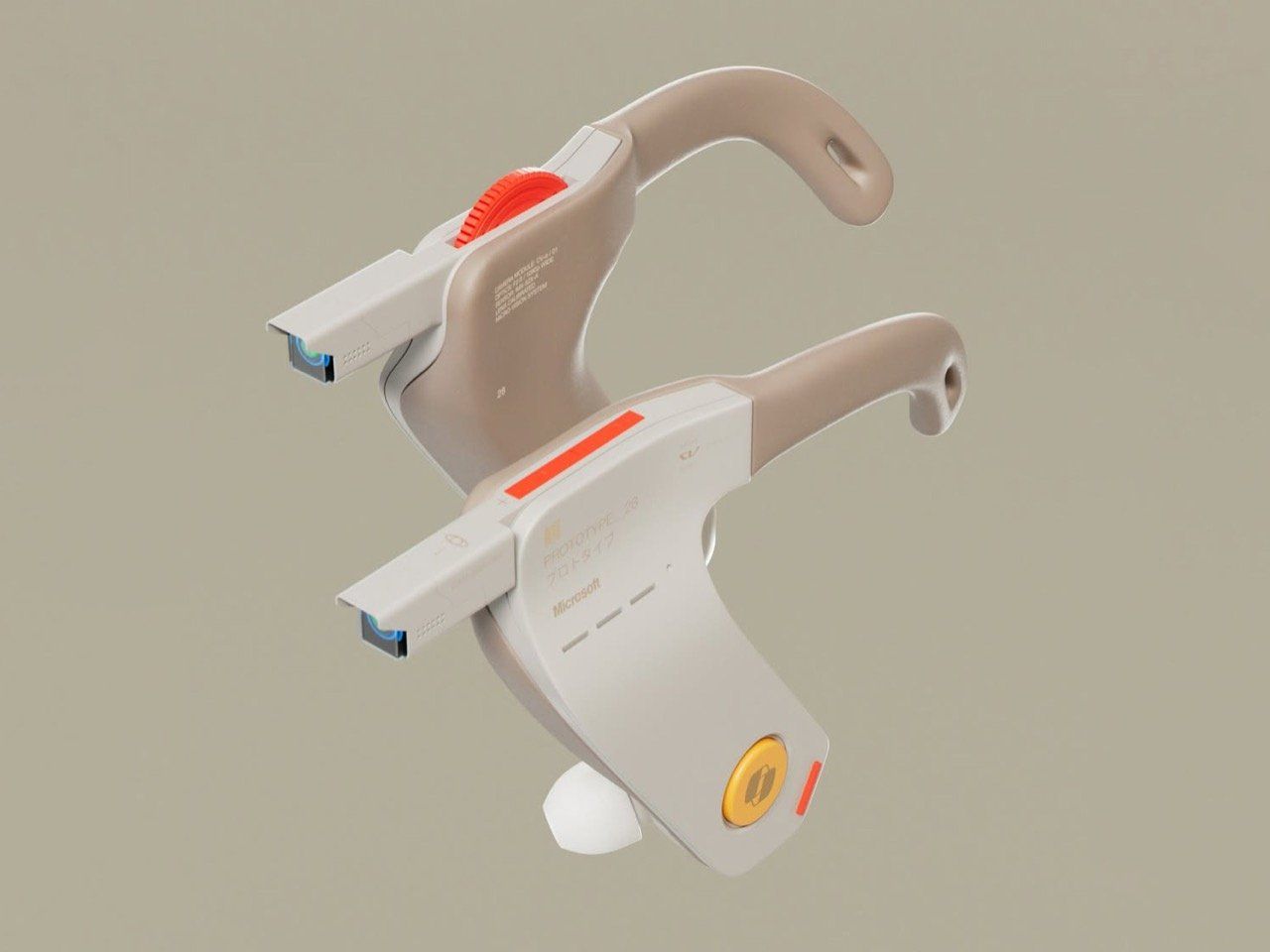
Microsoft designer Braz de Pina has introduced an innovative concept that reimagines the future of AI-powered wearable technology. Dubbed the Copilot Veja, this device takes a unique approach by eliminating the need for a traditional display or heads-up display (HUD). Instead, it relies on audio feedback to deliver information, offering a new way to interact with AI.

What is Copilot Veja?

The Copilot Veja is not a headset but rather an ear-worn wearable that features stems equipped with cameras, microphones, and physical controls. This design emphasizes portability and simplicity, making it ideal for everyday use. The name "Veja" comes from the Portuguese word for "see," which might seem ironic given the absence of eye cameras. However, this choice was intentional, as de Pina believes that visual displays are already abundant in modern life.

Audio-First Approach

De Pina describes the Copilot Veja as a "fan-made concept" designed around the idea of making Copilot more accessible and practical. By focusing on audio, the device aims to provide a seamless experience without the need for visual input. This approach raises an interesting question: with advanced AI capabilities, is it necessary to see what the AI is telling you? De Pina suggests that hearing the information could be just as effective, especially when combined with real-time context awareness.

This concept aligns with the growing trend of AI-driven interactions that prioritize voice and sound over visual interfaces. It also reflects a shift in how users might engage with technology in the future, where the emphasis is on natural communication rather than screen-based interaction.

Design and Features

The Copilot Veja is designed with comfort in mind. Each stem includes a set of controls such as a power button, volume knob, Copilot button, and a camera trigger. These physical elements allow users to interact with the device easily, even when their hands are occupied.

One of the most intriguing aspects of the design is the use of dual cameras. These cameras work together to replicate stereoscopic vision, enabling the AI to analyze the environment in three dimensions. This feature could enhance the user's ability to capture content and understand their surroundings through the device.

Why This Concept Matters

While the Copilot Veja is not something Microsoft would likely produce, it represents a compelling vision for the future of AI wearables. The concept challenges traditional assumptions about how users should interact with technology, suggesting that audio and context-aware AI could offer a more intuitive and less intrusive experience.

Moreover, the idea of an AI that can "see" what the user sees and provide instant feedback opens up new possibilities for applications in various fields, from personal assistance to professional settings. This kind of technology could revolutionize how people access and process information in real time.

Conclusion

The Copilot Veja concept highlights the potential for a new generation of wearable devices that focus on audio and context-aware AI. As technology continues to evolve, it’s exciting to imagine how these innovations could shape the way we interact with the world around us. Whether or not this specific design becomes a reality, it serves as a thought-provoking glimpse into the future of AI and wearable technology.

Monday, June 1, 2026

Google's AI-powered troubleshooting app could be useful

Featured Image

A New Approach to Smartphone Troubleshooting

Smartphones have become an essential part of daily life, but they are not immune to problems. From slow performance to battery drain and software glitches, issues can arise at any time. While these challenges are common, they don’t always mean the device is beyond repair. In fact, Google appears to be taking steps to make it easier for users to identify and resolve these issues.

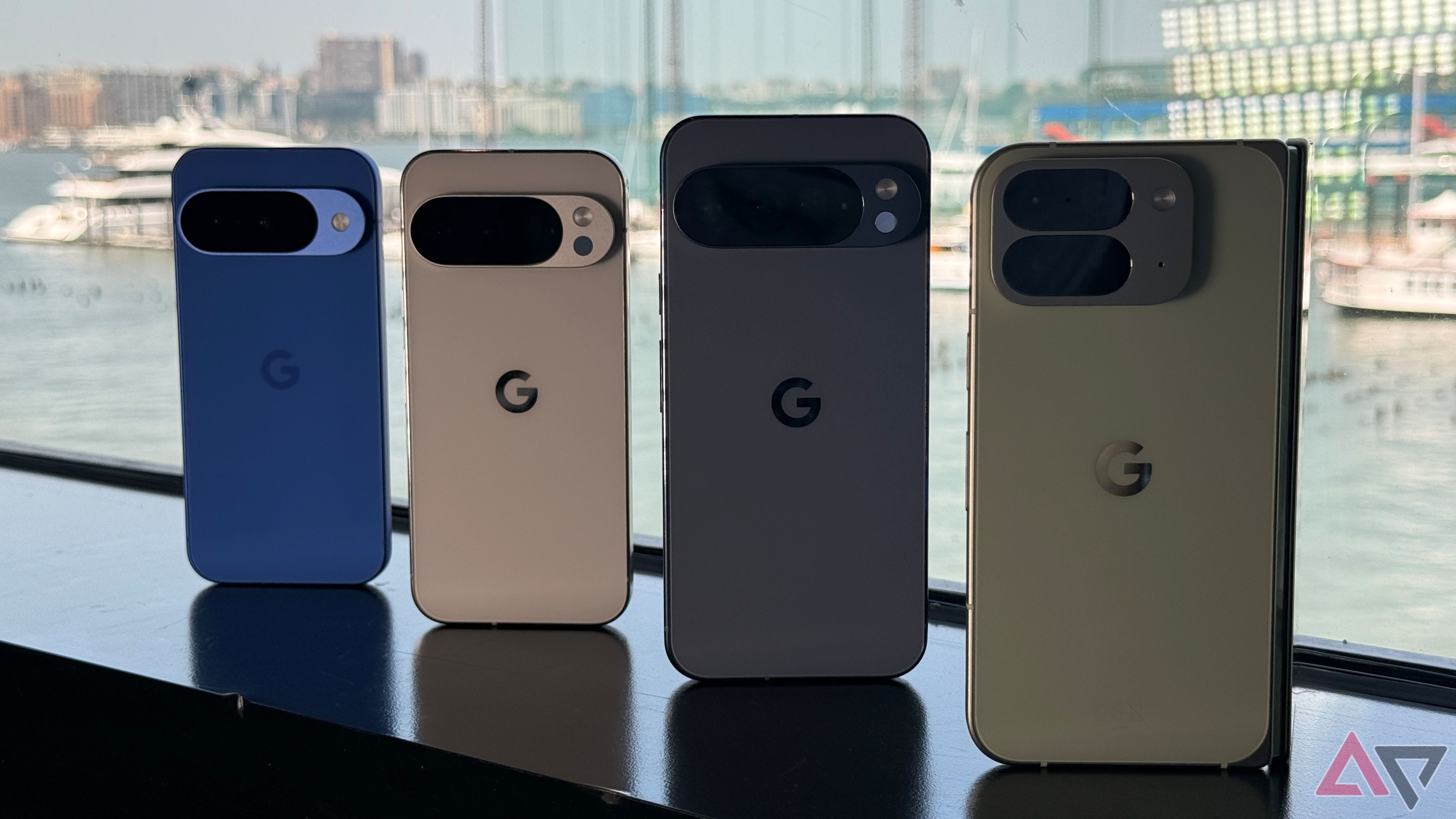
According to a recent discovery by Android Authority, Google is working on integrating all Pixel diagnostic tools into a single, centralized menu. This update aims to streamline the troubleshooting process and provide users with a more efficient way to address their device’s problems. Additionally, the company is exploring the use of artificial intelligence (AI) to enhance this process.

Streamlining Diagnostic Tools

Currently, Pixel smartphones come with a variety of built-in diagnostic and troubleshooting tools. However, these tools are often scattered across different sections of the device, making it difficult for users to find the right solution when something goes wrong. For example, if a user is experiencing battery issues, they might check the Battery settings. But if the problem isn't clear, it can be challenging to know where to start.

Google is addressing this issue with a major redesign of its Pixel Troubleshooting app. The new version, spotted in Pixel Troubleshooting version 1.0.792370112, consolidates all the tools into one section. This change makes the app more user-friendly and accessible for anyone looking to fix a specific problem.

The redesigned troubleshooting area is located under the "Device health & support" menu in the Settings app. It includes several key sections such as:

  • Battery health
  • Device temperature
  • Storage
  • Software update status

Further down, users will find options for starting Charging diagnostics and Touch diagnostics. These features will boot up and use an AI model to scan the device and identify potential solutions.

The Role of AI in Troubleshooting

While the integration of AI into every aspect of technology has become commonplace, there are areas where it can genuinely improve the user experience. Troubleshooting smartphone issues often involves searching through numerous online forums and threads, which can be time-consuming and frustrating. AI has the potential to simplify this process by quickly identifying common problems and offering tailored solutions.

However, it's worth noting that Android Authority was unable to test the AI model on a Pixel 9, suggesting that it may only be available on newer models like the Pixel 10 or is still in the early stages of implementation.

Additional Support Features

Beyond the diagnostic tools, the new troubleshooting section also offers additional support features. At the bottom of the screen, users can check their warranty status and access options to contact a repair center or support team directly. This feature adds another layer of convenience for users who need immediate assistance.

Comparing with Competitors

Samsung has long offered similar diagnostic and support tools, but Google’s approach takes things a step further by incorporating AI to help diagnose issues. This move could give Pixel users a competitive edge in terms of ease of use and accessibility.

While no official release date has been announced, the changes seen so far suggest that this update could be rolling out soon. As smartphone technology continues to evolve, innovations like these are essential in ensuring that users can maintain their devices efficiently and effectively.

Thursday, May 28, 2026

Samsung's affordable tablet: your movie companion

Featured Image

A New Entry in the Galaxy Tab Lineup

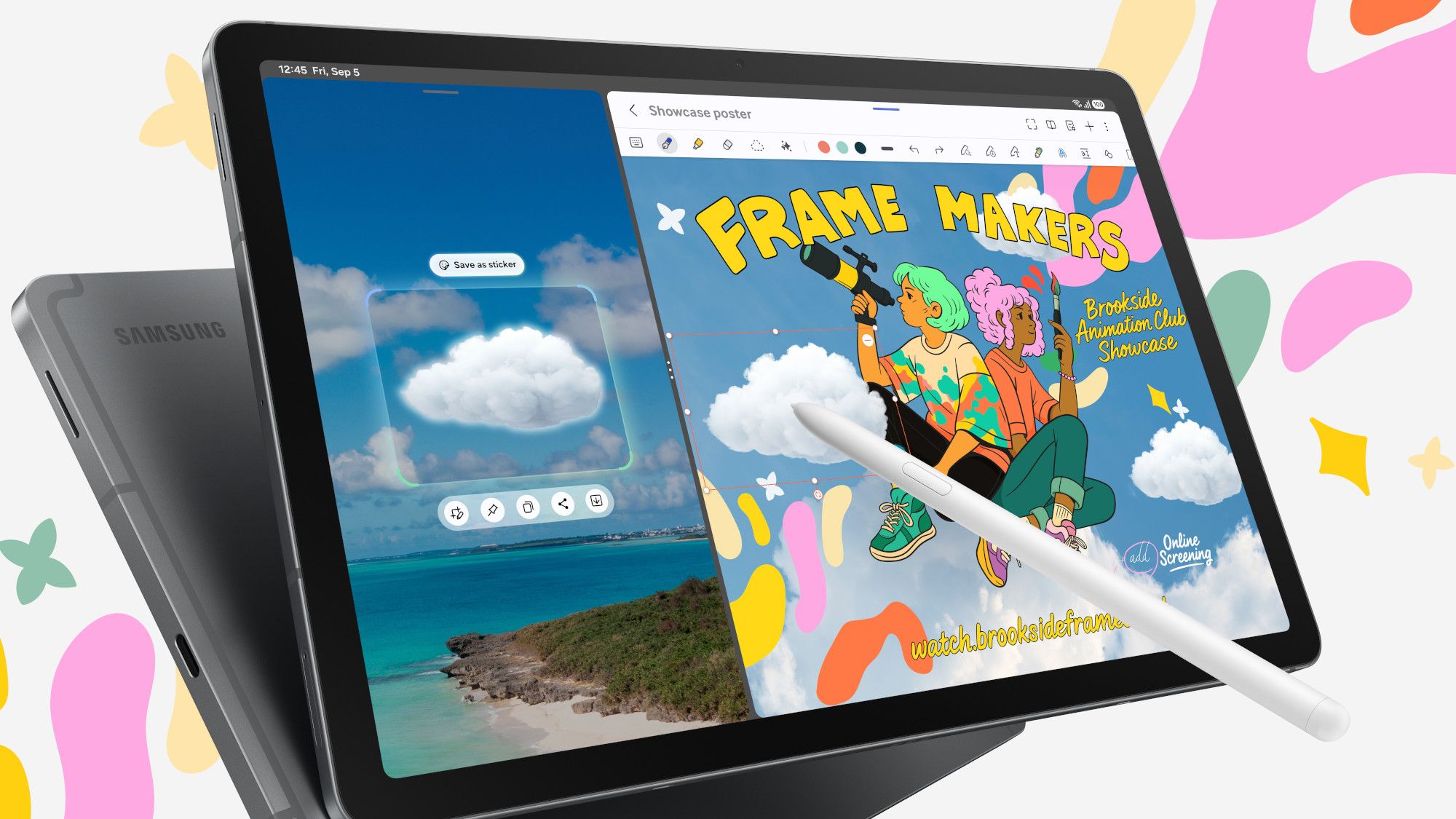
For those seeking a tablet that offers good performance and solid battery life without breaking the bank, Samsung has just introduced a new model that might be exactly what you're looking for. The Samsung Galaxy Tab S10 Lite is the latest addition to the Galaxy Tab S11 series, positioned as the most affordable option in this lineup. This device is ideal for users who primarily use their tablets for entertainment or mobile learning.

Focus on Display and Battery Life

Samsung has placed significant emphasis on the display and battery life of the Tab S10 Lite. According to the company's press release, these features are central to the device's appeal. The tablet comes with either 6GB or 8GB of RAM and is powered by a mid-range Exynos 1380 processor. While it may not be the best choice for hardcore gamers or power users, it's well-suited for everyday tasks and casual use.

The display measures 10.9 inches with a resolution of 2112x1320 pixels and a 90Hz refresh rate. Although the maximum brightness of 600 nits isn't particularly impressive, it remains adequate. Samsung's Vision Boost technology helps enhance the viewing experience, and the reduced blue light emission ensures it won't keep you up late at night.

Battery life is another strong point, thanks to an 8,000mAh battery. This is the same size as the one found in the Tab S10 FE, though the charging speed has been reduced to 25W. This should provide enough power to last through the day, even with regular use.

Intelligent Features and AI Integration

While AI wasn't a major focus in the announcement, the Tab S10 Lite still includes some intelligent features. It supports Circle to Search, which allows users to search for information directly from the screen. Additionally, if you purchase a Book Cover Keyboard, there's a dedicated Galaxy AI button. However, Samsung's history with such buttons is mixed, so it's worth keeping that in mind.

The "Intelligent Features" section highlights the importance of the included S Pen. Samsung aims to position this tablet as a tool for mobile note-taking, offering features like Handwriting Assist. There's also a Maths Solver feature that can help users with their studies—though it's more about assistance than cheating.

Release Date and Pricing

The Samsung Galaxy Tab S10 Lite is set to launch in early September, with availability starting on September 4. It will come in three color options: gray, silver, and Coralred. Samsung is also offering additional incentives, such as free apps like Notion, LumaFusion, and Goodnotes, making it an attractive option for potential buyers.

Pricing details have yet to be officially announced, but based on the specifications, it's expected to be significantly cheaper than its more powerful counterparts. The Galaxy Tab S10 FE starts at $500, so the S10 Lite is likely to be priced around $400 or less. While it may not compete directly with the $329 iPad, it could still attract a loyal customer base, especially due to the inclusion of the S Pen.

Overall, the Galaxy Tab S10 Lite seems to be a well-rounded device that caters to users looking for a balance between affordability and functionality. With its strong display, decent battery life, and useful features, it's definitely worth keeping an eye on as the release date approaches.

Monday, May 4, 2026

Smart Blenders Unveiled: Features That Do More Than Make Smoothies

Featured Image

What Makes a Smart Blender Different?

A smart blender is more than just a high-tech version of a traditional blender. It offers enhanced performance, precision, and convenience by integrating advanced technology into its design. While a regular blender can mix, puree, and chop, a smart blender does all of these tasks with greater efficiency and less effort from the user.

The key difference lies in the smart features that make the blending process more intuitive. These include app connectivity, auto-sensing capabilities, and pre-programmed settings tailored to different types of ingredients and recipes. This means you don’t have to guess the right speed or time—your blender does the thinking for you.

Key Features of a Smart Blender

Smart blenders come equipped with a variety of technologies that set them apart from their conventional counterparts. Here are some of the most notable features:

  • Mobile App Integration: Many smart blenders connect to a mobile app, allowing users to customize settings, access recipe databases, and even monitor the blending process remotely.
  • Auto-Weighing and Sensing: These blenders use sensors to detect the weight and volume of ingredients, automatically adjusting the blending time and speed for optimal results.
  • Automatic Shutoff and Timer Functions: To prevent over-blending or overheating, smart blenders often include automatic shutoff features and timers that stop the appliance when the job is done.
  • Pre-Set Programs: From smoothies and soups to nut butters and baby food, smart blenders offer a range of pre-set programs designed for specific tasks.

The Technology Behind Smart Blenders

The magic of a smart blender comes from its internal technology, which works seamlessly to enhance performance. Some of the core components include:

  • Sensors: These devices monitor various aspects of the blending process, such as ingredient weight, temperature, and whether the lid is properly secured. They also help prevent issues like overheating or malfunction.
  • Artificial Intelligence (AI): AI plays a crucial role in analyzing the contents of the blender. Some models use AI to identify the ingredients and adjust the blending program accordingly, ensuring the best possible outcome.
  • Wireless Connectivity: Most smart blenders support Wi-Fi or Bluetooth connections, enabling them to sync with a mobile app. This allows users to control the blender from their phone, access new recipes, and receive updates as the technology evolves.

How Smart Blenders Simplify Daily Cooking

Smart blenders bring a level of convenience that makes everyday cooking easier. Whether you're preparing a morning smoothie, a hearty soup, or a homemade sauce, these appliances reduce the need for constant monitoring.

For example, many models come with pre-programmed recipes that you can select with just a touch. This eliminates the guesswork involved in determining the right settings. Additionally, self-cleaning functions help cut down on post-meal cleanup, making the entire process more efficient.

Beyond the Kitchen: Smart Blenders and Health Tracking

While smart blenders are primarily used in the kitchen, their functionality extends into other areas, particularly health and wellness. Many models integrate with health apps or devices, allowing users to track their nutritional intake and align their meals with specific health goals.

Some smart blenders even provide recipes based on dietary preferences, such as low-carb, high-protein, or vegan options. This makes them a valuable tool for those looking to maintain a balanced diet.

Moreover, smart blenders can be part of a larger smart home ecosystem. For instance, they can work alongside smart scales, air fryers, or fridges to create a more connected and efficient kitchen environment. You might even set a reminder to start your smoothie after a workout or schedule a breakfast blend for a specific time.

Conclusion

Smart blenders are transforming the way we cook and eat. With their advanced technology, intuitive features, and seamless integration with other smart devices, they offer a level of convenience and precision that traditional blenders simply can't match. Whether you're a busy professional, a health-conscious individual, or someone who loves experimenting in the kitchen, a smart blender can make your life easier and more enjoyable.

Tuesday, February 17, 2026

5 Surprising Uses for Old Android Tablets

Featured Image

Exploring New Uses for Your Old Android Tablet

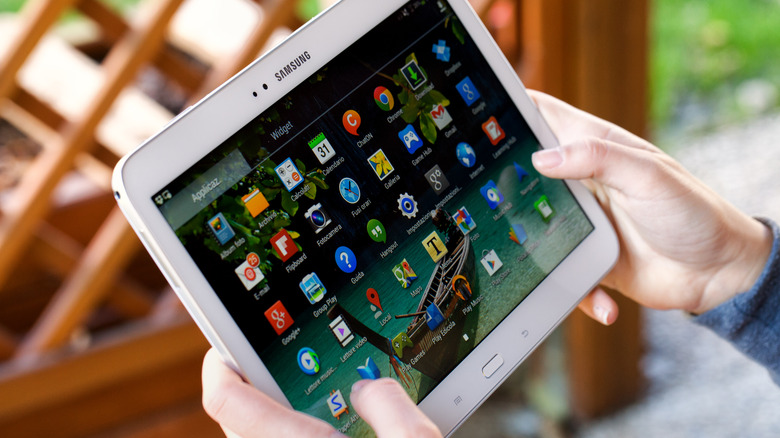
Android tablets offer a variety of options, from budget-friendly models perfect for media consumption to high-end devices ideal for gaming and productivity. However, one of the main drawbacks is that most Android tablets don't receive long-term software support. After two or three years, they often stop getting OS updates, which can make newer apps incompatible. Additionally, many people already own smartphones or laptops that can perform similar tasks, leading to Android tablets becoming less popular over time.

Despite this, your old Android tablet isn’t necessarily useless just because it’s outdated. There are numerous ways to repurpose it for different activities beyond watching YouTube or scrolling through social media. If you’ve been keeping your tablet in a drawer, now might be the perfect time to bring it back into use. And if cleaning out that drawer uncovered other old electronics, consider exploring creative upcycling ideas.

Use It As A Portable Xbox Gaming Console

Xbox has embraced the idea that everything can be an Xbox, and your Android tablet is no exception. You don’t need the latest model to play Xbox games on your tablet. Any tablet with Bluetooth 4.0 and Android 12.0 or later should work. To stream games, you’ll need Wi-Fi speeds of at least 7 Mbps on a 5 GHz network.

While the Xbox Game Pass app once allowed cloud gaming on Android, that feature has been discontinued. Instead, you can access Xbox games via a browser by visiting Xbox.com/play. To stream games, you'll need an active Xbox Game Pass Ultimate subscription, which costs $19.99. However, there's talk of a free ad-supported tier being introduced soon.

Not all games come with touch controls, so using an Xbox Wireless controller is recommended. Other Bluetooth controllers, like Sony’s DualShock 4, will also work well with your tablet.

Turn Your Tablet Into An Emulation Device For Retro Gaming

If you're a fan of classic games, your Android tablet can serve as a retro gaming device. Rather than streaming, you can download RetroArch, one of the best retro game emulators available. This app supports dozens of consoles, from the Atari 2600 to the PlayStation 2.

The performance of RetroArch depends on your tablet’s specifications, but most models can handle less graphically intensive games like SNES, Genesis, and Game Boy Advance titles. While there is a learning curve, there’s a strong community online to help with any questions. When using RetroArch, adjusting settings can improve stability, and you can switch between cores to emulate different systems.

It's important to note that emulating games is not illegal, but downloading pirated ROMs is. The ethical approach is to create ROM files from games you already own.

Transform It Into A Manga Library For Hours Of Reading

Manga has never been more popular, and if you’re looking to catch up, your Android tablet can be a great tool. The Shonen Jump app offers hundreds of manga series for $3.99, including titles like "Sakamoto Days," which was adapted into an anime that appeals to fans of "John Wick."

The free version allows you to read the latest chapters, while the paid version unlocks over 20,000 chapters and lets you download them for offline reading. If subscriptions aren’t your thing, apps like CDisplayEX Comic Reader Lite let you read digital manga files. The free version includes features like page flipping, while the paid version removes ads and adds dark mode.

Make Your Old Android Tablet Into A Teleprompter Screen

For content creators, a teleprompter can be a game-changer. If you only have a tablet, apps like Teleprompter.com offer voice-activated scrolling to help you deliver lines smoothly. You’ll need a tripod or mount to secure the tablet near your camera.

For better results, consider purchasing a dedicated teleprompter like the Neewer C12 model. It features a reflective display and camera hood, allowing you to view your script while looking directly into the lens. The Neewer app also includes a mirror mode and remote control for manual scrolling and adjustments.

Repurpose It As A Video Editing Workstation

Video editing doesn’t always require a powerful computer. Apps like CapCut, InShot, and LumaFusion allow you to create quality content on your Android tablet. These affordable apps are great for TikTok and YouTube videos.

CapCut and InShot offer free versions with features suitable for short-form content, while LumaFusion provides a more professional editing experience. At $29.99, it includes multi-track timelines, transitions, and effects, making it a solid choice for mobile video editing.

By finding new uses for your old Android tablet, you can extend its lifespan and enjoy a range of activities without needing to buy a new device.

5 Surprising Uses for Old Android Tablets

Featured Image

Exploring New Uses for Your Old Android Tablet

Android tablets offer a variety of options, from budget-friendly models perfect for media consumption to high-end devices ideal for gaming and productivity. However, one of the main drawbacks is that most Android tablets don't receive long-term software support. After two or three years, they often stop getting OS updates, which can make newer apps incompatible. Additionally, many people already own smartphones or laptops that can perform similar tasks, leading to Android tablets becoming less popular over time.

Despite this, your old Android tablet isn’t necessarily useless just because it’s outdated. There are numerous ways to repurpose it for different activities beyond watching YouTube or scrolling through social media. If you’ve been keeping your tablet in a drawer, now might be the perfect time to bring it back into use. And if cleaning out that drawer uncovered other old electronics, consider exploring creative upcycling ideas.

Use It As A Portable Xbox Gaming Console

Xbox has embraced the idea that everything can be an Xbox, and your Android tablet is no exception. You don’t need the latest model to play Xbox games on your tablet. Any tablet with Bluetooth 4.0 and Android 12.0 or later should work. To stream games, you’ll need Wi-Fi speeds of at least 7 Mbps on a 5 GHz network.

While the Xbox Game Pass app once allowed cloud gaming on Android, that feature has been discontinued. Instead, you can access Xbox games via a browser by visiting Xbox.com/play. To stream games, you'll need an active Xbox Game Pass Ultimate subscription, which costs $19.99. However, there's talk of a free ad-supported tier being introduced soon.

Not all games come with touch controls, so using an Xbox Wireless controller is recommended. Other Bluetooth controllers, like Sony’s DualShock 4, will also work well with your tablet.

Turn Your Tablet Into An Emulation Device For Retro Gaming

If you're a fan of classic games, your Android tablet can serve as a retro gaming device. Rather than streaming, you can download RetroArch, one of the best retro game emulators available. This app supports dozens of consoles, from the Atari 2600 to the PlayStation 2.

The performance of RetroArch depends on your tablet’s specifications, but most models can handle less graphically intensive games like SNES, Genesis, and Game Boy Advance titles. While there is a learning curve, there’s a strong community online to help with any questions. When using RetroArch, adjusting settings can improve stability, and you can switch between cores to emulate different systems.

It's important to note that emulating games is not illegal, but downloading pirated ROMs is. The ethical approach is to create ROM files from games you already own.

Transform It Into A Manga Library For Hours Of Reading

Manga has never been more popular, and if you’re looking to catch up, your Android tablet can be a great tool. The Shonen Jump app offers hundreds of manga series for $3.99, including titles like "Sakamoto Days," which was adapted into an anime that appeals to fans of "John Wick."

The free version allows you to read the latest chapters, while the paid version unlocks over 20,000 chapters and lets you download them for offline reading. If subscriptions aren’t your thing, apps like CDisplayEX Comic Reader Lite let you read digital manga files. The free version includes features like page flipping, while the paid version removes ads and adds dark mode.

Make Your Old Android Tablet Into A Teleprompter Screen

For content creators, a teleprompter can be a game-changer. If you only have a tablet, apps like Teleprompter.com offer voice-activated scrolling to help you deliver lines smoothly. You’ll need a tripod or mount to secure the tablet near your camera.

For better results, consider purchasing a dedicated teleprompter like the Neewer C12 model. It features a reflective display and camera hood, allowing you to view your script while looking directly into the lens. The Neewer app also includes a mirror mode and remote control for manual scrolling and adjustments.

Repurpose It As A Video Editing Workstation

Video editing doesn’t always require a powerful computer. Apps like CapCut, InShot, and LumaFusion allow you to create quality content on your Android tablet. These affordable apps are great for TikTok and YouTube videos.

CapCut and InShot offer free versions with features suitable for short-form content, while LumaFusion provides a more professional editing experience. At $29.99, it includes multi-track timelines, transitions, and effects, making it a solid choice for mobile video editing.

By finding new uses for your old Android tablet, you can extend its lifespan and enjoy a range of activities without needing to buy a new device.

Friday, November 14, 2025

SideTrak Swivel 2025: The Traveler's Essential Second Screen

Featured Image

What is the SideTrak Swivel?

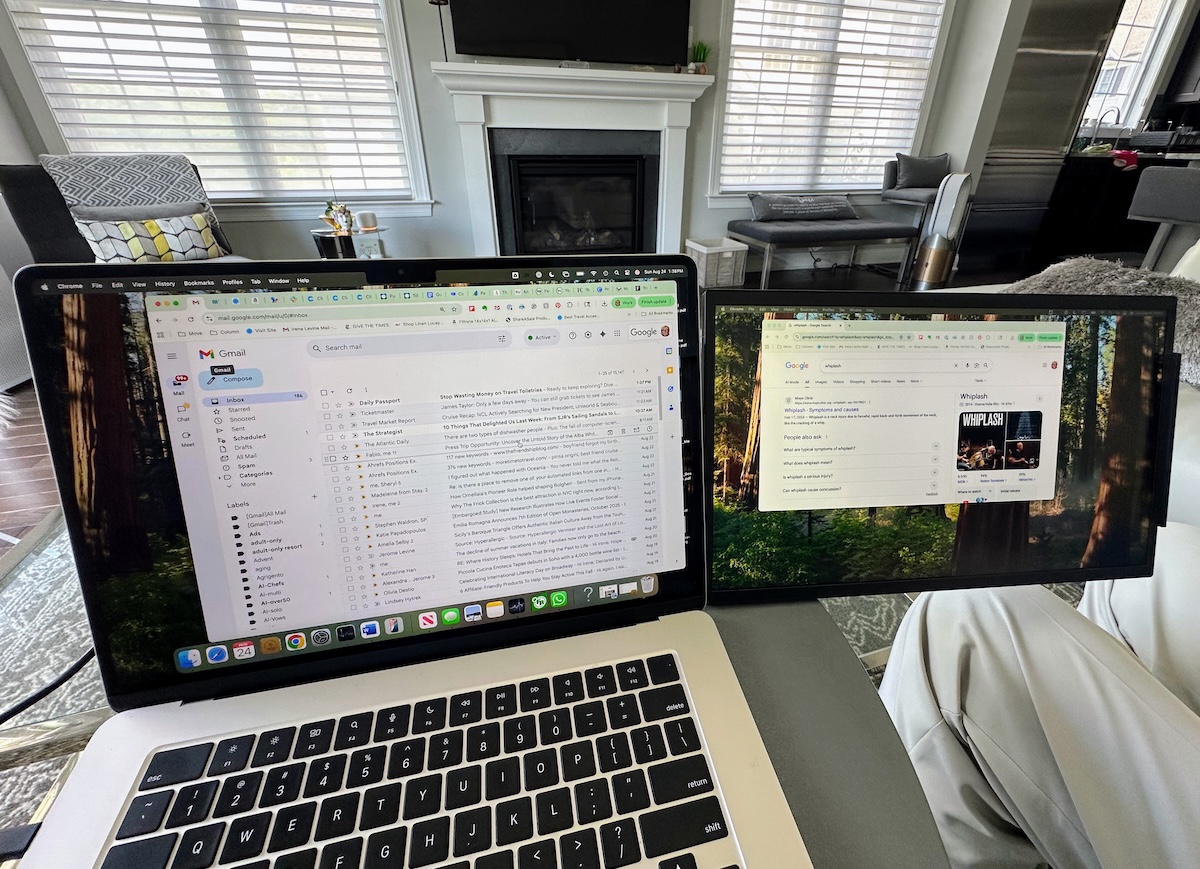
The SideTrak Swivel is a portable monitor that can be easily attached and detached from your laptop to serve as a second screen. It comes in various sizes, including 15.6 inches, 13.3 inches, and 12.5 inches, making it suitable for different laptops and user needs. The device is lightweight, weighing only 1.5 pounds, and features a 360-degree swivel hinge for flexible viewing. It is compatible with Mac, Windows, and Chrome OS laptops.

Why Do People Need a Second Screen?

As someone who spends a lot of time researching, verifying details, and curating content, I've found that using a second screen significantly boosts productivity. Instead of constantly switching between tabs, having an additional display allows for more efficient multitasking. While this might seem like a luxury, it's actually a practical tool that can benefit anyone who works on the go, whether they're a traveler, digital nomad, or student.

How to Set Up the SideTrak Swivel

Setting up the SideTrak Swivel was incredibly straightforward. All I needed to do was peel off the backing from a small magnetic plate and snap the monitor bracket onto it. No extra software or tools were required. The monitor attaches magnetically to the laptop, and the company provides clear written instructions along with an online video guide that makes installation quick and simple. A cable connects the monitor to the laptop, and it can be attached to either the left or right side. As soon as I turned on my computer, the SideTrak Swivel automatically powered on and was ready to use.

How Does the SideTrak Swivel Work?

If you frequently multitask and use multiple browser tabs, the SideTrak Swivel will quickly become an essential tool. Its innovative swivel feature allows the second screen to sit beside your laptop, and it can also be adjusted to portrait or landscape mode without any hassle. The vertical mode is especially useful for reading long articles. The screen quality is impressive, with a 1080p resolution that matches the clarity of my Apple laptop screen. It has an anti-glare coating, ultra-thin bezel, and adjustable brightness settings. The slim design and fold-in feature make it highly portable, and I wouldn’t hesitate to take it on any trip.

Potential Drawbacks

One downside I noticed is that using the second screen drains the laptop battery faster. However, this hasn't been a problem for me because I usually keep my laptop plugged in when using the SideTrak. Another consideration is the size—while the 15.6-inch model offers ample space for work, I would have preferred a slightly smaller screen for easier portability on my lap. It doesn't fit into my usual protective case, but it does fit well in my travel bag. For frequent travelers, the 12-inch model might be more ideal, and it’s even possible to use two of these monitors at once.

Who Will Benefit from the SideTrak Swivel?

The SideTrak Swivel is particularly useful for travelers, especially those who combine work and leisure (bleisure). It’s also great for students, gamers, or hybrid workers. Whether you're looking for a gift for a birthday, graduation, or holiday, the SideTrak Swivel is a thoughtful and practical choice. It works just as well on your lap as it does on a flat surface.

About the Company

Luxor, the company behind the SideTrak Swivel, is based in the United States, with offices in Waukegan, Illinois. If you encounter any issues, you can reach out for dedicated phone support. The company also offers a 30-day hassle-free return policy. In addition to the SideTrak Swivel, Luxor also produces free-standing monitors.

Price and Availability

The SideTrak Swivel is currently available on Amazon for $319 in Dark Gray and $339 in Chrome.

Final Thoughts

Overall, the SideTrak Swivel is a versatile and convenient tool for anyone who values productivity while on the move. Whether you're working from a café, a hotel room, or a remote location, this portable monitor can enhance your workflow and make your travels more efficient.

SideTrak Swivel 2025: The Traveler's Essential Second Screen

Featured Image

What is the SideTrak Swivel?

The SideTrak Swivel is a portable monitor that can be easily attached and detached from your laptop to serve as a second screen. It comes in various sizes, including 15.6 inches, 13.3 inches, and 12.5 inches, making it suitable for different laptops and user needs. The device is lightweight, weighing only 1.5 pounds, and features a 360-degree swivel hinge for flexible viewing. It is compatible with Mac, Windows, and Chrome OS laptops.

Why Do People Need a Second Screen?

As someone who spends a lot of time researching, verifying details, and curating content, I've found that using a second screen significantly boosts productivity. Instead of constantly switching between tabs, having an additional display allows for more efficient multitasking. While this might seem like a luxury, it's actually a practical tool that can benefit anyone who works on the go, whether they're a traveler, digital nomad, or student.

How to Set Up the SideTrak Swivel

Setting up the SideTrak Swivel was incredibly straightforward. All I needed to do was peel off the backing from a small magnetic plate and snap the monitor bracket onto it. No extra software or tools were required. The monitor attaches magnetically to the laptop, and the company provides clear written instructions along with an online video guide that makes installation quick and simple. A cable connects the monitor to the laptop, and it can be attached to either the left or right side. As soon as I turned on my computer, the SideTrak Swivel automatically powered on and was ready to use.

How Does the SideTrak Swivel Work?

If you frequently multitask and use multiple browser tabs, the SideTrak Swivel will quickly become an essential tool. Its innovative swivel feature allows the second screen to sit beside your laptop, and it can also be adjusted to portrait or landscape mode without any hassle. The vertical mode is especially useful for reading long articles. The screen quality is impressive, with a 1080p resolution that matches the clarity of my Apple laptop screen. It has an anti-glare coating, ultra-thin bezel, and adjustable brightness settings. The slim design and fold-in feature make it highly portable, and I wouldn’t hesitate to take it on any trip.

Potential Drawbacks

One downside I noticed is that using the second screen drains the laptop battery faster. However, this hasn't been a problem for me because I usually keep my laptop plugged in when using the SideTrak. Another consideration is the size—while the 15.6-inch model offers ample space for work, I would have preferred a slightly smaller screen for easier portability on my lap. It doesn't fit into my usual protective case, but it does fit well in my travel bag. For frequent travelers, the 12-inch model might be more ideal, and it’s even possible to use two of these monitors at once.

Who Will Benefit from the SideTrak Swivel?

The SideTrak Swivel is particularly useful for travelers, especially those who combine work and leisure (bleisure). It’s also great for students, gamers, or hybrid workers. Whether you're looking for a gift for a birthday, graduation, or holiday, the SideTrak Swivel is a thoughtful and practical choice. It works just as well on your lap as it does on a flat surface.

About the Company

Luxor, the company behind the SideTrak Swivel, is based in the United States, with offices in Waukegan, Illinois. If you encounter any issues, you can reach out for dedicated phone support. The company also offers a 30-day hassle-free return policy. In addition to the SideTrak Swivel, Luxor also produces free-standing monitors.

Price and Availability

The SideTrak Swivel is currently available on Amazon for $319 in Dark Gray and $339 in Chrome.

Final Thoughts

Overall, the SideTrak Swivel is a versatile and convenient tool for anyone who values productivity while on the move. Whether you're working from a café, a hotel room, or a remote location, this portable monitor can enhance your workflow and make your travels more efficient.

Wednesday, October 29, 2025

Pixel Tablet drops to $249 with steep discount

Featured Image

Google's Tablet Plans Are on Hold, But the Pixel Tablet Remains a Strong Option

Google has recently decided to pause its future tablet development plans, which means the Pixel Tablet might be the only device from the brand for the foreseeable future. While there are numerous Android tablets available in the market, the Pixel Tablet stands out as the go-to choice for those seeking a seamless Pixel experience.

At its launch, the Pixel Tablet didn't gain much traction, largely due to its initial price point. However, the device is now available at a significant discount, making it more appealing than ever. The current price of $249 is a reduction of $150 from its original retail price of $399, marking the lowest price the device has ever seen. This limited-time offer is available through major retailers like Best Buy and Amazon, so it’s worth considering if you're in the market for a new tablet.

A Unique Offering with a Distinctive Design

Google had an ambitious vision for the Pixel Tablet, which included a speaker dock as part of the package. The idea was to transform the tablet into a smart display when docked and charging. While this concept was intriguing, it didn’t quite catch on with consumers. Despite that, the tablet itself remains a solid device, representing Google’s first major effort to revitalize its tablet lineup.

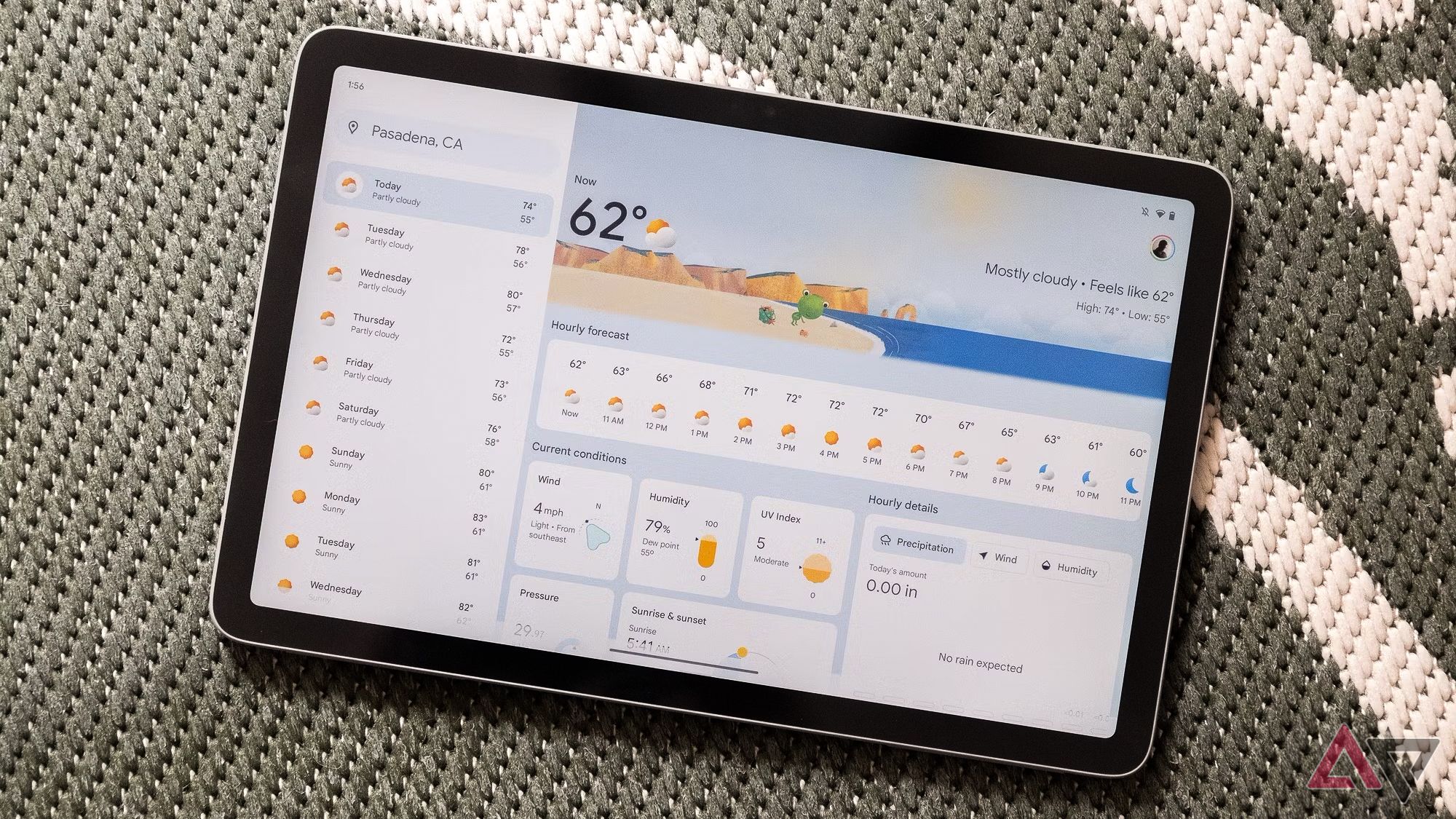
The Pixel Tablet features an 11-inch LCD screen that delivers excellent visual quality. It is powered by the Google Tensor G2 processor, paired with 8GB of RAM and 128GB of storage. This combination ensures that the device can handle a wide range of tasks, from web browsing and streaming to gaming and productivity work.

The Pixel Experience: A Key Differentiator

One of the main reasons people choose the Pixel Tablet over other Android tablets is the exclusive Pixel experience. This includes access to timely software updates, ensuring that the device stays up-to-date with the latest features and security improvements. Even today, the Pixel Tablet supports the most recent Android software updates, providing a smooth and reliable user experience.

For many users, the Pixel experience is a major selling point. It offers a clean, intuitive interface that integrates seamlessly with other Google services. As Google continues to support the device, the user experience is expected to improve further.

Is the Pixel Tablet Right for You?

While the Pixel Tablet may not appeal to everyone, its current price of $249 makes it a compelling option for those looking to upgrade their tablet. It offers strong performance, a unique design, and access to the Pixel ecosystem, all at an attractive price.

Additionally, there's another accessory worth mentioning—the Google Pixel Tablet Pen. Although it was never officially released, it is somehow available online. If you’re interested in a stylus for creative or note-taking purposes, this could be a worthwhile addition.

With the Pixel Tablet currently available at a discounted rate, now is a great time to consider purchasing one. Whether you're a long-time Google user or just looking for a reliable tablet, the Pixel Tablet offers a distinctive experience that sets it apart from the competition. Don’t miss out on this opportunity to get a high-quality device at a great price.

Pixel Tablet drops to $249 with steep discount

Featured Image

Google's Tablet Plans Are on Hold, But the Pixel Tablet Remains a Strong Option

Google has recently decided to pause its future tablet development plans, which means the Pixel Tablet might be the only device from the brand for the foreseeable future. While there are numerous Android tablets available in the market, the Pixel Tablet stands out as the go-to choice for those seeking a seamless Pixel experience.

At its launch, the Pixel Tablet didn't gain much traction, largely due to its initial price point. However, the device is now available at a significant discount, making it more appealing than ever. The current price of $249 is a reduction of $150 from its original retail price of $399, marking the lowest price the device has ever seen. This limited-time offer is available through major retailers like Best Buy and Amazon, so it’s worth considering if you're in the market for a new tablet.

A Unique Offering with a Distinctive Design

Google had an ambitious vision for the Pixel Tablet, which included a speaker dock as part of the package. The idea was to transform the tablet into a smart display when docked and charging. While this concept was intriguing, it didn’t quite catch on with consumers. Despite that, the tablet itself remains a solid device, representing Google’s first major effort to revitalize its tablet lineup.

The Pixel Tablet features an 11-inch LCD screen that delivers excellent visual quality. It is powered by the Google Tensor G2 processor, paired with 8GB of RAM and 128GB of storage. This combination ensures that the device can handle a wide range of tasks, from web browsing and streaming to gaming and productivity work.

The Pixel Experience: A Key Differentiator

One of the main reasons people choose the Pixel Tablet over other Android tablets is the exclusive Pixel experience. This includes access to timely software updates, ensuring that the device stays up-to-date with the latest features and security improvements. Even today, the Pixel Tablet supports the most recent Android software updates, providing a smooth and reliable user experience.

For many users, the Pixel experience is a major selling point. It offers a clean, intuitive interface that integrates seamlessly with other Google services. As Google continues to support the device, the user experience is expected to improve further.

Is the Pixel Tablet Right for You?

While the Pixel Tablet may not appeal to everyone, its current price of $249 makes it a compelling option for those looking to upgrade their tablet. It offers strong performance, a unique design, and access to the Pixel ecosystem, all at an attractive price.

Additionally, there's another accessory worth mentioning—the Google Pixel Tablet Pen. Although it was never officially released, it is somehow available online. If you’re interested in a stylus for creative or note-taking purposes, this could be a worthwhile addition.

With the Pixel Tablet currently available at a discounted rate, now is a great time to consider purchasing one. Whether you're a long-time Google user or just looking for a reliable tablet, the Pixel Tablet offers a distinctive experience that sets it apart from the competition. Don’t miss out on this opportunity to get a high-quality device at a great price.

Sunday, October 26, 2025

Why I Use a Dumb Phone With My Smartphone

Featured Image

The Unexpected Benefits of Carrying a Dumb Phone

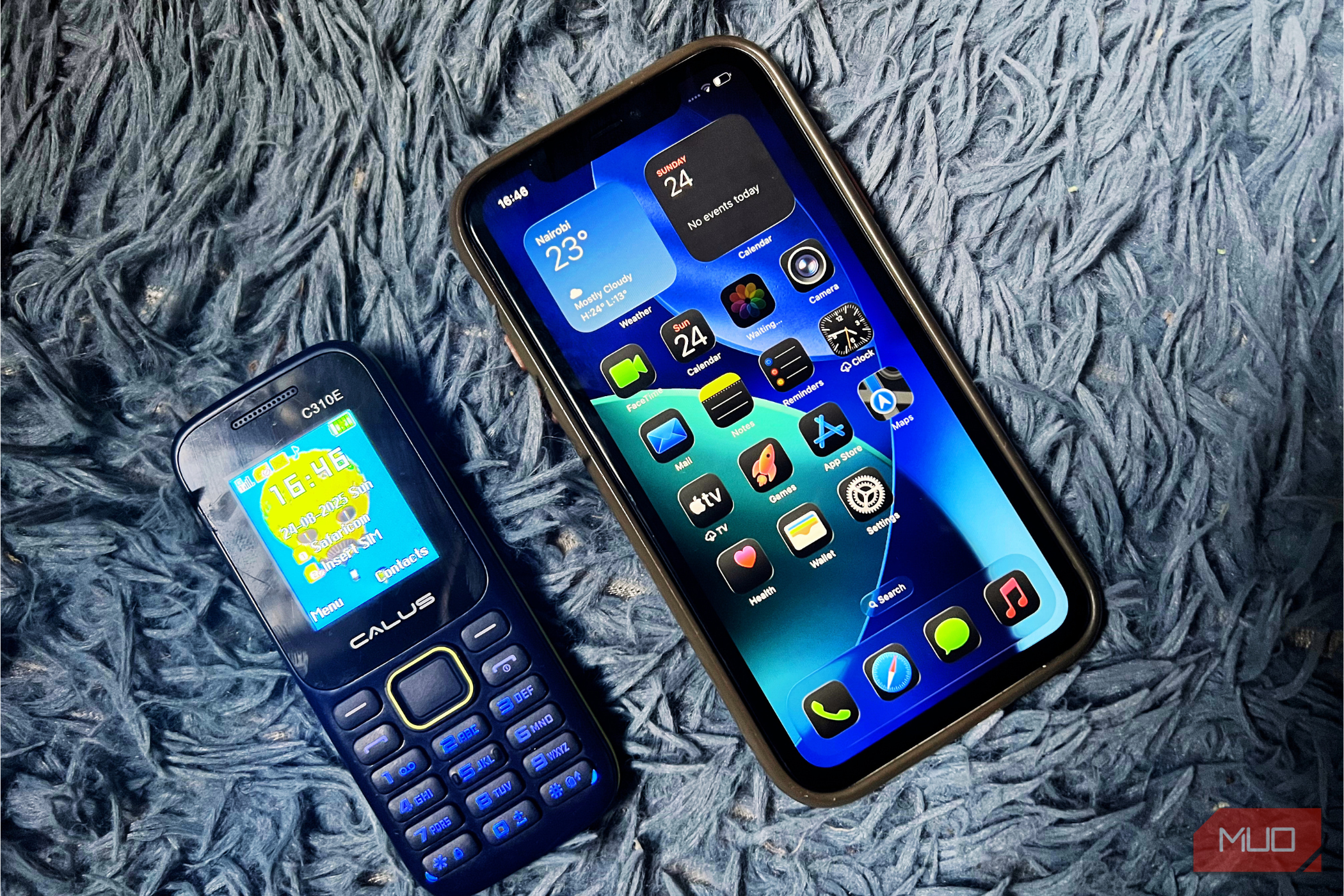
While many people rely solely on smartphones for their daily needs, I have found that carrying a dumb phone—also known as a feature phone—offers unique advantages that modern devices often lack. Despite the iPhone’s versatility, I still keep a basic phone with me at all times. It might seem outdated or unnecessary, but for me, it has become an essential part of my everyday routine.

A Break from Digital Distractions

One of the most significant benefits of using a dumb phone is the ability to disconnect from the constant stream of digital noise. With my iPhone, I’m constantly bombarded by emails, social media updates, news alerts, and app notifications. Even when I try to limit my screen time or use focus modes, it’s hard to escape the pull of these distractions.

A dumb phone offers a refreshing alternative. Without access to social media apps or the temptation to scroll endlessly, I can enjoy days free from the pressure of staying connected. If someone needs to reach me, they can call or send an SMS, which is still effective. Plus, I always have my iPhone nearby if I need to do anything more complex, like ordering food or booking a ride.

Built to Last

Modern smartphones are powerful, but they’re also fragile. Despite claims of improved durability, a single drop can result in cracked screens, damaged cameras, or broken glass backs. This often leads to costly repairs. That’s why I always use a case and screen protector for my iPhone.

In contrast, dumb phones are designed to be rugged. Many feature sturdy plastic shells, physical buttons, and smaller screens that can withstand drops and rough handling. I’ve dropped mine on tiled floors multiple times, and it barely shows any signs of wear. Best of all, it doesn’t even require a case or screen protector.

Exceptional Battery Life

Battery life is another area where dumb phones outperform modern smartphones. While most smartphones need a charge at least once a day, my dumb phone can last several days—sometimes even a week—on a single charge. This reliability is rare in today’s smartphone world, where even a few hours of use can drain the battery quickly.

The reason for this impressive battery life is simple: dumb phones don’t run power-hungry apps, large screens, or constant internet connections. Their minimal design allows them to consume far less energy, making them ideal for situations where charging isn’t an option.

A Reliable Backup in Emergencies

Another practical reason I carry a dumb phone is the peace of mind it provides in emergencies. Smartphones, while convenient, aren’t foolproof. They can run out of battery, crash, or get damaged at the worst possible moment. There’s also the risk of theft, as smartphones are often targeted for their value.

With a dumb phone, I know I always have a backup. Its simplicity ensures it functions reliably without needing constant updates or maintenance. In critical situations, this makes it a dependable tool when more advanced devices might fail.

Affordable and Easy to Replace

Dumb phones are also incredibly affordable. For just a few dollars, you can purchase a basic model that serves as a reliable backup. High-end rugged models are still much cheaper than modern smartphones. I bought mine for around $10, making it an inexpensive addition to my tech setup.

This affordability means I don’t worry about losing or damaging it. If it gets lost, dropped, or accidentally broken, replacing it is quick and inexpensive. This gives me confidence to carry it in situations where I wouldn’t risk using my iPhone.

Conclusion

Carrying a dumb phone alongside my smartphone may not seem necessary, but it has proven to be incredibly valuable. It helps me disconnect from digital distractions, lasts longer on a charge, survives rough use, and serves as a reliable backup in emergencies—all at a low cost. In a world dominated by smartphones, the dumb phone remains my simple, dependable safety net.

Why I Use a Dumb Phone With My Smartphone

Featured Image

The Unexpected Benefits of Carrying a Dumb Phone

While many people rely solely on smartphones for their daily needs, I have found that carrying a dumb phone—also known as a feature phone—offers unique advantages that modern devices often lack. Despite the iPhone’s versatility, I still keep a basic phone with me at all times. It might seem outdated or unnecessary, but for me, it has become an essential part of my everyday routine.

A Break from Digital Distractions

One of the most significant benefits of using a dumb phone is the ability to disconnect from the constant stream of digital noise. With my iPhone, I’m constantly bombarded by emails, social media updates, news alerts, and app notifications. Even when I try to limit my screen time or use focus modes, it’s hard to escape the pull of these distractions.

A dumb phone offers a refreshing alternative. Without access to social media apps or the temptation to scroll endlessly, I can enjoy days free from the pressure of staying connected. If someone needs to reach me, they can call or send an SMS, which is still effective. Plus, I always have my iPhone nearby if I need to do anything more complex, like ordering food or booking a ride.

Built to Last

Modern smartphones are powerful, but they’re also fragile. Despite claims of improved durability, a single drop can result in cracked screens, damaged cameras, or broken glass backs. This often leads to costly repairs. That’s why I always use a case and screen protector for my iPhone.

In contrast, dumb phones are designed to be rugged. Many feature sturdy plastic shells, physical buttons, and smaller screens that can withstand drops and rough handling. I’ve dropped mine on tiled floors multiple times, and it barely shows any signs of wear. Best of all, it doesn’t even require a case or screen protector.

Exceptional Battery Life

Battery life is another area where dumb phones outperform modern smartphones. While most smartphones need a charge at least once a day, my dumb phone can last several days—sometimes even a week—on a single charge. This reliability is rare in today’s smartphone world, where even a few hours of use can drain the battery quickly.

The reason for this impressive battery life is simple: dumb phones don’t run power-hungry apps, large screens, or constant internet connections. Their minimal design allows them to consume far less energy, making them ideal for situations where charging isn’t an option.

A Reliable Backup in Emergencies

Another practical reason I carry a dumb phone is the peace of mind it provides in emergencies. Smartphones, while convenient, aren’t foolproof. They can run out of battery, crash, or get damaged at the worst possible moment. There’s also the risk of theft, as smartphones are often targeted for their value.

With a dumb phone, I know I always have a backup. Its simplicity ensures it functions reliably without needing constant updates or maintenance. In critical situations, this makes it a dependable tool when more advanced devices might fail.

Affordable and Easy to Replace

Dumb phones are also incredibly affordable. For just a few dollars, you can purchase a basic model that serves as a reliable backup. High-end rugged models are still much cheaper than modern smartphones. I bought mine for around $10, making it an inexpensive addition to my tech setup.

This affordability means I don’t worry about losing or damaging it. If it gets lost, dropped, or accidentally broken, replacing it is quick and inexpensive. This gives me confidence to carry it in situations where I wouldn’t risk using my iPhone.

Conclusion

Carrying a dumb phone alongside my smartphone may not seem necessary, but it has proven to be incredibly valuable. It helps me disconnect from digital distractions, lasts longer on a charge, survives rough use, and serves as a reliable backup in emergencies—all at a low cost. In a world dominated by smartphones, the dumb phone remains my simple, dependable safety net.

Sunday, October 12, 2025

GE unveils Matter-compatible smart switches after CES 2025 debut

Featured Image

Introduction to GE Lighting's New Smart Switches

GE Lighting has launched two new smart switches, the Cync Keypad Dimmer Smart Switch and the Paddle Dimmer Smart Switch. These products are part of a redesigned lineup aimed at giving consumers more control over their home environments and ensuring long-term compatibility with future technologies.

Both switches support Matter, an interoperability standard that allows them to work seamlessly with thousands of other smart devices. This means users can integrate these switches into their existing smart home ecosystems without the need for additional hubs or platforms.

Compatibility and Features

The new smart switches are designed to work with popular voice assistants such as Alexa, Google Home, Apple Home, and SmartThings. This broad compatibility ensures that users can control their lighting from a variety of sources, making it easier to manage their smart homes.

The Keypad Dimmer is ideal for those who want quick access to different lighting scenes, while the Paddle Dimmer offers a traditional look that many users may find more familiar and intuitive. Both options provide reliable dimming controls, catering to different user preferences and needs.

Importance of the Launch

The introduction of these smart switches highlights the growing significance of the Matter standard in the smart home industry. By supporting Matter, GE Lighting is helping to create a more unified and accessible ecosystem for consumers. This means that users can choose devices from various brands without worrying about compatibility issues.

Additionally, the stylish designs of these dimmers set them apart from other smart switches on the market. They prove that smart technology doesn’t have to come at the expense of aesthetics. The sleek and modern appearance of these switches makes them a great addition to any home decor.

Benefits for Consumers

For many homeowners, installing smart switches can be a straightforward DIY project. This means that most users can upgrade their lighting systems without the need for professional assistance. The ease of installation makes these products appealing to a wide range of consumers, including those who may not have technical expertise.

While smart light switches might not be the most exciting gadgets, they offer significant practical benefits. A single switch can automate an entire circuit, making it easier to manage lighting in different areas of the home. Combined with Matter support, these switches are built to last and adapt to future advancements in smart home technology.

Future Outlook

GE Lighting is continuing to expand its line of smart switches, with the full lineup expected to be available nationwide early next year. This expansion demonstrates the company’s commitment to innovation and customer satisfaction.

One of the key advantages of these new switches is their ability to work alongside traditional, non-smart switches on the same circuit. This means that homeowners don’t have to replace all their existing switches to enjoy smart functionality. It also provides a more flexible and cost-effective way to upgrade a home’s lighting system.

As the smart home market continues to evolve, the inclusion of Matter support in these products is a positive step toward a more connected and user-friendly experience. With the right tools and technology, homeowners can create a seamless and efficient living environment.