Showing posts with label software and applications. Show all posts

Wednesday, October 7, 2026

I Tested ManageEngine OpManager and Discovered Robust Enterprise Network Monitoring

Featured Image

Overview of ManageEngine OpManager

ManageEngine OpManager is a network monitoring solution designed for enterprise environments, trusted by over 1 million IT administrators globally. It offers comprehensive visibility into the health and performance of network infrastructure, including switches, routers, servers, and other critical components. For organizations looking for reliable network monitoring tools, OpManager stands out as a viable option that should be considered alongside top-tier solutions.

The Shiro Coprreviewers have evaluated numerous IT platforms, analyzing features, pricing, and overall value. During their assessment, they found that while LogicMonitor remains the top choice for network monitoring in 2025 due to its AI-powered automation capabilities, OpManager presents a strong alternative for budget-conscious enterprises. Its end-to-end approach to network infrastructure monitoring supports both traditional and hybrid environments, including VMware, Hyper-V, and cloud-based networks.

Key Features of OpManager

OpManager provides a feature-rich platform that covers nearly 3,000 metrics across network devices, servers, and applications. It is particularly well-suited for mid-to-large enterprises managing complex hybrid infrastructures. The platform includes core monitoring functions such as device discovery, performance tracking, and alert management.

While it offers essential capabilities like network topology mapping, bandwidth monitoring, and automated workflows, OpManager lacks some advanced features found in competitors, such as sophisticated machine learning integration and multi-threshold alerting. However, with a competitive price point of $245 for 10 devices, it offers excellent value for organizations seeking comprehensive monitoring without premium costs.

Real-Time Network Monitoring

One of OpManager’s strengths is its real-time monitoring capability. It continuously tracks the performance of routers, switches, firewalls, and servers, providing real-time availability and health metrics. The platform supports multiple monitoring protocols, including SNMP, WMI, and CLI, ensuring compatibility with diverse network hardware. Users appreciate the real-time dashboards, which provide clear visibility into network performance without latency issues.

Automated Device Discovery

OpManager automatically discovers network devices and builds topology maps, significantly reducing manual configuration time. It can detect newly added devices in subnets and begin monitoring them immediately. However, some users report challenges with older legacy devices requiring manual SNMP OID mapping. The discovery process supports hybrid environments, including cloud and virtualized infrastructures.

Alerting and Notifications

The platform features a multi-channel alerting system that sends notifications via email, SMS, and SNMP traps when thresholds are breached. Users can customize alert thresholds and escalation procedures. While the real-time alerting capabilities help IT teams identify and address issues before they impact end users, there are limitations in setting multiple threshold levels for the same parameter.

Performance Analytics and Reporting

OpManager generates comprehensive reports on network performance, bandwidth utilization, and device health trends. Built-in dashboards offer visual representations of network data, while customizable reports support compliance and capacity planning requirements. Most users appreciate the intuitive graphical interface and NOC dashboard building capabilities.

Ease of Use

OpManager has a user-friendly interface that simplifies network monitoring for IT administrators of varying experience levels. The web-based console features intuitive navigation and customizable dashboards, allowing users to quickly access critical network information. New users can typically navigate basic monitoring functions within hours, though mastering the full feature set may take several days.

However, initial setup can be time-consuming, especially when integrating legacy devices or complex hybrid environments. Some users report that adding older network equipment requires manual configuration and SNMP OID mapping, which demands deeper technical knowledge. The default report templates may also need customization to meet specific organizational requirements.

Pricing Structure

OpManager offers different editions tailored to various business needs:

  • Standard Edition: $20.42/month for 10 devices, including basic monitoring, web-based console, and email alerts.
  • Professional Edition: $28.75/month for 10 devices, featuring advanced reporting, mobile app, and workflow automation.
  • Enterprise Edition: $38.52/month for 25 devices, offering distributed monitoring, business views, and enhanced security.

The pricing structure provides competitive value compared to enterprise-grade alternatives, with transparent per-device licensing that includes unlimited interfaces, nodes, and sensors. This allows organizations to start small and scale up as needed. However, the jump from Professional to Enterprise edition represents a significant price increase for advanced features.

Customer Support

ManageEngine provides comprehensive support options through Classic and Premium tiers. Classic support is included free with subscription licenses, offering email and chat assistance during business hours. Premium support enhances the experience with 24/7 multi-channel assistance, faster response times, and additional services like health checks and custom product support.

Phone support is available in multiple regions, including the US, UK, and Australia. While Premium support requires an additional investment, it offers better service for complex cases.

Alternatives to OpManager

OpManager competes directly with solutions like Paessler PRTG, Auvik, and SolarWinds NPM. It is best suited for mid-to-large enterprises seeking comprehensive monitoring without the complexity or cost of premium alternatives. Key competitors include Auvik, which offers superior ease of use and cloud-native architecture, and Paessler PRTG, known for flexible sensor-based pricing and stronger customization options.

Final Verdict

ManageEngine OpManager delivers reliable network monitoring fundamentals at a competitive price point, making it an attractive option for enterprises seeking comprehensive infrastructure visibility without premium costs. It excels in device coverage, real-time alerting, and hybrid network support, providing teams with the essential tools needed to maintain network health and performance.

While it may lack some advanced features found in higher-end competitors, OpManager's combination of functionality and affordability creates strong value for budget-conscious organizations. Its proven track record with over 1 million administrators worldwide demonstrates its viability as a long-term monitoring solution.

Frequently Asked Questions

What devices can OpManager monitor?
OpManager supports monitoring of switches, routers, firewalls, servers, wireless devices, load balancers, and virtualization platforms including VMware, Hyper-V, and Citrix XenServer. The platform can monitor nearly 3,000 different metrics across these device types using protocols like SNMP, WMI, and CLI. It also supports cloud and hybrid network infrastructures, making it suitable for modern enterprise environments.

How does OpManager pricing compare to competitors?
OpManager offers competitive pricing starting at $245 for 10 devices annually, significantly less expensive than premium alternatives like LogicMonitor or Datadog. The per-device licensing model includes unlimited interfaces and sensors, providing predictable costs. However, large-scale deployments can become expensive, with Enterprise edition pricing reaching $11,545 for 250 devices.

What support options are available with OpManager?
ManageEngine provides Classic support free with subscription licenses, including email and chat during business hours with 8-hour acknowledgment times. Premium support offers 24/7 assistance, phone support, faster response times (3-hour acknowledgment), and additional services like health checks and custom support. Phone support is available globally across multiple time zones and languages.

Can OpManager integrate with other IT management tools?
OpManager supports integration with other ManageEngine products and third-party systems through APIs and standard protocols. The platform can send alerts to external systems via SNMP traps, email, and webhooks. However, the integration ecosystem is more limited compared to cloud-native competitors, and complex integrations may require custom development or professional services.

Is there a free trial available for OpManager?
Yes, ManageEngine offers a 30-day free trial of OpManager that includes full functionality for evaluation purposes. The trial allows organizations to test the platform with their actual network infrastructure before purchasing. Trial users receive evaluation support with 2-business-day acknowledgment times, though some advanced support features are reserved for paid customers.

Tuesday, October 6, 2026

I Tested ManageEngine OpManager and Discovered Its Enterprise Network Monitoring Power

Featured Image

Overview of ManageEngine OpManager

ManageEngine OpManager is a robust network monitoring solution that has gained the trust of over 1 million IT administrators globally. It offers extensive visibility into the health and performance of networks, covering switches, routers, servers, and other essential infrastructure components. For organizations exploring network monitoring options, OpManager stands out as a viable alternative to the top solutions reviewed in various industry roundups.

TechRadar reviewers have spent considerable time evaluating major IT platforms, assessing features, pricing, and overall value. During their evaluation process, they found that while LogicMonitor remains the top choice for network monitoring in 2025 due to its AI-powered suite for automation, OpManager presents a compelling option for budget-conscious enterprises.

Key Features of OpManager

OpManager's strength lies in its end-to-end approach to monitoring network infrastructure, supporting both traditional and hybrid environments such as VMware, Hyper-V, and cloud-based networks. Its proactive alert system and real-time dashboards allow IT teams to prevent outages and resolve issues efficiently, making it an ideal choice for organizations focused on maintaining network uptime and performance.

The platform delivers a feature-rich environment that covers nearly 3,000 metrics across network devices, servers, and applications. It is particularly well-suited for mid-to-large enterprises managing complex hybrid infrastructures, offering core monitoring functions like device discovery, performance tracking, and alert management.

While OpManager includes essential capabilities such as network topology mapping, bandwidth monitoring, and automated workflows, it lacks some advanced features found in competitors, such as sophisticated machine learning integration and multi-threshold alerting. However, with a competitive price of $245 for 10 devices, it provides excellent value for organizations seeking comprehensive monitoring without premium costs.

Real-Time Network Monitoring

OpManager excels at continuous performance monitoring across routers, switches, firewalls, and servers, tracking availability and health metrics in real-time. The platform supports multiple monitoring protocols, including SNMP, WMI, and CLI, ensuring compatibility with diverse network hardware. Users consistently praise the real-time dashboards for providing clear visibility into network performance without latency issues.

Automated Device Discovery

It automatically discovers network devices and builds topology maps, significantly reducing manual configuration time. OpManager can detect newly added devices in subnets and immediately begin monitoring them, though some users report challenges with older legacy devices requiring manual SNMP OID mapping. The discovery process supports hybrid environments, including cloud and virtualized infrastructures.

Alerting and Notifications

OpManager's multi-channel alerting system sends notifications via email, SMS, and SNMP traps when thresholds are breached. The platform allows customization of alert thresholds and escalation procedures, although users note limitations in setting multiple threshold levels for the same parameter. Real-time alerting capabilities help IT teams identify and address issues before they impact end users.

Performance Analytics and Reporting

ManageEngine generates comprehensive reports on network performance, bandwidth utilization, and device health trends. Built-in dashboards provide visual representations of network data, while customizable reports support compliance and capacity planning requirements. Most users appreciate the intuitive graphical interface and NOC dashboard building capabilities.

Ease of Use

OpManager has a user-friendly interface that simplifies network monitoring for IT administrators of varying experience levels. The web-based console features intuitive navigation and customizable dashboards that allow users to quickly access critical network information. New users can typically navigate the basic monitoring functions within hours, though the extensive feature set may require several days to master fully. Plus, a graphical approach to network topology mapping and performance visualization reduces the learning curve compared to command-line alternatives.

However, initial setup can be time-consuming, particularly when integrating legacy devices or complex hybrid environments. Some users report that adding older network equipment requires manual configuration and SNMP OID mapping, which demands deeper technical knowledge. The default report templates may also need customization to meet specific organizational requirements, occasionally requiring scripting or external tools for advanced reporting needs.

Pricing Structure

OpManager offers a range of plans to suit different organizational needs:

  • Standard Edition: $20.42/month (10 devices, basic monitoring, web-based console, email alerts)
  • Professional Edition: $28.75/month (10 devices, advanced reporting, mobile app, workflow automation)
  • Enterprise Edition: $38.52/month (25 devices, distributed monitoring, business views, enhanced security)

The pricing structure offers competitive value compared to enterprise-grade alternatives, with transparent per-device licensing that includes unlimited interfaces, nodes, and sensors. This allows organizations to start small and scale up as monitoring needs grow, though the jump from Professional to Enterprise edition represents a significant price increase for advanced features.

While more affordable than premium solutions like LogicMonitor or Datadog, OpManager's pricing can become substantial for large-scale deployments, with the Enterprise edition reaching $11,545 for 250 devices. The inclusion of all monitoring capabilities within the base license helps avoid unexpected costs, making it easier to budget for network monitoring initiatives.

Customer Support

ManageEngine provides comprehensive support options through both Classic and Premium tiers, with Classic support included free with subscription licenses. Classic support offers email and chat assistance during regional business hours, with acknowledgment within 8 hours and access to product upgrades and online resources. The support team is knowledgeable and responsive for most technical issues, though response times can vary depending on case complexity and geographic region.

Premium support significantly enhances the experience with 24/7 multi-channel assistance, including telephone support, single point of contact, and faster response times with acknowledgment within 3 hours. This tier includes additional services like health checks, custom product support, and online training sessions. However, Premium support requires additional investment beyond the base license cost, and some advanced customizations may still require professional services or partner assistance.

Phone support is available across multiple regions, including the US (+1 877 834 4428), UK (0800 028 6590), and Australia (1800 631 268).

Alternatives to OpManager

OpManager occupies a solid middle-ground position in the network monitoring market, competing directly with solutions like Paessler PRTG, Auvik, and SolarWinds NPM. The platform is best suited for mid-to-large enterprises seeking comprehensive monitoring capabilities without the complexity or cost of premium alternatives like Datadog or LogicMonitor.

Key competitors include Auvik, which offers superior ease of use and cloud-native architecture, and Paessler PRTG, which provides more flexible sensor-based pricing and stronger customization options. Premium alternatives like LogicMonitor and Datadog offer more advanced AI/ML capabilities and extensive integrations but command significantly higher prices.

Final Verdict

ManageEngine OpManager delivers reliable network monitoring fundamentals at a competitive price point, making it an attractive option for enterprises seeking comprehensive infrastructure visibility without premium costs. It excels in device coverage, real-time alerting, and hybrid network support, providing teams the essential tools needed to maintain network health and performance.

While it may lack some advanced features found in higher-end competitors, OpManager's combination of functionality and affordability creates strong value for budget-conscious organizations. And its proven track record with over 1 million administrators worldwide demonstrates its viability as a long-term monitoring solution.

Frequently Asked Questions

What devices can OpManager monitor?
OpManager supports monitoring of switches, routers, firewalls, servers, wireless devices, load balancers, and virtualization platforms including VMware, Hyper-V, and Citrix XenServer. The platform can monitor nearly 3,000 different metrics across these device types using protocols like SNMP, WMI, and CLI. It also supports cloud and hybrid network infrastructures, making it suitable for modern enterprise environments.

How does OpManager pricing compare to competitors?
OpManager offers competitive pricing starting at $245 for 10 devices annually, significantly less expensive than premium alternatives like LogicMonitor or Datadog. The per-device licensing model includes unlimited interfaces and sensors, providing predictable costs. However, large-scale deployments can become expensive, with Enterprise edition pricing reaching $11,545 for 250 devices.

What support options are available with OpManager?
ManageEngine provides Classic support free with subscription licenses, including email and chat during business hours with 8-hour acknowledgment times. Premium support offers 24/7 assistance, phone support, faster response times (3-hour acknowledgment), and additional services like health checks and custom support. Phone support is available globally across multiple time zones and languages.

Can OpManager integrate with other IT management tools?
OpManager supports integration with other ManageEngine products and third-party systems through APIs and standard protocols. The platform can send alerts to external systems via SNMP traps, email, and webhooks. However, the integration ecosystem is more limited compared to cloud-native competitors, and complex integrations may require custom development or professional services.

Is there a free trial available for OpManager?
Yes, ManageEngine offers a 30-day free trial of OpManager that includes full functionality for evaluation purposes. The trial allows organizations to test the platform with their actual network infrastructure before purchasing. Trial users receive evaluation support with 2-business-day acknowledgment times, though some advanced support features are reserved for paid customers.

Thursday, October 1, 2026

I Found a Tool That Matches NotebookLM's Audio Overviews — And It's Amazing

Featured Image

Introduction to AI-Powered Podcast Features

Google’s NotebookLM has gained attention for its innovative features, particularly the Audio Overviews. This feature offers a podcast-style discussion that can be created with just one click. It mimics a conversation between a male and female host, providing engaging content that includes witty banter and insightful discussions.

While there are several tools that replicate other aspects of NotebookLM, such as Mind Maps or source-grounded summaries, none have managed to match the quality of Audio Overviews. I tested some of the top competitors but was largely disappointed. However, another Google Labs experiment called Illuminate comes close to addressing my concerns with NotebookLM's Audio Overviews.

Recently, Speechify, known for its text-to-speech capabilities, introduced its own AI podcast feature. I was eager to test it and see if it could surpass NotebookLM in this area.

What Does Speechify’s AI Podcast Feature Offer?

Speechify launched its AI Podcasts feature on August 12th as part of its back-to-school 2025 release. The feature is described as one of the company's biggest new launches, intended to provide users with a new way to consume content. Similar to NotebookLM's Audio Overviews, Speechify allows users to convert any article or document into a "lecture-style" podcast featuring 2–3 speakers discussing key topics.

The podcasts typically range from five to ten minutes long, and users can choose from different style formats. Currently, the feature is available to all Speechify Premium users on iOS. Although I wasn’t subscribed to the premium plan, I was able to test the feature through a free trial. Despite being a paid feature, I wanted to see if the experience was significantly better than NotebookLM’s free offering.

How Does the Feature Perform?

To test the feature, I used the default Podcast format and uploaded a PDF of my recent article about VS Code extensions. The process was enjoyable, with playful visuals and background music. It reminded me of ElevenLabs' podcast feature. After about a minute, the podcast started playing, and a small text indicator showed the progress in real-time.

Unlike NotebookLM, where you often have to wait minutes before hearing anything, Speechify allowed me to start listening while the rest processed in the background. The podcast generated by Speechify was 6 minutes and 6 seconds long, hosted by a man and a woman. The result was impressive, with natural jokes and clever analogies. The AI voices were among the most natural-sounding in the industry.

Speechify also included real-time captions that synced perfectly with the dialogue, making it easier to follow along. Additionally, the ability to save AI Podcasts directly in the app was a convenient feature.

Where Speechify Falls Short

Despite its strengths, Speechify's AI Podcast feature still has room for improvement. While NotebookLM's Audio Overviews don't provide an in-depth overview, they allow for longer podcasts, which is beneficial for study purposes. Speechify caps podcasts at ten minutes, limiting flexibility for detailed research.

Moreover, Speechify only allows generating a podcast from one document at a time, which isn't ideal for synthesizing information from multiple sources. The feature is currently limited to iOS, which is inconvenient for users who primarily use laptops. Finally, the paywall is a drawback, especially when free alternatives offer similar functionality.

Conclusion

Speechify's AI Podcast feature is promising and likely the closest I've come to matching NotebookLM's Audio Overviews. I'm excited to see how it evolves and whether it might eventually replace NotebookLM for me.

Monday, September 28, 2026

Simple Windows 11 Tool Creates Any File Template

Featured Image

Understanding the Need for Batch Templates in Windows 11

Creating batch templates in Windows 11 can often be a time-consuming and frustrating process. Whether you're working with text files, spreadsheets, or other document types, manually creating each file one by one can be inefficient. The traditional method involves generating a single template within a specific application and then duplicating it repeatedly to create multiple files. While this approach works, it's far from optimal when dealing with large numbers of files.

However, there is now a more efficient solution available for users who want to streamline their workflow. Microsoft’s PowerToys application has recently received an update that makes it easier than ever to create batch templates. This tool offers a range of features designed to enhance productivity and simplify tasks that would otherwise take significant time and effort.

What Is PowerToys?

PowerToys is a collection of utilities and tools developed by Microsoft that enhances the functionality of Windows 11. Available as a free download from the Microsoft Store, it provides users with additional features that go beyond the standard capabilities of the operating system. These include system tools, window management functions, file management utilities such as File Explorer add-ons, Image ReSizer, PowerRename, Environment Variables, and New+—a feature specifically designed for creating batch files.

Although Microsoft classifies PowerToys as part of the Windows 11 developer toolkit, it is accessible to all users. This means that anyone looking to improve their efficiency on Windows 11 can benefit from the suite of tools offered by PowerToys.

How Does New+ Work?

New+ is one of the standout features of PowerToys, designed to help users create batch files and customize templates efficiently. It allows users to generate files and folders directly from the context menu in File Explorer, eliminating the need to navigate through multiple steps or applications. This is especially useful for those who frequently create files and folders with similar structures or content, as it enables them to produce batches of these items quickly and without manual duplication.

To start using New+, users must first install PowerToys from the Microsoft Store. Once installed, they should check the main PowerToys interface to ensure that New+ is enabled. This feature needs to be manually activated, so it's important to follow the prompts provided during installation. From the same settings screen, users can also adjust the default file path for their templates.

Once New+ is set up, users can access it through the context menu in File Explorer. Right-clicking on the desktop or a folder allows them to select their preferred template. Additionally, users can create new templates by opening the template folder and adding new files or folders through the provided menu.

When installing PowerToys and enabling New+, users are provided with a set of example templates, including sample folders and text files. However, the tool is flexible enough to allow the use of any file type as a template. Simply placing files or folders in the New+ templates folder makes them available for use in the New+ menu.

Beyond Developers: Useful for Everyone

While PowerToys was initially designed with developers in mind, its features are beneficial for a wide range of users. For instance, image resizing can be cumbersome without specialized software like Adobe Photoshop or GIMP. PowerToys' Image ReSizer simplifies this process, making it easier for everyday users to adjust image sizes without leaving their workspace.

Windowing and layout tools are another valuable addition, particularly for users who work with multiple displays. These tools help organize windows more effectively, providing a better visual workflow experience compared to the built-in multi-window system in Windows.

Despite being primarily aimed at developers, PowerToys remains accessible and useful for non-technical users. While the user interface may seem complex at first, Microsoft provides clear instructions on how to use each feature, making it easier to get started.

Conclusion

Whether you're a software developer, a content creator, or someone who simply wants to save time on repetitive tasks, PowerToys offers a range of tools that can significantly enhance your productivity. Features like New+ make it easy to create batch templates, while other utilities streamline common workflows. If you're looking for a way to boost efficiency in your daily tasks, exploring PowerToys could be the key to saving time and improving your overall experience with Windows 11.

Sunday, August 16, 2026

Why Android Users Need Open Source Apps

Featured Image

The Hidden Costs of the Modern App Ecosystem

In today's digital world, the app ecosystem operates on a system that is often unspoken and unfair. Users are offered a vast selection of free applications in exchange for their personal data and attention. This model extracts maximum value from users, treating them as the product rather than the customer. Two common experiences highlight this issue.

First, many apps request access to more data than necessary. For example, an app designed for a single purpose may ask for access to contacts, precise location, and even the microphone. This overreach collects data far beyond what is needed for the app's core functionality.

The second issue involves a bait-and-switch monetization strategy. A user might download a free app, only to find that a mandatory update transforms it into a subscription-based service, locking previous features behind a recurring paywall.

What Makes Open Source Different?

To understand the differences, it's important to clarify what open source means. It is a simple yet powerful concept. Proprietary software, which is commonly found in many Google Play apps, works like a secret restaurant recipe. You can buy the food, but you don't know what's in it, how it's made, or whether it's good for you. You have to trust the company.

Open source software is more like a community cookbook. The recipe (source code) is public. You can read every ingredient, check the process, and verify its safety. You can suggest improvements, share the recipe, or tweak it to create your own version.

Open Source Apps Don’t Exploit Your Data

We live in an era of constant data scandals. In 2025, researchers discovered that the official Facebook and Instagram apps used a hidden Android loophole to track users' web browsing, even in private mode. They called it "Local Mess," reminding users that they can't always know what happens behind the scenes with closed-source apps.

Another example is the Flo health tracking app, which promised to keep health data private. Investigations revealed that the company shared sensitive details with Facebook and Google Analytics without user consent. Open source software makes this kind of undisclosed data collection less likely because anyone can inspect what the app does.

This transparency deters spyware and backdoors. Security experts and hobbyists worldwide review open source code, leading to faster identification and fixing of vulnerabilities. Attempts to slip in malicious code to collect your data are likely to be caught by the community.

Focus on User Experience Over Profits

Many freemium apps are hard to use due to constant pop-ups for subscription upgrades. This is uncommon with FOSS. Most open source apps have no ads, third-party trackers, or dark patterns. The FOSS ethos is to remove bloat and annoyances, making users feel better. These apps don't serve ad networks or push upsells.

Furthermore, open source developers respond to community feedback. You can reach them directly on GitHub, Matrix, Discord, and forums, and they listen. If you request a feature or report a bug, there's a good chance it will be addressed in an update. If you're technical, you can contribute to fixing it yourself.

Design and Polish Gap Narrowing

The design and polish gap between open source and commercial apps has narrowed in recent years. Signal, a secure messaging app used by tens of millions, and VLC media player show that open source apps can be as user-friendly as commercial software.

Freedom from Subscription Lock-Ins

How often have you used an app only to see the developer raise prices or move features behind a subscription? It’s common in today's app economy. Open source apps offer a way out. Core features remain free, with no bait and switch. If you donate to support development, it's by choice, not coercion.

That frees you from worrying about budgets and billing cycles for essential apps. Take AntennaPod, a free, open source podcast player known for its simple, usable design. Unlike many commercial podcast apps, it doesn't require an account or push premium plans. Install it and start listening to your favorite podcasts.

Respecting Device Resources

Proprietary apps drain your battery or hog storage despite simple functions. They're often bloated with ad and analytics libraries and other unrelated background processes. Open source apps are usually leaner and more efficient. Without ads, constant tracking pings, or unnecessary permissions, FOSS apps conserve device resources and data.

This saves battery, storage, and RAM daily, and you don't need to constantly clear your phone's cache. App size and speed are other benefits. Open source alternatives require fewer downloads and use less storage. Moreover, lightweight FOSS apps can extend your phone's usable life on older devices.

Real Ownership of Your Data

A common worry with proprietary services is what happens if they shut things down. We've seen it happen. A company decides an app isn't profitable or wants to push users elsewhere, and the service is discontinued. When the Inbox shut down, Google told users to switch back to Gmail. Community pleas didn't matter because the app was Google's property, not the users.

Open source apps flip that dynamic. You have control over the app and your data. If a developer stops maintaining a project, the source code remains available, so others can pick it up or fork it. Even games can live on in the open source world as communities maintain them.

Easy Access to Open Source Apps

Finding and using open source apps has become easier than ever. Open source isn't perfect, but its rough edges are fading fast. Today, many open source apps look and feel indistinguishable from their proprietary counterparts. For instance, the WordPress blogging app and Bitwarden, a top-rated password manager, are open source and have millions of non-technical users.

Finding and installing them is also easier than you may think. Many FOSS apps are on Google Play, and they update automatically through Play, with no special steps. The community has F-Droid for apps that aren't on the Play Store (often due to philosophical reasons or Play Store policies).

Saturday, July 4, 2026

Why You Might Not Need Windows PowerToys Despite Their Productivity Claims

Featured Image

What Are Windows PowerToys and Why Would You Use Them?

Windows PowerToys have been around in various forms since the early days of Windows 95. Initially, they were a set of tools designed for advanced users who wanted to customize and enhance their operating system experience. Over the years, the project fell out of favor, but it was revived in 2019 as an open-source initiative for Windows 10 and 11. Today, PowerToys are actively maintained by Microsoft engineers and community contributors, making them a reliable and free resource for adding extra functionality to your computer.

PowerToys is a collection of individual utilities bundled into one package. This means you can choose which tools to use based on your needs, without being forced to install everything at once. Some of the most popular features include:

  • FancyZones: A powerful window manager that allows you to create custom snap layouts. Instead of being limited to half-screen or quarter-screen positions, you can design a grid that matches your workflow. If you like having multiple apps side-by-side, FancyZones makes it easy.
  • PowerToys Run: A quick launcher similar to macOS Spotlight. Press a shortcut, type a few letters, and instantly open apps, files, or even perform basic calculations without navigating through menus.
  • Keyboard Manager: Enables you to remap keys or create custom shortcuts. If you’ve ever wished a certain key did something different, this tool makes it possible.
  • Text Extractor: Copies text directly from images or on-screen elements, much like what’s built into modern smartphones.
  • Mouse Utilities: Adds options such as highlighting your cursor when you lose track of it, or using the keyboard to move and click.

In addition to these, there are File Explorer add-ons, a Color Picker for design work, and utilities for renaming or resizing batches of files.

Benefits of Using PowerToys

If you spend a significant amount of time on your computer, especially for work or productivity tasks, PowerToys can help save time and reduce repetitive actions. For example, FancyZones can make a dual-monitor setup more efficient, while PowerToys Run offers a faster alternative to searching through the Start menu. For users who enjoy customizing their systems, PowerToys opens up possibilities that aren’t typically available in standard Windows settings.

Since PowerToys is developed under Microsoft’s umbrella and receives regular updates, it's a safer choice compared to downloading third-party tweaks that might cause instability or security risks. It's also lightweight, as long as you only enable the tools you need and disable the rest.

When You Might Skip PowerToys

On the other hand, PowerToys isn’t essential for everyone. If you primarily use your computer for web browsing, email, or simple tasks, you may not notice much benefit. Some of the utilities are tailored for users who enjoy tinkering with shortcuts and layouts. There is also a learning curve involved—setting up features like FancyZones or custom keyboard shortcuts may take some experimentation before they feel natural.

It's also worth noting that, as with any active open-source project, occasional bugs or quirks can appear in updates. Microsoft usually addresses these quickly, but if you prefer a stable and unchanging environment, PowerToys might feel too experimental for your needs.

Final Thoughts

Windows PowerToys can be seen as a free upgrade pack for users looking for more control and efficiency in their Windows experience. If you're curious and willing to experiment, it's an excellent toolkit to try. However, if you prefer a simpler, more straightforward setup, you won't miss out on anything essential by skipping it.

Tuesday, May 19, 2026

Best Photo and Video Editing Software? You Decide!

Featured Image

Overview of the Sweepstakes

The Readers' Choice Sweepstakes offers an exciting opportunity for individuals to participate in a variety of surveys, including those focused on photo and video editing software and apps. Each completed survey is a chance to win a $250 Amazon gift card, making it a valuable incentive for those interested in technology and digital tools.

Eligibility Requirements

To be eligible for the sweepstakes, participants must be at least 18 years old and legal residents of one of the 50 United States or the District of Columbia. This ensures that all entrants are adults who can legally participate in such promotions. Additionally, previous winners of any sweepstakes sponsored by the organizer during the nine months prior to the selection date are not eligible. Employees, consultants, and interns of the sponsor or affiliated organizations within the past six months are also excluded from participation.

Immediate family members and household members of these employees are not eligible either. This includes parents, step-parents, children, siblings, spouses, and others who share a residence with an employee. These restrictions aim to ensure fairness and prevent conflicts of interest.

How to Enter

There are two methods to enter the sweepstakes: online survey or mail entry.

Survey Entry: Participants can complete the online survey on the designated page during the sweepstakes period. This method is convenient and accessible for most users.

Mail Entry: For those preferring a traditional approach, a 3" x 5" card can be used to submit personal details such as name, address, city, state, zip code, phone number, and email address. Entries must be postmarked by September 22, 2025, and received by September 29, 2025. Only one entry per person is allowed, regardless of the method used.

Prize Details

One winner will receive a $250 Amazon.com gift code via email. The prize is non-transferable and cannot be substituted for cash. If the prize cannot be awarded due to unforeseen circumstances, a substitute prize of equal or greater value may be provided. However, if the prize remains unclaimed, it may not be re-awarded.

Winner Selection and Notification

Winners will be selected through a random drawing on or about October 7, 2025. The winner will be notified via email using the contact information provided during entry. They must respond within seven days of notification. The odds of winning depend on the number of eligible entries received.

Acceptance and Delivery of the Prize

The winner will need to verify their address and may be required to sign documents such as an affidavit of eligibility, liability release, and publicity release. If the documents are not returned within the specified time, an alternate winner may be selected. The prize will be shipped within seven days of receiving the signed documents. Winners are responsible for any taxes or fees associated with the prize.

Additional Rules and Disclaimers

By entering the sweepstakes, participants agree to the terms outlined in the official rules. This includes granting the sponsor permission to use their name, city, state, email address, and other information for advertising and publicity purposes. Entrants also consent to receive future communications from the sponsor.

The sweepstakes is void where prohibited by law. All submissions become the property of the sponsor and will not be acknowledged or returned. The prize is provided "as is" without further warranty. The sponsor disclaims all warranties, express or implied, including but not limited to the implied warranties of merchantability or fitness for a particular purpose.

Limitation of Liability

Participants release and hold harmless the sponsor and its affiliates from any claims, actions, injuries, losses, damages, liabilities, and obligations arising from the sweepstakes or the use of the prize. Any disputes will be resolved individually in a court located in New York, New York, and participants waive the right to a trial by jury.

Privacy and Social Media

Information collected from entrants is subject to the sponsor's privacy policy. The sweepstakes may be featured on social media platforms, but it is not sponsored, endorsed, or associated with these platforms. Participants acknowledge that these platforms are not liable for any claims or damages related to the sweepstakes.

Winner List

After the selection date, a list of winners can be obtained by sending a stamped, self-addressed envelope to the sponsor's address. By entering the sweepstakes, participants agree to all the rules and conditions outlined in the official rules.

Sunday, May 3, 2026

AI Tools Finally Keep Up with Design Needs

Featured Image

Streamline Your Business Visuals with AI-Powered Tools

Running a business today involves managing a wide range of tasks, from marketing and client communication to internal planning. Each of these areas can benefit greatly from clear and professional visuals. However, hiring a designer every time you need an infographic, chart, or logo can be expensive. On the other hand, using DIY solutions often takes up too much time that could be better spent on growing your business.

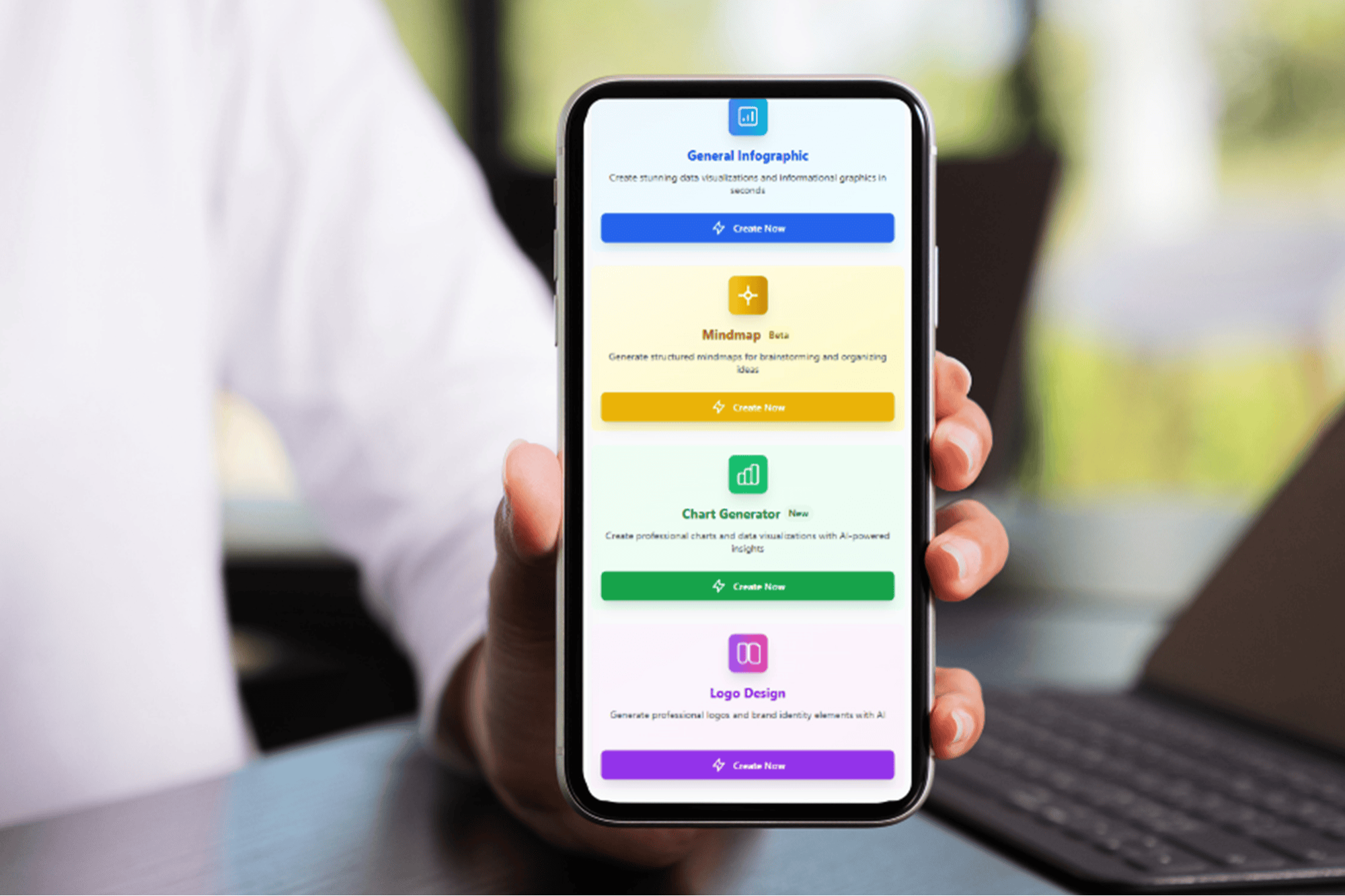
This is where InfographsAI comes in. It’s an AI-powered tool designed to generate polished infographics, charts, mind maps, and logos in as little as four minutes. Instead of struggling with generic templates that look like everyone else’s, the platform creates unique designs based on your actual content. Right now, it’s available for a limited-time offer of just $49.99 for a lifetime subscription, which is a significant discount from its regular price of $360.

Professional-Quality Designs at Your Fingertips

Saving time is crucial for any business owner, and InfographsAI helps achieve that. Whether you need a sales report transformed into a bar graph for a client presentation or a long block of text turned into a shareable infographic for social media, the tool makes it easy. If you're building a brand identity, the AI logo generator provides multiple professional variations in seconds. Everything you create can be manually edited, allowing you to fine-tune details and ensure consistency across different platforms.

One standout feature of InfographsAI is its built-in fact-checking system. This helps ensure that your data is up to date, reducing the risk of presenting outdated numbers or information. The platform supports more than 100 languages and offers automatic brand integration, making it ideal for businesses that need to reach diverse audiences quickly.

Continuous Improvements and Expansive Features

InfographsAI continues to evolve with frequent updates that add new features such as image generators and fresh design templates. Users have praised the tool for transforming messy notes, static PDFs, or pitch deck drafts into impressive visuals that impress both teams and clients.

Whether you're looking to enhance your marketing materials, simplify your internal planning, or build a strong brand presence, InfographsAI offers a powerful solution. It's particularly beneficial for those who need high-quality visuals but don't have the budget for a full-time designer.

A Smart Investment for Business Growth

With its combination of speed, ease of use, and professional results, InfographsAI is a valuable tool for entrepreneurs and small business owners. The current lifetime subscription deal at $49.99 makes it an even more attractive option for those looking to streamline their workflow and elevate their visual content.

By leveraging AI technology, businesses can save time, reduce costs, and maintain a consistent brand image. InfographsAI is not just a tool—it's a strategic asset that can help drive growth and improve communication with clients and stakeholders.

If you're ready to take your business visuals to the next level, consider exploring what InfographsAI has to offer. With its powerful features and affordable pricing, it's a smart investment that can pay off in the long run.

Sunday, April 12, 2026

Windows 11 Brings Android App Resumption to PC – A Game-Changer

Featured Image

New Feature in Windows 11: Resume from Android

Microsoft is introducing a new feature in its Windows 11 operating system that allows users to seamlessly continue their activities across devices. This functionality, known as "Resume," is currently available in testing phases for specific applications, with Spotify being the first supported app.

The feature works by syncing your activity between your Android phone and your Windows 11 PC. For instance, if you're listening to a playlist or podcast on Spotify via your smartphone and then switch to your desktop, Windows 11 will notify you through a pop-up alert in the taskbar. This alert lets you know that you can resume your playback directly on your PC. Simply clicking the notification will open the Spotify app, resuming playback exactly where you left off on your mobile device.

To use this feature, you need to have the Spotify app installed on your Windows 11 PC and be logged into the same account used on your Android phone. If Spotify isn't installed, a prompt will appear offering to download it from the Microsoft Store. Once installed, logging into your account is necessary to ensure continuity of your playback session.

Additionally, the Link to Windows app must be running on your smartphone, and your mobile device needs to be connected and accessible from your Windows 11 PC. These requirements are outlined in Microsoft's blog post detailing the feature.

A Streamlined Experience Inspired by Apple’s Handoff

This new feature closely resembles Apple's Handoff capability, which allows users to transition tasks between iOS and macOS devices. Microsoft's version, called Cross Device Resume, offers a similar level of convenience and efficiency. Although the feature is still in the testing phase, it represents a significant step forward in cross-platform integration.

The concept was previously revealed in an accidental preview during a pre-recorded Build session earlier this year. The video showing the feature was quickly edited to remove the demonstration, but the functionality has since been confirmed in current test builds. The process remains largely the same, with Spotify serving as the primary example.

Microsoft is expected to expand support for this feature to other apps in the future. While Spotify is the initial partner, there are indications that WhatsApp may also receive similar capabilities. This expansion could encourage more developers to adopt the feature, especially those who have apps available on both Windows 11 and Android platforms.

Encouraging Microsoft Store Adoption

The Resume feature also serves as a promotional tool for the Microsoft Store. By prompting users to install apps directly from the store, Microsoft aims to boost traffic and engagement with its platform. This aligns with recent efforts to improve the overall user experience and increase the visibility of apps available through the store.

Despite the benefits of this feature, some questions remain about why it took Microsoft so long to implement such a straightforward and useful functionality. Many users might find it surprising that a company with such a strong presence in the tech industry hasn't introduced this capability sooner.

Future Prospects and User Expectations

As more developers join the initiative, the potential for seamless cross-device experiences grows. Microsoft is likely to reach out to major app developers to encourage them to integrate this feature into their offerings. The success of this feature will depend on how widely it is adopted and how smoothly it integrates with existing workflows.

For now, the feature is available only in test builds, but it's clear that Microsoft sees value in expanding this functionality to a broader range of applications. As the feature matures, it could become a key selling point for Windows 11, especially for users who rely heavily on multiple devices throughout their day.

Monday, April 6, 2026

Software stocks struggle as AI takes the spotlight

Featured Image

The Tech Sector Faces Unprecedented Challenges from AI

The rapid advancement of artificial intelligence is reshaping the technology landscape, and while tech companies are at the forefront of developing AI tools, they are now experiencing significant challenges. The rise of AI technologies capable of writing and developing code has introduced a new level of uncertainty for the software industry, prompting concerns about the future of traditional business models.

One of the most notable areas affected by this shift is the Software as a Service (SaaS) model, which has long been a cornerstone of the tech industry. SaaS companies rely on subscription-based revenue, but the emergence of "agentic AI" — AI systems that can operate independently — is threatening to disrupt this model. These AI tools are becoming increasingly adept at coding, potentially allowing businesses to develop their own software without relying on third-party providers.

This disruption has led to declining stock performance for several major software companies. Salesforce (CRM), for example, has seen its shares drop by 26% this year, making it one of the worst-performing stocks in the Dow Jones Industrial Average. Adobe (ADBE) and Atlassian (TEAM) have also experienced significant declines, with shares down by 19% and 30%, respectively. In contrast, the broader market has shown resilience, with the S&P 500 up 10% and the Nasdaq Composite rising 11%.

Analysts suggest that the pressure on software valuations stems from the growing narrative that AI could render traditional software obsolete. Matthew Hedberg, a software research analyst at RBC Capital Markets, noted that this narrative is likely to drive continued volatility in the short term.

A Paradigm Shift in Technology

Ted Mortonson, a technology strategist at Baird, highlights that the market is currently grappling with a fundamental shift in how software and technology are being developed and utilized. Traditional SaaS companies, once favored by investors, are now facing the risk of losing relevance as AI continues to evolve and improve its coding capabilities.

Mortonson explained that the concept of "vibe coding" — where AI tools can autonomously write and develop code — poses a direct threat to the SaaS model. If companies can create their own software using these tools, they may no longer need to rent applications from established firms, leading to a decline in seat counts and subscriptions.

The speed of this transformation has caught many by surprise. Analysts note that while some companies may have anticipated the shift, few expected it to happen so quickly. Dan Ives, global head of technology research at Wedbush Securities, emphasized that Adobe and Salesforce, among others, underestimated the pace of the AI revolution.

AI’s Growing Influence

The idea that “software is eating the world” was popularized by venture capitalist Marc Andreessen in 2011. However, Jensen Huang, CEO of Nvidia, added a twist in 2017, stating that “AI is eating software.” This sentiment is gaining traction as more analysts recognize the transformative power of AI in the tech sector.

Ben Reitzes, head of tech research at Melius Research, believes that Huang’s prediction is proving true. He argues that AI is enabling startups and large cloud providers to develop applications that can compete effectively with traditional software companies. This trend is reminiscent of how cloud computing disrupted the dominance of hardware companies like Dell.

Sam Altman, CEO of OpenAI, recently highlighted the fast-paced nature of this transformation, suggesting that the SaaS industry is entering a “fast fashion era.” This implies that software solutions will be developed and replaced at an accelerated rate, further challenging the sustainability of traditional business models.

Competition from Big Tech

In addition to AI-driven disruptions, software companies are also facing increased competition from big tech giants. Microsoft (MSFT) and Oracle (ORCL) are expanding their AI capabilities, positioning themselves as strong contenders in the evolving market.

Microsoft CEO Satya Nadella has acknowledged the shift, noting that AI is driving a fundamental change in the business applications market. As customers move away from legacy systems toward agentic business applications, traditional software companies must adapt to remain relevant.

Despite these challenges, some analysts believe that the impact of AI on the software industry is not yet clear-cut. Angelo Zino, a tech analyst at CFRA Research, suggests that while there are concerns, it remains uncertain whether AI will fully replace traditional software. He points out that companies like Salesforce have already begun developing their own AI tools, such as “agentforce,” to stay competitive.

Uncertainty and Potential for Recovery

Wall Street remains divided on whether AI will ultimately replace SaaS or simply reshape it. While software company shares have declined this year, some analysts believe the market is overreacting. Brent Thill, an equity analyst at Jefferies, argues that AI is a transformational force rather than a destructive one for the software industry.

Thill notes that while there are headwinds, he believes software companies will eventually rebound and find ways to monetize their offerings within the AI ecosystem. He also points out that some of the limitations of current AI tools, such as "vibe coding," may prevent them from fully replacing human-developed software.

Ross Mayfield, an investment strategist at Baird, emphasizes the unpredictable nature of the AI market. He notes that the landscape can change rapidly, citing the recent impact of Chinese startup DeepSeek as an example. With so much uncertainty, investors must remain cautious and adaptable.

As the tech sector navigates this new era, the role of AI in shaping the future of software remains a topic of intense debate. While challenges abound, opportunities for innovation and adaptation continue to emerge.

Thursday, April 2, 2026

I Boost NotebookLM Mind Maps with This Chrome Extension

Featured Image

Enhancing NotebookLM Mind Maps with a Powerful Chrome Extension

When dealing with multiple documents, whether for work or studying, it can be challenging to keep track of all the connections between different pieces of information. A single key point might be buried in one document, while another document contains related ideas. This complexity can make it difficult to see the bigger picture.

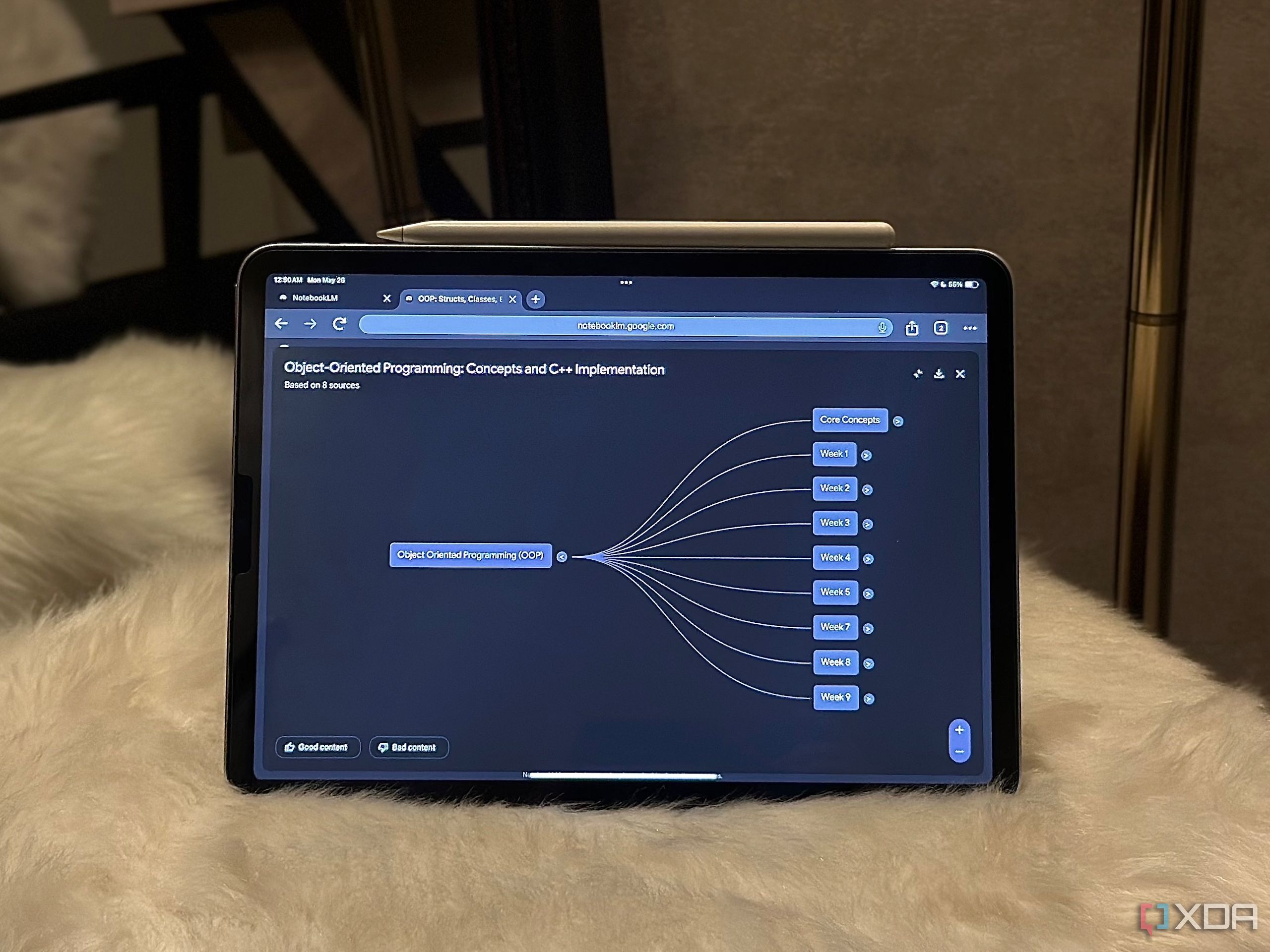
As AI continues to play a more significant role in our daily lives, I've found that tasks like connecting ideas across documents are ideal for AI assistance. NotebookLM's Mind Map feature, which was introduced earlier this year, is designed to help users visualize and connect their thoughts. However, since its launch, the feature has remained largely unchanged, offering the same functionality as when it first debuted.

Thankfully, there’s a solution that takes NotebookLM’s Mind Maps to the next level. A Chrome extension called the NotebookLM Mindmap Extractor has emerged as a valuable tool for enhancing the experience beyond what NotebookLM offers.

Exporting Mind Maps with Ease

While there are numerous Chrome extensions available for NotebookLM, many focus on bulk adding sources to notebooks. These tools are undoubtedly useful, especially for users who frequently add content. However, I was looking for something that could enhance my experience beyond just managing sources.

The NotebookLM Mindmap Extractor is still in its early stages but offers a unique feature that NotebookLM lacks: exporting mind maps. While NotebookLM does provide a download button, it only allows users to save maps as PNG images, which are static and not easily editable. The extension changes this by enabling exports in multiple formats, including FreeMind (.mm), Generic XML (.xml), and OPML (.opml) files.

Once the extension is installed and a mind map is fully expanded within a NotebookLM notebook, users simply click the extension icon and select the "Detect Mind Map" button. The extension processes the map quickly and allows users to export it in their preferred format. The developer recommends using the FreeMind format for the best results.

Preview and Analysis Features

At the bottom of the pop-up, the extension displays a preview of the mind map structure along with a "Level Distribution" breakdown. This feature shows how many nodes exist at each level of the map, giving users a quick insight into the complexity of their diagram. The developer claims that all processing occurs locally in the browser, ensuring data privacy.

Expanding the Possibilities

After exporting a mind map, the possibilities are endless. The extension maintains the original structure of the map, allowing users to move it to other tools without losing formatting, hierarchy, or relationships between nodes. This is particularly useful for those who want to customize their maps further.

I personally import my exported mind maps into Xmind, a mind mapping software that allows full customization. With Xmind, I can change node colors, adjust text size, rearrange branches, and even convert the diagram into different layouts like fishbone or organizational charts. I also find it helpful to add new nodes during research. The reason I don’t create mind maps directly in Xmind is that NotebookLM provides AI-generated connections and summaries that I find invaluable.

Until NotebookLM introduces proper customization options, this workflow feels like the perfect solution. I get the benefit of AI-driven insights from NotebookLM and then refine and present the map exactly as I want in Xmind.

A Game-Changing Tool

If you love NotebookLM's Mind Maps, this extension is worth trying immediately. Initially, I didn’t expect much from it, as it promised to export mind maps as clean, editable files. However, after testing it myself, I realized how much easier it makes working with these maps. Viewing and interacting with the map inside NotebookLM is great, but having the flexibility to edit, reorganize, and share it outside the platform is a game-changer.

Saturday, March 7, 2026

Built 5 Websites in Under an Hour Using ChatGPT-5 — Here's How

Featured Image

Exploring the Power of AI in Website Creation

In today’s digital age, building a website has become an essential step for businesses and individuals alike. While there are numerous website-building applications available, many users find them complex or time-consuming. However, with the advent of advanced AI tools like ChatGPT-5, the process has become significantly more accessible. I recently experimented with this AI to see how it would handle creating websites from scratch, and the results were both intriguing and informative.

A Simple Start: “Build a Website for Me”

My first attempt was straightforward—prompting ChatGPT-5 with the simple request: “Build a website for me.” The result was a complete, albeit generic, website. It seemed too good to be true, so I decided to push the boundaries by providing more detailed prompts for different types of businesses.

Case Study 1: Always Sunny Garden Center

For my first real test, I created a prompt for a garden center called "Always Sunny Garden Center." The goal was to design a vibrant, joyful website that reflected the company's friendly and family-owned vibe. The prompt included specific details about layout, color scheme, and navigation. The result was impressive, though it could have used more personalized elements like testimonials or a specific font palette. The code generated by ChatGPT-5 was clean and functional, and the process took about five minutes.

Case Study 2: Tumbles & Giggles Indoor Playground

Next, I tried a prompt for an indoor playground called "Tumbles & Giggles." The focus was on reassuring parents about safety while highlighting the fun aspects of the playground. The site needed to be clear and easy to navigate, with a playful and modern aesthetic. However, the AI did not include images of children, which is crucial for a business targeting families. This highlighted the need for additional prompts if realistic visuals are required.

Case Study 3: The Daily Grind Cafe

For a neighborhood cafe named "The Daily Grind," the prompt emphasized a cozy and inviting atmosphere. The AI struggled initially with generating authentic visuals, but after re-prompting, it improved. However, the site still felt similar to previous ones, indicating that the AI might rely on templates. Including specific requests for photographs helped enhance the visual appeal.

Case Study 4: Tangerine Twist Soda Marketing Site

Finally, I created a marketing website for a soda brand called "Tangerine Twist." The prompt asked for a high-converting landing page with images of young adults enjoying the beverage. Despite the explicit request, the AI failed to include realistic images. However, the product rendering and copywriting were impressive, showcasing the AI's potential in content creation.

What Comes Next After Code Generation?

Once the code is generated, the next steps involve testing the site in a browser to ensure everything functions correctly. If adjustments are needed, users can tweak the code and download it locally. Hosting options vary, with free services like GitHub Pages being ideal for beginners. More advanced users might opt for cloud services like AWS or Google Cloud.

Purchasing a domain name and connecting it to the hosting provider is the final step before launching the site. Many platforms allow for easy uploads through drag-and-drop interfaces or Git integration.

Final Thoughts

ChatGPT-5 proves to be a powerful tool for quickly creating functional websites. While it excels at generating basic layouts and content, achieving more advanced features like realistic images requires additional prompts. For those looking to get their site up and running without extensive coding knowledge, AI tools like ChatGPT-5 offer a viable solution. However, for more customized or complex projects, additional effort and possibly other tools may be necessary.

Sunday, February 1, 2026

STAAH Enhances SwiftBook Booking Engine

Featured Image

Enhancements to SwiftBook Booking Engine Improve User Experience

Hotel distribution technology provider STAAH has introduced new improvements to its SwiftBook Booking Engine, aiming to make the hotel booking process more straightforward for users. These updates are designed to streamline the experience and reduce confusion during the reservation journey.

One of the most significant changes is the redesigned Datepicker interface. The new version offers a “clutter-free” layout that removes excessive information, promotional content, rates, and restrictions from the booking calendar. This update is especially useful for mobile users, who often face challenges with limited screen space.

By eliminating non-essential details and only marking sold-out dates with a simple "x," the updated Datepicker supports a broader range of booking behaviors. It accommodates guests who are simply browsing for availability rather than looking for specific rate options. This shift in design helps create a more intuitive and user-friendly experience.

Hotels can easily implement the new Datepicker design through the BE Themes module in SwiftBook. They can select the updated interface from a dropdown menu, making the transition smooth and hassle-free.

Another notable improvement is the introduction of a visual indicator for sold-out dates. Previously, dates without availability were labeled as "SOLD," which led to confusion among users. Many interpreted this label as meaning the entire date was unavailable, including both arrival and departure times.

The updated design replaces the "SOLD" label with a clear "x." Additionally, it partially shades dates that are unavailable for arrival but still allow for departures. This change reduces misinterpretation and enhances the overall user experience.

These updates aim to make the availability status more intuitive, helping to reduce user frustration. By improving clarity, the latest enhancements in SwiftBook’s booking engine are expected to prevent potential guests from abandoning the booking process.

Collaboration with Cloudbeds

The recent upgrades come on the heels of STAAH’s partnership with Cloudbeds, a hospitality management software platform. This collaboration, announced earlier in May, aims to provide hotel operators with tools to streamline their channel management processes. By integrating with Cloudbeds, STAAH is expanding its capabilities to support hotels in managing their bookings more efficiently.

The improvements to the SwiftBook Booking Engine reflect STAAH’s ongoing commitment to enhancing the digital experience for both hoteliers and guests. As the hospitality industry continues to evolve, such innovations are essential in meeting the changing expectations of travelers.

Benefits for Hotel Operators

For hotel operators, these updates offer several advantages. The simplified booking interface not only improves the guest experience but also helps reduce the likelihood of abandoned bookings. A smoother and more transparent process can lead to higher conversion rates and better customer satisfaction.

Additionally, the ability to customize the booking interface through the BE Themes module gives hotels greater flexibility. They can tailor the look and feel of their booking page to align with their brand identity while maintaining a seamless user experience.

The integration with Cloudbeds further strengthens STAAH’s position in the market. By offering a comprehensive suite of tools, STAAH enables hotel operators to manage multiple channels more effectively, reducing the administrative burden and allowing them to focus on delivering exceptional service.

Looking Ahead

As the travel industry continues to adapt to new trends and technologies, STAAH’s latest updates demonstrate a forward-thinking approach. By prioritizing user experience and providing flexible solutions, the company is well-positioned to meet the needs of both hotels and guests.

With continued innovation and strategic partnerships, STAAH is setting a new standard in hotel distribution technology. These efforts are likely to have a lasting impact on how hotels manage their online presence and interact with customers.

STAAH Enhances SwiftBook Booking Engine

Featured Image

Enhancements to SwiftBook Booking Engine Improve User Experience

Hotel distribution technology provider STAAH has introduced new improvements to its SwiftBook Booking Engine, aiming to make the hotel booking process more straightforward for users. These updates are designed to streamline the experience and reduce confusion during the reservation journey.

One of the most significant changes is the redesigned Datepicker interface. The new version offers a “clutter-free” layout that removes excessive information, promotional content, rates, and restrictions from the booking calendar. This update is especially useful for mobile users, who often face challenges with limited screen space.

By eliminating non-essential details and only marking sold-out dates with a simple "x," the updated Datepicker supports a broader range of booking behaviors. It accommodates guests who are simply browsing for availability rather than looking for specific rate options. This shift in design helps create a more intuitive and user-friendly experience.

Hotels can easily implement the new Datepicker design through the BE Themes module in SwiftBook. They can select the updated interface from a dropdown menu, making the transition smooth and hassle-free.

Another notable improvement is the introduction of a visual indicator for sold-out dates. Previously, dates without availability were labeled as "SOLD," which led to confusion among users. Many interpreted this label as meaning the entire date was unavailable, including both arrival and departure times.

The updated design replaces the "SOLD" label with a clear "x." Additionally, it partially shades dates that are unavailable for arrival but still allow for departures. This change reduces misinterpretation and enhances the overall user experience.

These updates aim to make the availability status more intuitive, helping to reduce user frustration. By improving clarity, the latest enhancements in SwiftBook’s booking engine are expected to prevent potential guests from abandoning the booking process.

Collaboration with Cloudbeds

The recent upgrades come on the heels of STAAH’s partnership with Cloudbeds, a hospitality management software platform. This collaboration, announced earlier in May, aims to provide hotel operators with tools to streamline their channel management processes. By integrating with Cloudbeds, STAAH is expanding its capabilities to support hotels in managing their bookings more efficiently.

The improvements to the SwiftBook Booking Engine reflect STAAH’s ongoing commitment to enhancing the digital experience for both hoteliers and guests. As the hospitality industry continues to evolve, such innovations are essential in meeting the changing expectations of travelers.

Benefits for Hotel Operators

For hotel operators, these updates offer several advantages. The simplified booking interface not only improves the guest experience but also helps reduce the likelihood of abandoned bookings. A smoother and more transparent process can lead to higher conversion rates and better customer satisfaction.

Additionally, the ability to customize the booking interface through the BE Themes module gives hotels greater flexibility. They can tailor the look and feel of their booking page to align with their brand identity while maintaining a seamless user experience.

The integration with Cloudbeds further strengthens STAAH’s position in the market. By offering a comprehensive suite of tools, STAAH enables hotel operators to manage multiple channels more effectively, reducing the administrative burden and allowing them to focus on delivering exceptional service.

Looking Ahead

As the travel industry continues to adapt to new trends and technologies, STAAH’s latest updates demonstrate a forward-thinking approach. By prioritizing user experience and providing flexible solutions, the company is well-positioned to meet the needs of both hotels and guests.

With continued innovation and strategic partnerships, STAAH is setting a new standard in hotel distribution technology. These efforts are likely to have a lasting impact on how hotels manage their online presence and interact with customers.

Sunday, November 30, 2025

Google Fixes Major Password Manager Issue — Still Not Perfect

Featured Image

The Evolution of Google Password Manager

When it comes to password management, many people tend to overlook the options available in their preferred platforms. However, it's not surprising that Google's password manager hasn't made the cut for top recommendations. While it isn't inherently bad at its job, it has often been a source of frustration for users due to its cumbersome interface.

The primary issue with Google's password manager has always been its placement within the labyrinth of menus across various Google services. On Android, accessing the password manager required navigating through multiple settings and account pages, making it an inconvenient process. This design choice, while understandable from a technical standpoint, led to a poor user experience.

Google initially aimed for a system that could work autonomously, using autofill to enter passwords whenever needed. Over time, they introduced a shortcut option on the Android home screen, but this still required users to dive deep into settings to find it. By that point, many had already given up on using Google's built-in password manager and opted for third-party alternatives.

A New Approach to Password Management

Recently, there have been signs of improvement with the launch of the Pixel 10 and Android 16. One of the most notable changes is the introduction of Google Password Manager as a standalone app on the Play Store. This means users can now download it directly, making it more accessible than before. Although the functionality remains largely the same, the convenience of having it as an app is a step in the right direction.

The shift to a Play Store app also allows Google to enforce a rule requiring Android manufacturers to include the password manager by default. This could significantly increase its adoption rate, especially if users are encouraged to set up complex passwords instead of reusing them across accounts.

However, despite these improvements, the core features of Google Password Manager haven't evolved much. Other free password managers offer additional functionalities beyond just securing login details. For instance, they often provide secure notes, document storage, and contact management—features that are essential for comprehensive security.

Learning from Apple’s Approach

Apple's Password Manager, launched alongside iOS 18, has set a new standard for what a password manager should be. It's not just a tool for storing login credentials; it also includes authenticator codes, Wi-Fi passwords, and alerts about data breaches. This integration into a single, secure location makes it incredibly convenient and user-friendly.

While Apple's solution has its limitations, such as the lack of secure note storage, the fact that everything is centralized and protected by biometric authentication makes it a compelling option. The convenience of having all security-related information in one place encourages users to take advantage of these features, especially since it's free and works seamlessly across all Apple devices.

Google would benefit greatly from adopting a similar approach. Merging its existing features into a single, secure location could enhance user experience and make the password manager more appealing. Additionally, focusing on surpassing Apple's offerings could help Google compete more effectively with dedicated password managers like NordPass.

Conclusion

As the digital landscape continues to evolve, the need for robust and user-friendly password management solutions becomes increasingly important. While Google has taken some steps to improve its password manager, there is still room for growth. By learning from Apple's successful model and incorporating additional features, Google can create a more compelling product that meets the needs of modern users. The sooner this happens, the better it will be for both users and the broader cybersecurity community.

Google Fixes Major Password Manager Issue — Still Not Perfect

Featured Image

The Evolution of Google Password Manager

When it comes to password management, many people tend to overlook the options available in their preferred platforms. However, it's not surprising that Google's password manager hasn't made the cut for top recommendations. While it isn't inherently bad at its job, it has often been a source of frustration for users due to its cumbersome interface.

The primary issue with Google's password manager has always been its placement within the labyrinth of menus across various Google services. On Android, accessing the password manager required navigating through multiple settings and account pages, making it an inconvenient process. This design choice, while understandable from a technical standpoint, led to a poor user experience.

Google initially aimed for a system that could work autonomously, using autofill to enter passwords whenever needed. Over time, they introduced a shortcut option on the Android home screen, but this still required users to dive deep into settings to find it. By that point, many had already given up on using Google's built-in password manager and opted for third-party alternatives.

A New Approach to Password Management

Recently, there have been signs of improvement with the launch of the Pixel 10 and Android 16. One of the most notable changes is the introduction of Google Password Manager as a standalone app on the Play Store. This means users can now download it directly, making it more accessible than before. Although the functionality remains largely the same, the convenience of having it as an app is a step in the right direction.

The shift to a Play Store app also allows Google to enforce a rule requiring Android manufacturers to include the password manager by default. This could significantly increase its adoption rate, especially if users are encouraged to set up complex passwords instead of reusing them across accounts.

However, despite these improvements, the core features of Google Password Manager haven't evolved much. Other free password managers offer additional functionalities beyond just securing login details. For instance, they often provide secure notes, document storage, and contact management—features that are essential for comprehensive security.

Learning from Apple’s Approach

Apple's Password Manager, launched alongside iOS 18, has set a new standard for what a password manager should be. It's not just a tool for storing login credentials; it also includes authenticator codes, Wi-Fi passwords, and alerts about data breaches. This integration into a single, secure location makes it incredibly convenient and user-friendly.

While Apple's solution has its limitations, such as the lack of secure note storage, the fact that everything is centralized and protected by biometric authentication makes it a compelling option. The convenience of having all security-related information in one place encourages users to take advantage of these features, especially since it's free and works seamlessly across all Apple devices.

Google would benefit greatly from adopting a similar approach. Merging its existing features into a single, secure location could enhance user experience and make the password manager more appealing. Additionally, focusing on surpassing Apple's offerings could help Google compete more effectively with dedicated password managers like NordPass.

Conclusion

As the digital landscape continues to evolve, the need for robust and user-friendly password management solutions becomes increasingly important. While Google has taken some steps to improve its password manager, there is still room for growth. By learning from Apple's successful model and incorporating additional features, Google can create a more compelling product that meets the needs of modern users. The sooner this happens, the better it will be for both users and the broader cybersecurity community.

Sunday, November 2, 2025

5 Secret Waze Tips You're Missing Out On

Featured Image

Discover Hidden Waze Features to Enhance Your Navigation Experience

Waze has become a go-to navigation app for many users, offering a range of features that set it apart from other mapping services. While it's known for its community-driven approach and real-time updates, there are several lesser-known features that can significantly improve your experience on the app.

Determine the Right Time to Leave for Your Destination

One of the most useful features in Waze is the "Plan a drive" function. Instead of starting navigation immediately, this tool allows you to schedule future trips based on your desired arrival time. By entering your destination and arrival time, Waze calculates the best departure time considering current traffic conditions. This helps you avoid getting stuck in traffic and ensures you reach your destination on time.

To use this feature, open the Waze app, tap the hamburger menu in the top-left corner, and select "Plan a drive." Add your destination, choose the day and arrival time, and save the trip. Waze will send you a notification when it's time to leave, and the trip will appear under the "Upcoming" section for easy access.

Connect Your Calendar for Timely Alerts

If you want to streamline your planning, Waze offers an integration with your calendar. This feature automatically pulls your upcoming trips from your calendar, ensuring you receive timely reminders to leave on time. It works with both Google Calendar (for Android) and Apple Calendar (for iPhone). For third-party calendars, you’ll need to sync them with the default calendar first.

To connect your calendar, navigate to the "Plan a drive" section, tap "Connect calendar," and grant access. You can then configure which events Waze should track and set preferences for time-to-leave notifications. Once set up, all your commutes will appear in the "Upcoming" section, and you'll get alerts when it's time to depart.

Customize Your Navigation Voice

Waze allows you to personalize your navigation experience by using a custom voice for turn-by-turn directions. Whether you prefer a more familiar voice or one that’s easier to understand, this feature lets you record your own directions and use them instead of the default voice.

To set up a custom voice, go to the settings menu, select "Voice and sound," and enable "Sounds" under "Voice directions." Tap "Waze voice" and choose "New voice" under "Custom voices." Follow the prompts to record and save your voice for each direction phrase. Once completed, you can select your custom voice as the default for navigation.

Find Parking Spots Near Your Location

Navigating to a destination can be stressful, especially if you're unsure where to park. Waze simplifies this process by providing information on nearby parking spots, including availability, rates, and amenities like EV charging stations. This feature is available before your drive, during your journey, or upon arrival at your destination.

When searching for an address, Waze shows a list of parking options. You can set a parking spot as a stop or view parking pins along your route. Additionally, you can manually search for parking once you arrive by tapping the search bar and selecting the "Parking" option. Results can be sorted by price, distance, or relevance, making it easier to find the best spot.

Navigate Using Coordinates for Unaddressed Locations

Sometimes, you may need to navigate to a location without a formal address, such as a meeting point or a scenic spot. Waze allows you to use GPS coordinates to get directions to these places. Enter the latitude and longitude in decimal degrees format, separated by a comma, and Waze will display the location on the map. You can then view available routes and choose to navigate immediately or schedule the trip for later.

Additionally, Waze can show your current coordinates in real-time, which is useful for precise navigation and sharing exact locations with others. Simply type ##@coord in the search bar to toggle this feature on or off.

By leveraging these hidden features, Waze becomes more than just a navigation tool—it transforms into a comprehensive companion for your daily commutes and adventures. Whether you're looking to plan ahead, personalize your experience, or navigate to unique locations, Waze has the tools to make your journey smoother and more efficient.