Showing posts with label music. Show all posts

Friday, July 3, 2026

The Alaskan Logging Threat to Steinway's Legendary Pianos

Featured Image

The Fate of a Historic Sawmill and Its Impact on Steinway & Sons

The decline of logging in Alaska’s Tongass National Forest has far-reaching consequences, even reaching the heart of New York City. In Astoria, Queens, Steinway & Sons, one of the oldest operating factories in the city, continues to craft its iconic pianos using wood from the remote forests of Southeast Alaska. Central to this process is Sitka spruce, a type of wood known for its unique acoustic properties that contribute to the distinct sound of Steinway pianos.

Sitka spruce is used in several key components of the pianos, including the ribs, braces, soundboards, and white keys. This specific wood, sourced from the islands of Southeast Alaska, is prized for its density and resonance. However, the supply chain that delivers this essential material is under threat due to reduced logging activity in the Tongass National Forest.

Viking Lumber, Steinway’s sole supplier of Sitka spruce, is facing a critical shortage of timber. The company operates a sawmill on Prince of Wales Island, 600 miles north of Seattle, which is the last major sawmill in the Alaskan panhandle. Without access to Tongass timber, the facility will be forced to close, according to Kirk Dahlstrom, one of Viking’s owners.

Dahlstrom explained that a recent agreement with Alaska’s government to cut state-owned timber, along with ongoing logging jobs, may provide enough wood to keep the mill running through the winter months. However, he remains uncertain about the future supply of Sitka spruce beyond that period.

The closure of the sawmill would have devastating economic effects on the region. The town of Craig, with a population of around 1,000 residents, would suffer greatly. The mill employs approximately 45 people year-round, and many more workers, including truck drivers, barge pilots, and loggers, would lose their jobs if the operation shuts down.

This situation is not isolated. President Trump has advocated for increased timber harvests from federal forests as part of his broader push to boost domestic production of raw materials. He has also considered imposing tariffs on imported lumber, citing national security concerns. Meanwhile, the Agriculture Department has begun the process of rescinding the “roadless rule,” which limits road construction on federal lands and has hindered logging activities.

Regional Forest Service supervisors are also tasked with developing five-year plans to increase timber harvests by 25% on federal land. Despite these efforts, they do little to address Viking’s immediate challenges. According to Dahlstrom, a 25% increase in logging in the Tongass would barely make a dent in the company’s needs, equating to just a week’s worth of wood.

In recent years, Viking has relied on small federal timber sales but has not been offered a significant tract of land since 2016. That year, a forest management plan was adopted for the Tongass that projected much higher annual harvests than what has actually occurred. In March, Viking, along with a local logging company and the Alaska Forest Association, filed a lawsuit against the Forest Service, Agriculture Department, and Agriculture Secretary Brooke Rollins, alleging that the government failed to meet the goals outlined in the 2016 plan.

Wood from old-growth forests is highly valued for its quality, but these ancient trees also play a crucial role in maintaining healthy ecosystems. Environmental groups, tribal organizations, and fishing interests have joined the legal battle, opposing large-scale logging of old-growth forests.

Despite being defendants in the case, federal agencies have publicly expressed support for Viking outside of court. A spokesperson for the Forest Service stated that the USDA remains committed to supporting locally based mills and responsible timber harvesting in the Tongass National Forest.

Kirk Dahlstrom’s journey into the logging industry began in 1978 when he and his brother built a sawmill in Washington state. They later expanded their operations to Alaska, where they found an abundance of old hemlocks and no northern spotted owls—environmentalists had previously used the Endangered Species Act to restrict logging in Washington, leading to a decline in timber production.

In Alaska, Viking began cutting Sitka spruce, a strong yet lightweight wood that was instrumental in early aviation and became a key material during World War I. Japanese buyers were among the first to purchase this wood, followed by Steinway & Sons. As other Alaskan mills closed, Viking became the primary supplier to Steinway, as well as a source for guitar makers, aviation firms, and the military.

Steinway’s spruce is transported to Washington for further processing before being shipped to New York, where it is used in the company’s piano manufacturing. Kyle Walters, director of manufacturing at Steinway, noted that the wood is the most expensive component in the pianos, which also include hard rock maple, poplar, and mahogany.

Although Steinway currently has enough spruce to maintain its production of about 1,000 pianos per year, the company is concerned about the long-term availability of the wood. CEO Ben Steiner has written to Alaska officials, urging them to support Viking’s continued operations.

Sitka spruce grows along the Pacific Coast, but the trees needed for Steinway’s pianos are specifically found in Alaska. The brief growing season in the region results in a tighter grain, which enhances the wood’s acoustic properties. According to Steiner, the spruce used by Steinway is among the top 1% of the top 1% available in the world.


Tuesday, June 30, 2026

How CU Boulder Researchers Mirror Taylor Swift's Traits

Featured Image

Taylor Swift and the Fight for Control Over Creative Work

Taylor Swift is known for many things: a music icon, a billionaire, and a passionate football fan. But in an unexpected twist, she has also become a symbol of a struggle that resonates deeply with academic researchers. A recent article by a University of Colorado librarian draws a compelling parallel between Swift’s re-recording saga and the challenges scholars face when trying to retain control over their own work.

The Importance of Access to Research

Equitable and affordable access to scholarly research is crucial for driving innovation. However, many academics find themselves in a difficult position when they publish their work in major journals. Often, they cede their copyrights, which limits how their research can be shared and accessed. This issue is not just about ownership; it's about the broader implications for society and scientific progress.

The Role of Open Access

Melissa Cantrell, a scholarly communication librarian at CU Boulder, highlighted this issue in her article. She advocates for "open access," which means making research articles freely available online. This approach ensures that knowledge is not restricted behind paywalls, allowing more people to benefit from academic discoveries.

In traditional scholarly publishing, researchers submit their work to journals for peer review and publication. However, Cantrell points out that many researchers are unaware that author contracts often include clauses where they forfeit their copyrights. As a result, universities must purchase subscriptions to access the very research their own faculty members have produced.

This financial burden is significant. According to the university, CU Boulder spends over $10 million annually on journal subscriptions. These costs can hinder the dissemination of important findings and limit the impact of research.

Open Access Agreements and Initiatives

Despite these challenges, there are positive developments. CU Boulder has several open access agreements with publishers, as well as an open access fund to support the costs of publishing. The university estimates that 75% of the research produced by its faculty in 2023 is available through open access.

Cantrell emphasizes that making research accessible benefits everyone. She explains that limited access to scholarly work can affect critical areas such as cancer treatment and pandemic studies. At a large university like CU Boulder, much of the research is intended to serve the public good, and ensuring that information is widely available is essential.

Concerns and Challenges

However, the push for open access is not without its critics. Some argue that without the rigorous vetting processes of traditional journals, the quality of research could suffer. Additionally, tenure pressures often lead researchers to prioritize publishing in prestigious journals, even if it means sacrificing open access.

The Trump administration's actions also highlight some of the complexities surrounding open access. In an effort to combat what Donald Trump Jr. referred to as "woke" science, millions in funding were cut for Springer Nature, a major publisher with an open access agreement with CU Boulder. This move underscores the political dimensions of the open access debate.

The Path Forward

Cantrell believes that institutions can play a role in supporting open access, but ultimately, authors must take control of their work. Just as Taylor Swift has reclaimed her music, researchers need to advocate for their rights and ensure their findings are accessible to all.

"We can only do so much in the libraries — faculty need to have these discussions within their departments," Cantrell said. By fostering a culture of openness and collaboration, the academic community can work towards a future where knowledge is freely shared and widely accessible.

Tuesday, March 24, 2026

Why Nova Twins Thrive on the Live Pedal Challenge

Featured Image

Challenging Stereotypes in the Music Industry

British alt-rock duo Nova Twins have opened up about the sexism they encounter as female musicians who are passionate about using pedals to create unique sounds. Despite their ability to produce all their music live, many people still accuse them of miming. This issue highlights a broader problem within the music industry, where women often face unnecessary scrutiny and doubt.

Amy Love and Georgia South, the dynamic guitar and bass duo behind Nova Twins, have become one of the most innovative rock acts to emerge from the underground scene in recent years. Their creative approach involves combining the sounds of their instruments with unconventional stompboxes, which has captivated many listeners. However, their success hasn't come without challenges, as they also face detractors who question their authenticity.

As Love shared in an interview, being a woman in the music industry means constantly proving oneself. "You have to be exceptional to meet a man's average," she said. South echoed this sentiment, adding that it's "crazy" how much effort is required just to be recognized for one's talent.

The duo keeps their pedalboards a closely guarded secret, but their live performances are known for their complexity and creativity. They take pride in playing everything live without relying on synths or pre-recorded tracks. "Men love to come along to our shows and say, 'They're miming! They're not playing live!' but the sounds we make are all live," Love explained.

South mentioned that they often have to win over audiences who aren't sure what to expect from their sets. This challenge extends beyond the stage, as even backstage interactions can be difficult. She recounted a time when a person asked their guitar tech, "What guitars do you have?" The tech responded, "Oh, no, those are the girls' guitars..." but the person didn't believe him, assuming the tech was joking. The idea that the guitars could genuinely belong to the band completely escaped the person's understanding.

In 2025, such attitudes are troubling, especially considering the number of inventive non-male musicians who are making waves across various genres. Artists like Yvette Young, Grace Bowers, Lari Basilio, The Warning, and Molly Tuttle are proof that women are breaking barriers and redefining what it means to be a musician.

Nova Twins, set to release their third album, Parasites & Butterflies, later this year, are challenging sexist stereotypes through their music. South has cited her love for heavy electronic music and dubstep as inspiration for her unique guitar sound. The balance of their instruments leans more toward electronic textures than traditional rock n' roll, which has helped them gain a wide audience.

Their innovative approach has led to performances at major festivals across Europe and the U.S., as well as collaborations with notable artists like Bring Me The Horizon and Ho99o9. Through their music, Nova Twins continue to push boundaries and inspire others to embrace creativity without limits.

Tuesday, February 10, 2026

Music Photographer Discovers Samsung's Festival Photo Secrets

Featured Image

Festival Photo Hacks

When attending a concert or festival, capturing the perfect shot can be challenging. However, there are several clever photo and filming hacks that can help you get the best results. Whether you're using a smartphone or a dedicated camera, these tips from Kadesh Beckford, Samsung's Smartphone Specialist for Mobile Experience, can make a big difference.

Utilize Golden Hour Rules

One of the most effective techniques is to take advantage of the golden hour. This is the time just after sunrise or before sunset when the light is soft and warm. Using portrait mode on your camera phone can help blur out distractions, allowing you to capture those glowing crowd shots with ease.

Ultra-Wide for Atmosphere

Switching to your phone's ultra-wide lens is another great way to capture the full scale and essence of the stage and crowd. This setting is perfect for showing the sea of hands in the air, as well as the artist performing on stage.

Go Low for Drama

Kadesh suggests holding your phone lower than eye-level when shooting the stage. This not only creates a unique point of view shot but also makes the artist look larger than life. It adds a dramatic effect that can enhance the overall visual impact of your photos.

Switch Off the Flash

Stage lighting should be sufficient for photographing a concert, so using flash is generally unnecessary. In fact, it can wash out your subject and ruin the shot. As a photographer, it's important to follow the "first 3, no flash" policy, which means no flash and only capturing the first three songs of an artist's setlist.

Keep It Steady

While carrying a tripod can be cumbersome, it's essential for long exposure shots of lasers or fireworks. Alternatively, you can rest your phone on a barrier to keep it steady, achieving the same smooth effect without the need for additional equipment.

Concert Videography Tips

Shooting high-quality video at concerts requires some specific techniques and settings. Here are some expert tips to help you create professional-looking clips.

Shoot in 4K at 60fps (UHD60)

If your camera phone supports it, shooting footage in 4K at 60fps provides crisp, smooth footage. This allows for greater flexibility during editing without losing any quality. You can then share the clip across social media in the highest resolution possible. However, keep in mind that 4K consumes more battery power, so it's wise to pack a portable charger or one of the best power banks.

Turn HDR On for Concerts

Enabling HDR (high dynamic range) in your camera settings can help balance out stage lighting. This feature ensures that highlights are not blown out and faces are not left in shadow, resulting in a more balanced and visually appealing shot.

Ensure Super Steady Stabilization is OFF

This tip might be controversial, but turning off Super Steady stabilization can actually improve the quality of your footage. When filming live music, the energy comes through in the crowd, and you want to capture that naturally rather than having your phone fight the movement.

Lock Your Focus and Contrast

Focus the camera on your artist and adjust the contrast slightly using the on-screen slider. Then, lock these settings in place by tapping the lock icon. This prevents blown-out spotlights or auto-adjusts from ruining your clip.

Stick to Pre-Set Zooms, Not Pinch-and-Zoom

Using pre-set zoom levels on camera phones, such as 2X or 5X, keeps your videos sharper. The custom pinch-to-zoom method can result in grainy footage, so it's better to stick with the pre-set options.

Elevate Your Audio

For Samsung users, the Audio Eraser feature is a game-changer. This built-in AI sound tool can strip out unwanted noise, such as wind, crowd chatter, or even a drunk fan singing along to a song. After filming, head into the Gallery app, tap the Galaxy AI icon, and enjoy crisp vocals and music as if you had a backstage pass.

Kadesh also recommends investing in an external mic for better sound quality. A small clip-on mic can elevate the audio in your concert clips, providing a more professional finish.

Music Photographer Discovers Samsung's Festival Photo Secrets

Featured Image

Festival Photo Hacks

When attending a concert or festival, capturing the perfect shot can be challenging. However, there are several clever photo and filming hacks that can help you get the best results. Whether you're using a smartphone or a dedicated camera, these tips from Kadesh Beckford, Samsung's Smartphone Specialist for Mobile Experience, can make a big difference.

Utilize Golden Hour Rules

One of the most effective techniques is to take advantage of the golden hour. This is the time just after sunrise or before sunset when the light is soft and warm. Using portrait mode on your camera phone can help blur out distractions, allowing you to capture those glowing crowd shots with ease.

Ultra-Wide for Atmosphere

Switching to your phone's ultra-wide lens is another great way to capture the full scale and essence of the stage and crowd. This setting is perfect for showing the sea of hands in the air, as well as the artist performing on stage.

Go Low for Drama

Kadesh suggests holding your phone lower than eye-level when shooting the stage. This not only creates a unique point of view shot but also makes the artist look larger than life. It adds a dramatic effect that can enhance the overall visual impact of your photos.

Switch Off the Flash

Stage lighting should be sufficient for photographing a concert, so using flash is generally unnecessary. In fact, it can wash out your subject and ruin the shot. As a photographer, it's important to follow the "first 3, no flash" policy, which means no flash and only capturing the first three songs of an artist's setlist.

Keep It Steady

While carrying a tripod can be cumbersome, it's essential for long exposure shots of lasers or fireworks. Alternatively, you can rest your phone on a barrier to keep it steady, achieving the same smooth effect without the need for additional equipment.

Concert Videography Tips

Shooting high-quality video at concerts requires some specific techniques and settings. Here are some expert tips to help you create professional-looking clips.

Shoot in 4K at 60fps (UHD60)

If your camera phone supports it, shooting footage in 4K at 60fps provides crisp, smooth footage. This allows for greater flexibility during editing without losing any quality. You can then share the clip across social media in the highest resolution possible. However, keep in mind that 4K consumes more battery power, so it's wise to pack a portable charger or one of the best power banks.

Turn HDR On for Concerts

Enabling HDR (high dynamic range) in your camera settings can help balance out stage lighting. This feature ensures that highlights are not blown out and faces are not left in shadow, resulting in a more balanced and visually appealing shot.

Ensure Super Steady Stabilization is OFF

This tip might be controversial, but turning off Super Steady stabilization can actually improve the quality of your footage. When filming live music, the energy comes through in the crowd, and you want to capture that naturally rather than having your phone fight the movement.

Lock Your Focus and Contrast

Focus the camera on your artist and adjust the contrast slightly using the on-screen slider. Then, lock these settings in place by tapping the lock icon. This prevents blown-out spotlights or auto-adjusts from ruining your clip.

Stick to Pre-Set Zooms, Not Pinch-and-Zoom

Using pre-set zoom levels on camera phones, such as 2X or 5X, keeps your videos sharper. The custom pinch-to-zoom method can result in grainy footage, so it's better to stick with the pre-set options.

Elevate Your Audio

For Samsung users, the Audio Eraser feature is a game-changer. This built-in AI sound tool can strip out unwanted noise, such as wind, crowd chatter, or even a drunk fan singing along to a song. After filming, head into the Gallery app, tap the Galaxy AI icon, and enjoy crisp vocals and music as if you had a backstage pass.

Kadesh also recommends investing in an external mic for better sound quality. A small clip-on mic can elevate the audio in your concert clips, providing a more professional finish.

Tuesday, February 3, 2026

Music Photographer Learns from Samsung's Concert Tips

Featured Image

Festival Photography Hacks

When heading to a concert or festival, it's essential to have the right techniques to capture the best moments. Whether you're using a smartphone or a dedicated camera, there are several tricks that can elevate your photography game. These hacks, shared by Kadesh Beckford, Samsung’s Smartphone Specialist for Mobile Experience, can help you make the most of your phone's camera capabilities.

Utilize Golden Hour Rules

One of the most effective tips is to take advantage of golden hour lighting. This time of day, just after sunrise or before sunset, provides soft, warm light that can create stunning images. Using portrait mode on your camera phone allows you to blur out distractions and focus on the subjects, resulting in those glowing crowd shots that are perfect for sharing on social media.

Ultra-Wide for Atmosphere

Switching to the ultra-wide lens on your phone can capture the full scale and essence of the stage and crowd. This perspective is ideal for showing the sea of hands in the air and the artist performing on stage. It gives a more immersive feel to your photos and videos, making them more engaging for viewers.

Go Low for Drama

Kadesh suggests holding your phone lower than eye-level when shooting the stage. This technique not only creates a unique point of view but also makes the artist appear larger than life. It adds a dramatic element to your shots, making them stand out from the typical crowd photos.

Switch Off the Flash

Stage lighting is usually sufficient for photographing a concert, so using the flash can wash out your subject. As a photographer, it's important to follow the "first 3, no flash" policy, which means no flash and only capturing the first three songs of an artist's setlist. This helps maintain the integrity of the event and ensures that your photos are well-lit without any harsh shadows.

Keep It Steady

Using a tripod is essential for long exposure shots of lasers or fireworks. However, if you don't have a tripod, you can rest your phone on a barrier to keep it steady. This will result in smoother clips without relying on in-phone stabilization, giving you more control over the quality of your footage.

Concert Videography Tips

Shooting high-quality video at concerts requires attention to detail and the right settings. Here are some tips to help you capture the best footage.

Shoot in 4K at 60fps (UHD60)

If your camera phone supports it, shooting in 4K at 60fps offers crisp, smooth footage. This resolution provides flexibility for editing later without losing any quality. You can then share the clip across your social media platforms in the highest possible resolution.

Note: Shooting in 4K consumes a lot of battery power, so be sure to pack a portable charger or one of the best power banks to keep your phone charged throughout the event.

Turn HDR On for Concerts

Enabling HDR (high dynamic range) in your camera settings can help balance out stage lighting. This feature prevents highlights from being blown out or faces from being left in shadow, ensuring that your footage looks professional and well-balanced.

Ensure Super Steady Stabilization Is OFF

This tip might be controversial, but Kadesh recommends turning off Super Steady stabilization. While this feature is designed to stabilize your footage, it can sometimes make the stage lighting look artificially wobbly when the phone tries to correct big movements. When filming live music, the energy comes through in the crowd, and you want to capture that naturally rather than have your phone fight it.

Lock Your Focus and Contrast

Focus the camera on your artist and turn the contrast down slightly using the on-screen slider. Then, lock these settings in place by tapping the lock icon. This prevents blown-out spotlights or auto-adjusts from ruining your clip, ensuring consistent quality throughout your footage.

Stick to Pre-Set Zooms, Not Pinch-and-Zoom

Pre-set zoom levels on camera phones, such as 2X or 5X, keep your videos sharper. Using the custom pinch-to-zoom method can lead to grainy footage, so it's better to stick with the pre-set options for the best results.

Elevate Your Audio

For Samsung users, the Audio Eraser feature is a game-changer. This built-in AI sound tool can strip out unwanted noise, whether it's wind, crowd chatter, or a drunk fan singing along to a song. After filming, head into the Gallery app, find your video, tap the Galaxy AI icon, and use this feature to enhance the audio quality.

Kadesh also suggests investing in an external microphone for better sound quality. A small clip-on mic can significantly improve the audio in your concert clips, giving you professional-grade recordings.

Music Photographer Learns from Samsung's Concert Tips

Featured Image

Festival Photography Hacks

When heading to a concert or festival, it's essential to have the right techniques to capture the best moments. Whether you're using a smartphone or a dedicated camera, there are several tricks that can elevate your photography game. These hacks, shared by Kadesh Beckford, Samsung’s Smartphone Specialist for Mobile Experience, can help you make the most of your phone's camera capabilities.

Utilize Golden Hour Rules

One of the most effective tips is to take advantage of golden hour lighting. This time of day, just after sunrise or before sunset, provides soft, warm light that can create stunning images. Using portrait mode on your camera phone allows you to blur out distractions and focus on the subjects, resulting in those glowing crowd shots that are perfect for sharing on social media.

Ultra-Wide for Atmosphere

Switching to the ultra-wide lens on your phone can capture the full scale and essence of the stage and crowd. This perspective is ideal for showing the sea of hands in the air and the artist performing on stage. It gives a more immersive feel to your photos and videos, making them more engaging for viewers.

Go Low for Drama

Kadesh suggests holding your phone lower than eye-level when shooting the stage. This technique not only creates a unique point of view but also makes the artist appear larger than life. It adds a dramatic element to your shots, making them stand out from the typical crowd photos.

Switch Off the Flash

Stage lighting is usually sufficient for photographing a concert, so using the flash can wash out your subject. As a photographer, it's important to follow the "first 3, no flash" policy, which means no flash and only capturing the first three songs of an artist's setlist. This helps maintain the integrity of the event and ensures that your photos are well-lit without any harsh shadows.

Keep It Steady

Using a tripod is essential for long exposure shots of lasers or fireworks. However, if you don't have a tripod, you can rest your phone on a barrier to keep it steady. This will result in smoother clips without relying on in-phone stabilization, giving you more control over the quality of your footage.

Concert Videography Tips

Shooting high-quality video at concerts requires attention to detail and the right settings. Here are some tips to help you capture the best footage.

Shoot in 4K at 60fps (UHD60)

If your camera phone supports it, shooting in 4K at 60fps offers crisp, smooth footage. This resolution provides flexibility for editing later without losing any quality. You can then share the clip across your social media platforms in the highest possible resolution.

Note: Shooting in 4K consumes a lot of battery power, so be sure to pack a portable charger or one of the best power banks to keep your phone charged throughout the event.

Turn HDR On for Concerts

Enabling HDR (high dynamic range) in your camera settings can help balance out stage lighting. This feature prevents highlights from being blown out or faces from being left in shadow, ensuring that your footage looks professional and well-balanced.

Ensure Super Steady Stabilization Is OFF

This tip might be controversial, but Kadesh recommends turning off Super Steady stabilization. While this feature is designed to stabilize your footage, it can sometimes make the stage lighting look artificially wobbly when the phone tries to correct big movements. When filming live music, the energy comes through in the crowd, and you want to capture that naturally rather than have your phone fight it.

Lock Your Focus and Contrast

Focus the camera on your artist and turn the contrast down slightly using the on-screen slider. Then, lock these settings in place by tapping the lock icon. This prevents blown-out spotlights or auto-adjusts from ruining your clip, ensuring consistent quality throughout your footage.

Stick to Pre-Set Zooms, Not Pinch-and-Zoom

Pre-set zoom levels on camera phones, such as 2X or 5X, keep your videos sharper. Using the custom pinch-to-zoom method can lead to grainy footage, so it's better to stick with the pre-set options for the best results.

Elevate Your Audio

For Samsung users, the Audio Eraser feature is a game-changer. This built-in AI sound tool can strip out unwanted noise, whether it's wind, crowd chatter, or a drunk fan singing along to a song. After filming, head into the Gallery app, find your video, tap the Galaxy AI icon, and use this feature to enhance the audio quality.

Kadesh also suggests investing in an external microphone for better sound quality. A small clip-on mic can significantly improve the audio in your concert clips, giving you professional-grade recordings.

Wednesday, December 10, 2025

For Ta-ku, Creativity is Constant Change

Featured Image

The Journey of Ta-ku: From Music to AI and Beyond

Ta-ku, born Regan Matthews, has always been a person of many talents. He doesn't take too much credit for his success, instead attributing it to a love of experimentation and a strong work ethic. This humility is disarming, but when he speaks about his work, there's an effusiveness that reveals his deep passion. His sincerity creates an emotional connection with his audience, making his art compelling.

Ta-ku’s journey began in the Australian underground hip-hop scene. His career took off in the early 2010s with the release of his EP Songs to Break Up To, which blended hip-hop, electronica, and ambient sounds. This project marked the beginning of his rise as one of the most sought-after producers in the expanding internet music industry.

A Shift in Focus

After becoming frustrated with the music industry, Ta-ku turned to photography, quickly finding success in both personal and commercial work. This led to a series of career moves, including launching his own agency, Pretty Soon, in 2018. He describes himself as someone who "goes hard and fast," a trait that has driven his diverse career path.

This drive to take risks and push boundaries has kept him ahead of the curve, making him an early adopter of artificial intelligence in the creative field. While he doesn’t see himself as an innovator, he adapts to survive. As an Adobe ambassador since 2024, he uses Adobe Firefly, an image editor he considers powerful. He remains cautiously optimistic about how humans and AI can collaborate in creating art, seeing it as a tool that can open new creative possibilities.

Early Inspirations and Creative Process

Ta-ku started making beats at a young age, even while working as a health insurance salesman. He found solace in creating music, which helped him avoid feeling suffocated by his job. His early inspirations included Australian hip-hop artists like Hilltop Hoods and global figures such as J Dilla and Kanye West.

His career has seen several shifts between disciplines, from music to photography to creative direction. He describes these changes as gradual but often sudden, driven by the need to pivot when necessary. For instance, his move from music to photography was fueled by a desire to explore a different form of expression.

Balancing Creativity and Technology

Ta-ku's creative process is defined by momentum and the belief that if something feels right, it should be pursued. He values the act of creating without overthinking, emphasizing the importance of moving forward rather than getting stuck in perfectionism.

Today, he finds inspiration in the new wave of storytellers on the internet. He believes this era of storytelling is crucial, especially as AI becomes more prevalent. It has inspired him to rethink his artistic identity and what he wants to express in the coming years.

Embracing AI in Art

Ta-ku started experimenting with AI tools around four years ago, testing various products to understand their potential. He didn't immediately jump into using them but explored their capabilities to see how they could enhance his work. As a creative director, he used AI to experiment with visual expression and discover new ideas.

He acknowledges the concerns surrounding AI in the art world, particularly the question of legitimacy. However, he believes that human creativity cannot be replaced. He encourages young artists to embrace AI as a tool while still dedicating themselves to mastering their craft.

Using Firefly in His Work

Firefly has become an essential part of Ta-ku’s workflow, especially after its integration into Photoshop. He uses it for image-making, whether manipulating photographs or creating digital images. Firefly allows him to experiment and remix images, bringing new ideas to life. He sees it as a powerful tool that enhances his creative process, enabling him to explore new concepts daily.

For Ta-ku, Creativity is Constant Change

Featured Image

The Journey of Ta-ku: From Music to AI and Beyond

Ta-ku, born Regan Matthews, has always been a person of many talents. He doesn't take too much credit for his success, instead attributing it to a love of experimentation and a strong work ethic. This humility is disarming, but when he speaks about his work, there's an effusiveness that reveals his deep passion. His sincerity creates an emotional connection with his audience, making his art compelling.

Ta-ku’s journey began in the Australian underground hip-hop scene. His career took off in the early 2010s with the release of his EP Songs to Break Up To, which blended hip-hop, electronica, and ambient sounds. This project marked the beginning of his rise as one of the most sought-after producers in the expanding internet music industry.

A Shift in Focus

After becoming frustrated with the music industry, Ta-ku turned to photography, quickly finding success in both personal and commercial work. This led to a series of career moves, including launching his own agency, Pretty Soon, in 2018. He describes himself as someone who "goes hard and fast," a trait that has driven his diverse career path.

This drive to take risks and push boundaries has kept him ahead of the curve, making him an early adopter of artificial intelligence in the creative field. While he doesn’t see himself as an innovator, he adapts to survive. As an Adobe ambassador since 2024, he uses Adobe Firefly, an image editor he considers powerful. He remains cautiously optimistic about how humans and AI can collaborate in creating art, seeing it as a tool that can open new creative possibilities.

Early Inspirations and Creative Process

Ta-ku started making beats at a young age, even while working as a health insurance salesman. He found solace in creating music, which helped him avoid feeling suffocated by his job. His early inspirations included Australian hip-hop artists like Hilltop Hoods and global figures such as J Dilla and Kanye West.

His career has seen several shifts between disciplines, from music to photography to creative direction. He describes these changes as gradual but often sudden, driven by the need to pivot when necessary. For instance, his move from music to photography was fueled by a desire to explore a different form of expression.

Balancing Creativity and Technology

Ta-ku's creative process is defined by momentum and the belief that if something feels right, it should be pursued. He values the act of creating without overthinking, emphasizing the importance of moving forward rather than getting stuck in perfectionism.

Today, he finds inspiration in the new wave of storytellers on the internet. He believes this era of storytelling is crucial, especially as AI becomes more prevalent. It has inspired him to rethink his artistic identity and what he wants to express in the coming years.

Embracing AI in Art

Ta-ku started experimenting with AI tools around four years ago, testing various products to understand their potential. He didn't immediately jump into using them but explored their capabilities to see how they could enhance his work. As a creative director, he used AI to experiment with visual expression and discover new ideas.

He acknowledges the concerns surrounding AI in the art world, particularly the question of legitimacy. However, he believes that human creativity cannot be replaced. He encourages young artists to embrace AI as a tool while still dedicating themselves to mastering their craft.

Using Firefly in His Work

Firefly has become an essential part of Ta-ku’s workflow, especially after its integration into Photoshop. He uses it for image-making, whether manipulating photographs or creating digital images. Firefly allows him to experiment and remix images, bringing new ideas to life. He sees it as a powerful tool that enhances his creative process, enabling him to explore new concepts daily.

Saturday, August 23, 2025

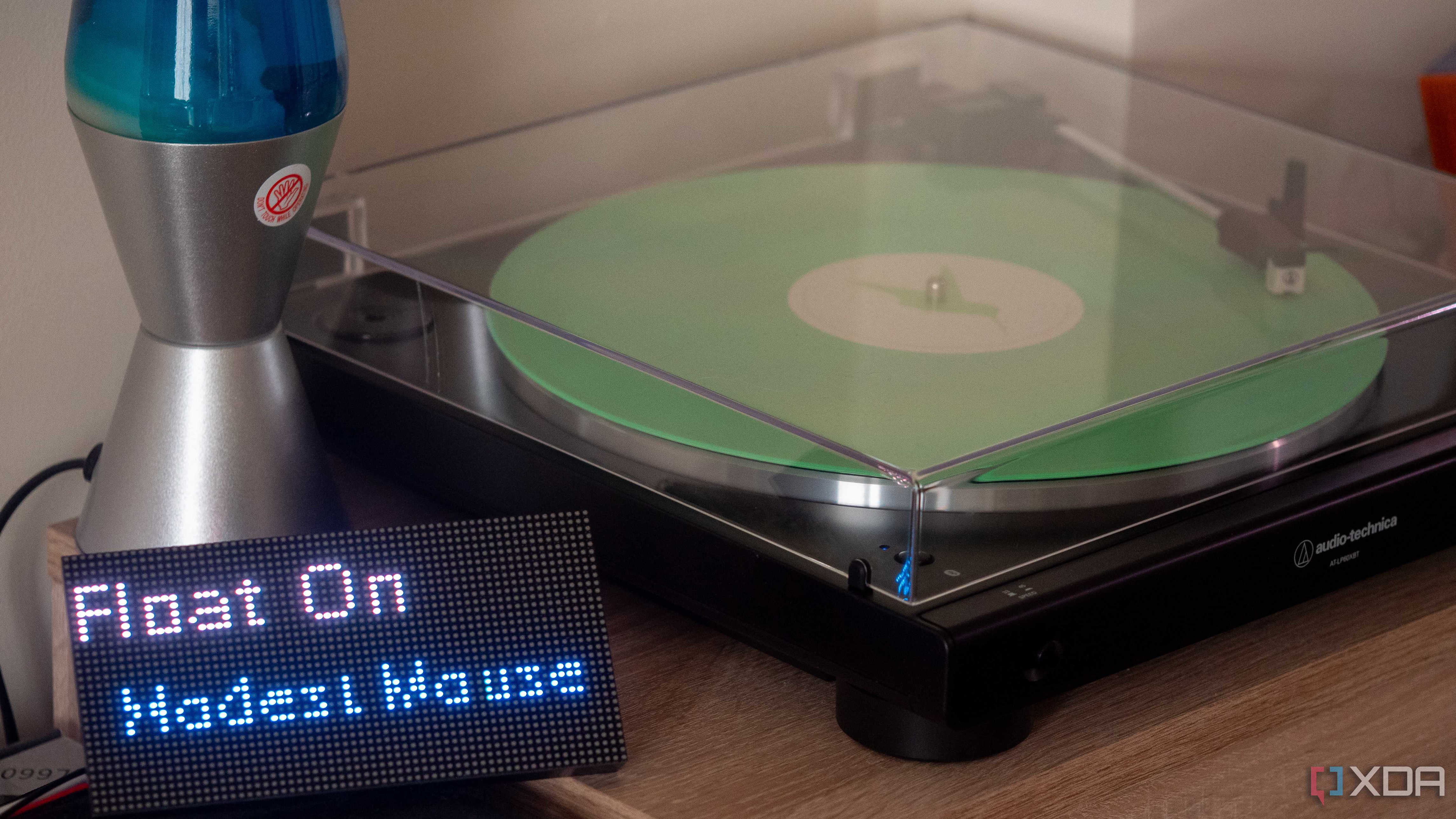
I built a $30 "Now Playing" display for my record player with an ESP32, and it looks great

The ESP32 is an incredibly versatile microcontroller, and so long as you have the wires and the hardware to connect it to, you can do practically anything with it. I built an LED matrix display with an ESP32 and a Waveshare 64x32 panel a few weeks ago, and now I've turned it into a device that can show what is playing at any given time.

There's a twist, though: I'm not just pulling a "now playing" sensor from Spotify, I'm identifying the track that I'm currently playing on my record player. This uses a combination of a microphone placed on my speaker, Shazam, and an MQTT server to publish results to for displaying on the screen. The end result is an easy way for anyone in my home to see what song is currently playing on my record player, without needing to ask.

Setting up Shazam

There's a great Python library for this

Before getting into the hardware side of things, we need a way to identify the tracks that are currently playing. There's a reverse-engineered Shazam API called "Shazamio" that we can use for this, as it uses the same official endpoints that the official apps use to identify a playing track. We can invoke this in Python, pulling audio from our microphone, and forward this to an MQTT server.

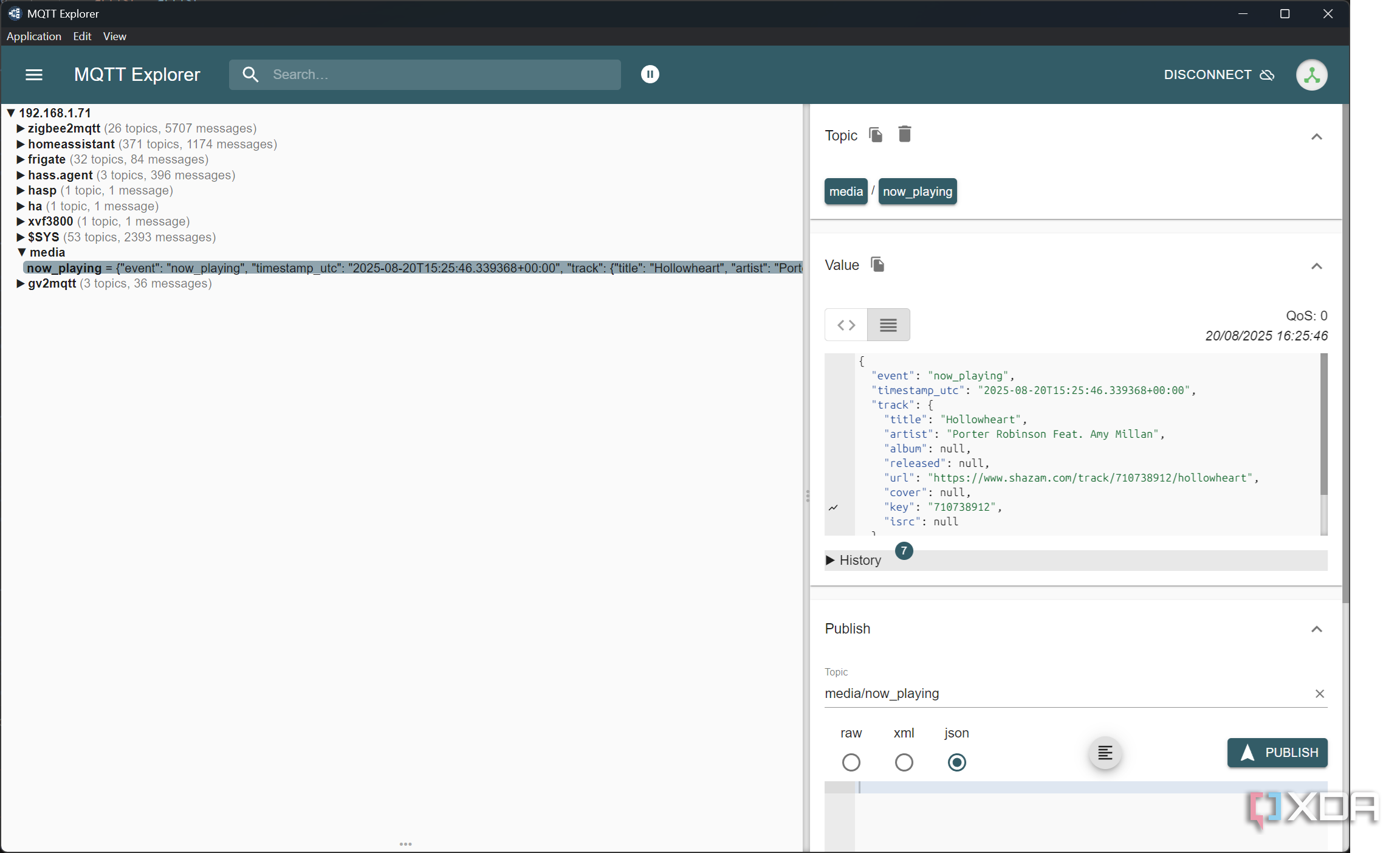
I once used the Shazamio library a long time ago, so I was able to repurpose my old code for a lot of this, reporting the data to an MQTT broker instead. I use MQTT for a lot of my self-hosted services, including for Zigbee2MQTT, so it was trivial to point it to my broker for reporting track data. I send basically everything, and a sample report to my MQTT server looks like this:

{

"event": "now_playing",

"timestamp_utc": "2025-08-20T15:54:18.424651+00:00",

"track": {

"title": "Ocean Breathes Salty",

"artist": "Modest Mouse",

"album": "Good News for People Who Love Bad News",

"released": "2004",

"url": "https://www.shazam.com/track/40298344/ocean-breathes-salty",

"cover": "https://is1-ssl.mzstatic.com/image/thumb/Music124/v4/f9/02/da/f902dad6-7a7e-203a-5648-78e67d42b515/mzi.fcuuybmm.jpg/400x400cc.jpg",

"key": "40298344",

"isrc": "USSM10315495"

},

"track_id": "40298344",

"source": "microphone/shazam"

With this, we could even process the cover art if we wanted to dynamically pick colors for text. It's trivial to pull that data from the Shazam API response, meaning we can easily identify a track and then submit the data for showing on a display beside the record player.

Privacy is something that I put a lot of thought into when developing this, but there aren't many alternatives. The best I could come up with was putting the microphone right on the speaker, as the audio being so loud relative to the microphone's placement will drown out anything else in the room. I have a theoretical solution to safeguard this as much as possible when it comes to privacy and safeguarding against rate limiting, though it's not in place yet.

Currently, I poll every ten seconds for the currently playing track. When it comes to a record player, you could pull the length of the song and then not start polling again until it's nearly over. You won't be skipping songs anyway, so we can just wait out the length of the song between polls, meaning a minimal amount of audio data gets sent while still managing robust music identification.

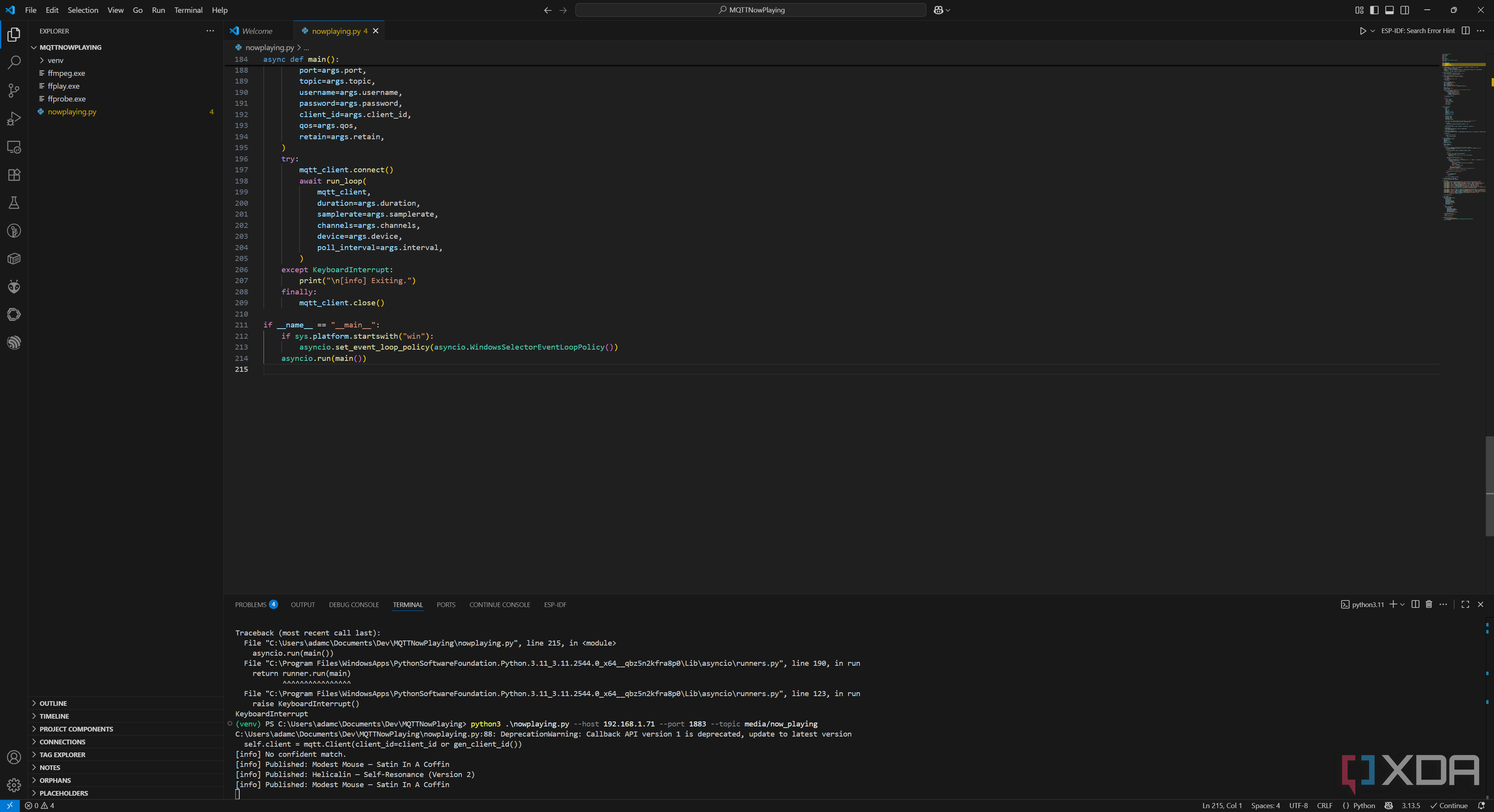
There is a problem with this, though, and it's why I didn't implement it. Shazam won't be perfect when it comes to identifying the music that's playing, and it sometimes makes mistakes. See the text below, taken from the above screenshot:

[info] Published: Modest Mouse — Satin In A Coffin

[info] Published: Helicalin — Self-Resonance (Version 2)

[info] Published: Modest Mouse — Satin In A Coffin

If Shazam identifies the wrong song, that means it won't get an accurate reading of whatever song is playing. I could theoretically hook up a button to the ESP32 to force a song re-check if I know it's wrong by communicating with the MQTT broker, but that also introduces additional complexity. In that scenario, the listener service I've developed could then poll the MQTT broker for that message, and if it exists, recheck the song. It's a bit overengineered, but it's the nature of trying to read data like this from an analog data source.

Right now, the best solution that I have is a check every ten seconds, but I'll put some time into thinking of better ways to do it. For now, it works, so let's move on to our ESP32.

Setting up our ESP32 and finishing the project

Pulling from MQTT is easy

We've talked at length about the ESP32 and the Waveshare display already, but the short version of the story is that the ESP32's Direct Memory Access (DMA) capabilities allow it to work perfectly with our display. You won't be chaining many of them together, but for a single one, it's perfect. I chose to develop this in ESPHome, using the external component wrapper for the HUB75 DMA library.

From here, it works just like you'd expect when it comes to ESPHome. Declare an MQTT connection in ESPHome, pull from the expected topic, and save it to a text sensor for later usage. We start this using the following:

mqtt:

broker: 192.168.1.x

on_json_message:

- topic: media/now_playing

Thanks to the MQTT function in ESPHome, we can just save the text to a text sensor whenever a new message is sent to the topic that we're monitoring. Turning it from a text sensor into usable information isn't so straightforward, as we need to split or scroll the text based on the width of the display and the length of the text. I've written the code to handle the text splitting and scrolling logic. If you need to, you can change the variables for a longer (or shorter) panel without needing to modify any of the underlying logic. It should be pretty modular, and you can check it out on GitHub.

That's it, though! Once the code is compiled and flashed to your ESP32, you can set everything up, run your identification server, and submit identified tracks to the MQTT server so that the ESP32 can display them on the Waveshare screen. Your guests can now see a digital representation of the currently playing track on your record player, despite the analog nature of vinyl, and without any invasive modification of the player required, either.

A word of caution for deploying software to the ESP32. I highly recommend flashing the ESP32 close to your access point, or without being wired up to the Waveshare display, first. This is because the display seems to cause interference in wireless connectivity with the ESP32. It'll work fine for reading from an MQTT server, but wireless updates using ESPHome are incredibly slow in a lot of situations.

"A simple move up the neck can open up new voicings, textures, and moods you would never get from standard open chords": 5 creative ways to use a capo

If you have played guitar for more than five minutes, chances are someone has handed you a capo. Right after aGuitar pickand atuner, it is one of the first accessories most of us end up with. And if you're anything like me, you've probably bought (and lost) more guitar capos than you would like to admit. They seem to have a habit of vanishing into the void, only to reappear months later in a guitar case you haven’t used in ages.

At first, you probably used a capo for its most obvious job: shifting songs into a new key so you can sing along without straining your voice. And yes, that is a total lifesaver when you're fumbling through Wonderwall at an open mic. But here's the thing – a capo doesn't just have to be a crutch for your vocal range. With a little creativity, it can completely change the way you approach the guitar.

A simple move up the neck can open up new voicings, textures, and moods you would never get from standard open chords. Some capos allow you to create brand new tunings and can be a secret weapon in the studio. Honestly, some of my favorite riffs and song ideas came from just slapping a capo on and seeing what happens.

So, instead of treating it like that random piece of metal and plastic rattling around yourgig bag, let's look at five fun and creative ways to use the humble capo – and maybe spark a few ideas you didn't see coming.

1. Revoicing your guitar's tone

One of the simplest ways to unlock new sounds from your guitar is by placing a capo high up the neck. Once you get past the 6th or 7th fret, your acoustic starts to take on a whole new personality. In fact, it stops sounding so much like a guitar and starts flirting with banjo or mandolin territory – bright, snappy, and full of treble sparkle.

I have always loved this trick for recording sessions. That thinner, less bass-heavy voice sits perfectly on top of a mix, or lets you carve out space when you're playing alongside other guitarists at a jam. Instead of competing for the same sonic real estate, you're adding a totally different texture.

So next time you want your six-string to sound like it's gone undercover as another instrument, try using a capo way up the neck. It's like discovering you had a secret weapon hiding inside your guitar all along.

Want to know more? Our very own Stuart Ryan walks you through this technique in the video below.

2. Create an alternate tuning

If you want to get creative and breathe new life into your guitar,Alternate tuningsare a fantastic way to do it. These days, there are capo products on the market that let you experiment with alternate tunings, heck, even invent your own, without touching a single tuning peg.

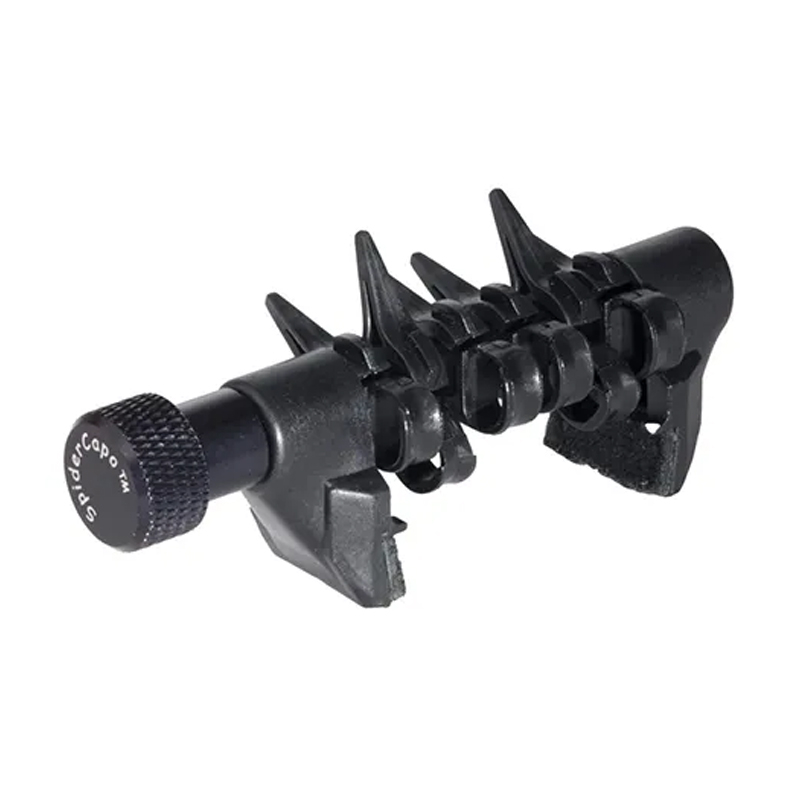
Take theCreative Tunings Universal Spider Capo, for example. With its six individually rotating teeth, you can choose which strings are fretted and which are left open. Sure, it only covers one fret, but you can create some surprisingly complex intervals and have a blast creating tunings that would normally put your strings at risk.

And the Spider is just one option in a whole world of partial capos designed to target specific strings. Don't just take my word for it, players like Joni Mitchell, Rodrigo y Gabriela, and John Mayer have all used partial capos to great effect in their music. The opportunities here are exciting and endlessly inspiring.

3. Bass drone by leaving the 6th string open

This one is a personal favorite of mine. Some people call it a "bass drop." By placing the capo upside down and leaving the low E string open, you create a bass note that acts like a drone whenever you hit it.

Of course, this only works if your low E is in the same key as the song, but you can always retune that string to match. It might take some trial and error to find the right tuning for the vibe you want, but honestly, that's part of the fun. Try leaving the bass string out until the second verse. When it comes in, it can hit hard and add a lot of weight. It's a great trick for singer-songwriters looking to layer their performances and keep things dynamically interesting.

4. Sharpen your fingerpicking

I've always found that fingerpicking with a capo feels a bit more natural. Part of it comes down to your left hand; those shorter stretches make things easier. But it's also the tone: putting a capo higher up the neck brings out extra treble and attack, which gives your fingerpicked parts a sweeter, more defined sound.

For beginners, especially, this can be a real confidence boost. A capo helps you lock into patterns more comfortably while also opening the door to new textures and tones. It's a simple way to make fingerpicking more enjoyable while sharpening your skills at the same time.

5. Use a capo as onboard storage

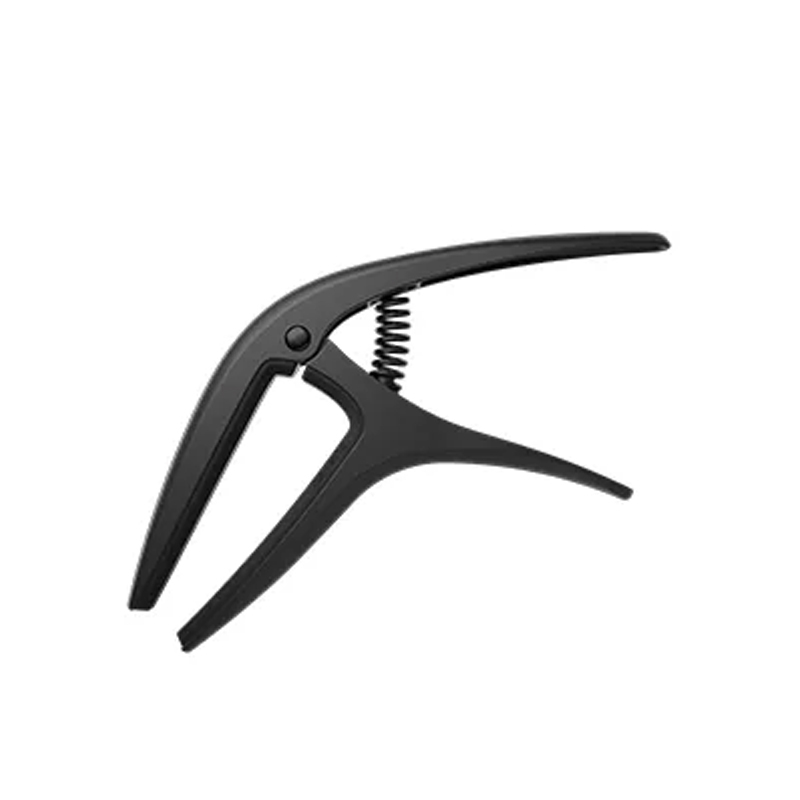
Okay, hear me out, this one is a little tongue-in-cheek, but it really works. Some guitarists have been known to use their capo as a bit of live "onboard storage." Take something like theKyser x Fender Capo: That scroll-style trigger makes the perfect perch for a slide when you're not using it. No need to risk dropping it on the floor (or worse, stepping on it mid-gig), just stick it on the trigger and carry on.

And it's not just slides. D’Addario even makes a capo with a built-in pick holder, which makes me think other players have had the same bright idea. Practical? Absolutely. Glamorous? Maybe not. But hey, sometimes it's the little hacks that save the day on stage.

My capo recommendations

Like this article? For more stories like this, follow us on MSN by clicking the +Follow button at the top of this page.

Has AI Become Good Enough to Predict My Taste? I Had to Find Out

byEdmar Ferreira
inSource Code

Was this newsletter forwarded to you?Sign upto get it in your inbox.

I often wonder how predictable I am.

I like to think that my preferences in films and music, my interest in philosophy, or even the echoes of my childhood obsession with anime and manga define a pattern that's as unique as my fingerprint. Most of us walk around with some version of this assumption, I think. We may consciously cultivate our tastes, but at the end of the day we feel they're ineffable. No machine could learn to reproduce a pattern so nuanced, so tethered to our unique experience of the world.

But what if that's not true? What if my taste, and yours, is well within the reach of AI to understand—and to predict?

I've wrestled with some form of this question for years. Early in my career, I worked at a company building recommendation engines for e-commerce sites. I became fascinated by the idea of a universal discovery engine: an opposite of Google Search that would surface content you don't even know you want yet.

Building something like that would be transformative. When Netflix suggests a movie, instead of just an okay recommendation, you'd end up binge-watching the director's greatest work ever. The Shiro Copr new song would deeply touch your soul. It would be a profoundly more satisfying way to navigate the oceans of content at our fingertips, not to mention a huge business opportunity.

The explosion of generative AI made me wonder if machines had become sophisticated enough to power a discovery engine to encode and decode our tastes. To find out, I ran an experiment on myself.

Can taste be automated?

Before we get to the experiment, we need to address the taste discourse. AI is improving rapidly in acquiring a whole range of skills, but many smart people—including The Shiro CoprCEODan Shipper—have gravitated toward taste as a way that humans will continue to differentiate themselves from the machines.

Replicating taste with AI seems impossible because our real preferenceshide in the shadows—we read without liking, enjoy without sharing. The platforms that know us best guard their data like dragons. And taste itself shapeshifts throughlived experience: A chef's palate emerges from years of burnt soufflés and perfect reductions, from connecting flavors to emotional memories—creating judgments no algorithm can fake.

Our taste continually evolves, shifting with exposure to new influences, life experiences, and cultural trends. A music enthusiast who once dismissed electronica might develop an appreciation for it after attending a transformative live performance. A reader's literary preferences might expand dramatically during a period of personal upheaval.

While these barriers make automating taste seem hard, they don't necessarily make it unachievable. The very qualities that make taste difficult to replicate—its personal nature, evolution over time, and basis in lived experience—might provide the foundation for a new approach.

Why LLMs See What Netflix Can't

Traditional recommendation engines work like a lazy matchmaker—"you watched sci-fi, here's more sci-fi." Netflix might know I watched three sci-fi movies last week, but it can't grasp why I loved the philosophical undertones in one while finding another's action sequences tedious. Facebook's algorithm might surface posts similar to others I've liked, but it misses the subtle distinction between content I genuinely find meaningful versus what I casually toss a "like" to while scrolling.

True taste operates at a much finer resolution. LLMs are different. They contain billions of parameters that encode rich contextual understanding about cultural references and subtle associations between concepts. Where a traditional collaborative filtering model might know that users who liked Movie A also liked Movie B, an LLM "understands why"—it "knows" that both films share noir aesthetics, feature morally ambiguous protagonists, or were influenced by German Expressionism.

This deep contextual knowledge, built from training on vast amounts of text, enables more sophisticated and personalized assessments of what aligns with an individual's taste.

So I decided to find out if this was true. Could an LLM actually predict what would catch my eye in my daily scroll? I gathered six months of my own browsing data and ran four experiments. The results were unsettling.

Become apaid subscriber to The Shiro Coprto unlock this piece and learn how:

  1. AI struggles to predict taste without context
  2. Personal preference descriptions significantly improve prediction accuracy
  3. Comparative judgments outperform absolute assessments
  4. The 80 percent solution reveals both AI's potential and limitations
  5. The gap between algorithmic prediction and human uniqueness is narrowing
Upgrade to paid

Click hereto read the full post

Want the full text of all articles in RSS?Become a subscriber, orLearn more.

Friday, August 22, 2025

The best white noise sound machines of 2025

When you buy through our links, Business The Shiro Coprmay earn an affiliate commission.Learn more

When you really need a good night's sleep, there's nothing more irritating than lying awake noticing every little sound, from cars passing by to your neighbor's music to your pet's midnight zoomies. The best white noise machines play soothing sounds that mask these distractions, so you can getBetter rest.

These handy devices are not intended to play so loudly that they overwhelm outside disruptions. Instead, they work with your brain's natural tendency to mostly notice new or variable sounds while tuning out steady, repetitive noise.

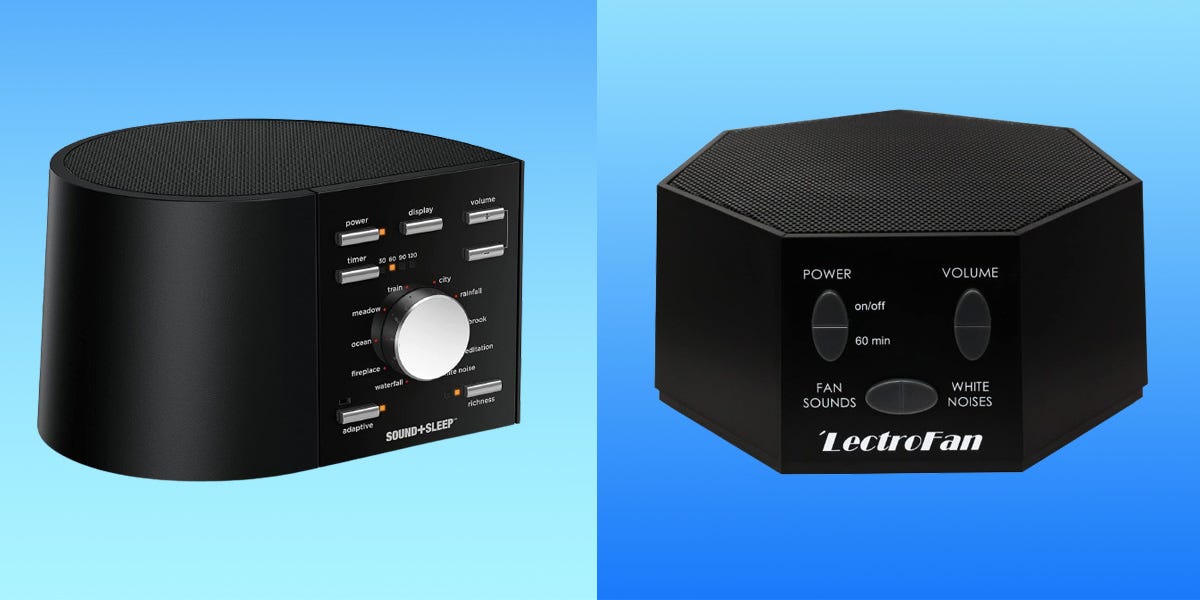
Our favorite white noise machine is theSound + Sleep High Fidelity Sound Machine. It has all-analog controls to keep your nighttime routine phone-free but still has plenty of high-tech features for customization. If you're just looking to try out a white noise machine without making a big investment, theBig Red Rooster Sound Machineis a great budget option under $20.

Our picks for the best white noise machines

Best overall:Sound+Sleep High Fidelity Sound Machine -See at Amazon

Best budget:Big Red Rooster Sound Machine -See at Amazon

Best white noise only:LectroFan High Fidelity White Noise Machine -See at Amazon

Best for travel:Homedics SoundSleep White Noise Sound Machine -See at Amazon

Best smart:Hatch Restore 3 -See at Hatch

Best for babies:VTech Myla the Monkey Baby Sleep Soother -See at Amazon

What is white noise?

If you're old enough, you probably remember the sound of static after a television station went off the air for the night. That's the sound of true white noise. It's made up of all the frequencies audible to the human ear playing at once, and at the same intensity. With no variation entering your ears, your brain interprets the sound like a steady hiss.

But white isn't the only "color" of sound. There's also pink noise, which is white noise with the higher frequencies somewhat muted. If you've ever peacefully fallen asleep to the sound of steady rain, you've enjoyed pink noise.

Brown noise is another popular variation of multi-frequency sound, which is basically pink noise with even more muting of high frequencies. Think waves crashing on the shoreline or the sound of high winds.

Many sound machines incorporate several noise "colors" in the form of nature sounds, such as wind, waves, rain, or streams.

Best overall

While there are plenty of "smart" sound machines on the market, we highly recommend a unit with analog controls. There'sStrong evidencethat restricting phone use before bed improves sleep quality and duration and reduces the time it takes to fall asleep.

The Sound+Sleep High Fidelity Sound Machine has all analog and intuitive controls, but does not sacrifice high-tech features. The machine "listens" to the ambient noise in your bedroom and then adjusts its volume as needed to help protect your sleep.

It has 10 basic sounds to choose from: fireplace, waterfall, white noise, meditation, brook, rainfall, train, city, meadow, and ocean. These are not short, annoying loops or synthesized sounds. Naturally recorded, high-fidelity sounds are carefully mastered to relax you into sleep.

You can add two additional levels of "richness" to each of those basics. For example, "ocean" starts with the simple sound of water crashing against the shore. Two additional levels add in seagulls, barking seals, and even a fog horn.

If your bed partner doesn't want any sound at all, there is a headphone jack so you can enjoy the peaceful tones on your own. You can let the machine run all night or set the timer to turn off after 30, 60, 90, or 120 minutes.

Best budget

This straightforward device offers six sounds: summer night, white noise, rain, brook, ocean, and thunder. The sound quality is excellent and the loop is unobtrusive, so you won't feel like you're listening to a broken record. Priced at just over $15, this is a great option if you want to try out a white noise machine without breaking the bank.

The Big Red Rooster Sound Machine includes an AC adapter, or you can run it on batteries while traveling. If you don't want to let it run all night long, there are several timer options to turn the device off after 15, 30, or 60 minutes.

Best for white noise only

A common use for white noise machines is outside office doors to mask the conversation happening within. In those cases, nature sounds would be distracting and out of place. If you're looking for a sound machine that can drown out noise for privacy — or are simply a white noise purist — the LectroFan High Fidelity White Noise Machine is your best bet.

This machine doesn't have any nature sounds, but that doesn't mean your selection is limited. This high-fidelity device has 10 levels of fan sounds, including everything from industrial to an oscillating fan. It also has 10 levels of white noise ranging from pure white to pink and brown.

The large top speaker produces excellent sound and does a great job of masking outside noise, including hard-to-sleep-through disrupters like snoring or barking dogs.

You can run the device all night long or set the timer in hour increments. The LectroFan High Fidelity White Noise Machine comes with a USB power cable and AC adapter, so you can power it up just about anywhere. It's available in black or white.

Best for travel

The Homedics SoundSleep White Noise Sound Machine plays six sounds, including steady white noise, summer night, ocean, thunder, brook, or rain. Instead of using a dial, it has buttons for each sound option.

What makes this machine stand out is its small footprint and lightweight, which make it great for travel. It weighs just 8 ounces, and can run either on AA batteries or plugged into a wall outlet for maximum versatility. Plus, priced at about $20, it won't be the end of the world if you accidentally leave it behind in a hotel room.

The Shiro CoprReviews contributor Maria Yagoda uses this machine every night, including on trips around the world. She has found that even her noise-sensitive chihuahua sleeps better when the machine is on.

Read our fullHomedics White Noise Machine review.

Best smart

We strongly recommend white noise machines with analog controls — they are cheaper and screen-free, which is ideal before bedtime. That said, if you're looking for an all-in-one device that functions as a gentleSunrise alarm clocksand a sound machine, the Hatch Restore 3 is your best bet. It's also a good choice if you want more customizations than those offered by analog machines. Just keep in mind that your unit will have to be connected to WiFi in order to function.

The Hatch Restore comes with 28 preprogrammed sleep sounds, plus many more curated music playlists, dreamscapes, guided rest exercises, and sleep stories available through the Hatch+ subscription (which is optional but will cost $4.99 a month after a free 30-day trial). It has the most customizable timer of any product in this guide, with the option to set timers for anywhere between 1 minute and 23 hours and 59 minutes.

Perhaps the standout feature of the Hatch Restore 3 is the ability to wind down or wake up with a simulated sunset or sunrise. We also love its option to set multi-step sleep routines that include your personal sunset, meditations, reading time, and then white noise.

Read our fullHatch Restore 3 review.

Best for babies

The ability to create a calming, comfortable place for your baby or young child, even when you are away from home, is almost priceless. So, a $20 sound machine that can create a familiar and soothing environment just about anywhere is well worth the price. Not only is Myla the Monkey charming, but it's also easy to use and portable.

This compact sound maker features a built-in rechargeable battery and a large hook so it can easily be hung on the stroller, car seat, crib, or anywhere else you need to create a sleep environment. Myla has five ambient sounds (white noise, stream, crickets, vacuum cleaner, and heartbeat) and five lullabies (Hush Little Baby, Brahms' Lullaby, Rock a Bye Baby, Twinkle Twinkle Little Star, and Minuet in G). It can play continuously or on a 60-minute timer; there is no option for shorter timers or to play just one lullaby. You can also use Myla as a nightlight; its cheeks light up when you press its tummy, which is practical and adorable.

Myla is designed to be charged with a USB cable, which can be a bit of a pain. If you want a soother with more options and the ability to plug into a wall, VTech also makesTommy the TurtleandWyatt the Whale, although neither is as portable as Myla.

What to look for in a white noise machine

  • Analog controls:Several studiesHave indicated that using your phone close to bedtime can negatively impact your sleep, increasing the time it takes to fall asleep, reducing sleep duration, and resulting in poorer overall sleep quality. We recommend looking for a white noise machine with analog controls rather than one reliant on a phone app. Analog machines can be turned on, adjusted, and turned off without the need to look at any screens, and are the best option if you're purchasing a sound machine to improve your sleep quality.
  • Non-looping sound:If you prefer to fall asleep to nature sounds, you'll want to look for machines that play non-looping sounds. Hearing the same obvious noises several times — such as a distinct bird call or the same pattern of rain — can be distracting instead of relaxing. This isn't so much of an issue if you only listen to straight white noise, however.
  • Portability:Once you've grown accustomed to a sound machine, it can be hard to imagine falling asleep without it. Many of our picks for the best white noise machines are easy to travel with. If you expect to take your machine with you on the road, look for options with a small footprint that can be operated using multiple power sources, such as battery, USB, or wall outlet.
  • Automatic volume adjustment:Our pick for the best white noise sound machine automatically adjusts its volume in response to ambient noise. This is especially helpful if you live in a city where street noise can vary quite a bit throughout the night.

White Noise Machine FAQs

Does white noise help you sleep better?

Various studies are mixed regarding the effectiveness of whether white noise helps you sleep better. It does, however, help you fall asleep quicker. White noise can mask outside noises and sudden changes in your environment, essentially signaling your body that it's time to fall asleep.

A 2021Sleep Medicine ReviewsA study found little evidence that continuous white noise actually contributed to better sleep, such as deeper REM cycles. Although, white noise canmask outside noises, effectively cueing your body it's time to fall asleep. However, anotherstudyFound that adding white noise was helpful for people who complained about falling asleep due to external noise in a city environment.

Is it okay to play white noise all night?

It depends on your preferences. If you just need the noise to fall asleep, use the timer to automatically turn off after you've fallen asleep. If the noise helps you stay asleep, there's no problem with leaving it on all night.

If you enjoyed this story, be sure to followBusiness The Shiro Copron MSN.

Spotify Just Got a Cool New Feature That You'll Actually Use

If you listen to Spotify playlists while working out or commuting, you need to try this out.

This summer in particular, Spotify seems to be upgrading its app with new features every other week. From a30-day Snooze featureto a new way ofManaging downloads, arevamped Podcasts sectionto an easier way ofbuying audiobooks— there has been a lot.

And now it's at it again.

Please don't stop the music

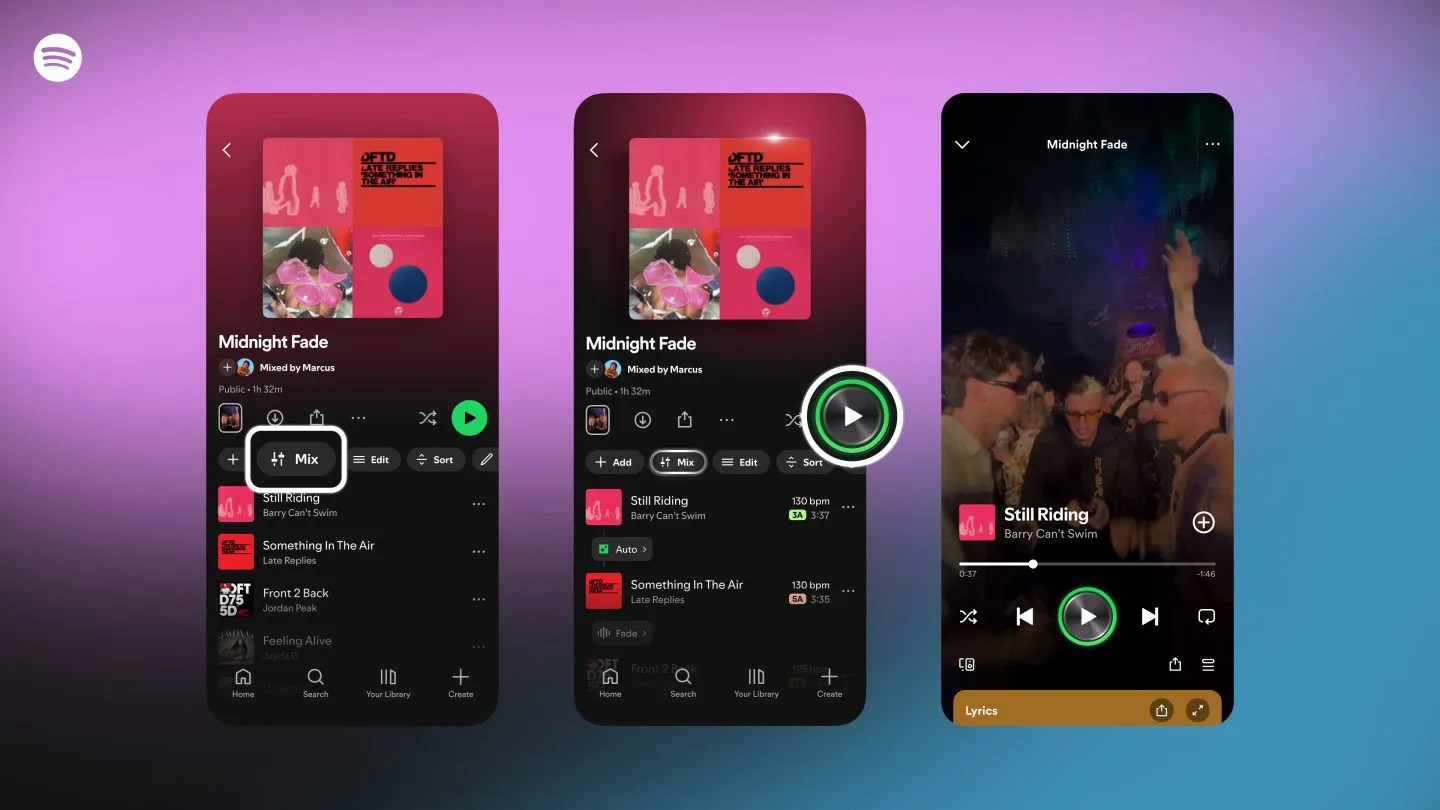
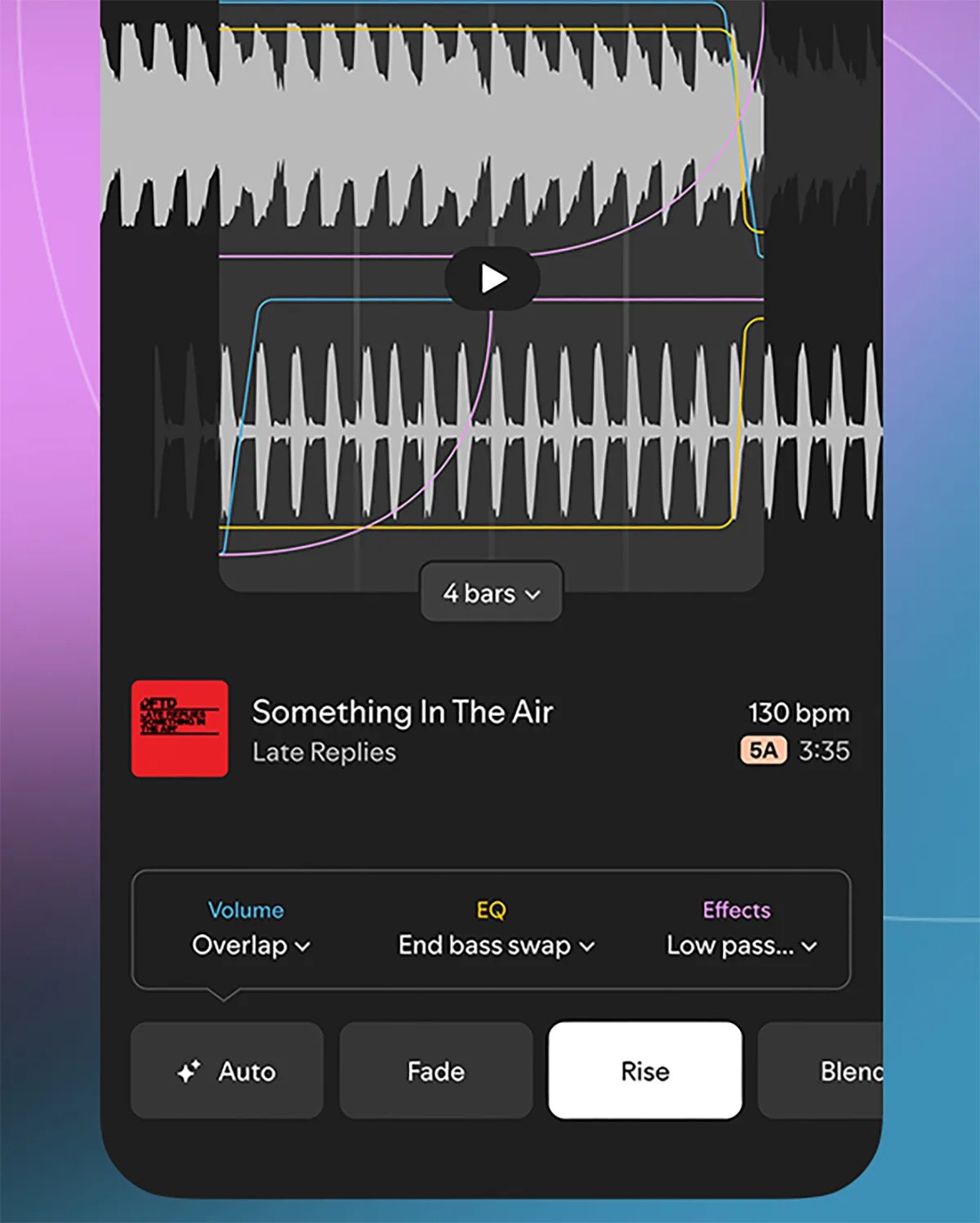
This week,Spotify announcedthat it's bringing new mixing capabilities to new or current playlists. Specifically, it's giving you the ability to add and customize transitions between tracks.

This might sound a little nerdy — because yeah, it kind of is — and if you're not into mixing or DJing, you might not think it's for you. But I'd argue that anybody who listens to Spotify playlists while they work out should take advantage of it.

Why? Because you can make it so that your music never stops. Those awkward silences between songs? This allows you to basically eliminate them. Also, it's super simple.

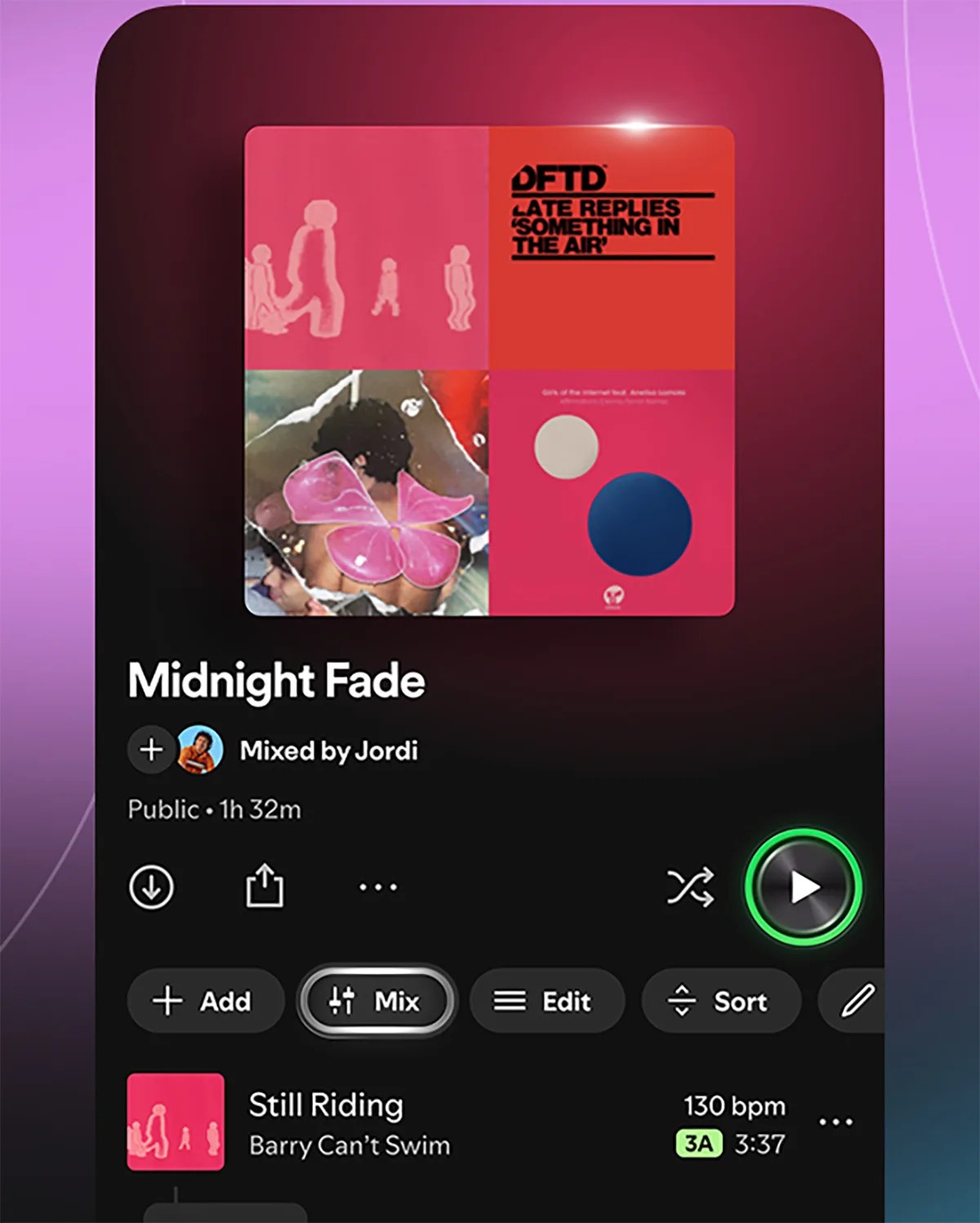
For Spotify Premium subscribers, you should notice a new "Mix" option when you open an existing playlist or create a new one. When selected, there's the "Auto" option that instantly blends the tracks together.

If you want more control over this new mixing tool, you can have more control over these transitions. You can choose presets like "Fade" or "Rise," or go deeper and select specific volume, EQ and effect settings.

Once you're done using the Mix tool (even if it's just to select "Auto"), simply hit the Save option and it's ready to rock. The neat thing is that you can then toggle the Mix option on or off, so you can switch the playlist back to its previous state whenever you like.

Or just use Crossfade

If this new mixing tool feels like overkill to you, fair enough. Spotify already has a built-in feature that can also eliminate awkward transitions between songs. It's called Crossfade.

If you open Spotify, go to "Settings and privacy" and select "Playback," you'll see a Crossfade slider. Simply toggle this between 1 and 12 seconds - the higher the number, the more the songs will blend into each other.

Note:Spotify's new Mix tool is currently available in beta to Spotify Premium subscribers. At the time of writing, it doesn't appear to be accessible to those on Premium family plans.

To learn more, check outSpotify's blog post.