Showing posts with label iphone. Show all posts

Saturday, July 11, 2026

First Foldable iPhone to Feature 4 Cameras and Touch ID

Featured Image

Apple's First Foldable iPhone to Launch in 2026

For years, foldable phones have been a niche product in the smartphone market. While companies like Samsung and Huawei have experimented with flexible displays, Apple has remained on the sidelines, choosing to focus on traditional designs. However, that may soon change as Apple prepares to enter the foldable phone arena.

According to reports from industry analysts, Apple is planning to launch its first foldable device in 2026. This move marks a significant shift for the company, which has traditionally prioritized sleek, compact designs over more experimental forms. Suppliers have already begun working on the new device, and manufacturing is expected to ramp up early next year. If all goes smoothly, the foldable iPhone could be announced in the fall of 2025.

Design and Features of the Foldable iPhone

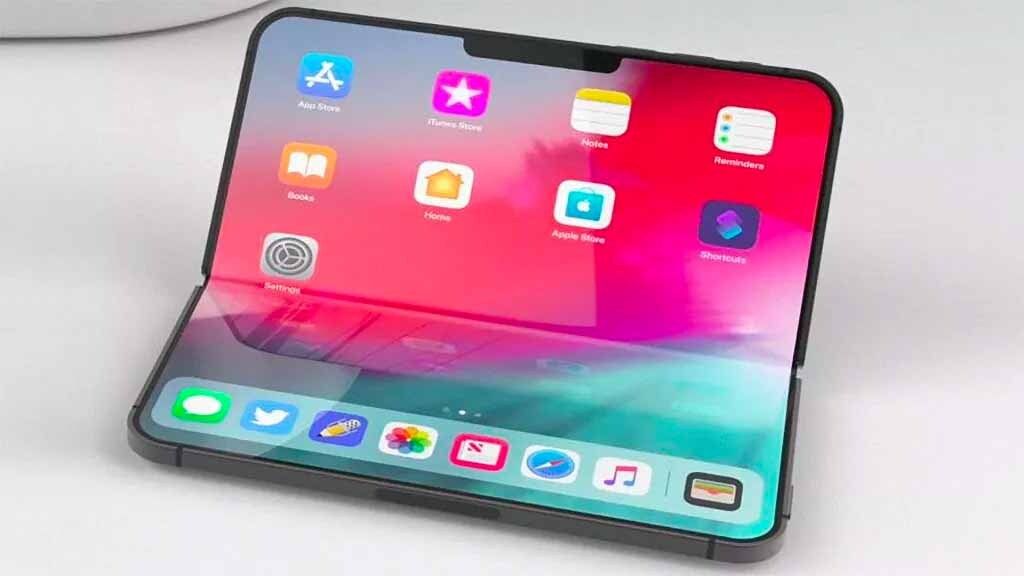
The foldable iPhone is expected to adopt a design similar to Samsung’s book-like clamshell style. When opened, it will transform into a tablet-like form, offering users a larger screen for multimedia consumption and productivity. The device is also rumored to feature four cameras—two on the front and two at the back. This configuration would allow for enhanced photography and video capabilities, especially when the device is unfolded.

One notable change is the absence of a physical SIM card slot. This isn’t entirely unexpected, as recent iPhone models, including the iPhone 14 and later, have been eSIM-only in the United States. However, another major departure from previous models is the removal of Face ID. Since the release of the iPhone X in 2017, Face ID has been a defining feature of Apple’s smartphones. The last iPhone to use a fingerprint sensor was the 2022 iPhone SE.

Instead of Face ID, Apple is reportedly bringing back Touch ID for the foldable model. Analyst Ming-Chi Kuo previously reported that the fingerprint sensor could be placed on the sides or top of the device, similar to how it works on the iPad. This return to biometric authentication could offer users a more familiar and secure way to unlock their devices.

Technological Upgrades

In addition to the design changes, the foldable iPhone is expected to include several technological upgrades. One of these is the C2 modem, an improvement over the current C1 modem used in the iPhone 16e. Apple introduced its own C1 modem last year, marking a shift away from relying solely on Intel and Qualcomm for cellular connectivity. The C2 modem is expected to provide better performance and efficiency, particularly for the foldable model.

Another key feature is the display. Apple is reportedly working on perfecting the screen technology to avoid common issues such as air gaps and visible creases. The company may use in-cell touch technology, which integrates the touch sensors directly into the display. This approach could result in a smoother and more seamless user experience.

Price and Market Position

With all these advanced features, the first foldable iPhone is expected to come with a hefty price tag. Analyst Ming-Chi Kuo estimates that the device could start at $2,000, matching the price of Samsung’s flagship Galaxy Z Fold 7. This pricing strategy positions the foldable iPhone as a premium product, targeting consumers who are willing to pay for cutting-edge technology and innovation.

As Apple continues to develop its foldable device, the tech giant is poised to make a strong statement in the smartphone market. With its reputation for quality and innovation, the foldable iPhone could redefine what consumers expect from a mobile device. Whether it will succeed remains to be seen, but one thing is clear: Apple is finally stepping into the foldable era.

Friday, May 29, 2026

Apple iPhone 17 Unveiled: August 2025 Preview Guide

Featured Image

Overview of the iPhone 17

The iPhone 17 is still months away, but speculation and rumors about its features are already growing. In 2025, Apple is expected to make some significant changes to its product lineup, potentially introducing an “Air” model that is said to be extremely slim. While the base model will remain as the iPhone 17, along with the iPhone 17 Pro and iPhone 17 Pro Max, there are whispers that the “Plus” model may be discontinued in favor of the iPhone 17 Air.

This article provides a preview of the upcoming iPhone 17, compiling all the latest rumors and leaks about the device. It will be updated frequently as more information becomes available ahead of the September release.

iPhone 17 Specifications

Surprisingly, there haven’t been many leaks regarding the specifications of the iPhone 17. Most of the focus has been on the Air and Pro models. One ongoing rumor is that the iPhone 17 might feature a 120Hz display. However, it's unlikely that Apple will include this feature since they market the 120Hz refresh rate under the term "ProMotion," which is exclusive to their Pro devices. Instead, a 90Hz screen could be a more realistic possibility, though it would still lag behind some budget smartphones like the Pixel 9a, which offers a 120Hz display.

New A19 Chipset

The iPhone 17 is expected to come equipped with the A19 chip. This chipset will not use TSMC’s next-generation 2nm process but will instead utilize an upgraded 3nm process. The A19 is likely to be manufactured using TSMC’s N3P process, which began mass production in late 2024. Similar to the iPhone 16 series, the base model will receive the A19, while the Pro models will get the A19 Pro. The primary difference between these chips will be the number of CPU and GPU cores.

In terms of RAM, the iPhone 17 is expected to retain 8GB of RAM, following the upgrade from 6GB in the iPhone 15 to 8GB in the iPhone 16. Meanwhile, the Pro models are anticipated to jump to 12GB of RAM.

Despite launching its own modem for the iPhone 16e, Apple is not expected to use its in-house modem for the iPhone 17. It may only be available for the iPhone 17 Air. The reason for this is volume; the Air is likely to be a low-volume model, so Apple won't need to produce as many modems. Additionally, the in-house modem does not support mmWave 5G, which could affect carrier support, such as Verizon.

ProMotion Display

The regular iPhone 17 is rumored to feature a ProMotion display with a variable refresh rate up to 120Hz. However, a 90Hz refresh rate is more probable. Apple refers to higher refresh rates as "ProMotion," which is currently exclusive to their Pro devices. This feature is not available on non-Pro iPhones, iPads, or MacBooks.

iPhone 17 Pricing

Some rumors suggest that the iPhone 17 will maintain the same price as the base model has been for several years, likely at $799. This would create a $200 gap between the iPhone 17 and the iPhone 16e. If the iPhone 17 Air starts at $899, it would be unusual for the base model to cost more than $799.

The Pro models are also expected to keep the same pricing, with the iPhone 17 Pro at $999 and the iPhone 17 Pro Max at $1,199.

However, some analysts predict a potential $50 price increase for the entire iPhone 17 lineup. While this rumor has circulated since the iPhone X in 2018, no actual price increases have occurred in the US. Nonetheless, it may be time for a price hike after seven years.

iPhone 17 Design

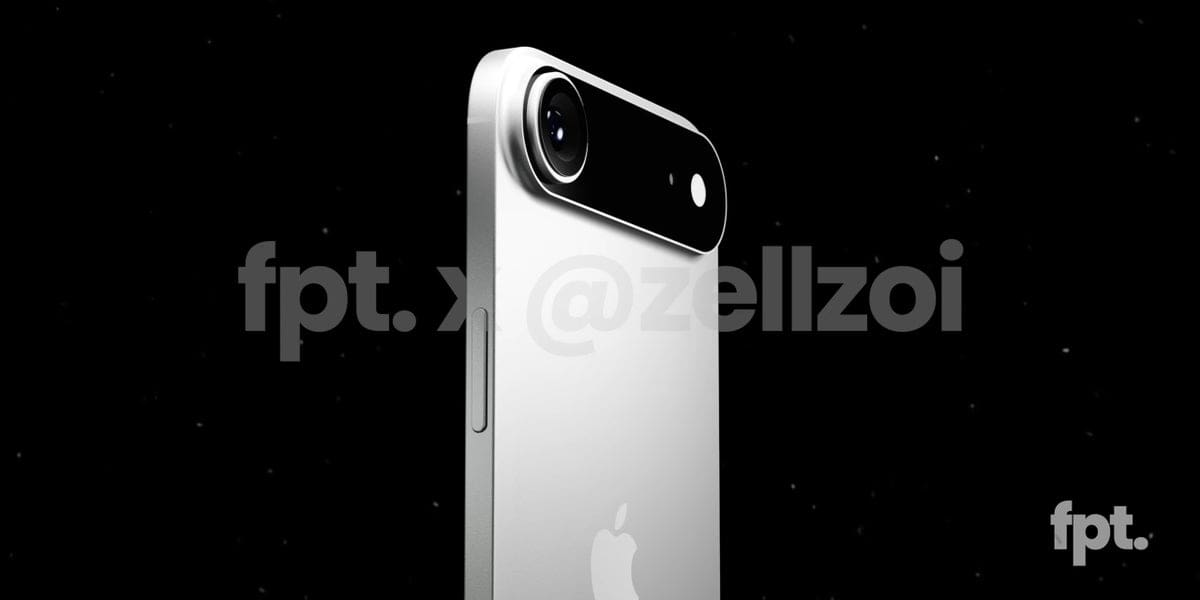
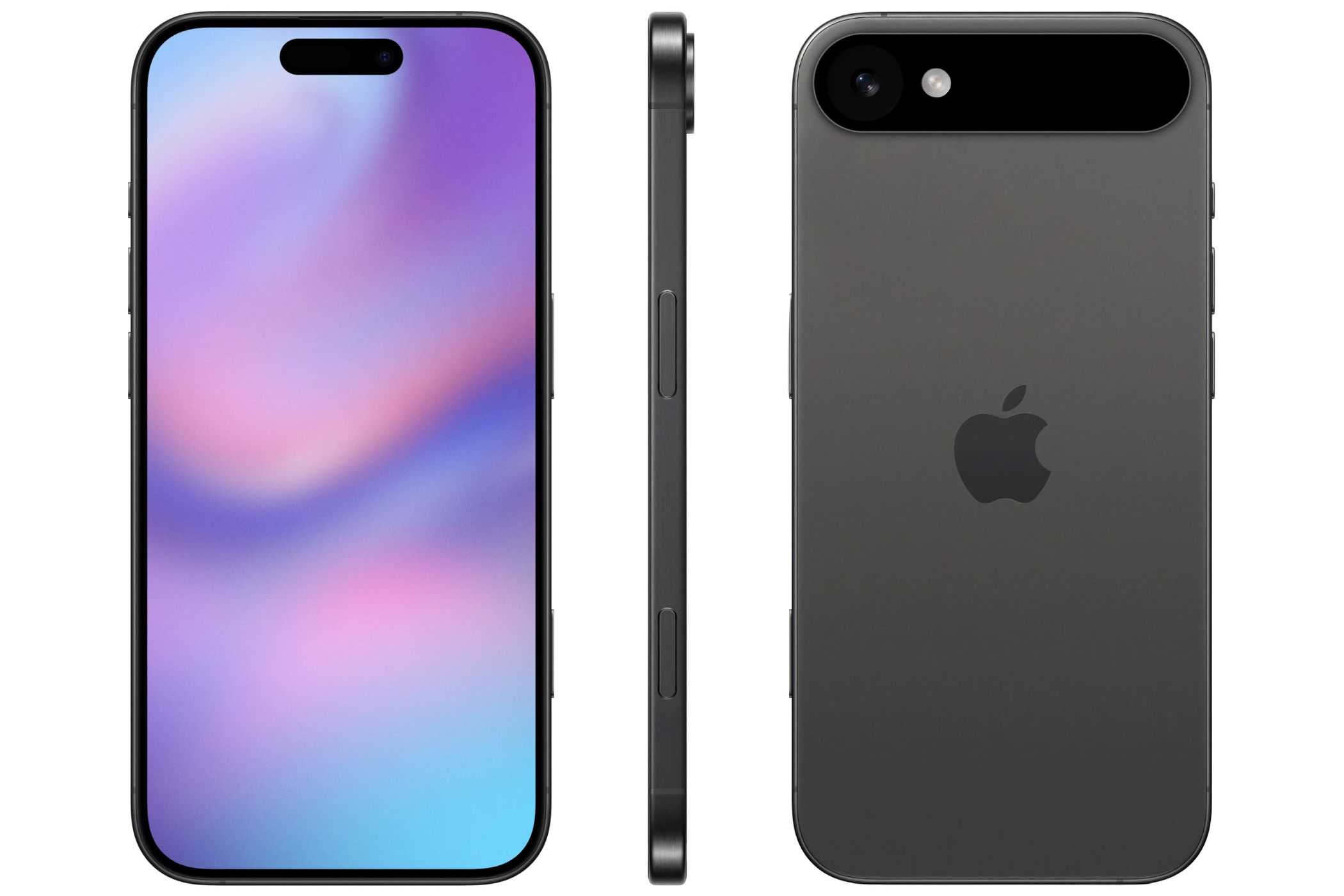
Several renders of the iPhone 17 have surfaced, showing Apple moving towards a camera setup similar to a camera bar, akin to the Google Pixel. The iPhone 17 Air is expected to have a camera bar that spans the top of the phone, while the iPhone 17 itself will be similar but slightly thinner, featuring two cameras instead of one.

These cameras will still be positioned side by side, with Face ID remaining off-center. The placement of the cameras is due to the size of the Face ID components, making it impractical to place a camera behind them. Otherwise, the iPhone 17 is expected to retain its current design, including the Camera Control and Action Buttons. Slightly smaller bezels and a smaller dynamic island are also anticipated.

iPhone 17 Cameras

The iPhone 17 is expected to feature a 24-megapixel front-facing camera across the entire lineup, with a six-element lens. This would be a significant upgrade from the current 12-megapixel camera on the iPhone. However, this is likely the only camera improvement for the base model.

The Pro models, on the other hand, are expected to have a 48MP primary camera, a 48MP ultra-wide camera, and a 48MP tetraprism telephoto camera. At least one model will include a mechanical aperture, allowing users to adjust the size of the aperture. This feature is expected to be on the Pro Max model.

iPhone 17 Connectivity

Apple is expected to remove the SIM card tray from even more countries, transitioning to eSIM-only support. This change was first introduced in the US with the iPhone 14. WiFi 7 will be available on the iPhone 17, supporting 2.4GHz, 5GHz, and 6GHz for faster speeds and lower latency. Bluetooth 5.3 support is also anticipated.

As mentioned earlier, Apple’s in-house modem is not expected to be included in the base model, only in the Air. Apple will continue using Qualcomm’s modems for the other iPhone 17 models.

iPhone 17 Launch Date

Apple typically announces new iPhones in September, usually a week after Labor Day. The iPhone 17, 17 Pro, and 17 Pro Max are expected to ship in late September. The iPhone 17 Air may ship slightly later, possibly in October.

On August 5, a German carrier reported that the iPhone 17 launch event will take place on September 9, aligning with Apple’s previous launch timelines.

Saturday, April 25, 2026

iPhone Fold Revealed: Display, Cameras, Touch ID, and 3-Year Reinvention

Featured Image

Apple's Future Plans: From iPhone Air to Foldable Innovations

Apple has always been known for its innovation and ability to redefine the smartphone market. While much of the attention is currently on the upcoming iPhone 17 event, there are several exciting developments in the pipeline that could reshape the future of the iPhone lineup. According to reports from Bloomberg’s Mark Gurman, Apple has a three-year roadmap that includes significant changes to its flagship devices.

The iPhone Air: A New Entry into the Market

The first major update in this roadmap is the iPhone Air, which is set to debut as a super-thin model designed to compete with high-end smartphones like the Samsung Galaxy S25 Edge. This new device will replace the Plus-sized version of Apple’s flagship and feature the company’s first in-house modem chip, the C1 modem. This chip was introduced with the iPhone 16e and is expected to improve connectivity and performance.

The iPhone Air is not just about design; it also marks a shift in Apple’s approach to hardware. It will be the first iPhone to ditch the traditional SIM card slot, relying instead on Apple’s in-house modem for connectivity. This move is likely aimed at making the device thinner and more streamlined, aligning with the company’s ongoing focus on sleek design.

The Foldable iPhone: A Game-Changer in 2026

Perhaps the most anticipated development is Apple’s potential entry into the foldable phone market in 2026. Rumors suggest that the device could be called the iPhone Flip or iPhone Fold, and it is expected to open like a book to reveal a larger inner display. This design is similar to existing foldable phones such as the Samsung Galaxy Z Flip 7 and Google Pixel 9 Pro Fold.

According to Gurman, the foldable iPhone will feature a four-camera setup, including one on the front screen, one on the inside, and two on the back. The rear cameras are expected to offer higher-resolution photos than the front-facing camera, while the second lens could serve either an ultra-wide or telephoto function. This configuration suggests that the device will function similarly to a standard iPhone, whether it is opened or closed.

Another notable change is the removal of Face ID in favor of Touch ID. This decision is likely due to the need to keep the foldable device slim when closed. Analyst Ming-Chi Kuo has estimated that the iPhone Flip (or Fold) will be between 9mm and 9.5mm thick when folded, and around 4.5mm to 4.8mm when open. These dimensions make it difficult to fit the TrueDepth camera system required for Face ID, making Touch ID a more practical choice.

Pricing and Market Positioning

While the foldable iPhone is expected to generate significant interest, its success will largely depend on pricing. Most Android foldables already come with a hefty price tag, starting at $1,099 for the Galaxy Z Flip 7 and reaching up to $2,000 for premium models. Given Apple’s history of maintaining high prices, the iPhone Fold is unlikely to be any cheaper.

Gurman reports that the initial model will only be available in black or white, and suppliers are preparing for mass production to start early next year, with a planned launch in the fall of 2026. This indicates that Apple is serious about entering the foldable market and is investing heavily in its development.

Design Overhaul in 2027

In 2027, Apple plans to celebrate the iPhone’s 20th anniversary with a major design overhaul. According to Gurman, the company is moving away from the squared-off corners seen on iPhones since 2020 in favor of curved glass edges. This redesign is expected to complement the upcoming Liquid Glass interface, a key feature of iOS 26. This interface adds rounded edges to on-screen elements, creating a translucent, layered look that mimics the appearance of glass.

Looking Ahead

As Gurman notes, 2025 may not be a revolutionary year for the iPhone, but it will lay the foundation for major shifts in 2026 and 2027. With the introduction of the iPhone Air, the potential foldable iPhone, and a design overhaul in 2027, Apple is setting the stage for a period of significant innovation. For fans of the brand, these developments promise an exciting future filled with groundbreaking technology and design advancements.

Saturday, March 21, 2026

Uncover This Secret iPhone Feature to Boost Call Clarity

Featured Image

Understanding Voice Isolation on iPhone

Apple recently released the fourth public beta of iOS 26, which introduced several new features and improvements for developers and beta testers. Among these updates is call screening, a feature that enhances user experience during phone calls. However, one hidden gem that can benefit all iPhone users is Voice Isolation. This feature, designed to make calls clearer for the person on the other end, doesn't require you to be a developer or beta tester to use.

Voice Isolation was first introduced by Apple in 2023 with the release of iOS 16.4. The feature was initially added alongside Wide Spectrum for FaceTime calls in iOS 15 back in 2021. However, at this time, only Voice Isolation is available for regular phone calls.

When enabled, Voice Isolation works by muffling distracting background noises that might interrupt your conversation. Whether you're having a business call or catching up with friends, this feature ensures that external sounds like a barking dog or construction work nearby don’t interfere with your communication.

To activate Voice Isolation, you must be on an active phone call since the feature isn’t found in the Settings app. Once activated, it will remain enabled for all future calls unless you manually turn it off.

How to Enable and Disable Voice Isolation

Here’s a step-by-step guide to activating and deactivating Voice Isolation:

  1. Open the Phone app.
  2. While on a call, swipe down from the top-right corner of your screen to access the Control Center.
  3. Tap on Phone Controls near the top of your screen.
  4. Select Voice Isolation to enable it.

To disable Voice Isolation, follow the same steps and tap on Standard in Phone Controls. This action will revert your microphone to its default setting.

Exploring Other Mic Modes: Wide Spectrum and Automatic

In addition to Voice Isolation, you’ll find two other mic modes in Phone Controls: Wide Spectrum and Automatic.

Wide Spectrum is different from Voice Isolation as it amplifies background sounds without affecting your voice. This mode is particularly useful for calls involving multiple people, ensuring that everyone is heard clearly. Currently, Wide Spectrum is only available for FaceTime calls. However, its presence in Phone Controls suggests it might become available for regular phone calls in the future.

Automatic mode allows the system to choose the best mic setting for your call. For instance, it uses Voice Isolation to block ambient noise during calls using the receiver and switches to Standard mic mode when using speakerphone.

For those interested in exploring more about iOS 26, there are several resources available. These include insights into the beta version, how to enable call screening, and a comprehensive list of new features Apple plans to introduce later this year. Additionally, an iOS 26 cheat sheet provides an early look at upcoming iPhone features.

Saturday, August 23, 2025

There Are Some Good Reasons to Avoid the Slim iPhone 17 Air

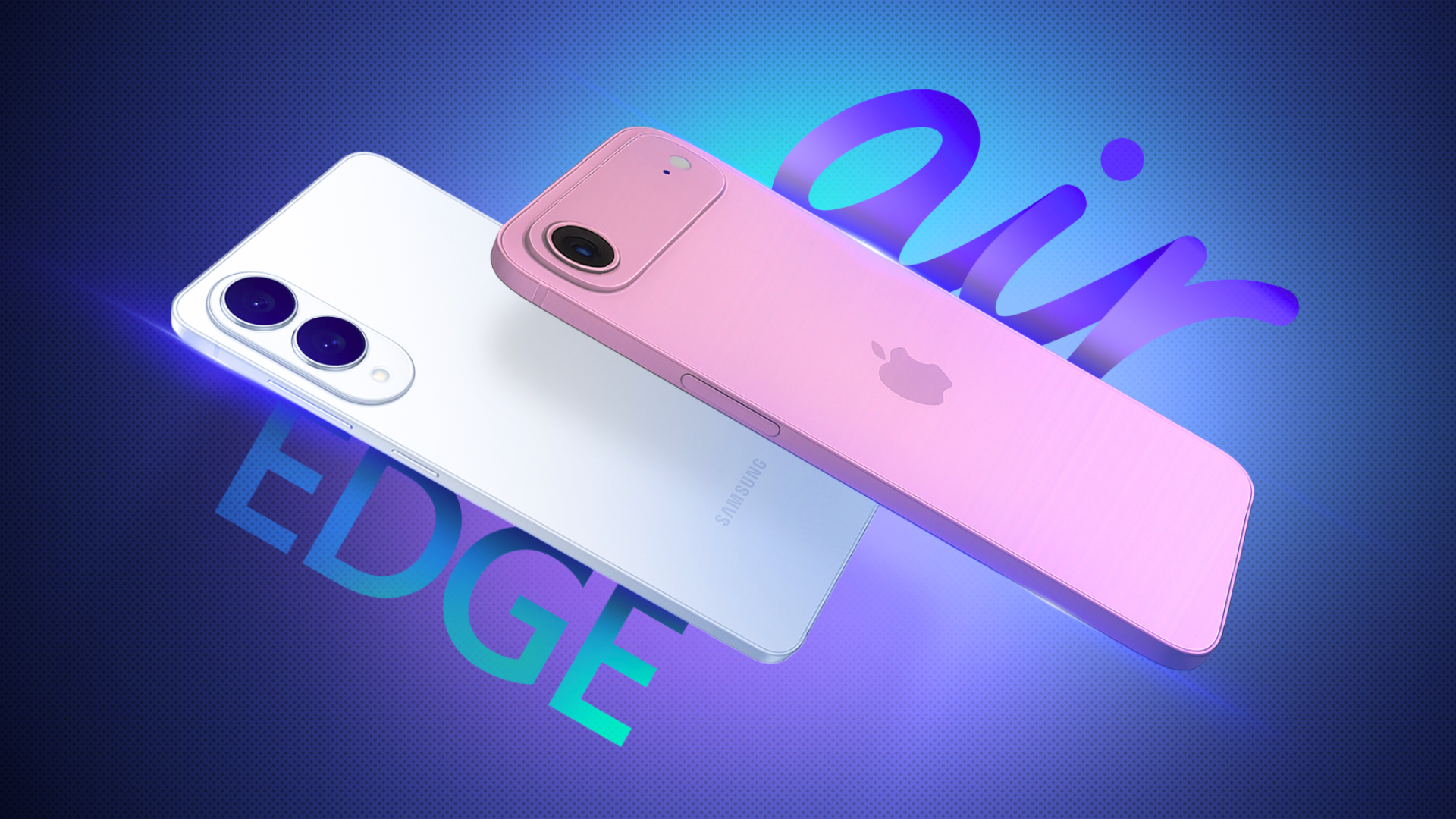
It's nearly time for Apple to charm us with shiny new gadgets, and this year's best-kept secret is the upcoming announcement of an ultra-thin iPhone 17. Dubbed the "Air" by anyone familiar with Apple's naming schemes, the device follows in the footsteps of the Samsung S25 Edge as a sliver of premium Apple smartphone for those who value pocket space.

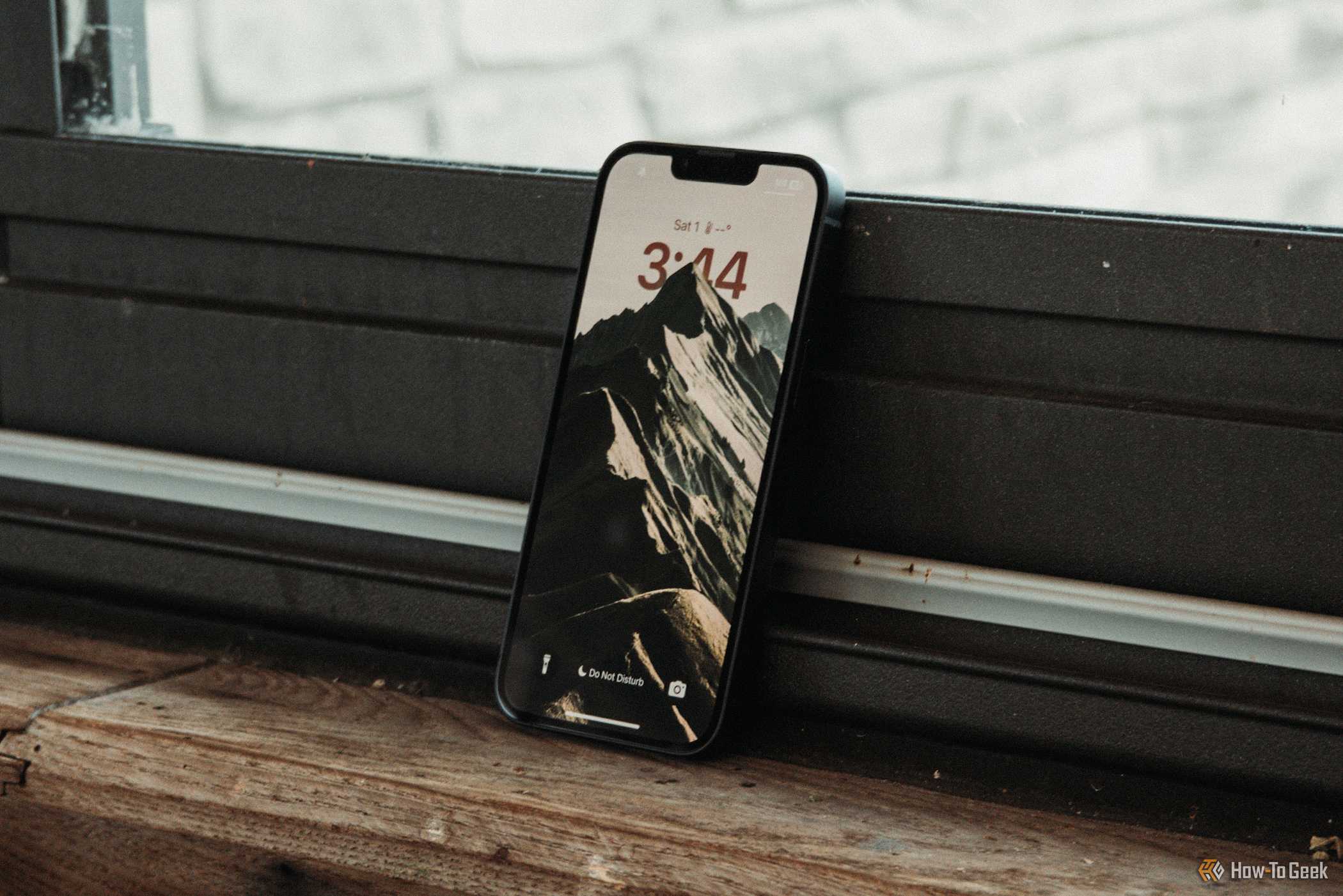
For me, it's iPhone upgrade year. My 13 Pro feels a bit rusty, and the charging port has been acting up. Despite the opportunity, I don't find myself tempted by the slimmest iPhone 17.

What the Rumors Say

The thin iPhone 17 has yet to be announced, but the rumor mill has been swirling and spitting out tidbits of information for well over a year. While nothing is confirmed and everything should be taken with a grain of salt, current rumors point to a super-flat profile that's around 5.5mm thick, which would make it just 0.2mm thicker than the impossibly thin 11-inch iPad Pro and significantly thinner than the 8.25mm iPhone 16 Pro (obviously excluding the camera bump).

It is expected that the "Air" will have a 6.6-inch display, which sits somewhere between a regular-sized iPhone 16 and the larger Plus and Pro Max models. Rumors also point to the same OLED panel upgrade as the base model iPhone 17, since Apple is expected to finally equip the whole generation with 120Hz displays.

It has also been suggested that a new, thinner iPhone would use a titanium alloy body, rather than the aluminum seen in the current base model iPhones. This sounds reassuring for anyone who remembers "bendgate" during the iPhone 6 era, where the Plus models in particular incurred permanent damage on account of the malleable chassis. The use of titanium will add some extra weight and likely push the price up somewhat.

Since Apple is also expected to drop the Plus base model iPhone this year (instead leaving only the high-end Pro Max for anyone who loves a phablet), it's quite possible the "Air" will occupy the same price bracket at around $899. That said, brace yourselves for a price hike, given that this is a brand-new iPhone model released during economically uncertain times.

There are many reasons thatA slim iPhone 17 could succeed and become a bestseller for Apple., but I'm yet to be swayed by any of them.

I'll Put a Case on It Anyway

How many "naked" iPhones do you see out in the wild? I love the way my titanium iPhone 13 Pro looks and feels without a case on it, but I also love having an iPhone that lacks dents and a broken screen. There's absolutely no way I'll be investing around a thousand dollars and not encasing my iPhone in a hunk of rubbery plastic to save me from my own clumsy self.

I've no doubt that upon walking into an Apple Store sometime after the product launch, I'll be wowed by the razor-thin iPhone in all its glory. It will undoubtedly feel glorious in the hand, like a futuristic piece of engineering that'll make my existing model feel bloated by comparison. I had a similar experience when I saw theSamsung Galaxy S25 Edgefor the first time.

But how long will this spectacle last? I'll probably preorder a case the second I preorder my new iPhone. By the time I've taken everything out of its packaging, most of Apple's engineering will be hidden away.

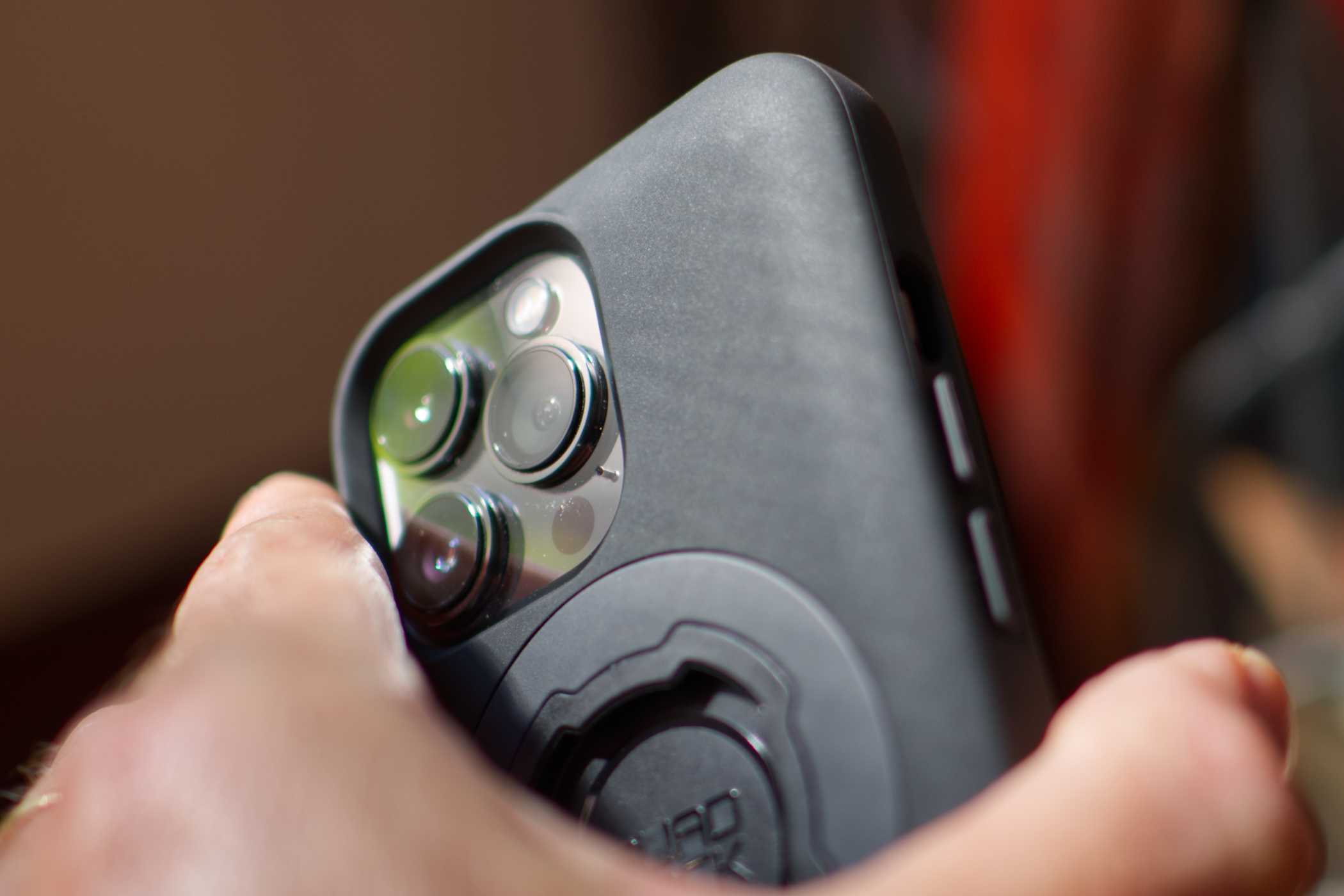
I'm partial tothe Quad Lock family of cases, which have saved me from cracked screens more times than I could possibly imagine. This is due to a small "lip" that rises above the surface of the screen. When your iPhone lands not-quite-face-down and hits a curb, it's the case that takes the scratch. My last Quad Lock case was polished shiny from hand grease, warped from the Australian heat, andcoveredIn battle scars that I wore with pride. The iPhone beneath is pristine.

A thinner iPhone would mean a thinner case, but putting on a case at all immediately undoes much of the reason you'd choose a device like this. After all, the iPhone needs to be able to take a hit; it's not an iPad Pro that lives on a coffee table, or a MacBook Air that is transported in a bag designed for this purpose.

A Single Camera? No Thanks

Outside of a temperamental charging port, which I could (and will, eventually) get fixed, the main reason I'm upgrading from the iPhone 13 Pro is to take advantage of the camera improvements. Despite owning a decent Sony mirrorless camera that takes magnificent photos and videos, my iPhone is still my primary camera. I take it everywhere and never hesitate to squeeze the proverbial shutter.

While the wide (1x) camera on my iPhone 13 Pro looks great, the ultrawide (0.5x) and telephoto (3x) leave much to be desired. This is especially true when comparing my photos to those shot by my partner, who last year upgraded to the iPhone 16 Pro. I absolutelyloveHaving a range of focal lengths to choose from, and I'm eager to see a quality upgrade across the board.

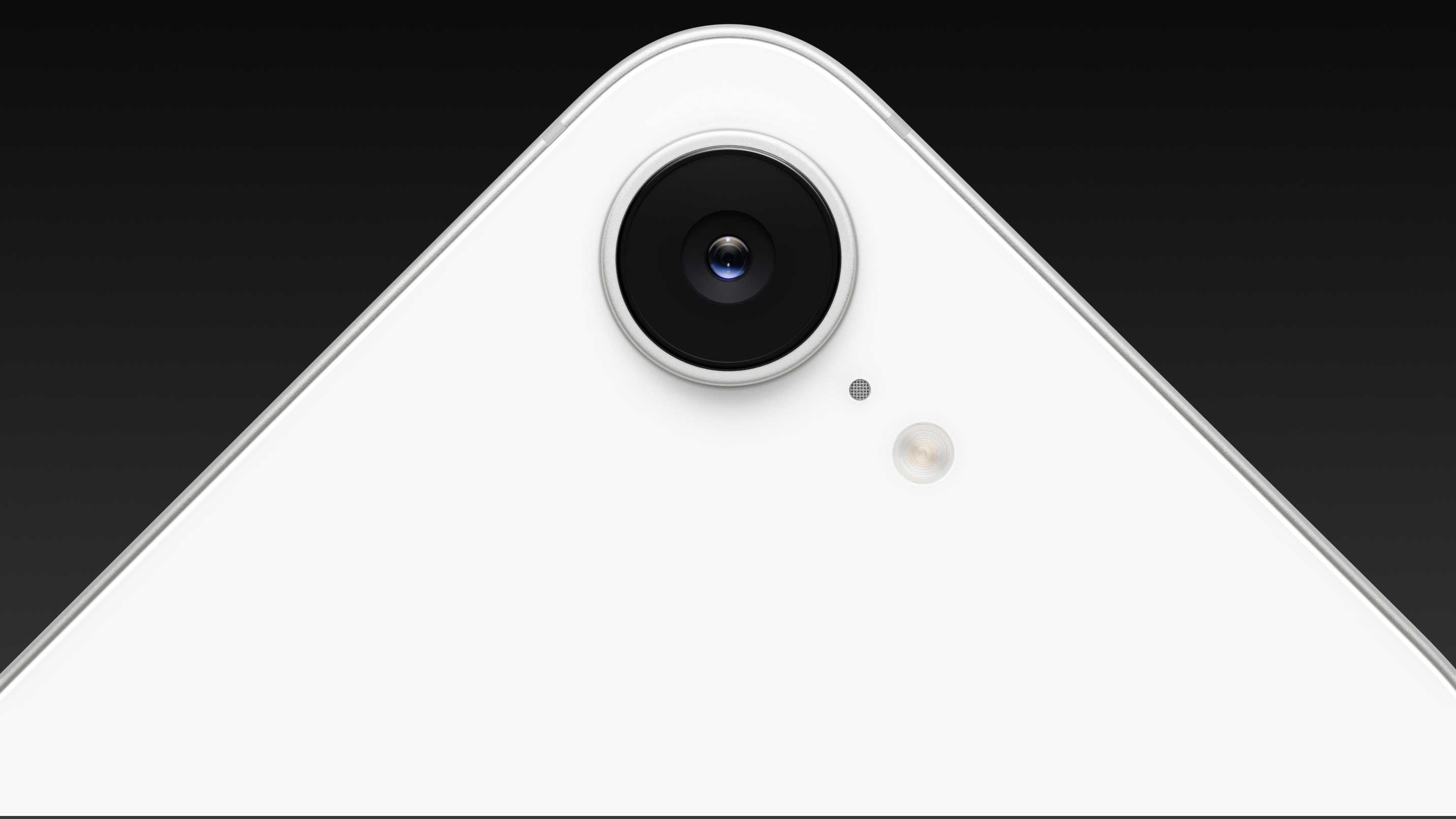
The iPhone 17 "Air" is rumored to have only a single camera, much like the regular base model iPhone. While Apple has increased the megapixel count to 48 and implemented a lossless 2x zoom that effectively crops the sensor down to 24MP to avoid losing image quality, I'm simply not interested in going back to a single lens camera.

If you're enthusiastic or even curious about photography, I'd strongly recommend getting a Pro model iPhone. The only downside here is that the selection of focal lengths has completely ruined my ability to ever consider an iPhone with a single camera again. I'm locked into the Pro lineup from now on unless Apple makes some major changes to the base models.

Ironically, the iPhone 17 Pro leaks point to the inclusion of a seriously chunky camera block this year, which I’ll happily admit looks terrible. Nevertheless, I’m always going to pick function over form when it comes to the camera (and I’ll pay considerably more for it).

Average Battery Life from the Start

My iPhone 13 Pro is still on its original battery, which means I have to fully charge it at least once a day with a few top-ups here and there. In this regard, I'm a "sipper"—I'll put my phone on charge 20 minutes before leaving the house to go from 20% to 70%, and I never charge overnight. Suffice to say, I'm used to poor battery life and anxiety-inducing single-digit percentage readings.

Now consider for a moment that the iPhone 17 Air will have less space for the battery than any iPhone that came before it. Forget the camera or the cooling; it is likely that battery life will be the biggest sacrifice that Apple will have to make in order to shave a few millimeters from the device's overall thickness. The inclusion of Apple's in-house C1 modem—first seen inthe "budget" iPhone 16e—will certainly help scrape back some power efficiency, but it can only go so far.

So far, numbers mentioned by analysts range from 2,800 to 3,000mAh. For comparison, the iPhone 16 has a 3,561mAh battery while the 16 Pro Max houses a 4,676mAh cell. Apple increased these capacities last year, and rumors suggest the same will happen again this year (with the 17 Pro potentially seeing an increase to around 5,000mAh).

One of the big contributors to that "new iPhone feeling" is a fresh battery that seems to last all day long. But things aren't looking great for the iPhone 17 "Air"—particularly when you factor in a few years of aging. I've come to expect my iPhone battery to lose around 30% of its total capacity within three years, though Appleadopting silicon-carbon batteriescould offer a boost.

The good news here is that owners of a slim iPhone could remedy this relatively easily with a MagSafe battery pack. The downside is that the battery pack attaches to the back of the iPhone, adding thickness.

I'm Not the Target Audience

There's undoubtedly a group of people out there for whom the iPhone 17 "Air" makes a lot of sense, but I've come to realize that I'm not in it. I'm quite happy with how much space the iPhone 13 Pro takes up in my pocket. I have big hands, so I have no issues reaching the furthest edge or gripping the phone. I've been carrying a titanium brick around for four years, and I have no qualms about the associated weight.

I'm also way more excited about the gains that Apple will make with the iPhone 17 Pro. Three cameras at 48MP, a potentially anti-reflective display that's better at preventing scratches, better battery life, the performance boost in the form of a new A19 Pro chip, and all the features I've missed out on in four years of not upgrading—Camera Control, Dynamic Island, faster charging speeds, and Apple Intelligence (for what that's worth).

If you're a fan of Plus-sized iPhones but don't have the budget to stretch to the Pro Max models, you might want toBuy an iPhone 16 Plus sooner rather than later. Alternatively, maybe the iPhone 17 Air is exactly what you're looking for.

We'll have to wait and see how the dust settles when Apple announces its new hardware sometime in September. Looking back at 2024, the iPhone 16 family was unveiled on September 10 and released more than a week later on September 20 alongside iOS 18.
How to Perform a Reverse Image Search on Your iPhone

You've probably used a search engine, such as Google, to find a picture of something online. But did you know you can also find out where a particular image originally came from? This is known as a reverse image search, and even better, you can easily do aReverse image search on your iPhone.

Perhaps you've seen a cute dog or cat picture online (isn't that what the internet is for?), and you want to find out what breed it is or find some similar photos. That's where reverse image search comes in handy. A reverse image search can help you track down the original source of a picture, find similar or identical pictures posted elsewhere, or identify subjects in a photo. You can even use it to look up products for shopping online!

Reverse image searching is one of the most usefuliPhone tipsout there, and it's not hard to do at all. Keep reading, and we'll lay out all the different tools available that will make you an expert internet photo sleuth in no time.

GetReader's Digest'sRead Up newsletterFor more tech, humor, travel, cleaning and fun facts all week long.

Can I reverse image search on my iPhone?

Yes. You don't need a computer to perform a reverse image search. In the past, you had to use a web browser or third-party app to perform a reverse image search. Today, however, there are several ways to perform a reverse image search on youriPhone—and you don't have to download any new apps to do it.

All you need is a browser app, such as Google Chrome or Safari, which should already be installed on your iPhone by default. Let's break down each method step by step, starting with the browser apps.

How to do a reverse image search with Google Chrome

Using an image from image search results

  1. Open the Google Chrome app.
  2. Navigate to images.google.com.
  3. Search for the image you want using relevant keywords.
  4. When you see an image you want to reverse search, tap and hold it until a menu pops up.
  5. In the pop-up menu, tap "Search Image with Google" to display the reverse image search results.

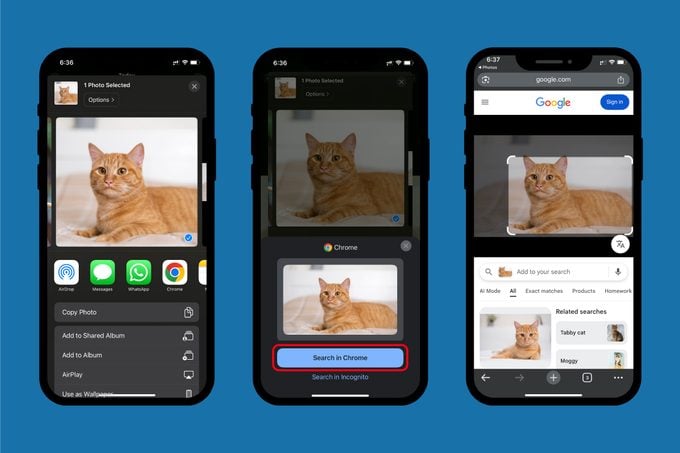
Using a photo in your Photos app

  1. Open the Photos app.
  2. In your Photo Library, tap and hold on the photo you want to search.
  3. Select "Share."
  4. Find Chrome in the row of apps that appears (you may have to scroll right) and tap on it.
  5. Tap the "Search in Chrome" button to display the reverse image search results.

Alternatively, you can do this directly from Chrome:

  1. Open the Chrome app.
  2. Tap the camera icon in the search bar.
  3. Tap the photo icon in the lower left corner.
  4. Select a photo from your Photo Library that you want to search (you may need to grant Chrome permission to access your Photo Library first).

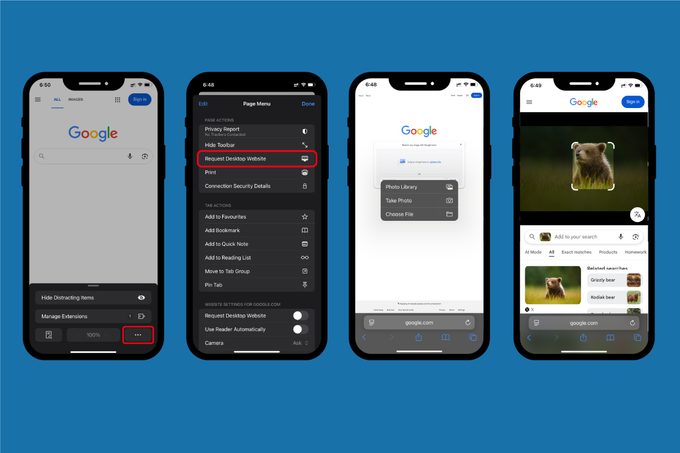
Troubleshooting tip:If the camera icon does not appear in the Chrome search bar, try navigating to images.google.com instead. If it does not appear there either, try requesting the desktop site by opening the Chrome menu (tap the three-dot icon in the lower right corner) and selecting "Request Desktop Website."

How to do a reverse image search with Safari

Using an image from image search results

  1. Open the Safari app.
  2. Navigate to images.google.com.
  3. Search for an image.
  4. Tap on a picture to open a detailed view.
  5. Tap on the camera icon in the lower left corner of the image to bring up the reverse image search results.

Troubleshooting tip:If the camera icon does not appear, make sure your Safari app is updated to the latest version. Alternatively, you can request the desktop version of Google Images. To do this, tap the menu icon in the Safari search bar (not the Google search bar) in the lower left corner of the screen. Then tap the icon with three dots and select "Request Desktop Website."

Using a photo in your Photos app

  1. Open the Safari app.
  2. Go to images.google.com.
  3. Tap the menu icon in the Safari search bar in the lower left corner of the screen.
  4. Tap the icon with three dots and select "Request Desktop Website."
  5. Tap the camera icon in the search bar.
  6. Tap "upload a file" in the search window.
  7. Tap "Photo Library" and select the photo you want to search.

Troubleshooting tip:Desktop versions of websites are designed for viewing on a computer screen, and they can be hard to view and read on mobile devices. If necessary, use two fingers to zoom into the desktop version of Google Images to make it more legible. When zoomed into a website’s desktop version on your phone, you may have to tap and hold the screen, then "drag" the website around on your screen to bring certain elements into view.

Does reverse image search work with Live Photos or videos on iPhone?

Reverse image searching doesn't work with videos on your iPhone and only works partially with Live Photos. With a Live Photo, you can only perform a reverse image search using the still image version of the photo (the .jpeg that your iPhone saves as a still photo in your Photo Library).

Although you can't do a reverse image search on a video to find its original source, you may still be able to find out more about it. If you want to find out more about a particular subject in the video,take a screenshotTake a frame from the video and use that still photo to perform a reverse image search. Alternatively, certain AI tools like ChatGPT and Gemini can analyze video files and potentially provide some additional information or insights.

Next, we'll take a look at using AI tools to perform a reverse image search.

How to reverse image search using AI

Using ChatGPT

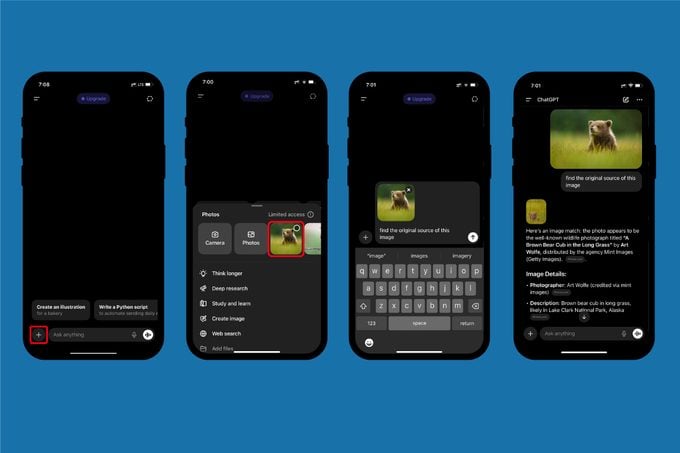
  1. Open the ChatGPT app or go to chatgpt.com in your browser.
  2. Tap the " +" icon in the mobile app or the paperclip icon if you're in a browser.
  3. In the menu that pops up, tap "Photos" if on mobile or "Images" if in a browser.
  4. Grant ChatGPT access to your Photo Library if necessary, then select the image you want to use.
  5. Give ChatGPT a prompt such as "find the original source of this image."

Troubleshooting tip:ChatGPT relies on your instructions, so make sure your prompt is simple and clear. If ChatGPT is acting slow or failing to load, it may be experiencing heavy traffic at the moment. Consider waiting and trying your search again later.

Using Google Gemini

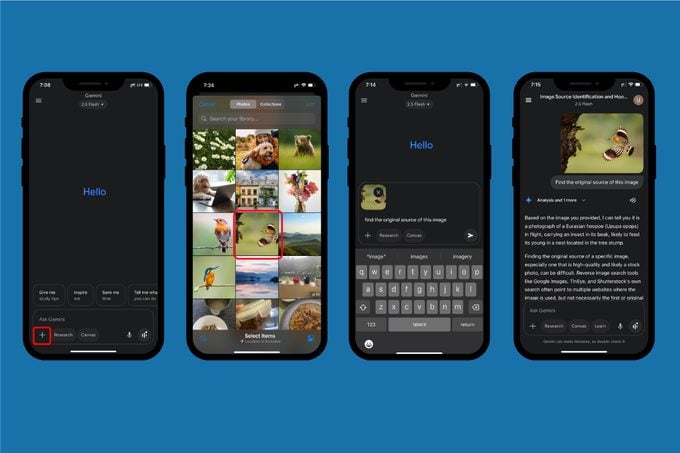
  1. Open the Gemini app or go to gemini.google.com in your browser.
  2. Tap the " +" icon in the "Ask Gemini" bar.
  3. Tap "Camera" in the mobile app or "Upload Files," then "Photo Library" if using a web browser.
  4. Tap the photo icon in the lower left.
  5. Grant Gemini access to your Photo Library if necessary, then select an image you want to search.
  6. Give Gemini a prompt such as "find the original source of this image."

Troubleshooting tip:As with ChatGPT, Google Gemini relies on your instructions, so make sure your prompts are clear and direct. Heavy user traffic may also slow down Gemini or cause answers to fail to load. Consider waiting a while or trying another reverse image search method if Gemini is not responding.

Can you use third-party sites or apps to perform a reverse image search on iPhone?

Yes, there are a number of third-party sites and apps that allow you to do a reverse image search on youriPhoneIn fact, before browsers like Chrome and Safari had built-in reverse image searching, these third-party tools were really the only way you could do it.

TinEye.com is one of the oldest and most popular reverse image search websites. Other search engines, such as Bing and Yandex, also feature a reverse image searching tool, similar to Google. There are also stand-alone apps, such as Reversee or Reverse Image Search & AI Lens.

What are the pros and cons of using third-party sites and apps?

The benefit of third-party websites or apps is that they can help you cast a wider net if your browser or AI searches aren't giving you what you want. Because they use different search algorithms, these tools can sometimes find images or bring up similar results that Google might miss.

The drawback of these third-party apps and websites is that they typically have access to smaller image databases than Google and often deliver less accurate or useful search results. Googleisthe most powerful and popular search engine for a reason, after all. Third-party tools may also be less convenient than simply using Google in your favorite browser, especially if they require you to go out of your way to use them.

Our recommendation is to try Google and/or your favorite AI helper first. If you can't find what you're looking for with either of those, then you should consider using a third-party tool such as TinEye or Bing.

Is it safe to perform a reverse image search on iPhone?

Performing a reverse image search on your iPhone is generally as safe as doing anything else, provided you aren't using anydodgy apps or websites. Remember, if you are doing a reverse image search on a picture in your Photo Library, whichever tool you are using will require access to your Photos app. However, if you don't want to grant access to your entire Photo Library, you can choose to only allow access to pictures you select when the app asks for permission. This will usually happen the first time you use an app to do a reverse image search on your iPhone.

Where will my reverse image search photos be stored?

Reverse image searching tools may also store uploaded images to a cloud when you perform a search. This cloud storage may only be temporary, but you should still be careful about using any potentially sensitive or personal photos when performing a reverse image search. That said, you canedit photosTo crop out anything you don’t want uploaded. This can be useful if you are trying to identify or get more information on a particular object in a photo rather than the entire image.

What else should I know about reverse image search safety?

AI models may also use uploaded images for their training data, so keep that in mind as well. Finally,Privacy-conscious iPhone usersShould consider removing metadata, such as location information, from photos before performing a reverse image search. There are a number of third-party websites and apps that can do this.

Generally speaking, you should be in safe waters as long as you stick with trusted services (such as Google Images), don't use any suspicious-looking apps or websites, and practice goodiPhone Security.

And there you have it: several ways you can quickly and easily perform a reverse image search right on your iPhone — no computer needed. And now that you've mastered the reverse image search, be sure to check out the hidden things youriPhone's volume buttonsCan do for even more handy tips and tricks that will have you using your smartphone like a pro!

Why trust us

AtReader's Digest, we are committed to producing high-quality content by writers with expertise and experience in their field, in consultation with relevant, qualified experts. We rely on reputable primary sources, including government and professional organizations and academic institutions, as well as our writers' personal experiences where appropriate. We verify all facts and data, back them with credible sourcing, and revisit them over time to ensure they remain accurate and up to date. Read more about ourteam, our contributors and ourEditorial policies.

Target:

  • AppleUse Apple Intelligence in Photos on iPhone

How to Factory Reset Your iPhone

Unlock an iPhone Without a Passcode

iPhone Disabled? Here's What to Do

Apple iPhone Embarrassed by Folding, AI-Powered Smartphones

Google and Samsung have raised the bar for smartphones with recent product launches, putting the pressure on rivalsAppleAAPL, which will soon introduce its iPhone 17 series handsets. Apple stock has stalled ahead of its event.

On Wednesday,Alphabet'sGOOGL Google showed off itsfall product line-up, led by its AI-enabledPixel 10 phones. Last month, Samsung launched new AI-poweredGalaxy smartphones. Both introduced folding, large-screen devices, something Apple is not rumored to have until late next year.

Please watch the video at Investors.com - Apple's AI Ambitions: Are Investors Losing Patience?

Analysts and product reviewers have taken notice of the Google and Samsung smartphone innovations.

"Apple is getting lapped by its Android competitors," said Nicole Nguyen, personal technology columnist at the Wall Street Journal, in anarticleWednesday. She said the new Google Pixel phones are "leagues ahead of the iPhone in AI."

The Gemini AI on Google phones can perform real-time voice translation, fast photo edits, and will proactively surface information when a user needs it.

"Google is pushing the boundaries of premium devices - especially in camera and AI integration, leveraging Gemini and showcasing that the promise of a universal agentic AI assistant can actually be in your hands - today," said IDC analyst Nabila Popal in a statement.

Meanwhile, Apple has delayed the release of many iPhone AI features until next year, including an upgraded Siri digital assistant. Apple is scheduled to announce its iPhone 17 family next month.

Apple Stock Sees Price-Target Cut

On thestock market today, Apple stock slid 0.5% to close at 224.90. On Tuesday, it dropped 2% to 226.01.

GlobalData analyst Anisha Bhatia said Google targeted Apple in its sales pitch for the Pixel 10 phones.

"Google clearly targeted switchers during the event - the marketing pointedly addressed iPhone users with two key problems - easy transfer of data and inclusive RCS (Rich Communication Services) messaging," she said in areportAlthough Google has not yet significantly affected Apple's market share, its Pixel series, loaded with its ever-improving set of AI magic, could give consumers a compelling reason to switch.

Loop Capital Markets analyst Ananda Baruah cut his price target on Apple stock to 226 from 230 on Thursday and reiterated his hold rating.

Follow Patrick Seitz on X at@IBD_PSeitzfor more stories on consumer technology, software and semiconductor stocks.

YOU MAY ALSO LIKE:

Apple iPhone 17 Anticipation Builds. Is Apple Stock a Buy?

Figma Stock Gets Buy Rating After Post-IPO Downturn

This Newsletter Helps You Uncover New Opportunities

Find Winning Stocks With MarketSurge Pattern Recognition & Custom Screens

Join IBD Live for Stock Ideas Each Morning Before the Open

Friday, August 22, 2025

iOS 26 Lets You Control Your iPhone by Raising Your Eyebrows or Sticking Out Your Tongue

Apple's iPhone offers a wide range of accessibility features that help all users, with varying needs, access their smartphones. There are features that allow you to control the device with your voice, your eyes, and it can even generate a special voice that sounds just like you, so it can speak for you. In iOS 26, Apple is adding one extra method for controlling your iPhone or iPad, and that is by using head tracking gestures.

Until now, the Switch Control feature, which allows you to move and select things on your screen simply by moving your head, has been the only head tracking on the iPhone. It's useful, but can be tedious if you just want to map a specific gesture to a specific action. Now, you can program specific OS level functions and shortcuts to specific head movements. For example, you can raise your eyebrows to go to the Home Screen.

How to set up Head Tracking gestures in iOS 26

First, make sure that you're running the latest version of iOS 26 on your iPhone. At the time of writing, it's available as aPublic beta, but the stable release is expected in September, in a couple of weeks.

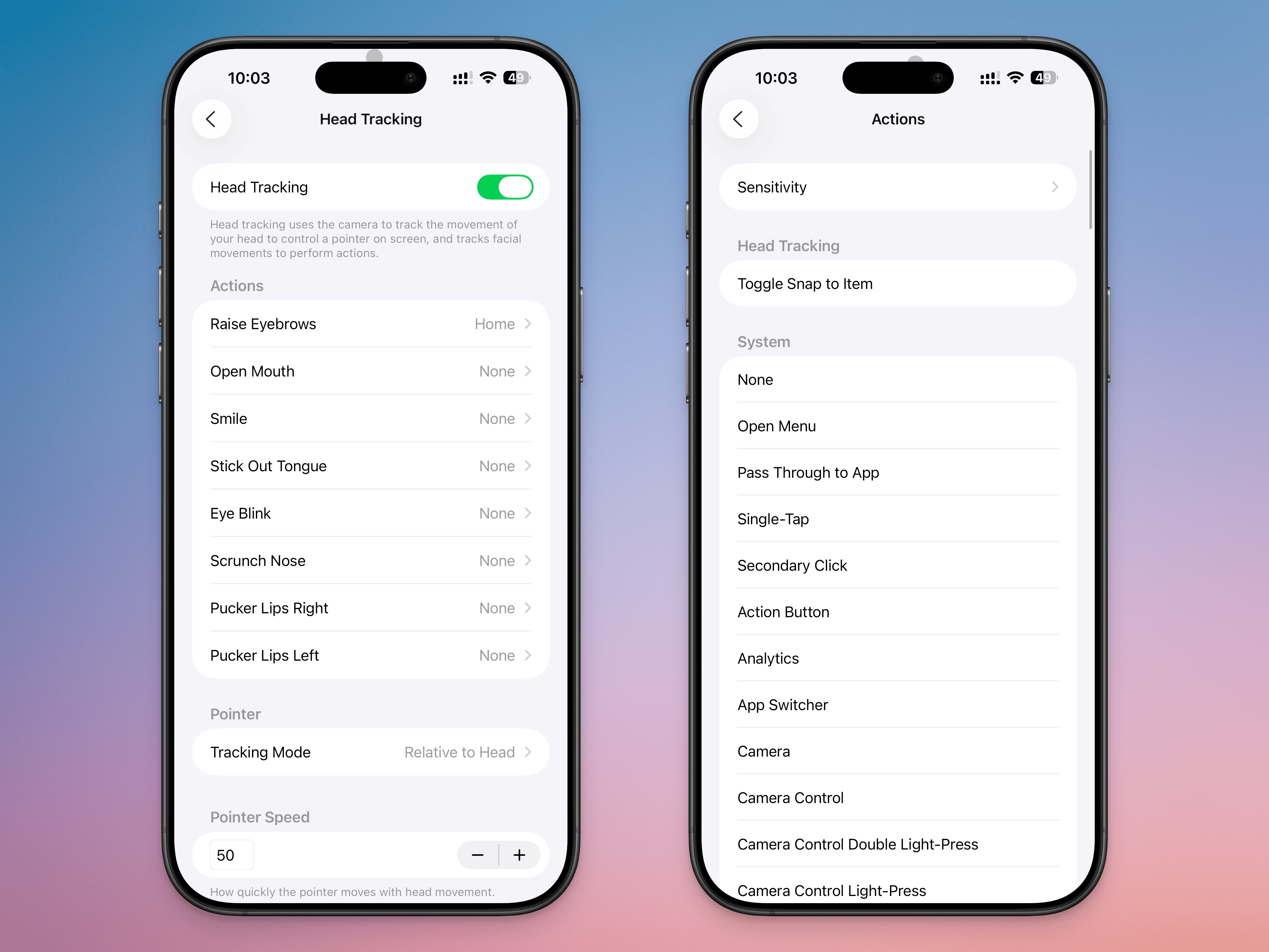
Go toSettings>Accessibility>Head Trackingand enable theHead Trackingfeature.

Before you start using this feature, it's important to talk aboutDwell Control. This is the feature where holding the cursor in one spot for a specific amount of time will select the action it's hovering over. Essentially, if you're controlling your cursor with your head and you keep looking at a specific point on the screen, it will get selected automatically. This can lead to accidental clicks, so if you want to use head tracking gestures, it's best to disable Dwell Control first.

Next, go to theActionssection. Here, you'll be able to choose from many gestures, such as Raise Eyebrows, Open Mouth, Smile, Stick Out Tongue, Eye Blink, Scrunch Nose, Pucker Lips Right, and Pucker Lips Left. Choose an action, and map it to what you want it to do on your phone. You can map it to a simple tap, have it open your Camera, or even assign it to start an app like Home or Siri. You can also map it to any Accessibility feature, scroll action, or shortcut you might have.

From theSensitivitymenu, you can change the facial expression sensitivity toSlight, orExaggerated. Depending on your setting, this will help prevent accidental inputs, or make it easier for your phone to recognize a gesture.

By setting multiple gestures to corresponding actions, you'll be able to mimic what a finger might be able to do. For example, you can mapPucker Lips RighttoScroll DownandPucker Lips LefttoScroll Up, then use them together. Similarly, you can mapRaise EyebrowstoHometo complete the effect.

Instead of using the dwell control to select things, you can also use a gesture likeStick Out Tonguefor theSingle Tapaction, for faster inputs.

You can also easily enable or disable head tracking gestures, as it is linked to AssistiveTouch. You can add the AssistiveTouch toggle to Control Center for one-touch access to head tracking gestures. Open Control Center, tap and hold in an empty area, tapAdd a Control, then search for and add theAssistiveTouchcontrol. Now, tapping on it will enable or disable head tracking gestures.

If you enjoyed this story, be sure to followThe Shiro Copron MSN.

5 Apple Products You Should Wait to Buy Until Next Year

Apple has already refreshed some of itsPopular productsthis year, including the MacBook Air and Mac Studio, with the iPhone and Apple Watch also among the company's anticipated fall 2025 releases.

Trending Now:8 Luxury Items at Costco That You Can Buy for Less

See Next:8 Things You Must Do When Your Savings Reach $50,000

However, other devices have not received updates since 2024 or earlier, which makes it important to time your purchases carefully so you get the best value for Apple's premium prices. Here are five Apple products that you should probably wait until 2026 to buy.

Also here is how to pay less for Apple products.

Earning passive income doesn't need to be difficult.You can start this week.

iPhone 17 (e)

Apple is expected to announce its new iPhone 17 lineup in September 2025, so you don't have to wait too long if you're looking for the updated standard, Pro and Pro Max models. But if you're on a budget, it may be worth waiting for the more basic iPhone 17(e), which is rumored to come out in spring 2026.

According to9 to 5 Mac, you can expect the iPhone 17(e) to have the faster A19 chip and possibly an upgraded modem, though the overall design and single camera may remain the same.MacworldEstimated that the iPhone 17(e) could sell at the current retail price of the iPhone 16(e), $599, or go up to $699, depending on how Apple positions it in the lineup.

For You:8 Items to Stock Up on Now in Case of Tariff-Induced Product Shortages

Apple Studio Display

Thecurrent 27-inch Apple Studio Displayhas beena hot pickfor those who would like a 5K Retina screen with a built-in camera and speakers to accompany their MacBook, Mac Mini or Mac Studio. However, the monitor has not had any updates since its release in March 2022.

Rather than spending $1,599 or more now, consider waiting for the rumored Apple Studio Display 2, which could finally be released in early 2026 after multiple delays. In August 2025,MacRumorsWrote that the upgraded model might have the A19 Pro chip and possibly mini-LED backlighting, although the specifics (including its price and size) are still unknown.

iPad Air

The most recentiPad AirReleased in May 2024, it remains a smart purchase if you want a powerful everyday tablet at a competitive starting price of $599 (11-inch) or $799 (13-inch). But if you can wait until next spring, you can expect a new release with a performance upgrade.

In July 2025,BloombergIt was reported that the updated tablet should launch in March or April 2026 and feature the M4 chip, which should provide a faster experience when using apps and help improve battery life.MacRumorsandApple Insideralso noted an upcoming iPad Air with an OLED display, but it's unclear whether that will wait until 2027.

Apple HomePod

Released in February 2023, the currentApple HomePodIt does the job if you just want a smart speaker for playing music and issuing Siri requests. But the $299 smart home device lacks the interactive touchscreen of its competitors, like the Google Nest Hub and Amazon Echo Show.

AAugust 2025 Bloomberg articlenoted thatApple was working onA smart home hub that would have a 7-inch display attached to a speaker base and feature a special Siri-powered operating system, which has the codename "Charismatic." If you want that functionality, this home device may be worth the wait in 2026, but be prepared to pay a likely higher price.

MacBook Pro

Apple announcedthe most recent 14- and 16-inchMacBook Pro modelsin October 2024 and a refresh with the M5 chip was initially expected in late 2025. However, anAugust 2025 postFrom Apple analyst Ming-Chi Kuo indicated that new MacBooks may have to wait until 2026.

With premium laptops currently starting at $1,599 to $2,499 (depending on screen size), consider waiting for the next release to get a faster processor. You can also consider choosing a refurbished version of the current MacBook Pro at a discount.

According to9 to 5 Mac, even bigger changes are rumoured with a late 2026 release, including an updated design and OLED display upgrade.MacworldMentioned that a 5G-enabled MacBook Pro is also in the works.

More From The Shiro Copr

  • 5 Little Luxuries to Buy at Dollar Tree This August
  • 6 Summer Clothing Items You Should Buy at Costco Now 
  • How Middle-Class Earners Are Quietly Becoming Millionaires -- and How You Can, Too
  • 4 Low-Risk Ways To Build Your Savings in 2025

This article originally appeared onThe Shiro Copr:5 Apple Products You Should Wait To Buy Until Next Year