Thursday, September 4, 2025

Set Up an Email Triage System with Home Assistant and a Local LLM

Featured Image

Leveraging Home Assistant for Email Triage with a Local LLM

Home Assistant is an incredibly powerful platform that goes beyond just connecting hardware from different vendors into a single dashboard. It can integrate a wide range of tools and services, including software running on your PC or even games like Counter-Strike. One particularly useful integration is the IMAP integration, which allows you to link your email account to Home Assistant. This feature enables you to process every incoming email in a way that suits your needs.

I’ve taken this functionality and created a personal email triage system using Home Assistant and a local large language model (LLM). The system processes each incoming email, categorizes it, and provides a summary, making it easier to manage my inbox.

Why Build an Email Triage System?

Emails can quickly become overwhelming, especially when they’re filled with newsletters, work-related messages, and other types of communication. While I try to unsubscribe from unnecessary emails, some are still important, even if not always. I wanted a way to make this process more efficient, so I turned to a local LLM to help summarize and categorize incoming emails.

Home Assistant’s IMAP integration allows it to pull every email from a designated server, including the content. However, parsing this content can be challenging due to varying HTML structures. A local LLM offers a more flexible solution by recognizing patterns in the text, generating summaries, and assigning categories.

Using a local LLM also ensures privacy, as no data is sent to external servers. This approach doesn’t replace manual inbox checks but significantly reduces the frequency with which I need to review my emails. Additionally, it provides insights into the types of emails I receive, helping me better understand my communication patterns.

Setting Up the LLM Triage REST Command

To implement this system, I built two components: a REST command that sends emails to the LLM and an automation that processes the response. Here's the configuration for the REST command:

rest_command:
  llm_email_triage:
    url: "http://192.168.1.81:11434/api/chat"
    method: POST
    headers:
      Content-Type: "application/json"
    payload: >
      {{
        {
          "model": "dolphin-llama3",
          "stream": false,
          "keep_alive": "24h",
          "messages": [
            {
              "role": "system",
              "content": "You are an email-triage assistant. Read the email JSON, then return ONLY JSON matching the schema."
            },
            {
              "role": "user",
              "content": (email_payload if email_payload is string else (email_payload | to_json))
            }
          ],
          "format": {
            "type": "object",
            "properties": {
              "priority": {"type": "string", "enum": ["P0", "P1", "P2", "P3"]},
              "category": {"type": "string", "enum": ["personal", "transaction", "calendar", "newsletter", "promo", "alert", "receipt", "support", "unknown"]},
              "summary": {"type": "string"},
              "actions": {
                "type": "object",
                "properties": {
                  "archive": {"type": "boolean"},
                  "move_to_folder": {"type": "string"},
                  "snooze_until": {"type": "string"},
                  "create_task": {
                    "type": "object",
                    "properties": {
                      "title": {"type": "string"},
                      "due": {"type": "string"}
                    },
                    "required": ["title"]
                  }
                },
                "additionalProperties": false
              },
              "confidence": {"type": "number"}
            },
            "required": ["priority", "category", "summary", "actions", "confidence"],
            "additionalProperties": false
          },
          "options": {
            "temperature": 0,
            "num_ctx": 32768
          }
        } | to_json
      }}

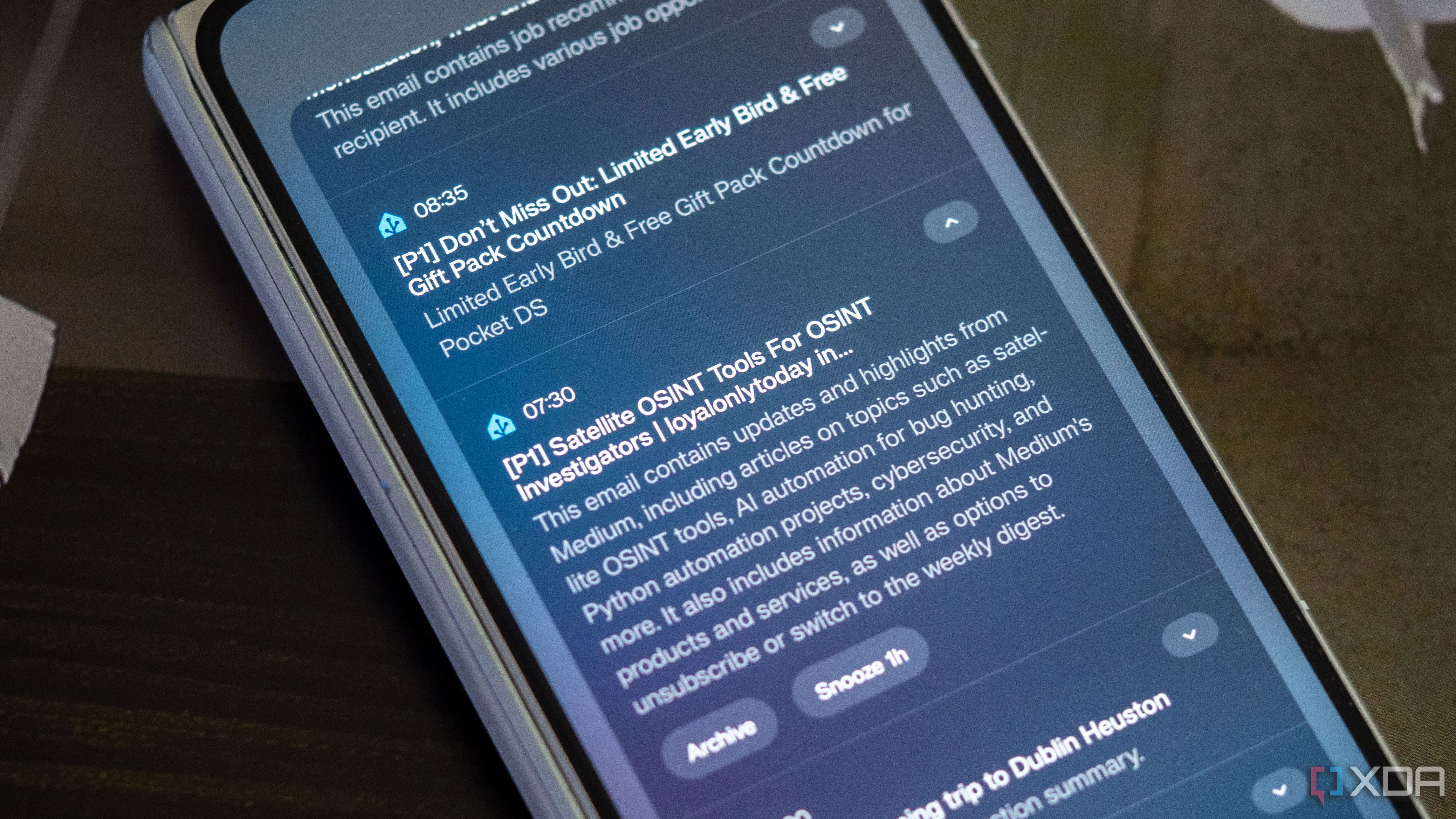
This REST command sends an email to the LLM, which returns structured data including priority, category, summary, actions, and confidence. The LLM uses a context window of 32,768 tokens, allowing it to handle complex emails effectively.

Setting Up Automation to Summarize Emails

The next step is to set up automation that processes the LLM’s response. When an email arrives, the automation fetches the message, extracts relevant details, and calls the REST command. It then processes the response, updates counters based on the category, and sends a notification to a device.

The automation includes variables such as mail, email_payload, and triage. It also increments counters for each category, such as counter.emails_personal or counter.emails_transaction. These counters help track the types of emails received over time.

Once an email is processed, a summary is sent to the phone, along with the subject line and priority. Additional actions, like snoozing or archiving, can be implemented based on the LLM’s recommendations.

Expanding the Possibilities

Home Assistant is a versatile platform that can integrate many different tools and services. For example, I’ve connected my GoXLR audio interface to control lights and linked Uptime Kuma to monitor office lights for service outages.

There are countless ways to customize Home Assistant to suit individual needs, and this email triage system is just one example. The GitHub repository for this project also demonstrates how tasks can be automatically added to a to-do list in Home Assistant, showcasing the platform’s flexibility.


Set Up an Email Triage System with Home Assistant and a Local LLM

Featured Image

Leveraging Home Assistant for Email Triage with a Local LLM

Home Assistant is an incredibly powerful platform that goes beyond just connecting hardware from different vendors into a single dashboard. It can integrate a wide range of tools and services, including software running on your PC or even games like Counter-Strike. One particularly useful integration is the IMAP integration, which allows you to link your email account to Home Assistant. This feature enables you to process every incoming email in a way that suits your needs.

I’ve taken this functionality and created a personal email triage system using Home Assistant and a local large language model (LLM). The system processes each incoming email, categorizes it, and provides a summary, making it easier to manage my inbox.

Why Build an Email Triage System?

Emails can quickly become overwhelming, especially when they’re filled with newsletters, work-related messages, and other types of communication. While I try to unsubscribe from unnecessary emails, some are still important, even if not always. I wanted a way to make this process more efficient, so I turned to a local LLM to help summarize and categorize incoming emails.

Home Assistant’s IMAP integration allows it to pull every email from a designated server, including the content. However, parsing this content can be challenging due to varying HTML structures. A local LLM offers a more flexible solution by recognizing patterns in the text, generating summaries, and assigning categories.

Using a local LLM also ensures privacy, as no data is sent to external servers. This approach doesn’t replace manual inbox checks but significantly reduces the frequency with which I need to review my emails. Additionally, it provides insights into the types of emails I receive, helping me better understand my communication patterns.

Setting Up the LLM Triage REST Command

To implement this system, I built two components: a REST command that sends emails to the LLM and an automation that processes the response. Here's the configuration for the REST command:

rest_command:
  llm_email_triage:
    url: "http://192.168.1.81:11434/api/chat"
    method: POST
    headers:
      Content-Type: "application/json"
    payload: >
      {{
        {
          "model": "dolphin-llama3",
          "stream": false,
          "keep_alive": "24h",
          "messages": [
            {
              "role": "system",
              "content": "You are an email-triage assistant. Read the email JSON, then return ONLY JSON matching the schema."
            },
            {
              "role": "user",
              "content": (email_payload if email_payload is string else (email_payload | to_json))
            }
          ],
          "format": {
            "type": "object",
            "properties": {
              "priority": {"type": "string", "enum": ["P0", "P1", "P2", "P3"]},
              "category": {"type": "string", "enum": ["personal", "transaction", "calendar", "newsletter", "promo", "alert", "receipt", "support", "unknown"]},
              "summary": {"type": "string"},
              "actions": {
                "type": "object",
                "properties": {
                  "archive": {"type": "boolean"},
                  "move_to_folder": {"type": "string"},
                  "snooze_until": {"type": "string"},
                  "create_task": {
                    "type": "object",
                    "properties": {
                      "title": {"type": "string"},
                      "due": {"type": "string"}
                    },
                    "required": ["title"]
                  }
                },
                "additionalProperties": false
              },
              "confidence": {"type": "number"}
            },
            "required": ["priority", "category", "summary", "actions", "confidence"],
            "additionalProperties": false
          },
          "options": {
            "temperature": 0,
            "num_ctx": 32768
          }
        } | to_json
      }}

This REST command sends an email to the LLM, which returns structured data including priority, category, summary, actions, and confidence. The LLM uses a context window of 32,768 tokens, allowing it to handle complex emails effectively.

Setting Up Automation to Summarize Emails

The next step is to set up automation that processes the LLM’s response. When an email arrives, the automation fetches the message, extracts relevant details, and calls the REST command. It then processes the response, updates counters based on the category, and sends a notification to a device.

The automation includes variables such as mail, email_payload, and triage. It also increments counters for each category, such as counter.emails_personal or counter.emails_transaction. These counters help track the types of emails received over time.

Once an email is processed, a summary is sent to the phone, along with the subject line and priority. Additional actions, like snoozing or archiving, can be implemented based on the LLM’s recommendations.

Expanding the Possibilities

Home Assistant is a versatile platform that can integrate many different tools and services. For example, I’ve connected my GoXLR audio interface to control lights and linked Uptime Kuma to monitor office lights for service outages.

There are countless ways to customize Home Assistant to suit individual needs, and this email triage system is just one example. The GitHub repository for this project also demonstrates how tasks can be automatically added to a to-do list in Home Assistant, showcasing the platform’s flexibility.
Tuesday, September 2, 2025

Down 19%, Should You Buy D-Wave's Dip?

Featured Image

D-Wave's Remarkable Rise and the Future of Quantum Computing

D-Wave's stock has experienced a dramatic surge, climbing nearly 1,500% over the past year. This impressive growth reflects the growing interest in emerging technology stocks, particularly those involved in cutting-edge fields like quantum computing. Despite recent market fluctuations that have seen shares drop by 19% from mid-August to late August, the long-term trajectory of D-Wave remains strong, fueled by investor enthusiasm for the future of technology.

A New Era in Quantum Processing

D-Wave, which positions itself as the world’s first commercial supplier of quantum computers, recently introduced its next-generation quantum processor, the Advantage2. This new model represents a significant step forward in the field, offering enhanced capabilities for real-world applications such as process optimization, materials simulation, and artificial intelligence. The Advantage2 is designed to meet the increasing demands for computational power while maintaining energy efficiency, making it a promising development in the industry.

The company has already demonstrated the potential of the Advantage2 through trials with institutions like the Jülich Supercomputer Center and the Los Alamos National Laboratory, as well as a Japanese tobacco company that used quantum computing to enhance large language models in drug discovery. These collaborations highlight the practical applications of quantum computing and the growing interest in leveraging this technology for complex problem-solving.

Challenges and Opportunities

Despite these advancements, D-Wave faces several business challenges. In its second quarter, the company reported revenue of $3.1 million, a 42% increase compared to the same period last year. Bookings, which represent customer orders expected to generate future revenue, saw a 92% increase to $1.3 million. However, the rise in bookings has also brought complexities, as larger organizations often require proof of concepts before committing to purchases. This can lead to longer sales cycles and more rigorous documentation processes.

Profitability remains a hurdle for D-Wave, as the company reported a net loss of $167.3 million for the second quarter, a significant increase from the previous year. Operating expenses rose by 41%, and the company faced a $142 million non-cash charge related to warranty liabilities and warrant exercises. While the balance sheet remains strong, with $819 million in cash and only $149.3 million in liabilities, the path to profitability is still uncertain.

Strategic Growth Plans

Management has emphasized that the company will use its strong financial position to fuel growth, potentially through mergers and acquisitions. D-Wave plans to invest heavily in research and development, manufacturing operations, and sales and marketing, which could lead to an estimated 15% increase in quarterly operating expenditures. While the company aims to be the first independent, publicly traded quantum computing firm to achieve consistent profitability, this goal may take time to realize.

Evaluating the Investment Potential

On a trailing-12-month basis, D-Wave's stock trades at a price-to-sales ratio of 173, which is significantly higher than traditional tech giants like Alphabet and IBM. This valuation suggests that investors are betting on the company's long-term potential. Analysts predict that D-Wave's 2025 revenue could reach $24.6 million, representing nearly an 180% increase from 2024. If the company can sustain this level of growth, it may justify its current valuation.

However, investing in D-Wave should be viewed as a speculative move, given the volatility and uncertainty surrounding the quantum computing sector. Until there is a clearer path to profitability and broader commercial adoption, it may be prudent to monitor D-Wave as part of a watchlist for emerging technology stocks.

Conclusion

D-Wave's journey highlights both the promise and the challenges of investing in cutting-edge technology. While the company has made significant strides with its Advantage2 processor and a robust balance sheet, the road to profitability remains uncertain. Investors considering D-Wave should weigh the potential rewards against the risks, keeping in mind the dynamic nature of the quantum computing landscape.

Down 19%, Should You Buy D-Wave's Dip?

Featured Image

D-Wave's Remarkable Rise and the Future of Quantum Computing

D-Wave's stock has experienced a dramatic surge, climbing nearly 1,500% over the past year. This impressive growth reflects the growing interest in emerging technology stocks, particularly those involved in cutting-edge fields like quantum computing. Despite recent market fluctuations that have seen shares drop by 19% from mid-August to late August, the long-term trajectory of D-Wave remains strong, fueled by investor enthusiasm for the future of technology.

A New Era in Quantum Processing

D-Wave, which positions itself as the world’s first commercial supplier of quantum computers, recently introduced its next-generation quantum processor, the Advantage2. This new model represents a significant step forward in the field, offering enhanced capabilities for real-world applications such as process optimization, materials simulation, and artificial intelligence. The Advantage2 is designed to meet the increasing demands for computational power while maintaining energy efficiency, making it a promising development in the industry.

The company has already demonstrated the potential of the Advantage2 through trials with institutions like the Jülich Supercomputer Center and the Los Alamos National Laboratory, as well as a Japanese tobacco company that used quantum computing to enhance large language models in drug discovery. These collaborations highlight the practical applications of quantum computing and the growing interest in leveraging this technology for complex problem-solving.

Challenges and Opportunities

Despite these advancements, D-Wave faces several business challenges. In its second quarter, the company reported revenue of $3.1 million, a 42% increase compared to the same period last year. Bookings, which represent customer orders expected to generate future revenue, saw a 92% increase to $1.3 million. However, the rise in bookings has also brought complexities, as larger organizations often require proof of concepts before committing to purchases. This can lead to longer sales cycles and more rigorous documentation processes.

Profitability remains a hurdle for D-Wave, as the company reported a net loss of $167.3 million for the second quarter, a significant increase from the previous year. Operating expenses rose by 41%, and the company faced a $142 million non-cash charge related to warranty liabilities and warrant exercises. While the balance sheet remains strong, with $819 million in cash and only $149.3 million in liabilities, the path to profitability is still uncertain.

Strategic Growth Plans

Management has emphasized that the company will use its strong financial position to fuel growth, potentially through mergers and acquisitions. D-Wave plans to invest heavily in research and development, manufacturing operations, and sales and marketing, which could lead to an estimated 15% increase in quarterly operating expenditures. While the company aims to be the first independent, publicly traded quantum computing firm to achieve consistent profitability, this goal may take time to realize.

Evaluating the Investment Potential

On a trailing-12-month basis, D-Wave's stock trades at a price-to-sales ratio of 173, which is significantly higher than traditional tech giants like Alphabet and IBM. This valuation suggests that investors are betting on the company's long-term potential. Analysts predict that D-Wave's 2025 revenue could reach $24.6 million, representing nearly an 180% increase from 2024. If the company can sustain this level of growth, it may justify its current valuation.

However, investing in D-Wave should be viewed as a speculative move, given the volatility and uncertainty surrounding the quantum computing sector. Until there is a clearer path to profitability and broader commercial adoption, it may be prudent to monitor D-Wave as part of a watchlist for emerging technology stocks.

Conclusion

D-Wave's journey highlights both the promise and the challenges of investing in cutting-edge technology. While the company has made significant strides with its Advantage2 processor and a robust balance sheet, the road to profitability remains uncertain. Investors considering D-Wave should weigh the potential rewards against the risks, keeping in mind the dynamic nature of the quantum computing landscape.

Monday, September 1, 2025

Crashing PCs via File Searches—Now Done from Your Phone

Featured Image

The Evolution of File Searching

File searching has come a long way from its early days. It was once considered a groundbreaking feature, especially with the introduction of Windows Vista. However, today, it's so seamlessly integrated into our daily lives that we often take it for granted.

Windows Vista and the Rise of File Indexing

Windows Vista introduced several features that were ahead of their time, including the Windows Aero theme. One of the most notable advancements was the improved file search functionality. While file indexing wasn't a new concept, Vista was the first version of Windows to enable it by default. This meant users didn't have to be tech-savvy to benefit from the ability to quickly locate files and applications.

The Microsoft developer blog provides an in-depth look at the history of file indexing on Windows. It explains how this technology evolved over the years and became a standard feature. For many users, this shift made managing digital files much more efficient. I remember experimenting with reducing the number of folders I used, relying instead on search functions. However, my experiments with third-party disk encryption software eventually led to a system crash, prompting me to explore Linux.

Linux Desktops and the Struggle with Search

Around 2010, Linux desktops were still working on refining their file indexing capabilities. I recall using KDE Plasma 4 and encountering issues with Nepomuk, a file indexing system that often crashed. Some implementations worked, but they were resource-heavy, which was a problem for laptop users who needed longer battery life.

As a college student, I had to disable these features to make sure my laptop lasted through classes. Fortunately, Linux has since improved significantly, and file searching is now a standard feature that most users don’t even think about anymore.

Spotlight on Macs

While I haven’t owned a modern Mac, I know that Spotlight is a core feature of macOS. Introduced with Mac OS X Tiger in 2005, Spotlight revolutionized how users searched for files and information. Although it wasn’t perfect at launch, it laid the groundwork for the powerful search tools we see today.

Spotlight’s impact on the computing world cannot be overstated. It set a new standard for how operating systems should handle file searches, influencing other platforms like Windows and Linux.

File Searching on Phones

Today, file searching is so ingrained in our daily lives that we no longer think about it. With smartphones becoming increasingly powerful, they now offer capabilities that were once reserved for laptops and desktops. The iPhone, for example, has its own version of Spotlight, allowing users to search for files, apps, and even content within documents.

Modern flagship phones are capable of handling tasks that were once unthinkable for mobile devices. They can encode video, play high-end games, and stream 4K media. Searching for files is a trivial task for these devices, making it easy to overlook just how advanced they’ve become.

My Experience with File Searching on a Galaxy Z Fold 6

On my Galaxy Z Fold 6, I’ve noticed how much faster and more efficient file searching has become. I pay much less attention to file hierarchy than I used to. Searching for files is nearly instantaneous, and the file manager can quickly sift through large photos and PDFs. I can even search for specific words within files, not just their names. The results appear so quickly that I often find myself clicking through folders before the search results are even displayed.

This level of performance has made me question whether folders are still necessary. If I can find any file in an instant, as long as I give them easily identifiable names, why not keep everything in one place? While I haven’t completely done away with folders, I find myself navigating them less and less.

The Future of File Management

As mobile devices continue to evolve, it's clear that file searching will only become more seamless and efficient. The technology has reached a point where I can use my phone as my primary computing device, and file indexing is just one more area where I’m amazed by how far mobile devices have come. Folders may soon be a thing of the past, replaced by a more intuitive and efficient way of managing digital files.

Crashing PCs via File Searches—Now Done from Your Phone

Featured Image

The Evolution of File Searching

File searching has come a long way from its early days. It was once considered a groundbreaking feature, especially with the introduction of Windows Vista. However, today, it's so seamlessly integrated into our daily lives that we often take it for granted.

Windows Vista and the Rise of File Indexing

Windows Vista introduced several features that were ahead of their time, including the Windows Aero theme. One of the most notable advancements was the improved file search functionality. While file indexing wasn't a new concept, Vista was the first version of Windows to enable it by default. This meant users didn't have to be tech-savvy to benefit from the ability to quickly locate files and applications.

The Microsoft developer blog provides an in-depth look at the history of file indexing on Windows. It explains how this technology evolved over the years and became a standard feature. For many users, this shift made managing digital files much more efficient. I remember experimenting with reducing the number of folders I used, relying instead on search functions. However, my experiments with third-party disk encryption software eventually led to a system crash, prompting me to explore Linux.

Linux Desktops and the Struggle with Search

Around 2010, Linux desktops were still working on refining their file indexing capabilities. I recall using KDE Plasma 4 and encountering issues with Nepomuk, a file indexing system that often crashed. Some implementations worked, but they were resource-heavy, which was a problem for laptop users who needed longer battery life.

As a college student, I had to disable these features to make sure my laptop lasted through classes. Fortunately, Linux has since improved significantly, and file searching is now a standard feature that most users don’t even think about anymore.

Spotlight on Macs

While I haven’t owned a modern Mac, I know that Spotlight is a core feature of macOS. Introduced with Mac OS X Tiger in 2005, Spotlight revolutionized how users searched for files and information. Although it wasn’t perfect at launch, it laid the groundwork for the powerful search tools we see today.

Spotlight’s impact on the computing world cannot be overstated. It set a new standard for how operating systems should handle file searches, influencing other platforms like Windows and Linux.

File Searching on Phones

Today, file searching is so ingrained in our daily lives that we no longer think about it. With smartphones becoming increasingly powerful, they now offer capabilities that were once reserved for laptops and desktops. The iPhone, for example, has its own version of Spotlight, allowing users to search for files, apps, and even content within documents.

Modern flagship phones are capable of handling tasks that were once unthinkable for mobile devices. They can encode video, play high-end games, and stream 4K media. Searching for files is a trivial task for these devices, making it easy to overlook just how advanced they’ve become.

My Experience with File Searching on a Galaxy Z Fold 6

On my Galaxy Z Fold 6, I’ve noticed how much faster and more efficient file searching has become. I pay much less attention to file hierarchy than I used to. Searching for files is nearly instantaneous, and the file manager can quickly sift through large photos and PDFs. I can even search for specific words within files, not just their names. The results appear so quickly that I often find myself clicking through folders before the search results are even displayed.

This level of performance has made me question whether folders are still necessary. If I can find any file in an instant, as long as I give them easily identifiable names, why not keep everything in one place? While I haven’t completely done away with folders, I find myself navigating them less and less.

The Future of File Management

As mobile devices continue to evolve, it's clear that file searching will only become more seamless and efficient. The technology has reached a point where I can use my phone as my primary computing device, and file indexing is just one more area where I’m amazed by how far mobile devices have come. Folders may soon be a thing of the past, replaced by a more intuitive and efficient way of managing digital files.

Sunday, August 31, 2025

The Best Part of Metal Gear Solid Delta: Snake Eater Is Spoiled by a New Feature

Featured Image

A Faithful Remake with a Few Unintended Consequences

Metal Gear Solid Delta: Snake Eater is widely regarded as an incredibly faithful remake of the original Metal Gear Solid 3. It retains much of the story, gameplay mechanics, and overall tone that made the original a landmark in the stealth genre. However, there are some changes that have sparked debate among fans, particularly regarding how certain features from the original game have been altered or phased out.

One of the most notable differences is the introduction of an autosave feature, which has significantly impacted the way players interact with the game’s narrative and mechanics. In the original MGS3, players had to manually call Para-Medic to save their progress. Each time they did, they were treated to a brief but engaging conversation about a movie she had seen, often reflecting on themes present in the game itself. This interaction added a layer of personality and atmosphere that many players found endearing.

In Delta, however, the game now automatically saves whenever the player transitions between areas. While this change streamlines the process, it also reduces the frequency of these interactions. Players can still choose to manually save by calling Para-Medic, but the autosave feature makes such calls less necessary, leading to fewer opportunities for these meaningful exchanges.

Another change that has drawn criticism is the addition of a "Tips" menu. This new feature provides players with direct access to information about enemy abilities and strategies for defeating bosses. While this can be helpful, it effectively removes the need to call EVA or Major Zero for guidance during boss battles. In the original game, these codec calls offered not only tactical advice but also a deeper narrative experience, with dialogue that often reflected the game's broader themes.

The Codec Calls: More Than Just Gameplay Mechanics

The use of codec calls in the Metal Gear series is more than just a gameplay mechanic; it's a core element of the game’s atmosphere and storytelling. These calls allow players to engage with characters in a way that feels natural and immersive. Even if the conversations sometimes seem rambling or unfocused, they contribute to the unique charm and personality of the series.

Codec calls also help maintain a sense of realism within the game world. Rather than pulling players out of the experience, they keep them engaged with the characters and the environment. For example, when interacting with Para-Medic, players are reminded of the game’s setting and the relationships between its characters. This level of immersion is difficult to replicate with a simple tip menu, which, while efficient, lacks the same emotional and narrative depth.

Balancing Streamlining and Atmosphere

The changes introduced in Delta are not without merit. The autosave and tips menu offer a more streamlined experience, eliminating the need to repeatedly listen to lengthy dialogues or scroll through multiple lines of text for a single piece of advice. For newer players or those who prefer a more straightforward approach, these features can be beneficial.

However, for longtime fans of the series, these changes may feel like a loss of something special. The codec calls were not just a means of getting information—they were a way of connecting with the game’s world and characters. They added a layer of humor, personality, and narrative richness that is hard to replace.

Looking Ahead

If Konami plans to remaster other titles in the Metal Gear series, it would be wise to reconsider how codec calls are integrated into future games. In Metal Gear Solid 2, these interactions play a more critical role in the story, and maintaining their presence could enhance the overall experience. Even in Delta, where they are less central, their absence is noticeable and leaves a gap in the game’s atmosphere.

Ultimately, while Delta is a commendable effort at remastering, it serves as a reminder that some elements of a game are not just functional—they are essential to its identity.