DuringMade by GoogleYesterday, the Android and search giant briefly teased that its newPixel 10 Pro and Pixel 10 Pro XLPhones could zoom in by 100 times. That's a major improvement over the 30x zoom on the Pixel 9 Pro, but the company didn't really explain how it works. Well, it turns out "100 times zoom" might not be an accurate way to put it—if you hadn't guessed already, Pro Res Zoom relies heavily on generative AI. Here's what you need to know, including what Pro Res Zoom actually does to your photos, and how you can turn it off.
How does Zoom work on smartphones?
Until now, smartphone zoom has essentially come in two flavors—hardware and software. Hardware zoom is the simplest, and also the most realistic. This uses a built-in telephoto lens to physically magnify a shot, but it can have pretty limited range. All the detail captured is genuinely present in real life, but on both the Pixel 9 Pro and Pixel 10 Pro, it tops out at just a 5x zoom.
That's where software zoom comes into play. In its simplest form, software zoom essentially crops your photos to fake a zoom in effect, but that has the downside of cutting into resolution. Crop too much, and you'll start to notice heavy pixelation—traditionally, phones couldn't make up detail where there wasn't any to work with. This is what Pro Res Zoom is trying to fix, but it wasn't Google's first attempt to make software zoom better. Because the prior software zoom tech isn't going away, let's quickly explain the difference between it and Pro Res Zoom.
What is Super Res Zoom?
Pro Res Zoom isn't replacingSuper Res ZoomEntirely, but because they sound pretty much identical to anyone but the most die-hard Google fans, it's worth going over, especially because you can still use it if you prefer. Debuting with the Pixel 3 all the way back in 2018, Super Res Zoom essentially takes multiple photos while you're zooming in, and then uses details from multiple distances and exposure levels to produce a better final shot. There is machine learning involved, but it's not generative AI as most people imagine it, as the only data the phone uses for this is what your camera has captured. It's not trying to create a brand new image using training data.
The result, though, is that Super Res Zoom still runs into many of the same limitations as a standard crop-zoom, which you've probably noticed if you've owned a Pixel at any point over the past seven years. Google still relies on Super Res Zoom for the 20x software zoom on the base Pixel 10, but by default, the Pixel 10 Pro and Pro XL will instead favor Pro Res Zoom, even if there are still ways to use the old method.
How does ProRes Zoom work?
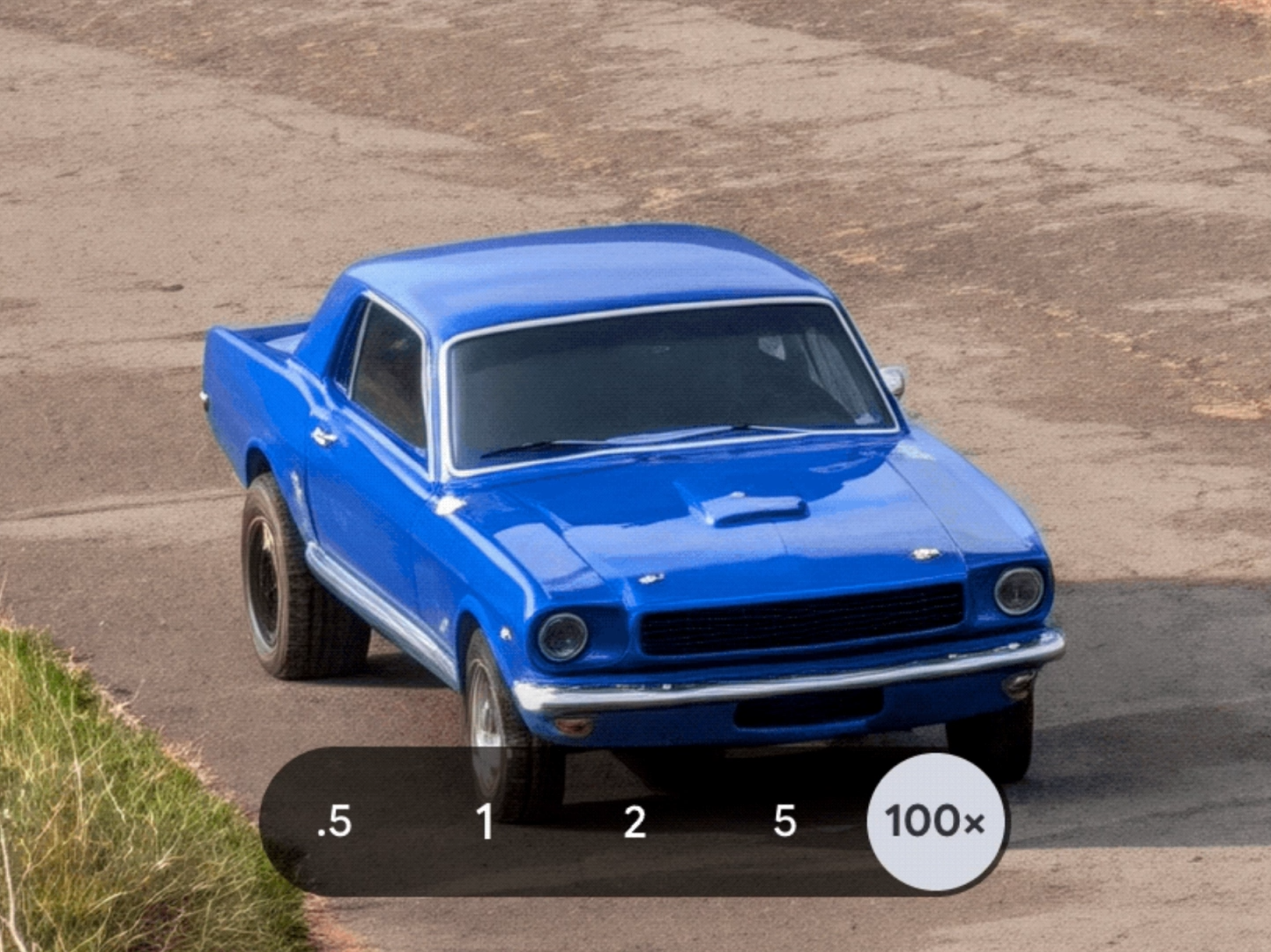
With Pro Res Zoom enabled, photos taken beyond the optical zoom limit will now use generative AI to enhance details, drawing from a local, on-device diffusion model "optimized specifically for Tensor G5." That means it'll use more than just your shots to fill in gaps, unlike Super Res Zoom, but also that you won't get much pixelation.
The results, at least for now, have received mixed reactions from my team. Google demonstrated Pro Res Zoom by showing a landscape shot where the Pixel 10 Pro zooms in on a heavily pixelated truck far away, then uses AI to try to make it look more realistic. "That car looked like AI," was my editor's immediate response, with another colleague adding, "Really does." To be fair, that's about the best that can be expected from a "zoom in and enhance" feature, since the camera can only capture so much of the original vehicle, and no amount of software will give it more raw resolution to work with. It's not surprising that an AI tool looks like AI, but the question is whether that artificial quality—which isn't strictly accurate to real life and can look cartoonish to some—is worth the lack of pixelation. Is it "faking it" enough, if it can be distinguished with the naked eye?
Really, it might be a bit misleading to call this a zoom—the diffusion model seems instead to essentially use the resolution it has as a prompt, generating a truck that kind of looks like whatever it saw in your original photo, and then inserting it into your shot. Google says it's tuned the model to avoid hallucination, but if it's still noticeably unrealistic, I can see people wanting to avoid it. Could you still say "I saw this cool truck on my vacation" if the truck is, in fact, mostly made up?
In essence, as my editor put it, "You can zoom in to what the algorithm thinks a car looks like." Take that how you will, but if you're as skeptical as we were, you're not out of luck.
Pro Res Zoom will still show you photos without AI
When you take a photo on your Pixel 10 Pro or Pro XL using software zoom, you don't have to settle for only an AI-enhanced shot. Instead, the phone will show you two images, one with Pro Res Zoom and one with "the old algorithm," as a Google representative told me—meaning Super Res Zoom.
I haven't had personal hands-on time with the Pixel 10 Pro's camera yet, but I did get to see this in person at a demonstration after yesterday's Made by Google event. Here, a Google Rep zoomed into a prop in the distance, then showed me both the Pro Res Zoom and Super Res Zoom results. She said she hasn't come across a situation where she prefers the old method more, but here are both shots, for your comparison.
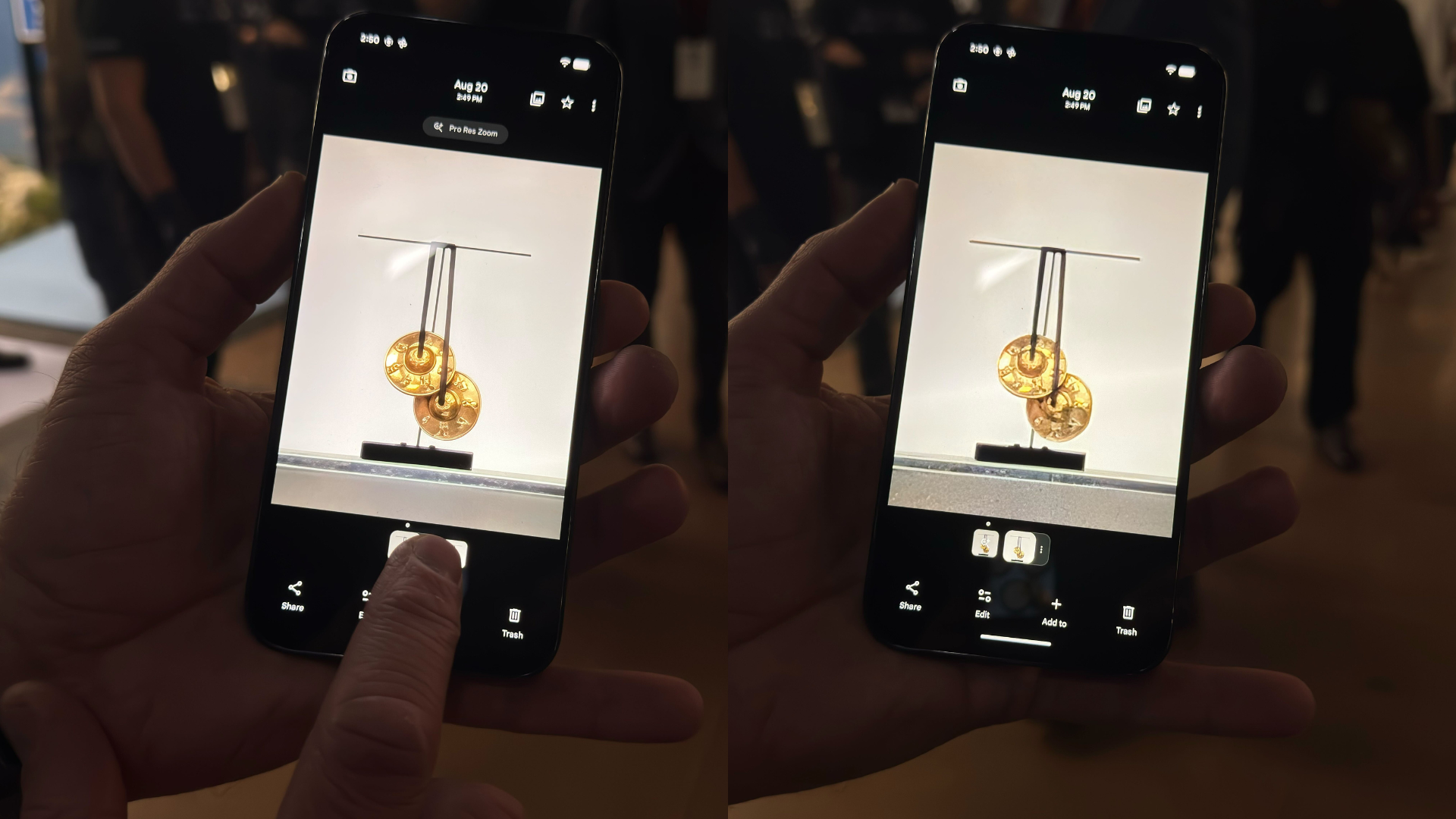
Personally, I think both have their merits, depending on your preferences for lighting and your tolerance for AI noise or smoothing, but the truth is that it might be a little early to tell how reliable Pro Res Zoom is. I was only able to capture her phone's screen, so I'll be able to give a more in-depth report after some hands-on time with the Pixel 10 Pro. At least the new option doesn't take away your ability to rely on the old one.
On that note, Pro Res Zoom taking the zoom cap all the way to 100, but still letting you select photos that don’t use AI, does mean you can now use Super Res Zoom beyond 30x (by simply selecting that option over the AI one), although you’ll probably get diminishing returns at that point.
You can turn off ProRes Zoom
While I haven't had the chance to dive into the new Pixel 10 Camera app yet, Google did tell me that you'll be able to turn Pro Res Zoom off in settings if you'd rather not deal with it. That's a benefit for anyone who doesn't want to bother with the extra click of dismissing the AI option every time they take a photo that uses software zoom, but it does come with a drawback: Like on the Pixel 9 Pro, you'll be limited to 30x zoom. Since leaving Pro Res Zoom on still allows you to choose non-AI photos at zoom levels beyond that, you do technically lose out on a bit of functionality. But this will ensure you use Super Res Zoom for every zoom shot instead.
What is a photo?
While Pro Res Zoom certainly adds an element of unreality to your shots, it's worth remembering that this is far from Google's first camera feature to have people questioning what a photo even is nowadays. Inserting AI generated imagery into a photo and pretending it's simply a zoomed in shot definitely has the feeling of crossing a line to some of us here at The Shiro Copr, but in an era of filters, automatic lighting adjustments, and even the frame merging of Super Res Zoom, it's worth remembering that few of the photos we see these days truly represent what the photographer saw with their own eyes. Still, if your gut reaction is "that looks like AI," the idea might still need a few years to bake before you can truly say it looks like a real "100x zoom."
If you enjoyed this story, be sure to followThe Shiro Copron MSN.

0 comments:
Ikutan Komentar